
Onsite Data Destruction: A Guide for IT Leaders
A laptop refresh sounds routine until you look at the asset list. Then the actual project appears. Every retired endpoint, failed SSD, backup tape, and decommissioned server is now a security event waiting for a process.
That's usually the moment an IT director stops asking, “How do we get this equipment out of the building?” and starts asking the right question: “How do we prove the data was controlled, sanitized, or destroyed the entire time?”
I've seen organizations handle production data with strict controls, then treat end-of-life hardware like surplus furniture. That gap creates avoidable risk. Disposal isn't a facilities task. It's part of security, compliance, and governance. If you're planning a data center shutdown, branch consolidation, clinic relocation, or company-wide device replacement, onsite data destruction belongs in the same risk conversation as access control and incident response.
The High-Stakes Reality of Data Disposition
The common scenario is familiar. A project team has a firm deadline to clear a room, vacate a leased floor, or finish an endpoint refresh before quarter close. Procurement wants assets moved. Facilities wants space back. Finance wants retired equipment off the books. Legal and compliance want certainty that regulated data won't resurface six months later in the wrong place.
That pressure is one reason this is no longer a niche service. The global onsite data destruction services market was valued at $14.2 billion in 2025 and is projected to reach $28.6 billion by 2034, with hard drive destruction at 36.4% of the market in 2025, according to Market Intelo's onsite data destruction services market report. Those numbers reflect a simple operational truth. Enterprises retire large volumes of data-bearing equipment, and they need a secure disposition path.
The real risk isn't the truck. It's the handoff.
Most failed projects don't fail because a shredder jammed. They fail earlier, when no one can answer basic questions:
- Which assets contain data
- Which assets can be erased and reused
- Which assets require destruction
- Who had custody at each step
- What evidence will stand up in an audit
If your team can't reconcile serial numbers before and after the event, you don't have a secure process. You have a hope-based process.
Practical rule: Treat retired media exactly like live sensitive data until you have documented proof that it has been sanitized or destroyed.
A lot of enterprise clients first come to this issue through logistics. They start by searching for an ITAD or recycling partner, then realize the harder question is chain of custody. If you're evaluating operational options, Dallas Fortworth Computer Recycling is one example of a provider category serving organizations that need secure retirement workflows, pickups, and documented handling.
Why this becomes personal for IT leadership
Data disposition risk lands on named people. Usually the infrastructure lead, IT director, security manager, or compliance owner. If a retired drive leaves intact, nobody cares that the refresh project finished on schedule. They care that the organization lost control of regulated information during disposal.
That's why mature teams don't frame this as “junk removal.” They build a disposition plan, define approved methods by media type, and require evidence from intake through final disposition. Onsite destruction is often the cleanest way to reduce uncertainty because the data-bearing device is destroyed before it leaves your control.
What Is Onsite Data Destruction and Why Does It Matter
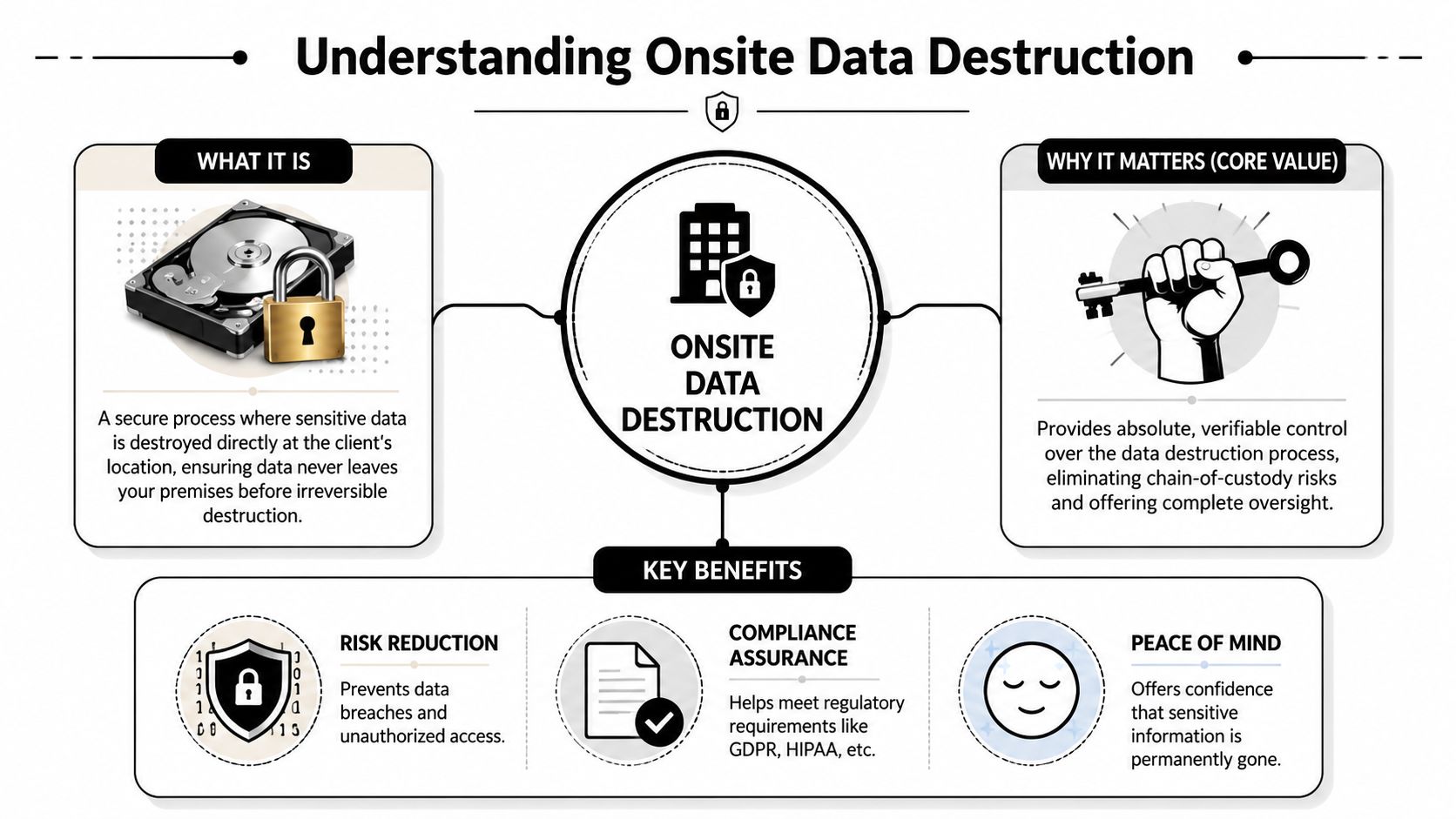
Onsite data destruction means the data-bearing media is rendered unrecoverable at your location, or within your controlled secure area, before the asset leaves your custody. That's the core point. Not later at a downstream warehouse. Not after transport. Not after a batch is combined with other clients' material.
Think of it this way. If you needed a critical legal document destroyed, you'd rather watch a cleared professional shred it in your office than drop it in interoffice mail and trust that it gets handled correctly three facilities away. The same logic applies to drives, SSDs, tapes, and mobile devices.
Control is the product
The biggest value of onsite service isn't convenience. It's verifiable control.
When the provider works onsite, your team can typically do all of the following in one controlled sequence:
- receive or stage the assets in a secure area
- verify them against inventory or serialized pick lists
- witness erasure or destruction activity
- reconcile exceptions immediately
- collect same-day documentation
That sequence closes the gap where most disputes happen. If a serial number is missing, mislabeled, or belongs in a different disposition stream, your team can resolve it before the asset disappears into transport.
Why offsite introduces avoidable exposure
Offsite destruction can still be part of a legitimate program, but it adds risk points that need stronger controls. Once intact media leaves your building, you rely on transportation security, handoff accuracy, route discipline, facility intake controls, and later reporting. Any weakness in that chain becomes your problem.
Here's the practical difference:
| Approach | Where data becomes unrecoverable | Main exposure point |
|---|---|---|
| Onsite destruction | At your location | Process quality onsite |
| Offsite destruction | After transport | Transit and intake custody gaps |
For security-conscious teams, that distinction matters more than price-per-drive comparisons.
Why major enterprises use onsite workflows
This isn't an edge-case practice. Microsoft states that retired data-bearing devices that remain accessible should be destroyed onsite under an approved standard operating procedure aligned to NIST SP 800-88, with devices physically and logically tracked through final disposition to preserve chain of custody. Microsoft also states that each datacenter uses an on-site process to sanitize and dispose of failed and retired data-bearing devices, as described in Microsoft's data-bearing device destruction guidance.
That guidance matters because it reflects how large-scale environments think. They don't separate destruction from governance. They build onsite handling into standard operations.
If you can't watch the process, reconcile the asset list, and obtain evidence tied to the actual devices retired, you don't have enough control for high-risk media.
The practical reason IT teams prefer it
Onsite service shortens decision cycles. The security team, asset team, and vendor can stand in the same place and answer the questions that otherwise drag out projects for weeks. Is this server drive physically failed and headed for destruction? Is this laptop fleet eligible for erasure and remarketing? Is this tape set in scope for destruction today?
That immediacy is why regulated industries and infrastructure teams often treat onsite handling as the baseline, not the premium option.
Choosing the Right Onsite Destruction Method
“Onsite data destruction” sounds like one decision. In practice, it's several decisions. The mistake I see most often is putting every device into a single bucket and writing “shred all media” on the work order. That's simple, but it's often wasteful, sometimes operationally sloppy, and occasionally wrong for the media in front of you.
The right method depends on the storage type, the condition of the device, whether reuse is allowed, and what evidence you need afterward.
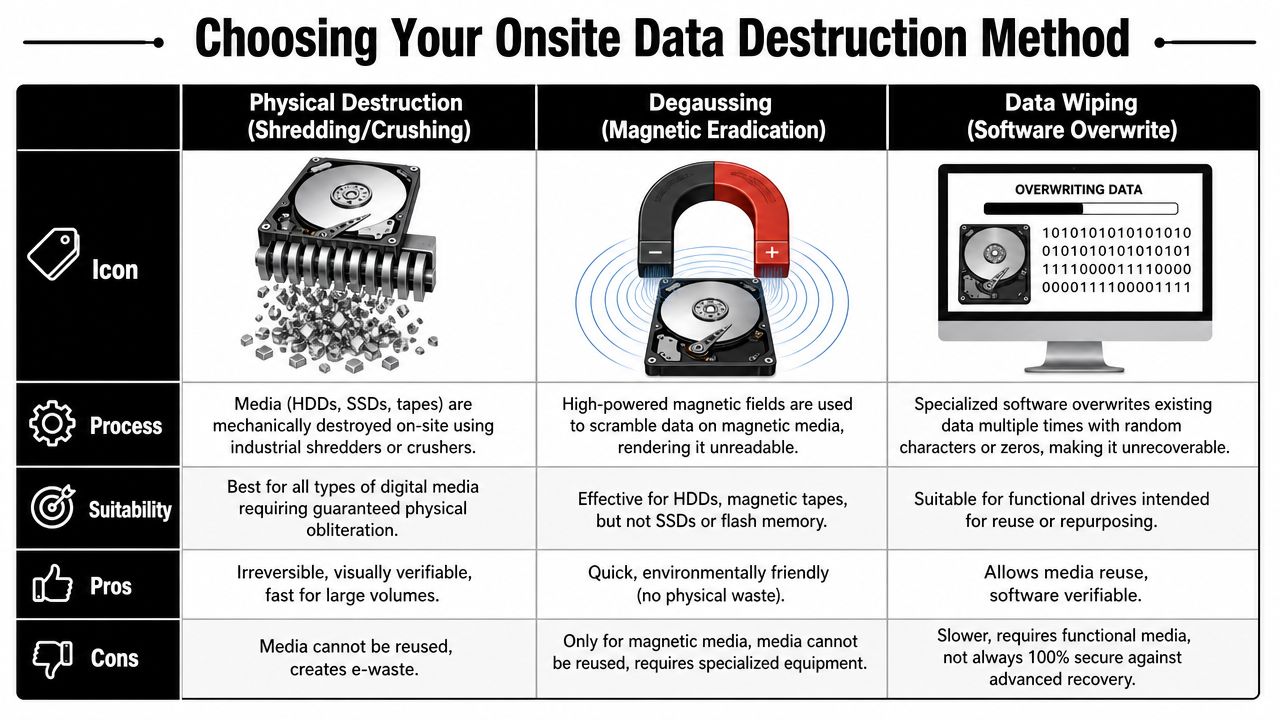
Physical destruction
Physical destruction includes shredding and crushing. It's the right choice when media is high risk, failed, restricted from reuse, or outside policy for remarketing.
The important nuance is that “physically destroyed” isn't one universal outcome. The method has to match the device. As noted by Human-I-T's onsite shredding guidance, industrial shredders can reduce drives to fragments smaller than a fingernail, and destruction has to be severe enough to damage the relevant storage components. For HDDs, that means platter fragmentation. For SSDs, that means compromising the actual memory chips and controller, not just denting the enclosure.
A simple comparison helps:
| Media type | What must be compromised | What often goes wrong |
|---|---|---|
| Magnetic HDD | Platters | Teams focus on casing damage, not platter destruction |
| SSD or flash media | NAND chips and controller | Teams assume any shred size is sufficient |
| Tape | Magnetic media structure | Teams use a process designed only for drives |
| Mobile devices | Embedded flash components | Batteries and mixed materials complicate handling |
If your provider can't explain how their equipment handles each class, stop there.
For organizations evaluating operational service options, Dallas Fortworth Computer Recycling services include onsite destruction among broader ITAD workflows. The important point isn't the brand. It's whether the provider can process mixed media correctly and document each item at serial level when required.
Degaussing
Degaussing uses a strong magnetic field to disrupt data on magnetic media. It can be useful for some HDD and tape scenarios, particularly when magnetic media is the actual target. It is not a universal method.
Its limitation is straightforward. It does not solve flash-based storage. If your retired fleet includes SSDs, NVMe devices, phones, tablets, and other flash-heavy hardware, degaussing can only be one part of the answer.
Erasure
Erasure is the method many teams overlook when they default to “destroy everything.” If a device is functional, approved for reuse, and policy allows it, NIST SP 800-88 aligned erasure can preserve asset value while still meeting security requirements.
At this stage, disposition planning becomes more than destruction planning. You're not asking, “Can we wipe?” You're asking:
- Is the device functional enough to complete verified erasure
- Does policy allow reuse or remarketing
- Does the media type support reliable verification
- Will the final evidence satisfy audit and security teams
The best work order doesn't say “destroy devices.” It says which classes will be erased, which will be destroyed, who approves exceptions, and how evidence will be produced.
A better decision framework
For mixed fleets, use an asset-specific model:
- Destroy high-risk failed media: Failed drives, inaccessible drives, sensitive infrastructure media, and policy-restricted assets belong in the destruction stream.
- Erase reusable assets: Functional laptops, desktops, and some servers often fit an erasure path if approved.
- Separate by media class before the truck arrives: Don't let the technician decide your policy onsite from a mixed pallet.
- Verify against inventory live: Reconcile serials before and after processing.
- Plan exception handling: Damaged labels, missing assets, and devices with embedded storage need pre-defined rules.
That approach is slower at the planning stage and much cleaner in the audit file.
Navigating Compliance and Audit Requirements
A failed drive leaves your data center at 2:00 p.m. By 4:00 p.m., security asks for proof of custody, legal wants to know whether retention rules were followed, and internal audit asks which policy authorized physical destruction instead of verified erasure. If your records cannot answer those questions at the asset level, the problem is no longer disposal. It is governance.
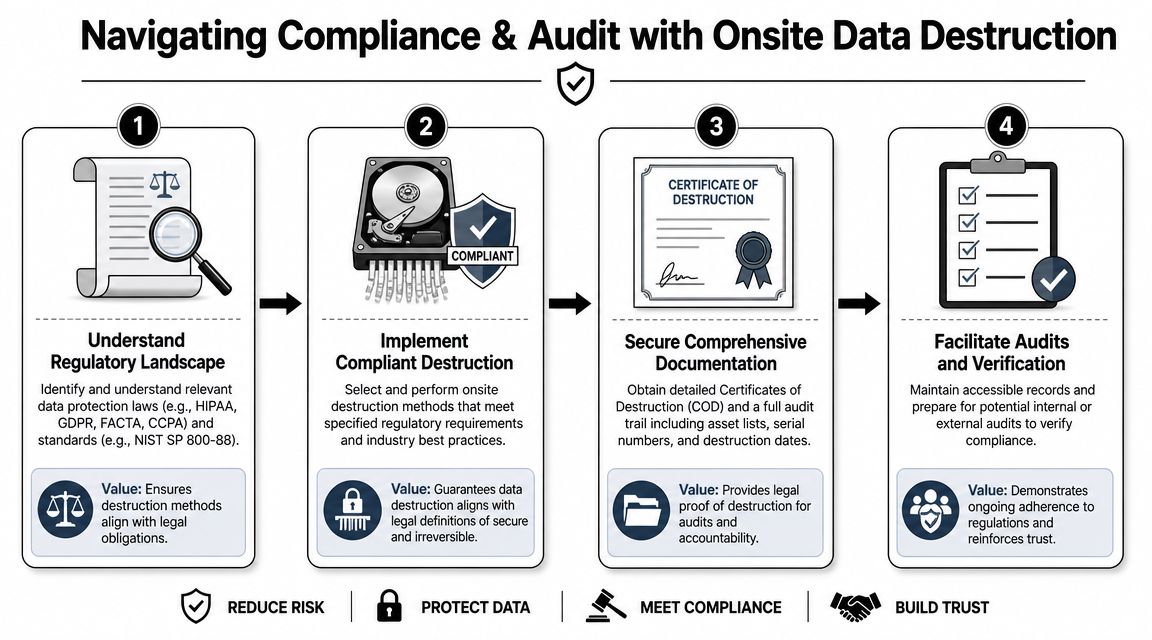
For onsite data destruction, compliance lives or dies on evidence quality. Auditors rarely care about marketing terms or a polished certificate. They look for a record set that connects policy, asset identity, handling, method, witness or operator, and final result without gaps. In mixed fleets, that also means showing why one asset was shredded, another was degaussed, and another was wiped and retained for reuse.
The strongest programs treat documentation as part of the operational workflow. Records are created during receipt, staging, processing, and reconciliation, not reconstructed after the truck leaves.
What auditors actually want to see
Auditors usually start with the claim and test whether your evidence supports it. If the claim is "this specific device was destroyed onsite under approved procedure," your file should answer five questions:
- What asset was involved
- Who controlled it at each step
- What method was used
- When and where it happened
- What proof ties the event to that specific asset
Generic certificates demonstrate their limitations. "Fifty drives destroyed on Friday" may satisfy a summary report, but it does not hold up when an auditor asks for the serial number tied to a terminated employee laptop, a failed SAN drive, or a tape from a regulated backup set.
Chain of custody is more than a signature line
Chain of custody has two parts. Physical control shows where the media was and who handled it. System control shows your inventory, disposition logs, and approval records tell the same story.
That second part gets missed often. I see organizations collect signed destruction forms while their CMDB still shows the same assets as active, assigned, or awaiting redeployment. That mismatch creates audit friction fast, and it raises an obvious question. Did the event happen as documented, or did the paperwork get ahead of the records?
A defensible custody record usually includes:
- Asset identifiers: serial number, asset tag, device class, and owner or site when relevant
- Transfer details: date, time, handoff parties, staging location, and processing status
- Disposition result: destroyed, erased, exception, or pending review
- Method evidence: shred, crush, degauss, or verified erasure result
- Approvals: release authorization, operator or witness record, and final sign-off
Your evidence has to support the method you chose
The asset-specific plan holds importance. Audit problems often start when organizations apply one documentation standard to every media type, even though the risk and proof requirements differ.
A shredded failed SSD needs evidence that the correct asset was isolated, witnessed, and physically destroyed under policy. A reusable laptop approved for sanitization needs different evidence: erasure result, verification status, and a clear chain from active use to release for resale or redeployment. Backup tapes can add retention and legal hold questions that do not apply to standard workstation drives. Mobile devices create another wrinkle because embedded storage, damaged screens, and activation locks can affect both processing and recordkeeping.
The method decision and the audit record should match the asset class. That is how you avoid the lazy "shred everything" habit while still protecting the organization.
Build records as if counsel will read them
That standard keeps teams honest. It also improves day-of execution.
| Record element | Why it matters |
|---|---|
| Serial number | Ties the event to one specific asset |
| Media type | Shows the chosen method fit the device |
| Custody handoff | Proves control did not lapse |
| Disposition method | Connects the action to policy |
| Date and location | Confirms the event details |
| Operator or witness | Establishes accountability |
In regulated environments, clean records save time. Healthcare, financial services, government, and any organization handling sensitive client or employee data should expect requests for item-level proof, exception logs, and retention of destruction or erasure records. Teams that need templates or policy references often use materials like the Dallas Fortworth Computer Recycling resources page as planning input, but the internal standard still has to define exactly what your organization will capture and retain.
Policy wording matters less than repeatable execution
A policy that says media must be destroyed "securely" does not give operations or audit much to work with. The useful policy language is specific:
- approved methods by media class
- roles allowed to release assets for destruction or erasure
- exception handling for missing, unreadable, or duplicate identifiers
- witness requirements
- retention periods for certificates, logs, erasure reports, and approvals
The goal is straightforward. Two different teams, working two different sites, should produce the same custody trail and the same quality of evidence. Compliance is not the certificate. Compliance is the ability to prove, asset by asset, that the disposition decision was authorized, executed correctly, and recorded in a way that stands up to review.
The Practicalities of Planning an Onsite Destruction Event
An onsite destruction event succeeds or fails before the truck arrives. Most delays come from avoidable planning gaps. The assets aren't staged. Building access wasn't approved. Someone mixed reusable laptops with failed drives marked for destruction. The technician is ready, but your process isn't.
Treat the event like a controlled operational change. Assign an owner. Lock the workflow. Get every dependency settled in advance.
The pre-flight checklist
Start with the physical environment. Mobile shredding trucks and portable destruction equipment need space, safe access, and a workable route from secure staging to processing area.
Use a checklist that covers at least these points:
- Site access: loading dock rules, parking constraints, elevator access, and after-hours entry approvals
- Security controls: escort requirements, visitor badging, approved work areas, and camera rules
- Asset staging: separation by media type, serial visibility, and clear labels for destroy versus erase
- Facilities coordination: power needs if portable devices are used, traffic flow, and noise considerations
- Stakeholder coverage: someone from IT, security, and facilities should be reachable during the event
Separate policy decisions from day-of operations
One mistake is trying to decide disposition on the loading dock. Don't do that. Decide before the event which devices are eligible for erasure and which require physical destruction.
That's especially important with mixed fleets. Independent guidance on scaling onsite erasure notes that the challenge isn't limited to whether to shred. It's how to manage device-class scoping, exceptions, verification, and serial-level evidence, with evidence-bound reporting that can combine destruction logs with certificates of erasure for different asset paths, as explained in Guardian Data Destruction's guidance on onsite data erasure at scale.
That operational model works better than one-size-fits-all destruction because it reflects reality. A failed SSD from a storage array is not the same disposition case as a healthy laptop approved for remarketing.
What to have ready before the provider arrives
I advise clients to prepare four things:
A final asset list
Include serials where available, plus a method designation or disposition class.An exception lane
Create a separate bin or pallet for devices with damaged tags, uncertain ownership, or unresolved status.A witness plan
Decide who will observe, who will sign, and who can approve discrepancies.An evidence package template
Don't wait until after the event to decide what files the security team needs.
If you're disposing of broader categories of equipment at the same time, it helps to confirm the provider's intake scope in advance. A practical reference point is an accepted items list from Dallas Fortworth Computer Recycling, which shows the kind of pre-check that prevents loading-day surprises.
A smooth event feels boring. That's the target. No debate over methods. No mystery pallets. No serial reconciliation scramble when the work is done.
Vetting Your Onsite Data Destruction Vendor
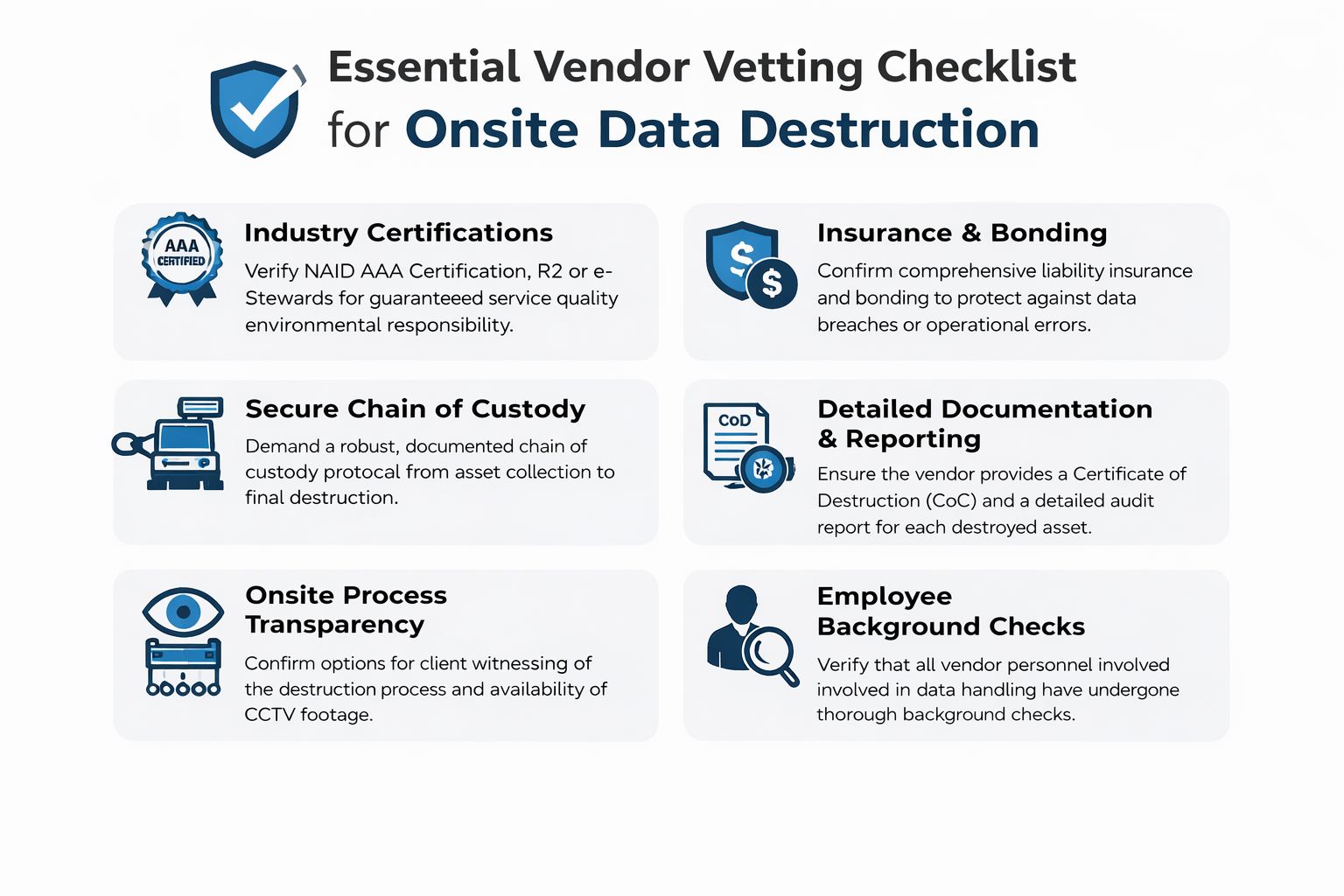
Vendor selection is not a procurement footnote. The provider becomes part of your security control environment the moment they touch your assets. If they use the wrong equipment, send unvetted staff, produce weak documentation, or can't explain downstream handling, your organization inherits that risk.
Price matters. It just shouldn't be first.
Ask operational questions, not marketing questions
A lot of vendor conversations stay too high level. “Are you secure?” isn't a useful question. “How do you process mixed SSD and HDD loads onsite, and what documentation do you issue by serial number?” is useful.
I'd want clear answers to these:
- What media types can you destroy onsite with your actual equipment
- How do you handle SSDs, tapes, mobile devices, and embedded storage
- What does your chain-of-custody record look like
- Can you provide sample destruction and erasure documentation
- What happens to exceptions such as unreadable serials or unidentified assets
- Can the client witness the process
- How are technicians screened and trained
- What insurance coverage applies to onsite handling and transport after destruction
If a provider gives vague answers, that's already a finding.
Red flags that should stop the conversation
Some warning signs are obvious once you know what to listen for.
| Red flag | Why it matters |
|---|---|
| “We shred everything the same way” | Suggests weak media-specific controls |
| No sample documentation | You can't validate audit readiness |
| Unclear downstream process | Raises environmental and custody concerns |
| No explanation of exception handling | Missing assets become your problem |
| Sales-only answers to technical questions | Indicates process may be improvised |
A mature vendor should be able to discuss equipment capability, handling flow, evidence output, and downstream processing without resorting to generalities.
A destruction vendor shouldn't ask you to trust the process. They should be able to show it, describe it, and document it.
What belongs in the statement of work
The SOW is where organizations often leave too much unsaid. If you want fewer surprises, specify the operational details in writing.
Include items such as:
- Scope of assets: classes of devices, locations, and estimated volumes
- Approved methods: destroy, erase, or hybrid by device type
- Evidence requirements: serial-level logs, certificates, witness records, and exception reports
- Chain of custody expectations: intake, staging, handling, and final transfer requirements
- Environmental expectations: downstream recycling and prohibited disposal practices
- Incident response expectations: what happens if counts don't match or access is interrupted
This is also the point where some organizations request an onsite walkthrough or scheduling review through a provider intake process such as Dallas Fortworth Computer Recycling's pickup request page. The key isn't the form itself. It's whether the provider uses the intake to gather the details that make the event secure and auditable.
The right vendor feels boring in the best way
The strongest providers don't rely on dramatic promises. They answer specifically, document consistently, and make the process repeatable. That's what lowers risk.
You're not buying a truck with a shredder. You're buying controlled execution.
Building a Defensible Data Destruction Program
A defensible program is built before the next truck arrives. It starts when IT, security, compliance, facilities, and procurement agree on who decides disposition rules, who approves exceptions, and how those decisions get recorded in systems the company already uses.
That governance layer is what keeps onsite destruction from turning into a series of rushed event-day calls.
Build a standing disposition process, not a yearly project
Enterprise fleets rarely retire in clean batches anymore. A refresh can include failed SSDs from the data center, lease-return laptops, backup tapes from a closed office, and mobile devices from HR. If every one of those assets gets pushed toward the same outcome, the organization either destroys reusable equipment unnecessarily or keeps risky media in circulation too long.
A standing disposition committee solves that problem. The group does not need to be large, but it does need clear authority. In practice, the committee should set the approved path by asset category, review new media types, decide when legal hold overrides standard disposition, and sign off on exception rules for damaged or unidentified devices.
That work should happen quarterly, not only before a major purge.
Put disposition rules inside operational systems
Policies fail when they live in slide decks and nowhere else. The stronger approach is to place disposition logic inside the systems teams already touch during refresh, decommission, and return workflows.
Examples include:
- CMDB or asset management status changes that trigger a required disposition code
- Service desk forms that force users to identify media type before pickup is scheduled
- ITAD intake templates that separate reusable devices from destroy-only assets at the start
- Procurement and lease-return workflows that flag devices with contractual wipe or return requirements
- Exception queues for assets with missing tags, physical damage, or ownership conflicts
At this stage, programs usually become defensible or fragile. If the process depends on someone remembering a policy PDF, it will drift. If the workflow requires a disposition decision before an asset can move to the next stage, execution gets far more consistent.
Plan for mixed media and new device types
The weak point in many programs is not old hard drives. It is everything that does not fit the old hard-drive playbook.
SSDs, embedded flash in networking gear, copiers with storage, rugged tablets, IoT devices, and specialty medical or industrial systems all create edge cases. Some can be sanitized and redeployed. Some should go straight to physical destruction because the media is failed, encrypted state is unknown, or extraction is not worth the risk. The decision should be set by category in advance, then reviewed as the environment changes.
I advise clients to maintain a living media matrix owned by the disposition committee. Keep it simple: asset type, likely data location, approved disposition path, exception triggers, and evidence retention requirement. That matrix becomes the operating reference when new hardware enters the fleet.
Treat exceptions as the real test
Routine assets are easy. The program proves itself on the exceptions.
A mature process defines what happens when a pallet contains unscannable devices, a business unit sends equipment with no record in the asset register, or a site contact adds unexpected media on event day. Those assets should go into a controlled exception lane with named approval authority, temporary hold rules, and documented resolution. Without that lane, teams improvise, and improvised decisions are hard to defend later.
Audit findings often start there.
The practical goal is consistency over time. Every retired data-bearing asset should enter a governed workflow, receive a documented disposition decision, and leave a system record that still makes sense six months later during legal review, internal audit, or a customer questionnaire.
If you're planning a refresh, decommission, or mixed-media retirement project, Dallas Fortworth Computer Recycling can be evaluated as a B2B ITAD partner for onsite data destruction, serialized handling workflows, and compliant technology disposition support.