
How to Erase a Computer Hard Drive for Business Compliance
To truly erase a computer hard drive, you need to go beyond just hitting "delete." Secure erasure requires specialized methods like software data wiping, cryptographic erasure, or physical destruction. Simply dragging files to the trash or running a standard format is a critical mistake, as it leaves behind data fragments that are easily recoverable with forensic tools.
Why Dragging Files to the Trash Is a Major Security Risk

Deleting a file feels final, but it’s a dangerous illusion. When you move something to the recycling bin or even format a drive, the operating system doesn't actually remove the information. It just deletes the pointer that tells the system where to find it, marking that space as available for new data.
This means your "deleted" information—customer records, financial reports, proprietary trade secrets—is still sitting right there on the drive. It’s essentially a hidden library of your most sensitive data, just waiting for someone with the right tools to come along and read it.
The Real-World Consequences of Improper Erasure
This isn’t just a theoretical problem. I’ve seen the fallout firsthand. Consider a healthcare provider that decommissioned dozens of office computers, believing a standard reformat was good enough before sending them to a reseller. Later, it was discovered that patient data, including protected health information (PHI), was recovered from those devices.
The consequences were catastrophic. The organization faced massive regulatory fines for violating HIPAA, not to mention the severe reputational damage and the high cost of notifying every affected patient. This isn't an isolated incident; it’s a common story that highlights a critical gap in IT asset management.
The core mistake is treating data erasure as a simple IT task rather than a fundamental component of your security and compliance strategy. Every retired asset represents a potential data breach if not handled correctly.
Compliance Is Not Optional
This is about more than avoiding a public relations nightmare. Proper data destruction is a legal and regulatory requirement. Several major compliance frameworks explicitly mandate the secure sanitization of data before an asset leaves your control:
- HIPAA (Health Insurance Portability and Accountability Act): Requires healthcare organizations to protect patient data on all media, including during disposal.
- GDPR (General Data Protection Regulation): Imposes strict rules on the handling and erasure of personal data for EU citizens, with severe penalties for non-compliance.
- CCPA (California Consumer Privacy Act): Gives consumers the right to have their data deleted, which means ensuring it’s truly gone from your systems.
Failing to meet these standards means you're not just practicing poor security; you're breaking the law. Research on e-waste management consistently shows that many organizations mistakenly believe factory resets or simple file deletion are enough. They're not. Storage devices retain recoverable data fragments and user profiles accessible to recovery tools, creating a major gap between perceived and actual security.
Understanding how to erase a computer hard drive the right way is the first step toward building a defensible data destruction program. It’s an essential part of the IT asset lifecycle that safeguards your business, your customers, and your bottom line. To fully understand your options, explore our detailed guide on secure data destruction.
Building Your Data Destruction Playbook
Before you touch a single hard drive, your organization needs a clear, documented strategy. Winging it with data destruction creates massive security gaps and is a surefire way to fail an audit. A formal data destruction policy isn’t just bureaucratic paperwork; it’s your first and best line of defense, ensuring every action is deliberate, repeatable, and defensible.
This playbook establishes standardized procedures for everyone involved, from the IT team to facilities staff. It takes the guesswork out of the process, cuts down on human error, and creates a clean audit trail that proves you're handling sensitive data responsibly from retirement to final disposition.
Start with Data Classification
Not all data is created equal, so your erasure methods shouldn't be one-size-fits-all. The foundation of any solid policy is data classification—categorizing your information based on its sensitivity. This crucial step ensures you apply the right level of security to the right data, which is smart for both your budget and your compliance posture.
A typical classification system might look something like this:
- Public Data: Information that's already openly available and poses no risk if disclosed, like marketing materials or public press releases.
- Internal Data: Information for internal use only. It’s not highly sensitive but isn't meant for public eyes, such as operational procedures or internal memos.
- Confidential Data: Sensitive information that could cause moderate damage if it got out. Think employee records, financial reports, or business contracts.
- Restricted/Highly Confidential Data: Your most critical information. Exposure could lead to severe legal, financial, or reputational damage—we’re talking intellectual property, patient health records, or customer payment information.
Once data is classified, you can map specific destruction methods to each level. For instance, a simple one-pass software wipe might be fine for a drive with only public data. But a drive holding restricted health information? That will require a multi-pass wipe followed by physical destruction to meet tough standards like HIPAA.
Implement Asset Tracking and Chain of Custody
Knowing what you have is just as important as knowing how to destroy it. A robust asset inventory system is absolutely non-negotiable. Every single device—from servers in your data center to the laptops used by your remote team—must be tagged, tracked, and accounted for throughout its entire lifecycle.
This tracking is the backbone of your chain of custody. This is simply a chronological paper trail documenting who handled an asset, where it was stored, and how it was ultimately destroyed.
A secure chain of custody is your proof of diligence. It demonstrates an unbroken line of accountability, showing auditors and regulators that a sensitive hard drive never left your secure control until it was verifiably destroyed.
Imagine a company retiring 500 laptops. Without a chain of custody, a single missing device becomes a potential data breach. With proper documentation, you can instantly confirm all 500 assets were received, processed, and destroyed according to policy, complete with serial numbers and certificates of destruction. For more on handling old equipment, you can learn how to dispose of old computers safely in our related guide.
Create Your Policy Checklist
With your framework in place, it’s time to build the policy document itself. A strong data destruction policy is a living document that should be reviewed and updated regularly. Use the following as a starting point to make sure you cover all the critical components.
- Scope and Purpose: Clearly define what the policy covers (e.g., all company-owned media) and its objective (e.g., to ensure compliance with GDPR, HIPAA).
- Roles and Responsibilities: Assign specific duties. Who is authorized to perform data erasure? Who is responsible for verifying the destruction? Be specific.
- Data Classification Levels: Formally define your data tiers, just as we discussed above.
- Approved Destruction Methods: Specify the exact methods allowed for each data classification and media type (e.g., NIST 800-88 Purge for SSDs, physical shredding for HDDs containing PHI).
- Verification and Certification: Outline the requirements for generating and storing Certificates of Destruction.
- Record Retention: Define how long destruction records must be kept to meet legal and regulatory requirements.
Choosing Your Hard Drive Erasure Method
Once you have a solid data destruction policy, the next step is picking the right tool for the job. How you erase a computer hard drive comes down to a few key factors: the sensitivity of the data, the type of storage media you're dealing with, and whether you want to reuse the hardware. Each method offers a different mix of security, cost, and convenience.
Making the wrong choice here can be a costly mistake. For instance, using a degausser on a Solid-State Drive (SSD) is like trying to erase a whiteboard with a magnet—it does absolutely nothing and creates a false sense of security. Understanding how each method works is the only way to ensure your actions are both effective and compliant.
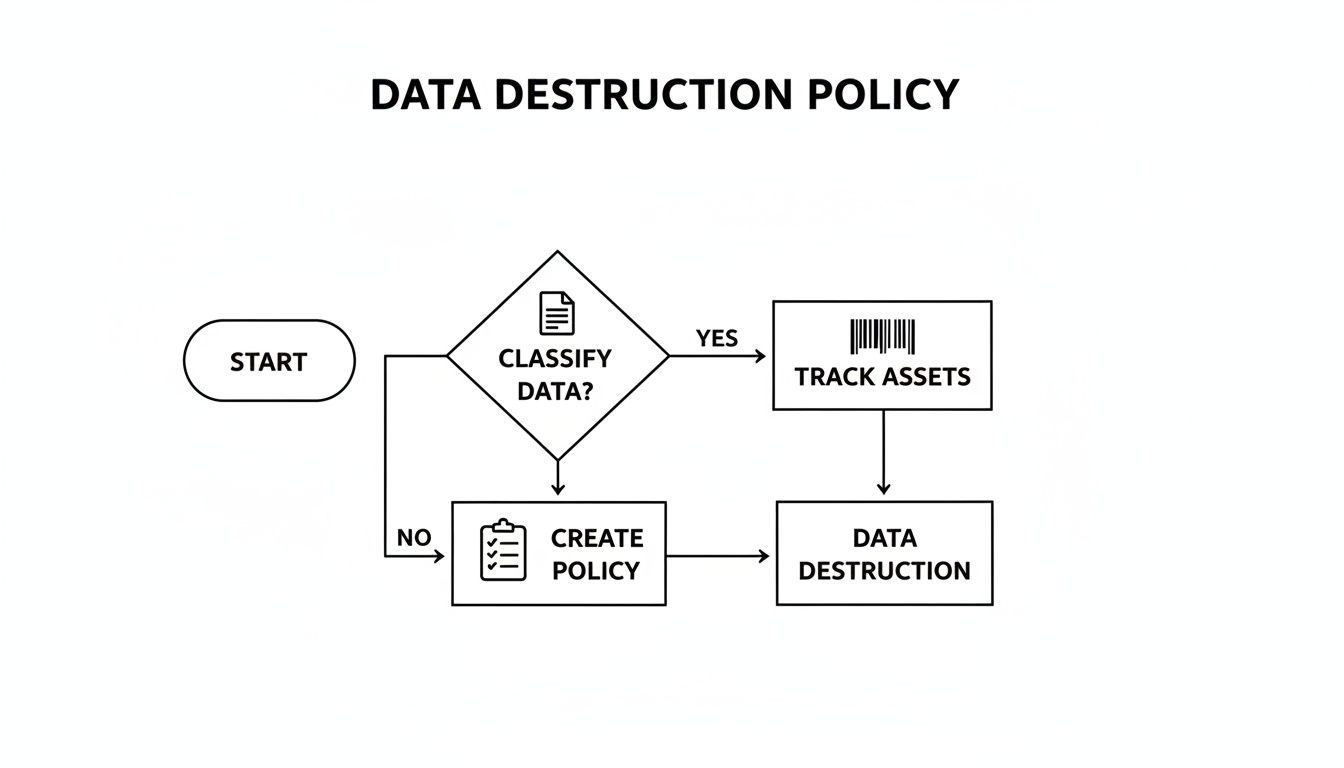
This flowchart helps visualize how a formal policy guides every decision, from classifying data to tracking the asset long before any destruction happens.
Getting Familiar with NIST 800-88
Before we get into the methods themselves, it's crucial to know the industry’s gold standard: NIST Special Publication 800-88. This framework from the National Institute of Standards and Technology is the definitive guide to media sanitization. It goes way beyond just "wiping" a drive and defines three specific actions:
- Clear: This involves using logical software commands to overwrite data, making it tough to get back with simple recovery tools. It’s a good baseline for lower-risk data.
- Purge: This is a much more robust process. It uses physical or logical techniques that make data recovery infeasible even with state-of-the-art lab equipment.
- Destroy: This is the final answer. It renders the media completely unusable by shredding, melting, or incinerating it, ensuring the data can never be recovered.
Following NIST 800-88 isn't just a suggestion; for many businesses, it’s a direct path to proving compliance with regulations like HIPAA, GLBA, and GDPR. It’s the framework auditors look for.
Software Wiping (Data Erasure)
Software wiping is exactly what it sounds like—using a program to overwrite the existing data on a hard drive with random characters. The software writes over the data, often multiple times, making the original information practically impossible to recover.
This is the go-to option when you plan to reuse or sell the hardware because it leaves the drive physically intact and working perfectly. Good software tools also generate a certificate of erasure, which is a critical piece of documentation for your audit trail.
Pro Tip: For old-school Hard Disk Drives (HDDs), a three-pass wipe (like the DoD 5220.22-M standard) usually gets the job done. For SSDs, however, a multi-pass overwrite isn’t as effective and can cause unnecessary wear and tear.
Cryptographic Erase (CE)
Most modern SSDs and many enterprise HDDs are self-encrypting drives (SEDs), and they offer a highly secure and incredibly fast sanitization method called Cryptographic Erase (CE). These drives encrypt everything written to them by default using a built-in media encryption key (MEK).
Erasing the drive is as simple as telling the drive to delete that key. Once the key is gone, all the data on the drive becomes a useless jumble of ciphertext. The process is nearly instant, puts zero wear on the drive, and is the preferred method for SSDs. You can dive deeper into the specifics of wiping SSD drives in our detailed article.
Degaussing
Degaussing uses a powerful magnetic field to scramble the magnetic domains on storage media like HDDs and backup tapes. This process instantly and permanently erases everything. It’s extremely effective for the right kind of media.
But there are two huge catches. First, it completely destroys the drive, making it useless afterward. Second, and this is critical, degaussing is completely ineffective on SSDs. SSDs use flash memory, not magnetic platters, so a degausser won’t touch the data stored on them.
Physical Destruction
When data is so sensitive that you can’t afford any risk, or when a drive is broken or at the end of its life, physical destruction is the only way to go. It’s the most secure method out there because it makes data recovery physically impossible.
Common methods include:
- Shredding: Industrial shredders chop hard drives into tiny, irregular pieces.
- Disintegration: A step beyond shredding, this method grinds media into dust-like particles.
- Incineration: Burning the media at extremely high temperatures melts it down completely.
Physical destruction provides absolute certainty, but it also means the asset has zero resale or reuse value.
Comparing Data Destruction Methods
So, how do you choose? It’s all about weighing the security requirements against your operational needs. This table breaks down the four main methods to help you make the right call.
| Method | Security Level | Allows Reuse? | Best For | Key Considerations |
|---|---|---|---|---|
| Software Wiping | High | Yes | HDDs, devices planned for remarketing or internal redeployment. | Can be time-consuming for large drives; effectiveness on SSDs varies. |
| Cryptographic Erase | Very High | Yes | Self-Encrypting Drives (most modern SSDs and enterprise HDDs). | The drive must support CE; the process is nearly instant. |
| Degaussing | Very High | No | Magnetic media like HDDs and data tapes. | Ineffective on SSDs; destroys the drive permanently. |
| Physical Destruction | Highest | No | All media types, especially end-of-life or failed drives and highly sensitive data. | Provides absolute certainty but eliminates any resale value. |
Ultimately, the best method to erase a computer hard drive is the one that aligns with your data classification, compliance needs, and IT asset lifecycle plan.
Executing and Verifying the Data Wipe
With your policy in hand and methods chosen, it’s time to actually get the work done. A proper data wipe is more than just running a program and walking away. It’s a controlled process that absolutely must end with undeniable proof of completion.
Without verification, you're just assuming the data is gone, and that kind of guesswork won’t hold up in an audit or a legal challenge. This two-part approach—execute, then verify—is what elevates a simple task into a defensible security procedure.
Selecting and Using Data Wiping Software
The software you choose is the engine driving this whole process. Your choice needs to align with the types of drives you're handling and the specific compliance standards you’re required to meet.
For small jobs or one-off tasks, a tool like DBAN (Darik's Boot and Nuke) was the go-to for years. It’s a bootable utility that does a solid job on traditional magnetic hard drives (HDDs). Just be aware, its own developers no longer recommend it for modern SSDs because of the fundamental differences in how they store data.
For any serious business need, professional-grade software is the only way to go. Solutions from companies like Blancco or KillDisk are built for this. They offer a few critical advantages:
- Certified Erasure: They provide erasure methods certified to meet strict standards like NIST 800-88 Purge.
- Broad Hardware Support: These tools are engineered to properly sanitize both HDDs and SSDs, often using firmware-level commands like Cryptographic Erase.
- Automated Reporting: They automatically generate tamper-proof reports for every single drive, which is the backbone of your audit trail.
Regardless of the tool, the basic workflow is similar: boot the computer from the erasure software (usually on a USB drive or via a network boot), then select the correct drive and the required erasure standard.
The Critical Role of Verification and Reporting
The wipe itself is only half the job. The next step—verification and reporting—is where you create the hard evidence to prove you’ve met your compliance obligations. This isn't just a good idea; it’s a non-negotiable requirement for regulations like HIPAA and GDPR.
Your key piece of evidence here is the erasure report, often called a Certificate of Destruction. This document serves as the official, permanent record that a specific device, identified by its serial number, has been successfully sanitized.
A detailed erasure report is your definitive proof of compliance. It should contain the who, what, when, and how of the data destruction event, creating an unbreakable link in your chain of custody.
At a bare minimum, this report needs to include:
- Unique Asset ID: The hard drive's serial number.
- System Information: Details of the computer it came from.
- Erasure Method: The specific standard used (e.g., NIST 800-88 Purge, DoD 5220.22-M).
- Verification Status: A clear "success" or "pass" confirming the wipe worked.
- Timestamp: The exact date and time the process was completed.
- Technician ID: The name or identifier of the person who ran the wipe.
This documentation is essential. To get a better handle on its importance, you can learn more about what makes a proper certificate of destruction for hard drives and why it’s a cornerstone of any responsible ITAD program.
Spot-Checking with Forensic Tools
While your erasure reports are the primary proof, adding a layer of random spot-checking provides another level of assurance. This means pulling a small sample of wiped drives—maybe 1-2% of a large batch—and trying to recover data from them with forensic software.
Tools like FTK Imager or Autopsy are designed to scan a drive for any leftover data fragments. If a supposedly clean drive yields even a single recoverable file, you know you have a failure in your process that requires immediate investigation. This proactive check shows due diligence and helps you find problems before they become a massive compliance headache.
Deciding Between On-Site and Off-Site Destruction
Finally, you have to decide where this work will happen. The choice between on-site and off-site processing really comes down to your organization’s risk tolerance, security policies, and logistics.
- On-Site Destruction: An ITAD vendor brings their equipment (like a mobile shred truck) to your facility. This is the best option for highly sensitive data, as you can physically witness the entire process and maintain a completely unbroken chain of custody.
- Off-Site Destruction: Your assets are securely picked up and transported to a certified ITAD facility for processing. This is often more cost-effective and efficient for larger quantities of equipment, as long as you partner with a trusted vendor who has a rock-solid, documented chain-of-custody procedure.
When to Work with a Certified ITAD Partner
Handling data destruction in-house can feel like you have complete control, but there are clear moments when the scale, risk, and complexity of the job call for a specialist. Bringing in a certified IT Asset Disposition (ITAD) partner isn't admitting defeat—it's a strategic move to transfer risk and guarantee airtight compliance when the stakes get high.
Knowing when to make that call is everything. For many businesses, the trigger is simply volume. If you’re a small shop retiring a handful of laptops a year, you can probably manage it internally. But what about a company-wide tech refresh involving hundreds of devices? Or a data center decommissioning project with thousands of drives? That’s when the logistics get overwhelming and the potential for a costly mistake skyrockets.
Recognizing the Triggers for Partnership
The decision to outsource isn’t always about quantity. It's often driven by the kind of data and equipment you’re dealing with. If your devices stored highly regulated information—think patient records under HIPAA or financial data governed by GLBA—your tolerance for error is zero. A single slip-up could trigger multi-million dollar fines and do permanent damage to your reputation.
Here are some common situations where a certified ITAD partner is the only sensible choice:
- Large-Scale Hardware Refresh: When you're deploying new equipment across an entire department or company, the sheer volume of retired assets makes in-house processing impractical and incredibly risky.
- Data Center Decommissioning: This is a massive, high-stakes project. A certified partner can manage the entire process, from asset removal and serialized data destruction to remarketing or recycling.
- Disposing of Regulated Equipment: Healthcare, finance, and government sectors operate under strict data handling rules. An ITAD partner provides the necessary certifications and audit trails to prove you’re compliant.
- Lack of Internal Resources: Let's be honest, your IT team is already stretched thin managing active systems. Data destruction is a specialized skill that demands dedicated time and expertise they likely don’t have.
The Value of Certifications like R2 and e-Stewards
When you start looking for a partner, their certifications are non-negotiable. They are the industry's stamp of approval, showing that a vendor follows the highest standards for data security, environmental responsibility, and worker safety. The two most important certifications to look for are R2 (Responsible Recycling) and e-Stewards.
These aren't just logos they slap on a website. They represent a serious commitment to rigorous, third-party audited processes. A certified partner guarantees an unbreakable chain-of-custody from the moment an asset leaves your building. You get serialized reporting that confirms every single drive was destroyed according to NIST standards, giving you the defensible proof you need for any audit.
Engaging a certified ITAD vendor transforms data destruction from a logistical headache into a documented, risk-mitigated business process. It’s about the peace of mind that comes from knowing experts are handling your sensitive data and legal obligations.
The global e-waste crisis has also made responsible disposal a major corporate responsibility. The world generated a staggering 136 billion pounds of electronic waste in 2022. This number alone highlights the challenge facing any company managing a device lifecycle. A certified partner doesn't just help you securely erase a hard drive; they ensure the hardware is recycled responsibly, aligning your security needs with environmental stewardship. You can read more about the impact of e-waste on business operations to understand the full scope.
Ultimately, working with a certified expert provides a secure, compliant, and efficient solution for managing end-of-life IT assets. For a deeper look into selecting the right partner, check out our guide on what to look for in IT asset disposition companies.
Common Questions We Hear About Erasing Hard Drives
Even with a rock-solid policy, questions always pop up on the ground. Getting straight answers is the key to avoiding costly mistakes and making sure your data destruction process is actually secure and compliant. Here are some of the most common questions we get from IT managers and data center operators trying to do the right thing.
Can We Just Drill or Hammer Our Old Hard Drives?
While taking a hammer to an old drive might feel satisfying, it's a huge compliance risk for any business. The DIY approach leaves you with zero audit trail—no certificate of destruction, no documentation, and absolutely no guarantee that the data is truly gone.
Think about it: a single missed fragment of a platter could still hold recoverable data. For any business that takes data security seriously, professional shredding or disintegration is the only defensible method of physical destruction.
What’s the Best Way to Erase SSDs vs. HDDs?
This is one of the most important distinctions to make. Traditional Hard Disk Drives (HDDs) store data on magnetic platters, so they respond well to multi-pass software wiping or degaussing. Solid-State Drives (SSDs), on the other hand, use flash memory with complex features like wear-leveling that can leave data remnants behind after a standard wipe.
For SSDs, you have a few good options:
- Cryptographic Erase (CE): If the drive is a Self-Encrypting Drive (SED), this is your best bet. It’s fast, secure, and works by simply deleting the encryption key, which instantly renders all the data unreadable.
- NIST 800-88 Purge: This involves using software that issues the ATA Secure Erase command directly to the drive's firmware, forcing it to reset all its storage blocks.
- Physical Destruction: When in doubt, or if an SSD is at the end of its life, shredding it is the ultimate guarantee.
Never use a standard multi-pass overwrite (like the old DoD 5220.22-M standard) on an SSD. It’s not effective, and it just puts unnecessary wear on the drive, shortening its lifespan if you were hoping to reuse it.
How Long Does This Actually Take?
The time it takes to erase a drive varies wildly based on the method, size, and type of drive you're dealing with. A Cryptographic Erase on an SSD is practically instant—we're talking just a few seconds.
A multi-pass software wipe on a big HDD, however, can be a serious time sink. Wiping a 1 TB HDD with a three-pass method could easily take several hours, tying up your equipment and your team. In contrast, physical shredding is incredibly fast on a per-drive basis once the machinery is running.
Doesn't Formatting a Drive Erase the Data?
No, not even close. This is one of the most dangerous misconceptions out there. A standard format just deletes the file system's address book, making the files invisible to your operating system. The actual data is still sitting right there, and it's easily recoverable with basic software.
What About the Environmental Impact of Destruction?
Proper hard drive destruction is actually a key part of responsible IT management. The commercial sector drove 39.3% of the growth in the electronic scrap recycling market, showing a clear push toward sustainable disposal.
Certified e-waste partners don't just destroy data; they recover valuable materials for reuse. For perspective, recycling one million laptops saves enough energy to power roughly 3,660 U.S. households for a year. You can find more insights on electronic recycling statistics at Wifitalents.com.
When your business needs a guaranteed, documented, and secure process for retiring IT assets, Dallas Fortworth Computer Recycling provides certified solutions nationwide. We handle the complexities of data destruction and electronics recycling so you don't have to. Contact us today to schedule your secure IT asset pickup.