
Migration of Data Center: An Enterprise How-To Guide
Most IT leaders don't start planning a migration of data center infrastructure because they want a fresh project. They start because the old environment has become expensive, fragile, or slow to support what the business is asking for. Hardware is aging. Power and cooling costs keep showing up in budget reviews. Application teams want faster releases, better resiliency, and cloud services that the current facility wasn't built to support.
That combination changes the conversation. This is no longer a facilities move or a server refresh. It's a business continuity project, an architecture decision, a security exercise, and eventually a decommissioning program. The teams that handle it well treat the old environment, the new target, and the retirement of hardware as one connected lifecycle.
Why a Data Center Migration Is Now Unavoidable
Aging data centers usually fail in slow motion. It starts with support contracts getting harder to renew, replacement parts taking longer to source, and infrastructure teams carrying too much tribal knowledge. Then the business asks for stronger recovery capabilities, faster provisioning, or tighter integration with cloud platforms, and the current estate starts fighting every request.
The market direction makes that pressure hard to ignore. The data center migration market is projected to grow from USD 16.81 billion in 2026 to USD 31.22 billion by 2030, driven by legacy system consolidation and stronger disaster recovery requirements, according to the data center migration market report from Research and Markets.
The trigger usually isn't just one problem
In practice, organizations move for a stack of reasons at once:
- Legacy consolidation: Too many workloads are spread across platforms that should have been retired years ago.
- Operating cost pressure: On-premises maintenance, space, power, and cooling don't stay flat.
- Recovery gaps: Executives stop accepting recovery plans that depend on aging hardware and manual runbooks.
- Application modernization: Development teams want platforms that support automation, portability, and cleaner release cycles.
- Capacity constraints: The old facility may still run, but it no longer gives the business room to grow cleanly.
A migration decision usually lands when leadership realizes that keeping the old environment alive is now its own high-risk strategy.
Practical rule: If your environment needs exceptional effort just to remain stable, you're already paying the migration cost. You're just paying it as operational drag instead of project spend.
The real shift is strategic
The organizations that succeed don't frame this as “moving boxes from one room to another.” They treat it as a reset of hosting model, operating model, and risk posture. That matters because bad migrations preserve old design mistakes in a new location. Good migrations reduce dependence on brittle infrastructure and make future changes easier.
That's why the migration of data center systems has moved from optional roadmap item to executive priority. The cost of waiting is rarely just technical debt. It's slower delivery, weaker resilience, and a growing inability to support the business without heroics.
The Foundation An Exhaustive Discovery and Dependency Map
A migration fails long before cutover weekend if discovery is weak. The root cause is usually simple. The organization thought it had an inventory, but what it really had was a hardware list, an outdated CMDB, and a lot of assumptions.
A usable discovery set has to answer five questions for every workload. What is it, who owns it, what data does it touch, what does it depend on, and what breaks if it moves at the wrong time? If you can't answer those questions, you don't have migration scope. You have exposure.
Start with machine data, then verify with humans
Automated discovery tools are the right starting point because they can surface servers, ports, process relationships, storage attachments, and traffic patterns at a scale that spreadsheet audits can't. But automation only gives you observed behavior. It won't tell you that a batch job matters only on month-end close, that one application relies on a forgotten license server, or that a file share nobody documented still feeds a critical report.
Use both sources:
- Automated discovery: Capture assets, network behavior, storage use, and system relationships.
- Stakeholder interviews: Validate business criticality, maintenance windows, recovery expectations, and undocumented dependencies.
- Application owner workshops: Force decisions on what gets migrated, retired, consolidated, or rebuilt.
- Operations review: Confirm backup, monitoring, patching, and support paths for each workload.
This is also where asset governance matters. A disciplined inventory process borrowed from IT asset management best practices helps keep device records, ownership, lifecycle status, and disposition planning aligned from the start instead of after the move.
Build a dependency map you can actually use
Dependency mapping shouldn't stop at application-to-database connections. The practical map includes:
- Application dependencies such as databases, middleware, APIs, authentication, and file services.
- Infrastructure dependencies including VLANs, firewalls, load balancers, hypervisors, and storage tiers.
- Operational dependencies like backup tooling, monitoring agents, certificate services, and scheduling platforms.
- Business dependencies such as quarter-end processing, clinic hours, agency reporting deadlines, or manufacturing shifts.
The most common planning mistake is separating tightly coupled systems because different teams own them. Ownership lines don't matter during cutover. Runtime relationships do.
Move dependency groups, not org-chart groups.
What good discovery usually uncovers
By the end of a serious assessment, teams usually find all the things that were hiding in plain sight:
- Ghost servers that still consume power and support effort but no longer provide business value.
- Shared services that many applications implicitly rely on.
- Unsupported platforms that can't be carried forward without creating new risk.
- Data sprawl across file shares, appliances, and database instances with unclear retention requirements.
- Critical timing constraints that change wave planning completely.
Treat the inventory as a living source of truth, not a one-time exercise. Discovery should keep getting refined as pilot migrations expose new facts. If the map doesn't change after testing, the team probably isn't learning enough.
Choosing Your Migration Strategy Lift-and-Shift, Replatform, or Refactor
Once discovery is solid, the next mistake is treating every workload the same. That's where costs rise and timelines slip. Different applications need different migration treatments, and the right choice depends on business urgency, technical debt, support model, and where the target environment is heading.
Adoption patterns show why strategy selection has become so important. 94% of enterprises use cloud computing, over 50% of enterprise and SMB workloads run in public clouds, and only 21% of cloud workloads have been repatriated on-premises, as summarized in Faddom's analysis of data center migration and cloud adoption. That means many migration programs aren't moving to a single destination. They're moving into hybrid and multi-cloud operating models.
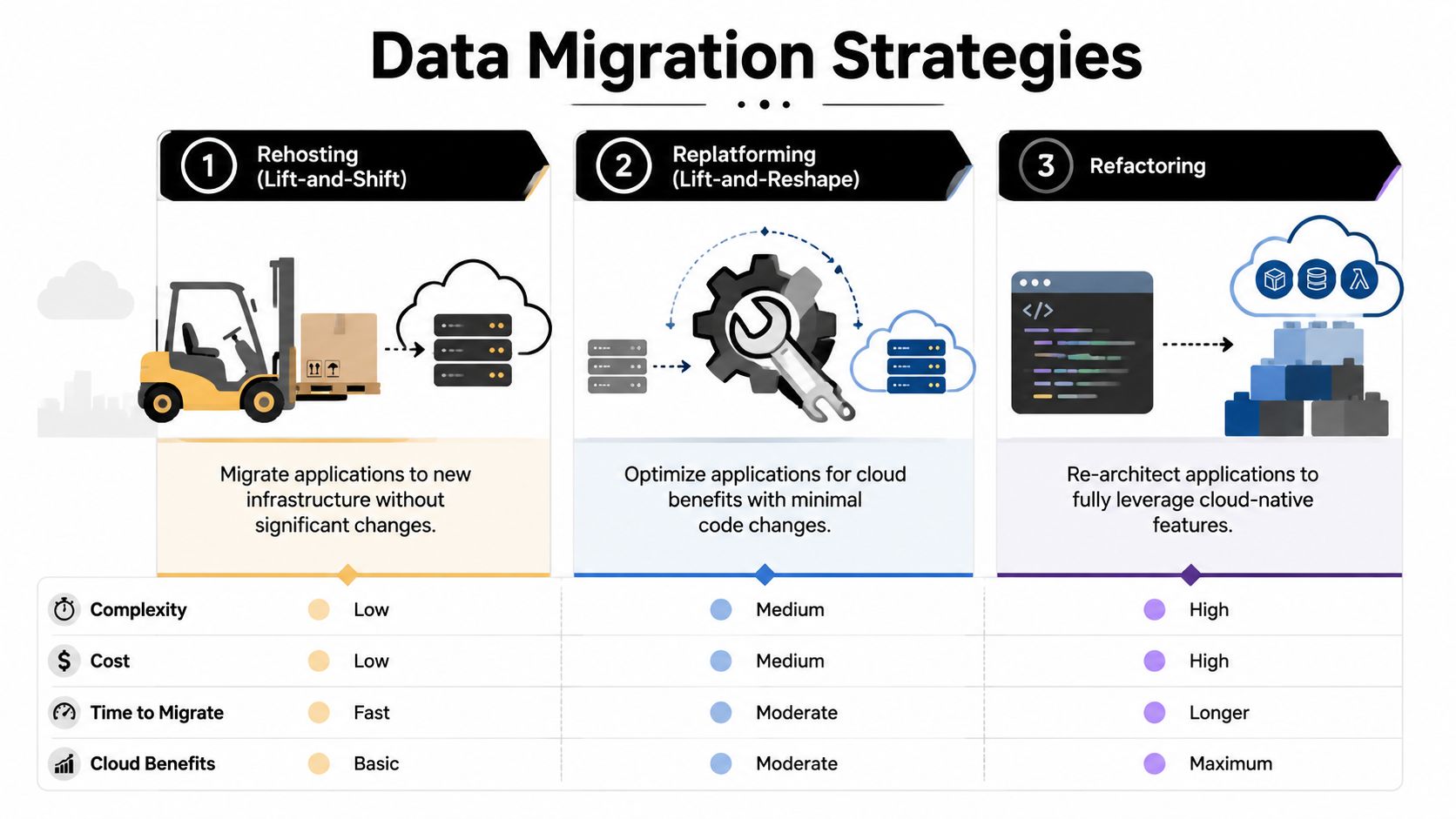
The three main choices
A migration strategy should match the workload, not the slogan.
| Strategy | Description | Best For | Risk Level | Cost & Effort |
|---|---|---|---|---|
| Rehosting | Move the application with minimal change to the target environment | Large portfolios, lease exits, urgent relocations | Moderate operational risk if technical debt is carried forward | Lower upfront effort, but may preserve inefficiencies |
| Replatforming | Make targeted platform changes without full application redesign | Applications that need better scalability, supportability, or managed services | Moderate because both migration and platform behavior change | Medium effort with a better long-term operating outcome |
| Refactoring | Re-architect the application for cloud-native or modern platform patterns | Strategic systems that justify modernization investment | Higher project risk because code, architecture, and operations all change | Highest effort, but strongest future agility |
What actually works in the field
Lift-and-shift works when time matters more than elegance. It's common when a lease is ending, a facility is closing, or the organization needs to reduce physical footprint quickly. The trap is obvious. You can move every weakness into a new home and still be stuck with hard-to-manage systems.
Replatforming is often the best middle path. You keep the application's core behavior, but improve the runtime, database model, automation, or support stack enough to reduce future friction. For many enterprises, that's the most practical answer because it balances speed with operational improvement.
Refactoring is the right call for applications that directly affect revenue, service delivery, or competitive capability. But don't use it as a default. Refactoring expands scope fast. It needs application engineering time, architecture governance, and realistic business sponsorship.
Add geography to the strategy decision
Target selection has changed. New capacity isn't only about rack space or low-latency proximity anymore. Reporting on current build patterns shows new data center development shifting inland, with power availability and power cost driving major location decisions in places like Texas and several Midwest states, as covered by Network World's reporting on inland data center expansion.
That affects strategy. If your target environment offers limited near-term expansion, lift-and-shift may solve today's move but create tomorrow's capacity problem. If the target region offers stronger long-term power access, replatforming critical workloads there may make more sense than rebuilding twice.
For teams comparing execution models, this is also where data center migration best practices can help frame decisions around sequencing, supportability, and end-state operations.
Choose the strategy that fits the workload's business role, not the one that sounds most modern in a steering committee.
Building Your Detailed Migration Project Plan and Timeline
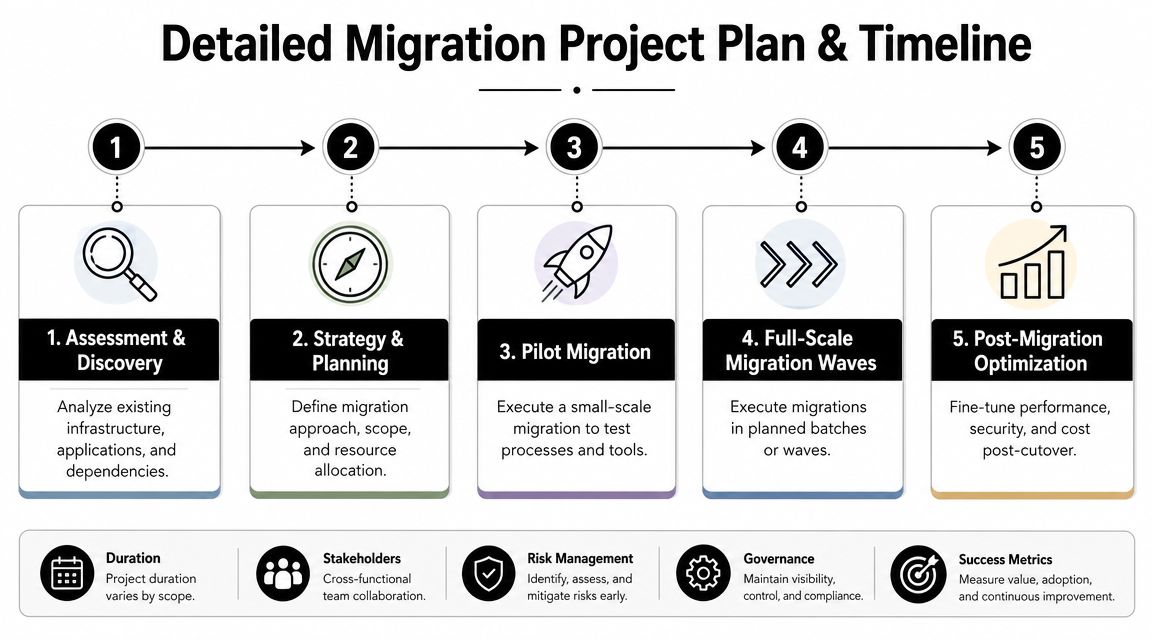
Once strategy is set, the project becomes a coordination problem. At this point, migrations usually become either controlled programs or recurring incidents disguised as projects. The difference is whether the plan is built around migration waves, ownership, and test gates.
A phased, wave-based cutover is the safer operating model. Guidance from Montclair Crew's migration best practices recommends grouping interdependent systems into migration waves, starting with a low-risk pilot, and applying lessons learned before each next wave.
Build the plan around waves, not departments
The right wave design groups systems that must move together to remain functional. That usually includes the application, its database, authentication dependency, integration endpoints, monitoring components, and any shared storage or messaging service it relies on.
A workable sequence often looks like this:
- Pilot wave with lower-risk systems and a cooperative owner team.
- Early production wave for workloads with moderate complexity and clear rollback paths.
- Core business waves for systems with heavier dependencies and stricter validation needs.
- Special-case waves for legacy, regulated, or hard-to-move platforms.
- Final cleanup wave for residual services, dormant assets, and decommissioning prerequisites.
Don't let politics set the order. The quiet application with six hidden dependencies is more dangerous than the visible one everyone is watching.
What the project plan needs to include
A credible migration plan is more than a timeline graphic. It should define:
- Scope control: What is in, what is out, and what gets retired instead of moved.
- Named ownership: Migration lead, infrastructure lead, application owner, security lead, service desk lead, and executive sponsor.
- Runbooks: Step-by-step execution scripts for each wave.
- Validation criteria: What must be true before a wave is declared successful.
- Rollback conditions: The exact triggers that require reversion.
- Communication model: Who gets updates, when, and through which channel.
- Freeze windows: Approved change restrictions before each move.
- Asset tracking: Hardware, licenses, and support contracts affected by each wave.
Organizations with large mixed estates often use an asset system to keep project data clean. If your tooling is fragmented, a review of IT asset management software options can help establish one system of record for ownership, status, and retirement planning.
Timeline discipline matters more than optimism
Migration timelines fail when teams only estimate the move itself and ignore preparation, issue handling, business testing, and post-cutover stabilization. Build time for dry runs, business signoff, remediation, and pause points between waves. You need room to absorb what the pilot teaches you.
Use milestone gates such as:
- design approved
- target environment ready
- pilot completed
- rollback tested
- business validation signed off
- source retirement approved
A migration plan that has no pause points isn't a plan. It's a hope that nothing surprises you.
Executing the Cutover and Validation Playbook
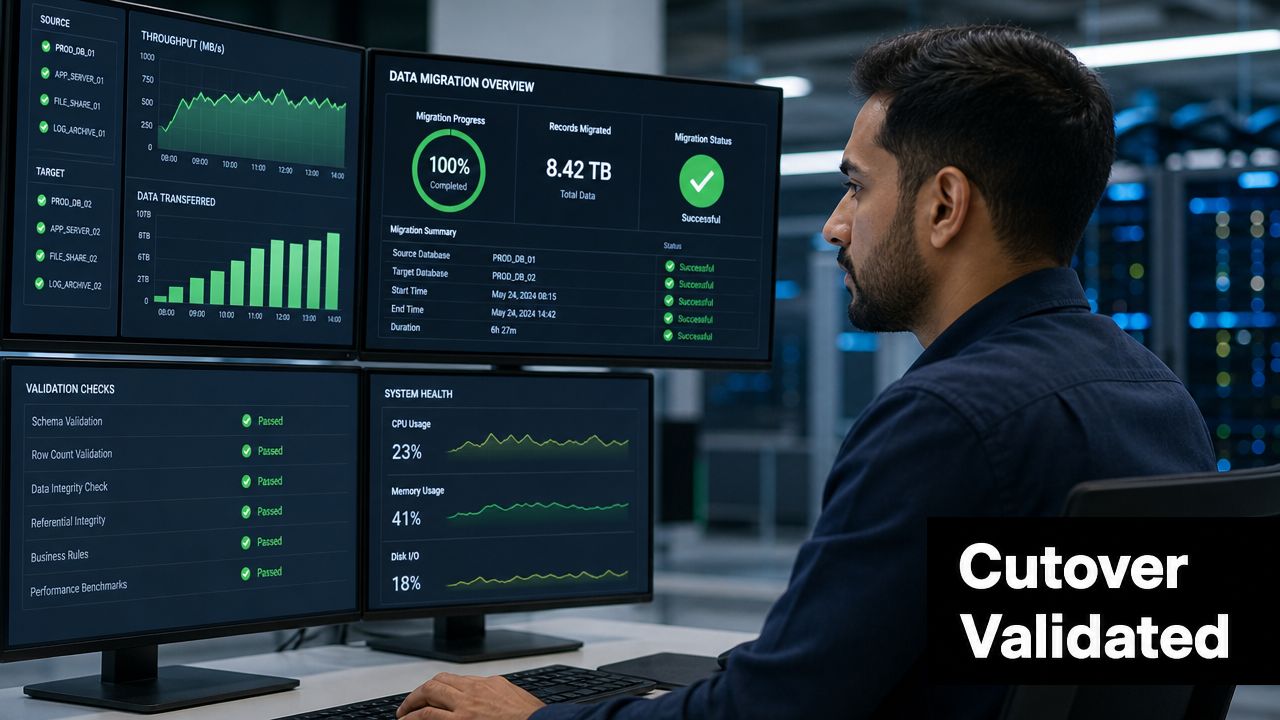
Cutover is where preparation gets audited by reality. If the planning has been disciplined, the weekend feels controlled. If it hasn't, everyone discovers missing details at the worst possible time.
I've seen the cleanest cutovers run like a mission control room. One person owns the timeline. One person owns technical command. Each application has an owner on standby. Security, networking, infrastructure, service desk, and business representatives all work from the same runbook and the same issue log. Nobody freelances changes.
The hours before cutover
The final pre-flight window should be boring. If major decisions are still being made at that stage, the team is late.
Run through a simple control list:
- Backups confirmed: Not assumed, confirmed and restorable.
- Change freeze active: No unrelated modifications entering the environment.
- Access validated: Admin credentials, vault access, consoles, and support paths tested.
- Target capacity checked: Compute, storage, and network headroom confirmed.
- Runbooks printed or duplicated: Don't rely on one collaboration platform during a high-stress event.
The execution sequence
For data moves, the safest workflow remains straightforward. Expert guidance recommends field-level mapping, dummy-data testing, and post-load validation because transformation mistakes and capacity issues usually do more damage than the transfer itself, as outlined in The Groove's data migration best practices.
That translates into a practical cutover sequence:
- Quiesce the source workload so data stops changing beyond an agreed point.
- Run final replication or export using the tested method.
- Load into the target with the same mappings and transformation rules validated earlier.
- Bring up dependencies in order so applications don't start against unavailable services.
- Switch traffic only after infrastructure and application checks pass.
- Monitor aggressively during the first production period.
Validation is not one test
A lot of teams validate too narrowly. The login page works, so they declare success. Then batch jobs fail, reports don't populate, or integrations break when real usage starts.
Use layered validation:
Infrastructure validation
Check host health, storage performance, network connectivity, monitoring feeds, backups, and alerting.
Application validation
Run smoke tests, integration tests, and role-based functional checks for the application itself.
Business validation
Have users execute the transactions that matter. Orders, claims, lab workflows, agency reports, invoicing, whatever drives the business.
Performance validation
Confirm the workload behaves properly under normal production conditions. A technically “up” system that runs poorly is not a completed migration.
The real success test is simple. Can the business do its work, with expected data, under expected load, without hidden defects?
Keep one issue commander and one decision log through the whole event. When incidents arise, teams need one place to classify the problem, assign the owner, record the workaround, and decide whether the wave continues.
Controlling Risk with Rollback Plans and Security Measures
Every migration plan needs a rollback plan with the same level of detail as the forward path. Not a paragraph. Not a note that says “revert to source.” An actual, executable sequence with decision triggers, owner names, data handling rules, and a tested deadline after which rollback is no longer clean.
A rollback plan is viable only if the source environment remains intact, the team knows exactly when the go/no-go point occurs, and the business accepts the consequences of reversion. If the source is altered too early, or if dependent systems continue changing data in multiple places, rollback turns into reconstruction. That's not the same thing.
What a real rollback plan includes
Use a practical structure:
- Trigger conditions: Define the failures that force rollback, such as failed business validation, critical data integrity issues, or target instability.
- Decision authority: Name the person or group that can authorize rollback.
- Timing window: Specify how long rollback remains safe before divergence makes it risky.
- Data handling: Identify what happens to transactions created during the attempt.
- Re-entry checks: Confirm the source can resume service cleanly.
Teams should test rollback in a pilot wave, not just discuss it in planning meetings. The organizations that skip this usually assume they'll “figure it out” if needed. They won't.
Security has to run in parallel with migration work
Security can't sit at the end of the schedule waiting for a final review. During a migration of data center environments, you temporarily expand attack surface. There are duplicate environments, temporary connectivity paths, increased privileges, staging storage, and external support teams. That creates risk even when nobody makes an obvious mistake.
Keep security controls active across the full program:
- Limit access deliberately: Grant temporary privileged access only where required, then remove it.
- Protect data in transit and at rest: Match controls in the target to the sensitivity of the workload.
- Validate compliance requirements early: Don't wait until after cutover to discover the target design misses a control.
- Track media and retired storage: Devices waiting for destruction are still a live security problem.
For retired drives, failed disks, and end-of-life storage arrays, secure handling matters as much as migration controls. A documented secure data destruction process should be tied to the project schedule so storage media isn't left sitting in cages, closets, or loading docks after production moves.
Security teams should sign off on each wave's readiness and each wave's closure. That keeps migration from introducing a short-lived exception that inadvertently becomes permanent.
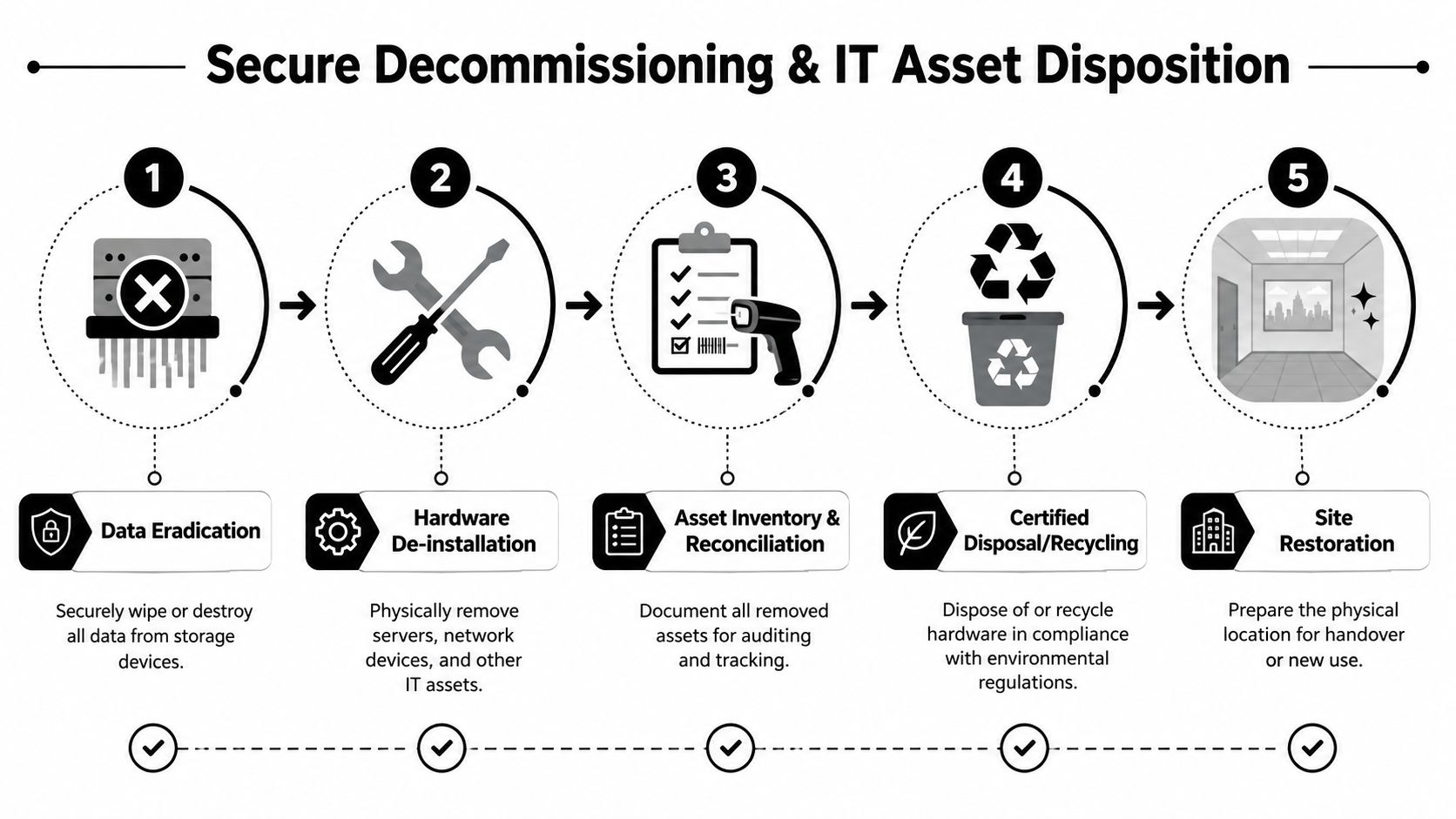
The Final Step Secure Decommissioning and IT Asset Disposition
A migration isn't complete when the new environment is live. It's complete when the old one is empty, documented, sanitized, and ready for handover. This is the phase too many teams postpone, and it's where avoidable security and compliance failures happen.
Data center operators face increasing scrutiny over resource use and infrastructure impact. BCG notes that migration decisions are shaped not only by technical needs but also by sustainability and responsible end-of-life planning for retired equipment in a sector under growing pressure around power and water use, as discussed in BCG's analysis of barriers to data center growth.
Treat decommissioning as a project milestone
Decommissioning should sit on the master schedule from day one. It needs budget, ownership, approvals, and evidence requirements. If you leave it until after cutover, old equipment tends to linger. Then nobody is fully sure what was wiped, what was removed, what is still under lease, and what still holds regulated data.
A disciplined sequence looks like this:
- Confirm production stability in the target before touching source hardware.
- Reconcile the asset list against what was migrated, retired, or left in place.
- Sanitize or destroy data-bearing media using the method required by policy and regulation.
- Remove and stage hardware under documented chain of custody.
- Process for reuse, resale, recycling, or destruction through an auditable ITAD workflow.
- Restore the site for landlord return, repurposing, or facility closure.
Data destruction is the control point
For storage devices, the first question isn't resale value. It's data risk.
Different media and policy requirements call for different approaches:
- Logical wiping works when the media is healthy, the device will remain in reuse channels, and your standards allow sanitization.
- Degaussing is used where magnetic media requires that treatment and reuse isn't the objective.
- Physical destruction is often the right choice for failed drives, highly sensitive data, or devices that can't be reliably sanitized.
What matters most is evidence. Keep serialized records, service logs, transfer records, and Certificates of Data Destruction where applicable. Auditability is part of the deliverable, not paperwork to chase later.
Chain of custody and environmental handling
The decommissioning floor is where expensive mistakes happen. Hardware gets disconnected in a rush, tags fall off, pallets get mixed, and useful records disappear. Prevent that with controlled staging, scanned inventory reconciliation, tamper-aware transport processes, and documented handoffs at every custody point.
For organizations that want outside support, Dallas Fortworth Computer Recycling is one example of a provider that handles data center decommissioning, secure equipment removal, and downstream disposition with an auditable process. What matters in any provider selection is chain-of-custody discipline, data destruction documentation, and compliant recycling or reuse workflows.
Don't close the project when users can log in. Close it when the old environment can no longer create risk.
The old room must become provably empty
The last walk-through should confirm more than missing racks. Verify that cabling is removed as required, leased assets are accounted for, network gear has been cleared, storage media has disposition records, and no orphaned devices remain in adjacent rooms or remote closets. Update asset systems, terminate support contracts, and archive all decommissioning records with the migration documentation.
That final discipline is what separates a completed migration from an unfinished one. Secure retirement is part of the migration of data center infrastructure, not an administrative afterthought.
If your team is planning a migration and needs the final phase handled with the same rigor as the cutover, Dallas Fortworth Computer Recycling provides B2B IT asset disposition, secure data destruction, and data center decommissioning services to help organizations retire old environments with documented chain of custody and compliant downstream handling.