
Electronic Recycling Dallas Texas: Secure IT Asset
Your storage room probably looks familiar. A few retired laptops from the last refresh. A shelf of failed drives nobody wants to touch. Old monitors, network gear, maybe a stack of desktops waiting for “the next cleanup day.”
That backlog creates two separate problems. One is obvious: space, clutter, and disposal. The other is the one IT directors worry about more: untracked assets, exposed data, and weak documentation once equipment leaves the building.
That's why electronic recycling in Dallas, Texas shouldn't start with a pickup request. It should start with a disposition plan. If you treat every asset as scrap, you lose recovery value. If you hand material to a vendor without a defensible paper trail, you create audit and compliance risk that can outlast the project itself.
Building Your E-Recycling Plan in Dallas
A solid plan starts before you call any recycler. Your organization needs to know what you have, what data it holds, what still has value, and what controls apply once it moves offsite.
Texas gives you a basic framework, but it doesn't remove the burden from commercial organizations. The Texas Commission on Environmental Quality says the state requires television and computer-equipment manufacturers to offer recycling opportunities, while also noting that businesses may use electronics recycling companies for items that are no longer working or can't be donated, according to Texas electronics recycling guidance from TCEQ.
For an enterprise environment, that means one thing: state access to recycling isn't the same as enterprise-grade disposition. You still need certified handling, chain of custody, and secure data destruction for servers, laptops, storage devices, and mixed IT assets.
Start with an internal asset inventory
Don't begin with pallet counts. Begin with a line-item inventory.
At minimum, your list should include:
- Asset type. Laptop, desktop, monitor, server, switch, firewall, mobile device, printer, storage media, and loose drives.
- Identifier. Asset tag, serial number, hostname, or any internal ID your team can reconcile later.
- Business status. In service, retired, failed, obsolete, or pending review.
- Data exposure. Whether the item contains storage media or ever held regulated, confidential, or customer data.
- Disposition path. Reuse, resale review, donation review, component harvest, or recycle.
If you skip this step, the rest of the project gets weaker fast. Vendor quotes become vague. Pickup counts drift. Certificates come back with generic descriptions instead of defensible records.
Practical rule: If you can't match a device on your floor to a device on your final report, you don't have a clean chain of custody.
Separate legal access from operational control
A lot of Dallas organizations assume “recycling available” means “process solved.” It doesn't. Residential-style access points and broad state programs serve a purpose, but they aren't built around enterprise asset accountability.
For business electronics, ask different questions:
- Which items contain data-bearing media?
- Which items might still be functional enough for redeployment or remarketing?
- Which items require documented destruction instead of general recycling?
- Which assets need management approval before disposition?
That's the point where many teams build an internal hold area and a release workflow. Nothing leaves until IT, security, and sometimes finance sign off.
If you need a model for handling business equipment rather than household drop-off, review a commercial-focused DFW computer recycling process and compare it against your own internal controls.
Define your project scope before the vendor walk-through
A clean scope prevents the usual confusion on pickup day.
Use three buckets:
- Data-bearing devices that need sanitization or destruction
- Potentially reusable assets that need testing and grading
- End-of-life material that should move straight into recycling streams
That internal separation makes every downstream decision easier. It also tells a qualified vendor that your organization is serious about risk, not just removal.
How to Select a Secure Recycling Partner
A Dallas pickup can look organized on day one and still create problems months later. The truck arrives on time, equipment leaves the building, and then your team starts asking basic questions no one can answer clearly. Which serial numbers were received, which devices were tested for reuse, which were destroyed, and which records will stand up in an audit?
That risk starts with vendor selection.
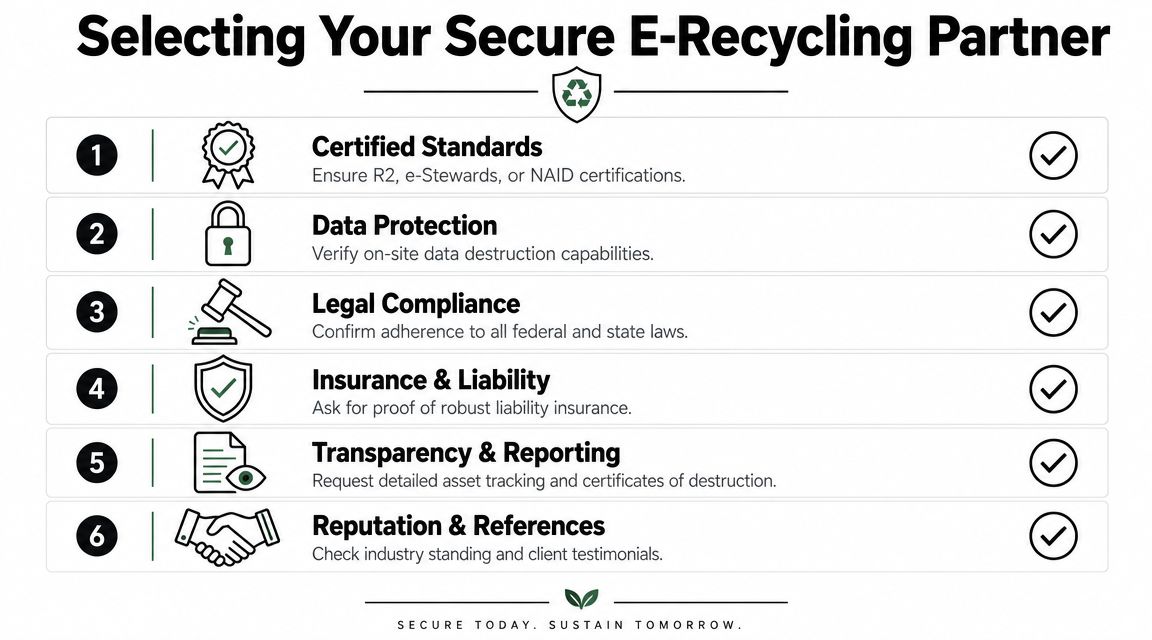
A secure recycling partner should run an ITAD process with controlled intake, asset tracking, disposition rules, and documented downstream handling. If a provider mainly talks about trucks, labor, and how fast they can clear a storage room, you still do not know how your organization's risk will be managed after pickup.
What matters during vendor vetting
The right partner can explain the full chain of handling in plain language. Assets are received, identified, reconciled, assessed for reuse potential, routed for sanitization or destruction, and then moved into remarketing, parts recovery, or end-of-life recycling. That flow matters because every handoff affects two outcomes that IT leaders care about. Residual value and defensible documentation.
A vendor that treats all incoming equipment as scrap usually leaves money on the table. A vendor that promises resale value without tight inventory control creates a different problem. Missing assets, weak records, and difficult audit conversations. You need both. Controlled processing and a clear decision path for reuse versus recycle.
| Vetting Criteria | Why It Matters | What to Ask For |
|---|---|---|
| Certifications | Shows whether the vendor follows recognized process and environmental controls | Ask which certifications are current, which facility they apply to, and whether scope includes electronics recycling and data-bearing devices |
| Asset tracking | Determines whether your inventory can be reconciled from pickup through final disposition | Ask for sample intake reports, exception handling procedures, and serialized reporting examples |
| Reuse and remarketing process | Protects resale value and prevents functional assets from being treated as low-value scrap | Ask how they test, grade, and approve equipment for resale or redeployment |
| Downstream transparency | Shows where non-reusable material actually goes after processing | Ask whether they document final vendors, commodity paths, and any subcontracted steps |
| Insurance and liability | Defines who carries risk during pickup, transport, storage, and processing | Ask for proof of coverage and confirm what incidents are included |
| Facility and personnel security | Reduces the chance of internal loss, substitution, or mishandling | Ask about access control, visitor rules, camera coverage, and employee screening |
Questions worth asking directly
Ask questions that force process details, not sales language.
- How do you reconcile assets at intake? If they cannot explain how serials are captured, matched, and escalated when something does not line up, expect reporting gaps later.
- How do you decide whether an asset is reused or recycled? This answer tells you whether the provider understands value recovery or just clears material.
- Can you show a sample final report package? Review it before signing. You want to see serialized records, disposition categories, and supporting certificates where applicable.
- Who performs each step after pickup? If another facility or downstream processor touches the material, ask where that handoff is recorded.
- What exceptions trigger client approval? Some organizations want laptops wiped and resold, while others require destruction for specific departments or device classes.
One practical benchmark is whether the provider can show you how an R2 certified electronics recycler structures controls around processing, downstream accountability, and reporting. Use that standard to compare vendors consistently.
Watch for the wrong signals
The weak vendors tend to reveal themselves early.
- Pickup-first conversations. Speed matters, but a fast pickup with weak intake controls creates cleanup work for your team later.
- No clear reuse policy. If every asset is treated the same, your organization loses the chance to recover value from usable equipment.
- Vague answers about downstream vendors. If they cannot explain where material goes after their dock, your documentation trail may stop too soon.
- Thin paperwork samples. A generic certificate and a weight ticket are not enough for most business dispositions.
- Facility claims without scope details. A certification only helps if it applies to the facility and services you are using.
Choose the partner that makes it easier to defend decisions later. That includes what was recycled, what was remarketed, why each choice was made, and how your team can prove it.
Ensuring Certified Data Destruction
A Dallas office closes a refresh project, pallets leave the building, and everyone assumes the risk is gone. Two weeks later, your legal or security team asks a simple question: which serial numbers were wiped, which were shredded, and where is the proof? If your recycler cannot answer that cleanly, the problem is no longer disposal. It is control failure.
Certified data destruction starts with a business decision. Do you need to preserve asset value through sanitization, or does policy require irreversible destruction? Many IT teams skip that step and shred everything. That approach can satisfy security requirements, but it also wipes out resale and donation value that could have been documented and recovered.
The three methods and when they fit
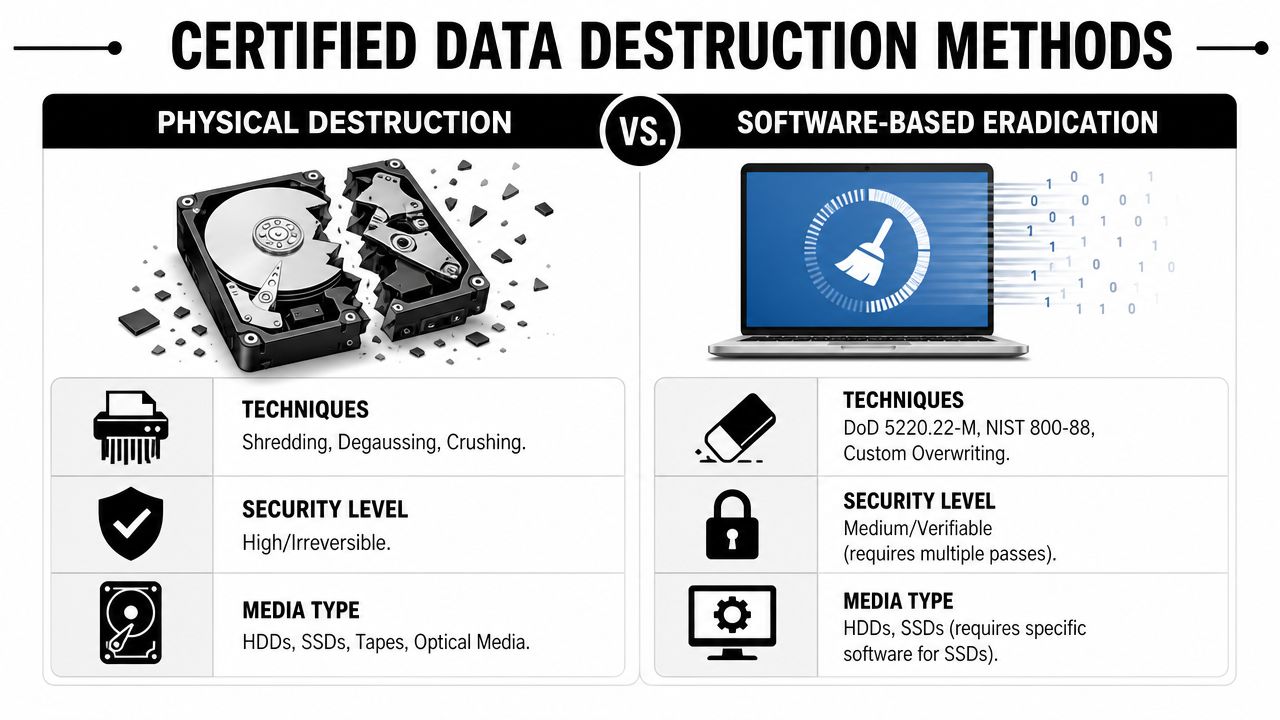
Most organizations choose between software wiping, degaussing, and physical shredding or crushing. The right option depends on the media, the condition of the device, and the standard your organization has to defend later in an audit.
Software wiping
Wiping fits assets you want to redeploy, resell, or donate. It preserves value, but only if the drive is accessible and the process produces a verifiable log tied to the device.
Use it when:
- The device is functional
- You want to retain resale or reuse value
- Your policy permits sanitization instead of destruction
The trade-off is straightforward. A wipe without device-level verification is weak evidence.
Degaussing
Degaussing applies to magnetic media. It is useful for some legacy storage where reuse is not the goal and your security policy calls for strong magnetic media neutralization.
Use it when:
- You are handling magnetic storage
- Your policy calls for media neutralization
- You do not need to preserve reuse value
It does not solve every case. Solid-state media requires a different approach.
Physical shredding or crushing
Physical destruction is often the cleanest answer for failed drives, damaged devices, and highly sensitive data sets. It removes reuse value, but it also removes debate about whether the media should re-enter circulation.
Use it when:
- The media is defective
- Your policy requires irreversible destruction
- The data risk outweighs any resale value
What good control actually looks like
The strongest data destruction programs treat sanitization and destruction as tracked workflow steps, not as isolated events on a loading dock. Problems usually start earlier. The wrong serial number gets captured, removable media is missed, or the item is processed before your inventory record is reconciled.
A defensible process follows the same path every time:
- Match the device to an asset ID or serial number
- Confirm the media type and approved disposition
- Apply the approved wipe, degauss, or physical destruction method
- Record the outcome at the device level
- Issue a certificate that ties back to those serialized records
The certificate is the summary. The substantive evidence is the chain of records behind it.
Choose by policy, risk, and value
Security teams often prefer shredding because it removes ambiguity. Finance teams often prefer wiping because it preserves recovery value. Both positions can be reasonable. The job is to apply the right method to the right asset class and document why that decision was made.
| Method | Best fit | Trade-off |
|---|---|---|
| Software wipe | Reuse, resale, redeployment | Requires working media and strict verification |
| Degauss | Certain magnetic media with high security requirements | Limited by media type and does not preserve reuse value |
| Physical destruction | Failed drives, highly sensitive data, irreversible disposal needs | Eliminates remarketing value |
If your project includes large volumes of storage media, compare vendors on device-level reporting, exception handling, and their certified hard drive destruction process, not just on whether they own a shredder. That is what lets your organization prove what happened, defend the disposition decision, and support both compliance and ESG reporting later.
Managing Logistics for Pickup and Transport
Once assets are approved for disposition, logistics become a control issue. Sloppy pickup prep creates asset mismatches, damaged equipment, and contaminated material streams.
Texas recycling data shows the broader importance of capture and sorting. The state's municipal solid waste recycling rate was 27.5% in 2019, and an estimated 43.8% of material landfilled in Texas could have been recycled, representing about 15,999,544 tons of potentially recoverable material, according to this Texas recycling and material separation overview. The same source notes that magnetic separators can recover over 90% of ferrous metals from mixed waste when feedstock is properly prepared.
For e-waste projects, the practical lesson is simple. Segregation starts at your site.
Prepare the load for reconciliation
Your final staging area should mirror your asset list.
Group equipment by disposition path:
- Data-bearing assets in one controlled area
- Reusable equipment in another
- Scrap-only electronics and peripherals separately
- Loose drives and removable media secured and counted independently
Don't let your team toss cables, docks, phones, keyboards, and adapters into random gaylords if they belong to a tracked project. Mixed loads create confusion during intake and lower recovery quality.
Package for handling, not just removal
Servers, desktops, and monitors need different treatment.
- Rack servers should be stacked in a way that prevents faceplate and rail damage.
- Monitors need stable, upright packing where possible to reduce breakage.
- Loose peripherals should be boxed by category instead of dumped together.
- Storage media should stay in sealed containers or clearly labeled bins.
If your vendor offers secure containers or scheduled service windows, use them when the project scope justifies it. A controlled pickup process is usually worth more than improvised speed.
If your onsite list says 40 laptops and the truck leaves with 38 confirmed units and two “probably in another box,” the problem started before transport.
Control the handoff on pickup day
Assign one internal owner for release. That person should have the latest asset list, know what's approved to leave, and stop any last-minute additions that weren't reviewed.
A clean handoff usually includes:
- A final onsite count or serialized reconciliation
- Pickup paperwork that identifies the load
- Clear labeling for special handling items
- A record of who released the equipment
For organizations coordinating office cleanouts, refresh projects, or recurring collections, it helps to align your staging process with a provider that supports electronics pickup for business assets rather than general haul-away service.
Exploring Value Recovery and Donation Options
Too many organizations treat retired electronics as waste the moment they leave production. That's the easiest route administratively, but it's often the weakest one financially and environmentally.
The more useful question isn't “How do we recycle this?” It's “What should happen to this asset next?”
The City of Dallas notes that working electronics may be better suited for donation, and a major gap in many local programs is what happens to business electronics that are still usable, according to Dallas electronic waste guidance. For IT directors, the highest-value decision is often whether assets should be redeployed, remarketed, donated, or recycled.
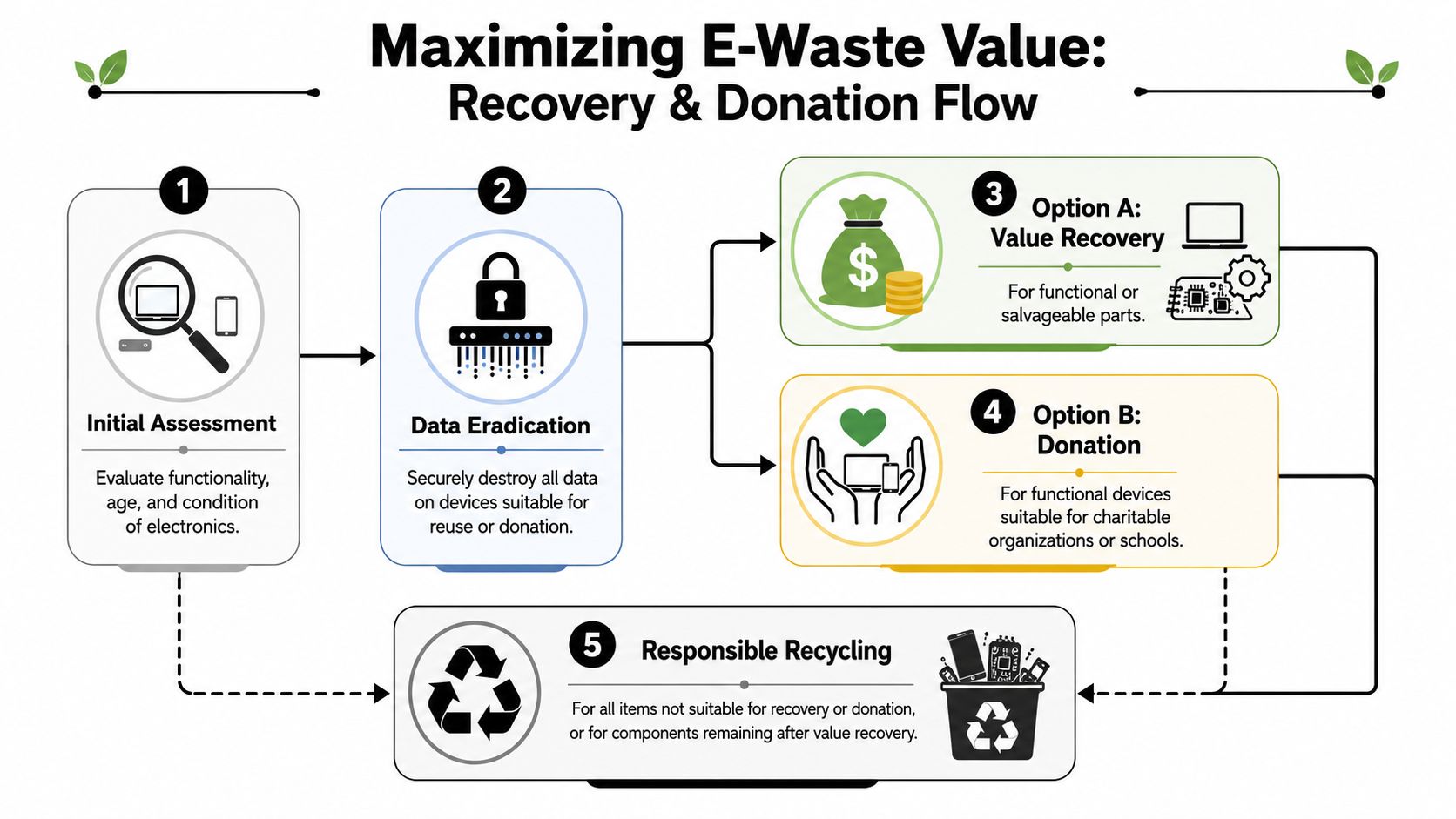
Use a disposition hierarchy
A practical hierarchy keeps teams from sending value straight into the shred stream.
Redeploy first
Some assets are old for one department but still perfectly usable somewhere else. Basic office laptops, monitors, and peripherals often fit this category if they pass testing and your security team approves the reset process.
Redeployment works best when your organization has:
- standardized device builds
- a documented refresh policy
- internal demand for secondary-use equipment
Evaluate remarketing next
If the equipment no longer fits your internal standards but still functions, remarketing may recover value. Testing, grading, and cosmetic assessment are vital for this.
The key mistake is assuming all used assets have equal resale potential. They don't. Value depends on age, condition, configuration, and whether the device can be processed efficiently.
Use donation deliberately
Donation can be the right choice when equipment is usable but not worth the overhead of remarketing, or when your organization has community-impact goals tied to technology access.
That only works if the donation path is controlled. Devices still need data eradication, asset tracking, and approval. “Donation” is not a substitute for secure disposition.
Working electronics deserve a decision, not a default. Recycling is the last step for equipment that has no better next use.
Build review criteria before the refresh starts
The cleanest value-recovery programs don't wait until pallets are stacked in the warehouse. They set approval criteria at the front end of the refresh.
Useful review questions include:
- Is the device functional?
- Is it cosmetically acceptable for reuse?
- Can it be sanitized without destroying value?
- Does your organization want return, community impact, or simple removal?
That framework keeps the conversation grounded. Some assets should be recycled immediately. Others should be harvested for parts. Some should go back into productive use.
The strongest Dallas-area electronic recycling programs don't just move material out. They help your team document why each class of equipment followed a specific path.
Finalizing Your Audit Trail and Compliance Docs
A recycling project isn't complete when the truck departs. It's complete when your organization has defensible records showing what left, how it was handled, and where it ended up.
That standard matters because the global e-waste stream is still poorly controlled. In 2021, the world generated 57.4 million metric tonnes of e-waste, and only 22.3% was known to be formally collected and properly recycled, according to global e-waste reporting summarized here. For a Dallas business, that's the strongest argument for demanding proof instead of accepting assurances.

The documents you should expect
At minimum, your reporting package should include documents that support both operational review and audit defense.
Asset disposition report
This should show what was received and how it was classified. If the project was serialized, the report should preserve that detail.
Certificate of destruction
This document should identify which data-bearing assets were destroyed or sanitized under the approved process. Generic statements are better than nothing, but they aren't the strongest evidence.
Certificate of recycling
This confirms that end-of-life material moved through a documented recycling path rather than disappearing into an unknown outlet.
Settlement or recovery report
If any assets were reused, remarketed, or harvested for value, your organization should receive a record showing that outcome clearly.
What makes paperwork audit-proof
Paperwork becomes useful when the documents connect to each other.
The strongest audit trail has these traits:
- Serialized continuity from internal inventory to vendor intake
- Documented handoffs from release through processing
- Clear disposition categories such as reuse, destruction, and recycling
- Supporting evidence that legal, IT, finance, and sustainability teams can all understand
Many vendors underdeliver on this point. They issue a final certificate but can't show the logic or records behind it. That's fine until internal audit asks for exception review, or your security team wants proof for a specific device.
Tie the records to ESG and internal controls
Documentation isn't just for compliance files. It also supports procurement reviews, sustainability reporting, and policy enforcement.
If your organization reports on environmental stewardship, broad claims won't hold up well. You need records that show retired electronics were processed through controlled channels. If your legal or finance team reviews disposal controls, they need more than an invoice and a pickup date.
One practical benchmark is to maintain a final package that includes:
| Document | Internal use |
|---|---|
| Pickup and transfer record | Confirms the initial handoff |
| Serialized destruction record | Supports security and compliance review |
| Recycling certificate | Supports environmental claims |
| Final disposition summary | Supports audit, finance, and asset closeout |
Good documentation does two jobs at once. It proves risk was controlled, and it gives your organization usable evidence later.
If you're tightening your reporting requirements, review what a formal chain of custody documentation process should include and compare that standard against what your current vendor provides.
If your team needs a business-focused partner for secure electronics retirement, Dallas Fortworth Computer Recycling provides IT asset disposition, data destruction, pickup logistics, and chain-of-custody documentation for organizations managing retired computers, laptops, drives, and other regulated technology assets.