
Certified Hard Drive Destruction: NIST Compliance Guide
A lot of IT directors meet certified hard drive destruction at the same moment. The refresh is done, the new systems are online, and the old equipment is sitting in a cage, on a pallet, or in a back room waiting for someone to “deal with it.” That’s the dangerous point in the lifecycle.
At retirement, a storage device stops being useful equipment and becomes concentrated liability. It still holds regulated data, internal records, credentials, and business history. If your disposal process is loose, that risk leaves your building intact.
The right way to think about this isn’t disposal. It’s risk elimination with evidence. Certified hard drive destruction is the process that turns a decommissioned drive from a breach vector into a closed compliance record.
Why Your End-of-Life Hard Drives Are a Ticking Time Bomb
A pallet of retired servers looks harmless. It isn’t. In practice, the highest-risk drives are often the ones nobody is watching closely anymore: failed RAID members, pulled laptop drives, old SAN shelves, and SSDs removed during upgrades.

What makes this risk real is how often supposedly “disposed” media still gives up data. A landmark study of used hard drives found that 67% contained personally identifiable information and 11% held sensitive corporate data, all recoverable with basic tools, which is exactly why deletion and casual disposal fail as a security control. The same source notes that data breaches can cost an average of $4.45 million (Augusta Data Storage on recoverable data in used drives).
What usually goes wrong
Most failures happen before destruction even starts. Teams pull drives during a migration, stack them in bins, and assume they’re safe because the equipment is offline. But offline doesn’t mean sanitized.
Common weak points include:
- Unsecured staging: Drives sit in closets, cages, or loading areas with no documented access.
- Assumed wiping: Someone says the device was formatted, but there’s no verification and no audit trail.
- Mixed asset streams: Recyclable equipment, reusable systems, failed media, and regulated devices all get lumped together.
- No final proof: The organization can’t show who handled the drive, where it went, or how it was destroyed.
A disciplined secure hard drive disposal process closes those gaps before a retired device becomes tomorrow’s incident report.
Old drives rarely cause trouble while they’re in production. They cause trouble after everyone assumes the risk is gone.
Why certified destruction is a business control
Certified hard drive destruction isn’t a maintenance task. It’s a security, legal, and procurement control. It protects regulated data, limits breach exposure, and gives compliance teams something they can defend in an audit.
If you manage healthcare, finance, government, or any environment with customer records and internal IP, retired media needs the same rigor as live systems. A drive at end of life still deserves chain-of-custody, documented handling, and a verified end state.
That’s the shift new IT directors need to make early. You’re not getting rid of junk. You’re neutralizing evidence-bearing assets that still contain risk.
Understanding the Pillars of Certified Destruction
The word certified gets thrown around too loosely in ITAD. A vendor can say “we destroy drives” and still leave you with a weak process, incomplete records, and exposure you won’t discover until an audit or investigation.
A defensible process stands on three pillars. If one is missing, the whole thing becomes hard to prove.
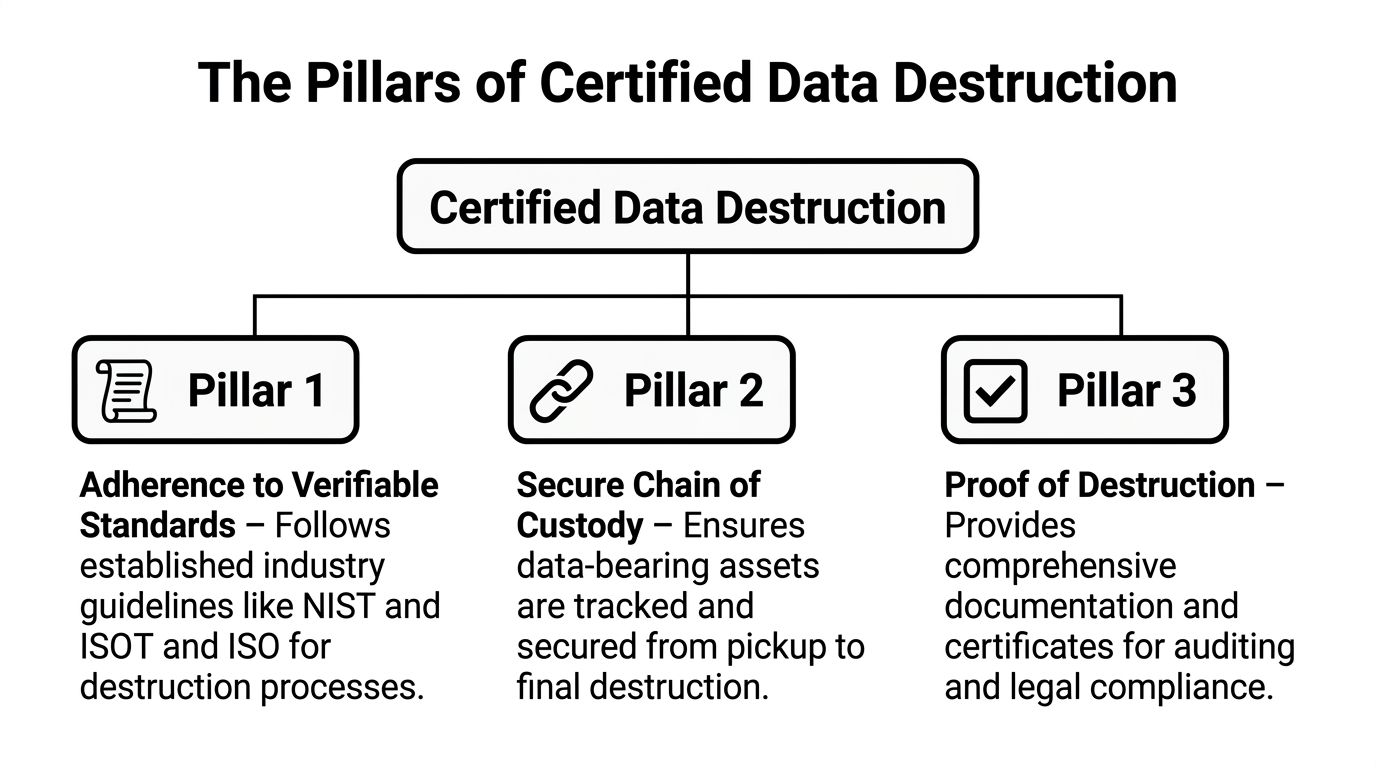
Verifiable standards
The first pillar is straightforward. The destruction method has to map to recognized standards, not vendor marketing language.
That means the provider should be able to tell you, in plain terms, whether the workflow follows recognized requirements for sanitization and destruction, how media type changes the method, and what output standard they validate against. If they can’t explain that clearly, they’re asking you to trust a black box.
A credible security data destruction workflow should translate standards into operational actions. Which drives get erased. Which drives get shredded. Which media requires special handling. Which evidence gets retained.
Chain of custody
The second pillar is the one IT leaders underestimate. Chain of custody is not paperwork theater. It’s the equivalent of evidence handling.
If a drive leaves your rack, every handoff matters. Who removed it. Who logged it. Whether serials were captured. Whether the transport container was sealed. Whether the vehicle route was controlled. Whether the final destruction event matched the inventory manifest.
Here’s the practical test. If a regulator, auditor, or internal investigator asks what happened to a specific serial-numbered drive, you should be able to answer without guesswork.
A solid chain of custody usually includes:
- Serialized inventory capture: The asset list starts before transport.
- Controlled collection: Drives are placed in secure containers or segregated by destruction path.
- Documented handoff: Each transfer is recorded and attributable.
- Secure transport: Off-site jobs need protected movement, not casual pickup.
- Reconciliation at destruction: The incoming manifest should match the destruction report.
Practical rule: If your provider can destroy a drive but can’t prove possession and control of that drive throughout the process, you don’t have a certified program. You have disposal with hope.
Proof that survives scrutiny
The third pillar is auditable documentation, which allows strong vendors to set themselves apart from others.
You need more than a generic receipt that says “media destroyed.” You need records that tie the destruction event to the actual assets, method used, date, location, and responsible parties. That record is what lets legal, compliance, and procurement close the loop.
Good documentation does two things at once. It proves security happened, and it proves your organization exercised due diligence.
That’s why certified hard drive destruction should feel structured, almost boring. The best programs remove improvisation. They replace “I think those drives were handled” with evidence someone else can verify.
Navigating Key Data Destruction Regulations and Standards
Most confusion around certified hard drive destruction comes from one bad assumption. Teams think regulations tell them exactly which machine to use. They usually don’t. Regulations tell you what outcome you’re responsible for, and standards tell you how to achieve and document that outcome.
That distinction matters when you’re writing policy, selecting vendors, or defending a disposal decision.
NIST 800-88 is the operating framework
For most enterprise environments, NIST SP 800-88 is the standard that gives your team practical direction. It separates sanitization into Clear, Purge, and Destroy. For sensitive data, only Destroy, such as shredding to particles smaller than 2mm, is considered sufficient to guarantee 100% irrecoverability, which matters when you’re trying to defend against HIPAA penalties that can exceed $50,000 per violation (Marrs IT on NIST 800-88 destruction requirements).
That framework helps you make better decisions:
- Clear: Acceptable only where risk is low and reuse is part of the plan.
- Purge: Stronger than clear, but still media-dependent.
- Destroy: The right path when data sensitivity, regulation, failed media, or policy removes any tolerance for recovery risk.
For a lot of IT directors, this becomes the internal policy baseline. If the drive held regulated, confidential, or business-critical data and is leaving control, default to destruction unless you have a documented reason not to.
What other standards add
Other standards help refine the details. DIN 66399 is useful when you need output requirements for particle size and protection level. For high-protection data, its H7 level points to very fine destruction output.
DoD 5220.22-M still gets mentioned often in procurement language, especially in older policies and government-adjacent environments. In current practice, I treat it less as the center of the program and more as historical language you may still need to interpret in contracts and internal controls.
What matters operationally is this: standards aren’t interchangeable shorthand. If a vendor says “we shred drives,” your next question should be, “To what output standard, for which media, and how do you verify it?”
How regulations connect to the standard
Most compliance obligations sit above the destruction method. HIPAA, SOX, GLBA, and similar requirements focus on protecting sensitive data and proving reasonable controls. They don’t care whether your team likes degaussing, shredding, or crushing. They care whether data remained exposed because your disposal process was weak.
That changes how you should read vendor claims. “Compliant destruction” means very little unless the method aligns with the data class and the documentation supports the event.
A few practical examples help:
| Requirement area | What your team needs to prove | Operational effect |
|---|---|---|
| Healthcare and regulated records | Protected data was rendered irrecoverable | Destroy failed drives and retain detailed records |
| Financial and corporate governance | Sensitive records were disposed under controlled procedure | Keep chain-of-custody and destruction evidence |
| Public sector and contractor environments | Destruction was auditable and policy-aligned | Use serialized manifests and formal certificates |
If your policy says data must be destroyed, but your vendor only offers a broad “sanitized” status with no media-level details, you’re carrying the compliance risk yourself.
What procurement should ask for
A vendor proposal should state the destruction method in terms your compliance team can use. It should identify the media type, destruction path, whether witnessing is available, and what the final records contain. If your provider can’t describe the difference between destroying an HDD and destroying an SSD, they’re not ready for a mixed enterprise environment.
Your documentation matters as much as the machine doing the work. A formal certificate of destruction for hard drives is what closes the compliance loop after the physical event is over.
For policy writers, the cleanest approach is simple. Tie your internal retirement standard to NIST terminology, define when destroy is mandatory, and require traceable documentation for every data-bearing asset that leaves service.
Comparing Destruction Methods Shredding Degaussing and Erasure
Most vendors can name three methods. Fewer can tell you when each one fails. That’s the more useful conversation.
The right choice depends on media type, reuse goals, risk tolerance, and audit requirements. If you manage a modern fleet with both spinning disks and flash storage, you need to evaluate methods by what they do, not by how secure they sound in a brochure.
The practical differences
Shredding is the most direct answer when the business objective is finality. The media is physically reduced to fragments, which makes it the strongest fit for high-sensitivity retirement and failed devices that can’t be reliably processed any other way.
Degaussing only applies to magnetic media. That makes it relevant to certain HDD workflows but useless for flash-based devices. Teams still get tripped up here because they assume “strong magnetic destruction” covers every drive in the lot. It doesn’t.
Certified erasure has a valid role when reuse is intended and the drive is healthy enough to verify. It can support redeployment, remarketing, or internal reassignment. It is not the default answer for damaged drives, heavily regulated environments, or mixed media that includes SSDs destined for final disposition.
Why SSDs change the equation
This is the gap many generic guides miss. Traditional HDD destruction is well understood, but enterprise storage has shifted. SSDs now hold 65% of the market share, and degaussing is ineffective on flash memory, making shredding to 2mm or less the only NIST-compliant Destroy method for that media class (Data Destruction on SSD-specific requirements).
That changes both equipment selection and vendor vetting. A provider that handles HDDs competently can still fail an SSD job if their shred size is too large or their reporting doesn’t distinguish between media types.
Don’t approve a destruction method at the batch level. Approve it at the media level.
Hard Drive Destruction Method Comparison
| Method | NIST 800-88 Level | Best For | Ineffective On | Asset Reuse Possible? | Compliance Level |
|---|---|---|---|---|---|
| Shredding | Destroy | Failed drives, regulated data, end-of-life retirement, mixed media with SSDs | Not broadly ineffective when sized correctly for the media | No | High, when output matches required destruction standard |
| Degaussing | Purge | Certain HDD workflows where magnetic media is the target | SSDs and other flash-based storage | No practical reuse path in most destruction programs | Situational, depends on policy and media type |
| Certified erasure | Clear or Purge, depending on method | Functional drives intended for reuse or resale | Damaged drives and media that cannot be verified | Yes | Appropriate only when policy and data sensitivity allow it |
There’s also a business-side decision hiding behind the technical one. If the asset still has resale value and your policy permits reuse, erasure may preserve value. If the device is failed, obsolete, or tied to regulated data, preserving value is the wrong priority.
A useful vendor conversation starts with the asset map. How many HDDs, how many SSDs, how many failed drives, how many devices must be destroyed on policy, and which ones could enter a reuse stream after verifiable erasure. If the provider jumps straight to one blanket method without asking those questions, keep looking.
For teams still deciding whether software wiping is enough, it helps to compare the limits of completely wiping a hard drive against a certified destruction workflow built for final retirement.
The End-to-End Certified Destruction Workflow in Action
A good certified hard drive destruction project should feel controlled from the first call. Not dramatic. Not improvised. Controlled.
When the process is mature, the client’s job is to define scope and access. The provider’s job is to carry the risk-sensitive steps without introducing gaps.
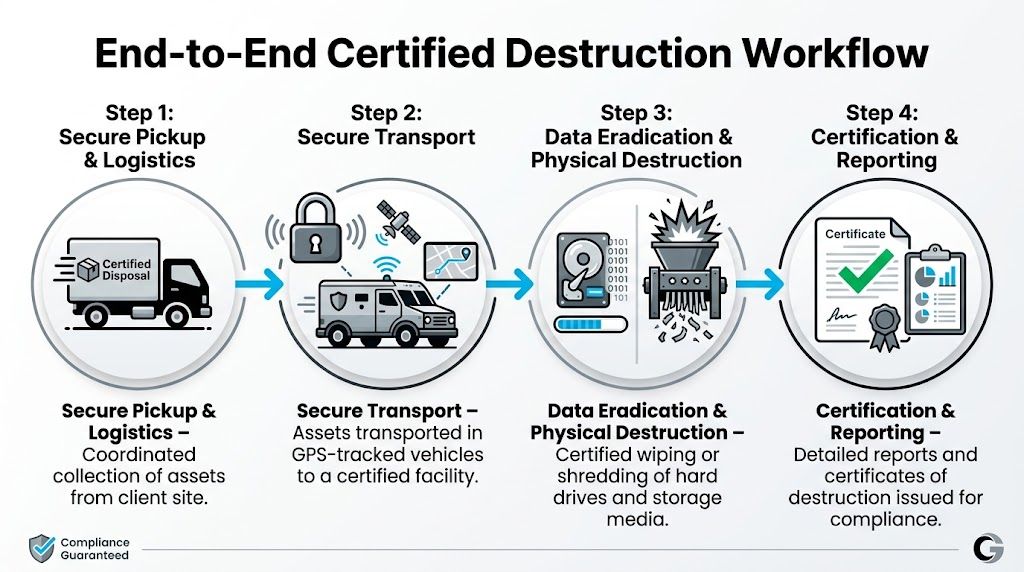
Step one is scoping, not hauling
The best engagements start with a real inventory conversation. What media types are involved. Which assets are already pulled. Which are still in servers or user devices. Which must be destroyed versus erased. Which locations are involved.
That early scoping determines almost everything that follows:
- Pickup model: Single site, multi-site, or data center decommission.
- Service mode: On-site destruction, off-site destruction, or a mixed workflow.
- Asset handling: Loose drives, complete systems, storage arrays, backup media, or specialty equipment.
- Documentation level: Asset-level serial tracking, witness requirements, and certificate format.
If you skip this step, you usually pay for it later in delays, mismatched manifests, or drives that arrive without the level of evidence your compliance team needs.
Collection and transport are part of the security event
Once the job is scheduled, secure handling begins before a single drive is destroyed. Technicians collect assets, segregate them by processing path, and log identifying details into an inventory or manifest. If the project is off-site, transport controls matter just as much as the shredder waiting at the facility.
Strong programs treat collection and movement as part of the destruction event, not as a casual prelude to it. That means sealed containers, controlled handoff, and route accountability.
A professional shred and recycle service should also account for what happens after destruction. The security event ends when the data is irrecoverable. The asset lifecycle ends only after the resulting material is processed responsibly.
The destruction event and final reporting
The destruction itself can happen on-site with mobile equipment or off-site at a secure facility. On-site gives immediate assurance and direct witnessability. Off-site usually handles scale more efficiently, especially for large lots and mixed electronics streams.
Either way, the event should be reconcilable to the manifest. That’s the operational detail many buyers miss. A secure process doesn’t just destroy media. It matches destroyed media to the inventory that entered the process.
The closeout package should include, at minimum, enough detail for your team to answer three questions later:
- What assets were processed
- How they were processed
- When and where the event occurred
A destruction job isn’t complete when the drives are gone. It’s complete when your audit file can survive questions from legal, compliance, and procurement.
That’s what a mature workflow looks like in practice. Not just destruction. Destruction with traceability, reconciliation, and a clean record at the end.
Your Vendor Selection and Procurement Checklist
Most bad vendor choices happen in procurement, not in operations. The team buys a service description instead of a control framework. Then later they discover the provider’s “certificate” is vague, the SSD process is weak, or the chain-of-custody language leaves too much unsaid.
A better approach is to force specific answers before you sign anything.
Ask these security questions first
Start with the operational core. You want the provider to describe the process in enough detail that you can see where risk is controlled.
Use questions like these:
- Media handling: How do you separate HDDs, SSDs, mobile devices, and failed media?
- Chain of custody: When does custody begin, and how is each handoff logged?
- Witness options: Can your team observe destruction on-site, off-site, or through documented evidence?
- Documentation: Does the certificate tie the destruction event to specific assets or just the batch?
- Downstream handling: What happens to the residual material after destruction?
If the answers sound polished but generic, push deeper. Experienced providers should be able to talk process without hiding behind buzzwords.
Then price the service correctly
Pricing is where many IT directors either overbuy or underbuy. You’ll see certified destruction commonly cited at $7-20 per drive, but that range lacks enterprise context. For larger jobs, buyers should expect volume discounts on 100+ drives and should also budget for premiums such as witnessed on-site service, which can add 20-50% extra when a tighter audit trail is required (Shred Nations on hard drive destruction pricing considerations).
That means you shouldn’t ask, “What’s your per-drive rate?” and stop there. Ask what changes the rate.
Important cost drivers include:
- On-site versus off-site: On-site usually costs more because the vendor brings secure destruction capability to you.
- Witnessed service: Higher-assurance jobs often include a premium.
- Volume and density: A few drives in many locations cost differently than one large pallet at one site.
- Asset mix: SSD-specific handling can differ from basic HDD lots.
- Logistics: Multi-site coordination and scheduling windows affect cost.
A simple cost-benefit lens
Don’t build the business case on disposal cost alone. Build it on risk-adjusted outcome.
A practical approach to this is:
| Decision factor | On-site destruction | Off-site destruction |
|---|---|---|
| Best fit | Highest sensitivity, strict internal policy, witness-heavy jobs | Larger batches, recurring programs, mixed electronics streams |
| Budget profile | Higher service cost | Better efficiency at scale |
| Chain-of-custody burden | Lower transport exposure | Higher dependence on documented transport controls |
| Operational disruption | Requires site access and staging coordination | Less equipment activity on your site |
| Audit posture | Strong when direct witnessing is required | Strong when manifests and reporting are rigorous |
The wrong comparison is “which one is cheapest.” The right comparison is “which one gives us enough assurance for this data class at this scale.”
Procurement test: If the vendor proposal doesn’t distinguish between media types, service mode, and evidence level, you’re not looking at a real destruction program. You’re looking at a hauling quote.
What belongs in the final vendor scorecard
Before award, make sure your selection criteria covers these categories:
- Standards alignment: Can the vendor map methods to recognized destruction requirements?
- SSD competence: Do they treat flash media differently where needed?
- Evidence quality: Is the final documentation asset-level and audit-ready?
- Logistics maturity: Can they support multi-site or nationwide projects without loose handoffs?
- Environmental handling: Do they pair destruction with responsible recycling?
- Commercial clarity: Are premiums, exclusions, and scheduling assumptions plainly stated?
A strong vendor gives you confidence before the first pickup. A weak vendor gives you confidence only until the first hard question.
Frequently Asked Questions About Hard Drive Destruction
Can we witness the destruction
Yes, and you should decide that requirement before procurement. Some organizations need direct on-site observation. Others are comfortable with off-site destruction supported by detailed records and documented chain-of-custody.
Witnessing has practical trade-offs. It can slow scheduling, raise cost, and make the service more operationally heavy. But for certain regulated environments, boards, or contractor obligations, it’s worth it because it removes ambiguity from the final event.
What happens to the e-waste after shredding
After destruction, the remaining material should move into a responsible recycling stream. That matters for both environmental compliance and internal sustainability reporting.
This is becoming more important as the market grows. The global hard drive destruction market is projected to reach $5.05 billion by 2035, driven by data security regulation and e-waste growth, which reinforces why buyers should choose providers that pair destruction with responsible recycling practices such as R2v3-certified handling (Spherical Insights on hard drive destruction market growth).
Do SSDs, phones, and backup media need different treatment
Often, yes. That’s one reason generic destruction programs break down in real enterprise environments.
HDDs, SSDs, mobile devices, and specialty media don’t all respond to the same method. SSDs need particular attention because flash memory doesn’t behave like a magnetic platter. Phones and embedded devices can also complicate inventory capture, battery handling, and destruction verification. The safest approach is to require your provider to define media-specific handling before the project starts.
Is one pass through a shredder enough
If the shredder output meets the required destruction standard for that media, then yes. The objective isn’t “more passes.” The objective is irrecoverability.
What matters is validated output size and a process that matches the device type. A large-particle result that might be acceptable for one use case may not be acceptable for another, especially with flash storage. This is why serious buyers ask for the destruction specification, not just the verb “shredded.”
Should we choose on-site or off-site service
Choose based on risk profile and operating model. If policy says drives must never leave the premises intact, on-site is the right answer. If you’re dealing with large enterprise volumes and want better throughput, off-site often makes more sense, provided the chain-of-custody controls are strong.
In practice, many organizations use both. They reserve on-site service for the most sensitive or visible events, then use off-site processing for recurring batches and large-scale refresh cycles.
What document matters most after the job
The final destruction certificate matters, but only if it’s backed by the inventory and chain-of-custody record behind it. A vague certificate with no asset-level detail won’t help much when someone asks what happened to a specific device.
The best closeout package lets you tie assets, method, date, and disposition together without reconstructing the story months later. That’s what turns certified hard drive destruction from a vendor task into an audit-ready business process.
If you need a nationwide ITAD partner that can handle certified hard drive destruction, data center decommissioning, secure logistics, and responsible recycling, Dallas Fortworth Computer Recycling works with organizations that need clear chain-of-custody, documented compliance, and practical service at scale.