
A Modern Leader’s Guide to IT Equipment Recycling
Proper IT equipment recycling is so much more than just getting rid of old gear. It's a strategic process that has to protect your sensitive data, keep you compliant with regulations, and hopefully, recover some value from those retired assets. A truly effective program always starts with two things: a formal policy and a detailed inventory. This groundwork is what lets you classify your hardware by risk and reuse potential, setting the stage for everything that follows.
Building Your IT Equipment Recycling Framework

Before a single server or laptop ever leaves your building, you need a rock-solid internal framework. I've seen it time and again: ad-hoc decisions made under pressure almost always lead to security gaps and compliance headaches. A documented policy, on the other hand, creates a consistent, repeatable process that takes the guesswork out of the equation and establishes clear accountability for every piece of hardware.
This is all about shifting from a reactive "uh-oh, what do we do with this?" mindset to a proactive IT asset disposition (ITAD) strategy. Instead of scrambling when equipment hits its end-of-life, your team will have a clear roadmap to follow. This ensures every action aligns with your organization's security, financial, and environmental goals.
Develop a Formal Recycling Policy
Think of your recycling policy as the constitution for your entire ITAD program. It needs to be a clear, accessible document that spells out procedures, roles, and responsibilities. And no, this isn't just bureaucratic paperwork; it’s one of your most critical risk management tools.
A strong policy provides the answers before the questions are even asked. Who has the authority to approve equipment for disposal? What are the mandatory data destruction standards for different devices? Which vendors are approved to handle our sensitive assets? Answering these in a formal policy locks in consistency across all your departments and locations.
To get started, make sure your policy includes these core components:
- Scope and Purpose: Clearly define which assets the policy covers (e.g., servers, laptops, mobile devices, networking gear) and state its goals, like data security, environmental compliance, and value recovery.
- Roles and Responsibilities: Assign ownership. Designate who is responsible for the inventory, who verifies data sanitization, and who coordinates with your recycling partners.
- Data Destruction Protocols: Get specific. Outline the required data sanitization methods (like wiping to NIST 800-88 standards or physical destruction) for different data sensitivity levels.
- Vendor Management: Detail the criteria for selecting and vetting your IT recycling partners, such as requiring certifications like R2 or e-Stewards.
Key Takeaway: A formal policy transforms IT asset disposition from an uncontrolled operational task into a governed business process. It’s your first line of defense against data breaches and regulatory penalties stemming from improper equipment handling.
Conduct a Thorough Asset Inventory
You simply can't manage what you don't measure. The very next step is to create a detailed inventory of every single asset slated for retirement. This isn't just a simple headcount; it involves grabbing specific data points for each device to figure out the right disposition path.
An accurate inventory is the backbone of a secure chain of custody. It allows you to track each asset from the moment it’s taken offline to its final destruction or resale, ensuring nothing gets lost. When you're evaluating different computer recycling companies, a detailed inventory list is often the first thing they’ll ask for to give you an accurate quote and plan logistics.
Your inventory should capture these critical details for each asset:
- Asset Tag or Serial Number
- Equipment Type (e.g., laptop, server, switch)
- Make and Model
- Physical Location (building, room, rack)
- Data Storage Status (does it contain sensitive data?)
Classify Equipment for Disposition
With a complete inventory in hand, you can now classify each asset to determine its fate. This step is all about prioritizing security and spotting opportunities for value recovery. After all, a high-end server packed with sensitive financial data requires a much different approach than a five-year-old office printer.
Categorizing your assets based on a set of criteria ensures every device is handled the right way, maximizing both security and financial return. This systematic approach prevents valuable, reusable equipment from being needlessly shredded while guaranteeing that devices with critical data undergo certified destruction.
To make this practical, we recommend a framework for categorizing assets. The table below offers a straightforward model to help you get started.
IT Asset Classification for Disposition
| Asset Category | Data Sensitivity | Reuse Potential | Recommended Action |
|---|---|---|---|
| Modern Laptops/Servers | High | High | Certified data erasure (NIST 800-88), followed by refurbishment and resale. |
| Older Network Switches | Low | Medium | Factory reset to clear configurations, then assess for secondary market or responsible recycling. |
| Damaged HDDs/SSDs | High | None | On-site or off-site physical shredding with a Certificate of Destruction. |
| Peripherals (Monitors, Keyboards) | None | Low | Direct to a certified recycler for materials recovery. |
By using a simple classification system like this, your team can make consistent, defensible decisions for every piece of retired IT equipment, turning a complex process into a manageable workflow.
Ensuring Compliant and Certified Data Destruction
Data security doesn't stop just because a device is unplugged. In fact, that's often when the real risks begin.
Failing to properly destroy the data on retired IT assets is a fast track to a breach—a costly mistake that can trigger staggering financial penalties and do permanent damage to your brand's reputation. This is why certified data destruction isn't an optional add-on; it's the non-negotiable final step for any equipment that has ever touched sensitive information.
An effective it equipment recycling program is built on the absolute certainty that your data has been permanently and verifiably destroyed. Just hitting "delete" or doing a factory reset is dangerously insufficient. Those methods often leave data fully recoverable with basic software, creating a huge liability you can't afford.
Choosing the Right Data Destruction Method
The right way to destroy data depends entirely on the type of storage media and your company's specific security rules. There are three primary, industry-standard techniques, and knowing the difference is key to making smart decisions that protect your organization.
-
Data Wiping (Sanitization): This is a software-based approach that overwrites every single sector of a hard drive with random data, usually in multiple passes. It's the perfect solution for modern hard disk drives (HDDs) and some solid-state drives (SSDs) you plan to resell or reuse, since it leaves the hardware completely functional. The go-to standard here is NIST 800-88, which gives clear guidelines for "Purge" and "Clear" levels of sanitization.
-
Degaussing: Using a machine that generates a powerful magnetic field, degaussing scrambles the magnetic domains on media like HDDs and old-school magnetic tapes. This renders the data totally unreadable, but it also destroys the drive in the process. Critically, it does not work on SSDs, which don't store data magnetically.
-
Physical Shredding: For the highest level of security, or for devices that are broken or can't be wiped, physical destruction is the final answer. Industrial shredders grind hard drives, SSDs, smartphones, and other media into tiny, mangled fragments, guaranteeing the data can never be pieced back together.
A common mistake is thinking one method fits all. For example, degaussing an SSD is completely useless. A certified partner will assess your inventory and apply the correct destruction method for each asset, ensuring total security without needlessly destroying valuable hardware.
Why NIST 800-88 Is the Gold Standard
The National Institute of Standards and Technology (NIST) Special Publication 800-88, "Guidelines for Media Sanitization," is the definitive playbook for data destruction in the United States. Following this standard isn't just a best practice; for industries like healthcare (HIPAA) and finance, it's often a direct compliance requirement.
Adhering to NIST 800-88 means you're using a defensible, documented process that will hold up in an audit. When you work with a certified ITAD vendor, they should be able to explicitly confirm their process aligns with these guidelines. For anyone wanting to dig deeper, feel free to check out our guide on how to wipe a hard drive according to these professional standards.
The Certificate of Destruction: Your Legal Safeguard
Once the data on your equipment is gone for good, your recycling partner must give you a Certificate of Destruction (CoD). This document is much more than a receipt—it's your legal proof that you did your due diligence to protect sensitive information.
A proper CoD needs to be detailed and auditable. At a minimum, it must include:
- A unique serial number for the certificate itself.
- A list of the individual serial numbers for every asset destroyed.
- The specific method used (e.g., Shredding, NIST 800-88 Purge).
- The date and location where the destruction took place.
- A signature from the vendor's authorized representative, officially transferring liability.
Without this document, you have no verifiable proof that your data was handled correctly. This leaves you completely exposed in a compliance audit or legal challenge.
We once saw a real-world case where a healthcare provider tossed old computers in a commercial dumpster. The drives, which they thought were erased, still held thousands of patient records. The resulting HIPAA fine was catastrophic—a disaster that a certified destruction process and a CoD would have completely prevented. Working with a vetted partner isn't an expense; it's an insurance policy against that kind of nightmare scenario.
Managing Logistics and Chain of Custody
Once you’ve tagged which equipment is headed out the door, the real action begins: getting it from your facility to your recycling partner. Honestly, this is where a lot of well-intentioned programs fall apart. A secure recycling process is only as strong as its weakest link, and that weak link is almost always logistics.
Every moment an asset is in transit, it’s vulnerable—to being lost, stolen, or just plain mishandled. This is exactly why establishing an unbreakable chain of custody isn’t just a nice-to-have; it's an operational necessity. It provides a documented, auditable paper trail for every single piece of equipment from the second it leaves your control.
Preparing Assets for Secure Transit
Proper prep work before the truck arrives is your first line of defense. Just stacking old laptops on a pallet and shrink-wrapping them won't cut it if you're serious about security or preventing damage. A professional process involves careful packaging and, crucially, a meticulous inventory check.
Before your partner even shows up, your team should be doing a final reconciliation, matching the serial numbers of the packaged assets against your initial inventory list. This simple step confirms that what you think is leaving the building is actually what gets loaded onto the truck.
Here are a few practical tips we've learned over the years:
- Use secure containers: For high-sensitivity assets like servers and hard drives, locked, tamper-evident bins or fully sealed pallets are the way to go.
- Avoid mixed pallets: Don't mix data-bearing devices with simple peripherals like keyboards and mice. Keep asset types separate to make things much smoother (and more secure) at the vendor's facility.
- Document everything: Snap a few photos of the sealed pallets or containers before they're loaded. It gives you a clear visual record of their condition when they left your site.
This kind of organized approach doesn't just boost security; it makes the receiving and check-in process at the recycling facility faster and far more accurate.
The Importance of Vetted Transportation
Who physically moves your equipment matters—a lot. You need a partner who uses vetted, secure transportation, not just any freight carrier you can find online. This means drivers have passed background checks and the vehicles are actually equipped for secure transport.
For high-value or highly sensitive loads, that might look like:
- Locked and sealed truck trailers.
- GPS tracking on the vehicle so you can monitor its location in real-time.
- Direct, non-stop routes from your facility straight to the processing plant.
This level of control is fundamental to maintaining that chain of custody. It ensures your assets aren’t left sitting unattended in a parking lot or taking an unscheduled detour, which drastically minimizes the opportunity for theft or loss.
Real-World Scenario: Picture a company closing down multiple offices. A professional ITAD partner would consolidate the assets at each location into sealed, serialized containers. They would then use a dedicated, GPS-tracked truck to make the rounds, reconciling each container against a master inventory list before leaving each site. That's how you ensure a complete and secure chain of custody from start to finish.
Unpacking the Chain of Custody Process
The idea behind chain of custody is simple: maintain an unbroken, documented trail for every single asset. The execution, however, demands precision. This entire process is pivotal for organizations looking to implement comprehensive IT asset disposition services.
It all starts with your initial inventory and follows every touchpoint until you get that final Certificate of Destruction. Every handoff has to be recorded, creating a seamless history that will hold up in an audit. Once at the recycling facility, every pallet is unsealed and each asset is scanned again, checking it against the original list. If there are any discrepancies, they get flagged and investigated immediately.
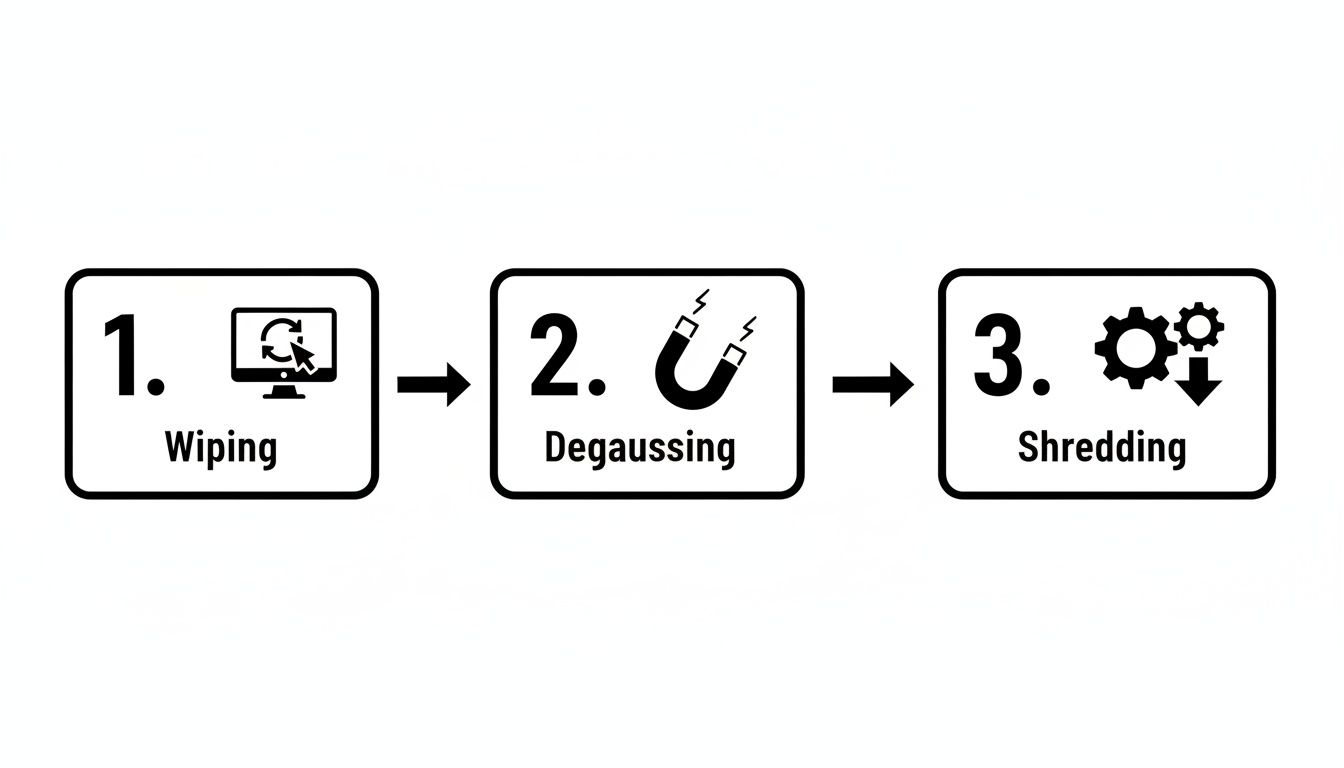
This visual shows that whether a hard drive is wiped with software, blasted by a degausser, or physically shredded into tiny pieces, the method is chosen specifically for that media type to guarantee data is gone for good. It’s a clear illustration of how a certified process gives you multiple, validated paths to achieving total data security.
Deciding Between Resale and Recycling
Not every retired device is destined for the shredder. A surprising amount of your outgoing IT equipment still holds real, recoverable value that can offset—or even pay for—your entire disposition project.
Making the right call between resale and recycling is a huge financial and environmental decision. This is the moment your IT equipment recycling program stops being just a line-item expense and starts acting like a value-recovery engine. The goal is simple: whenever possible, extend the useful life of an asset. This strategy puts money back in your budget and aligns with circular economy principles by keeping good hardware in circulation.
Evaluating Assets for Secondary Market Potential
The first move is a frank, realistic assessment of your hardware. Let's be honest, not everything is a candidate for a second life. An eight-year-old server has likely run its course and is better suited for responsible materials recycling. What you're looking for is the sweet spot where equipment is still recent enough to be in demand.
Here’s what we look for when evaluating equipment for resale:
- Age and Model: Laptops, servers, and networking gear that are 2-4 years old are typically in the prime window for high resale potential.
- Functional Condition: Does it power on and work? Small cosmetic scuffs are one thing, but non-functional hardware has almost no resale value.
- Completeness: Assets with all their original parts—like server rails or laptop power adapters—always fetch higher prices.
- Market Demand: High-end enterprise servers, professional-grade laptops (think Dell Latitudes or Lenovo ThinkPads), and Cisco networking equipment consistently hold strong secondary market value.
This evaluation is especially vital for complex data center hardware. For a deeper look into how we handle high-value enterprise gear, you can learn more about our process for data center equipment recycling and value recovery.
The Financial and Environmental Upside of Reuse
Opting for reuse over recycling delivers clear, measurable benefits. On the financial side, the revenue from remarketing directly chips away at the net cost of your entire ITAD program. Instead of just paying a fee for every item, you get a return that makes the whole process more budget-friendly.
Environmentally, the impact is even more powerful. Reusing a single laptop saves an enormous amount of energy, water, and raw materials needed to manufacture a new one. It's the purest form of recycling because it preserves the asset in its complete, functional form.
By prioritizing the resale of viable equipment, an organization can recover 10-30% or more of the original hardware's value. This recovered capital can then be reinvested into new technology or other strategic IT initiatives.
Security Is a Non-Negotiable Prerequisite
Let me be crystal clear: before any asset even gets considered for resale, it must undergo certified data destruction. This is an absolute, ironclad rule.
The entire process has to follow strict standards like NIST 800-88 to guarantee all sensitive corporate and customer data is permanently and verifiably wiped clean. You should only move a device into the refurbishment channel after you have a Certificate of Data Destruction in hand for that specific asset.
This is how you capture financial value without exposing your organization to the catastrophic risk of a data breach. A reputable partner handles this entire workflow seamlessly, giving you the documentation to prove security came first.
Navigating Regulations and Staying Audit Ready
Let's be clear: proper IT equipment recycling is fundamentally an exercise in compliance. It's not just about getting rid of old hardware. It’s about navigating a dense web of environmental and data privacy regulations that carry serious penalties if you get it wrong. A misstep can lead to steep fines, legal battles, and significant damage to your organization's reputation.
This landscape can feel complex, with a mix of federal, state, and even local laws dictating how electronic waste—and the sensitive data it contains—must be handled. For instance, healthcare organizations must adhere to HIPAA's strict data privacy rules, while companies in states like California or New York face specific e-waste disposal mandates. The key is to build a process that is inherently compliant and produces an unbreakable, auditable paper trail from start to finish.
Why Industry Certifications Matter
This is where industry certifications like R2 (Responsible Recycling) and e-Stewards become incredibly important. These aren't just fancy badges for a vendor's website; they are rigorous, third-party audited standards. They provide a clear assurance that a recycling partner adheres to the highest operational, environmental, and security protocols.
Think of it this way: when you partner with a certified recycler, you're essentially outsourcing a massive compliance burden to an expert who has already proven they know the rules.
- R2 Certification: This standard focuses on a "reuse, recover, dispose" hierarchy, ensuring that functional equipment is remarketed whenever possible and that all downstream material handling is done responsibly.
- e-Stewards Certification: Known for its stringent no-export policy, e-Stewards prohibits sending hazardous electronic waste to developing nations, offering the highest level of environmental and social accountability.
Choosing a vendor with one or both of these certifications is your first and most critical step toward building a defensible, audit-ready program. It proves you've done your due diligence.
The Growing Challenge of E-Waste
The need for certified, responsible partners is more urgent than ever. The sheer volume of discarded electronics is exploding globally, putting immense pressure on both the environment and the regulatory bodies trying to manage it.
Globally, e-waste is projected to surpass 60 million metric tons in 2025 and grow to 82 million metric tons by 2030—an 84% increase from previous years. As you can see from these electronic waste statistics, accelerated device replacement cycles are fueling this trend. This rapid increase means regulators are scrutinizing disposal practices more closely than ever. An undocumented or non-compliant disposal process is a significant liability just waiting to be discovered.
Building an Unbreakable Audit Trail
In the event of an audit—whether from an internal team or an external regulator—your documentation is your only defense. A verbal confirmation that assets were "handled properly" is worthless. You need a complete, serialized paper trail that documents every step of the disposition process for every single asset.
Key Takeaway: Your goal is to create a documentation package so thorough that it answers an auditor's questions before they're even asked. It should prove, without a doubt, that your organization took every necessary step to protect data and comply with environmental laws.
This auditable trail consists of several key documents you must receive and archive from your recycling partner:
- Serialized Chain of Custody Records: This document tracks each asset by its unique serial number from the moment it leaves your facility, through transportation, and upon arrival at the processing plant.
- Detailed Asset Reports: Once processed, you should receive a final report confirming the disposition of each asset—whether it was resold, refurbished, or recycled for its raw materials.
- Certificates of Data Destruction: This is arguably the most critical document. It must list the serial numbers of all data-bearing devices and certify the specific method of destruction used (e.g., wiping to NIST 800-88 standards or physical shredding). To learn more, check out our guide on the importance of a certificate of destruction for hard drives.
- Certificates of Recycling: This final document confirms that all non-reusable materials were processed in an environmentally compliant manner, satisfying e-waste regulations.
Together, these documents form a comprehensive record that proves due diligence, satisfies stakeholders, and provides a powerful defense in any audit scenario.
Common IT Equipment Recycling Questions Answered
Even the most detailed plan can’t cover every single question that pops up during an it equipment recycling project. I get it. Below, I’ve answered some of the most common questions IT leaders ask when we start working together. Think of it as a quick field guide to help you make smart decisions on the fly.
What Is the Difference Between R2 and E-Stewards Certifications?
This is a big one. Both R2 (Responsible Recycling) and e-Stewards are the gold standard certifications in our industry, but they’re built on one key philosophical difference: export rules. Choosing a partner with the right certification is crucial for aligning with your company’s corporate responsibility goals.
E-Stewards takes a hard-line stance, completely banning the export of hazardous e-waste to developing nations. Period. This guarantees none of your equipment will end up in a place where it could harm vulnerable communities or local ecosystems.
R2, on the other hand, permits the export of tested, working equipment to approved countries, but only under very strict, documented conditions. While R2 still upholds rigorous standards for data security and environmental safety, companies with an absolute zero-export policy often lean toward e-Stewards. Frankly, the best ITAD vendors hold both certifications to serve everyone.
How Can I Calculate the ROI of a Professional IT Recycling Program?
Looking at the ROI for a professional ITAD program means thinking far beyond the vendor’s quote. When you zoom out, you’ll realize a solid strategy is actually a profit center, not a line-item expense.
It really comes down to three things:
- Cost Avoidance: This is the elephant in the room. Just think about the financial fallout from a single data breach—regulatory fines from HIPAA or GDPR, legal battles, customer notification costs, and the impossible-to-measure brand damage. A certified program is your insurance policy against that nightmare scenario.
- Value Recovery: This is the straightforward revenue you get back from reselling refurbished equipment like servers, laptops, and networking gear. Any good partner will give you a detailed report showing exactly how much value they recovered from your assets.
- Operational Efficiency: Don't forget to factor in the time your team gets back. When you outsource the logistics, data destruction, and paperwork, your skilled IT staff can focus on driving the business forward instead of wrestling with pallets of old hardware.
When you add up the value recovery and the massive potential cost avoidance, then subtract the program fees, the positive ROI becomes crystal clear. The financial risk of not using a professional service is almost always far greater than the cost.
What Documentation Is Essential to Receive from My Recycling Vendor?
Your documentation is your proof. Without it, you're flying blind from a legal and financial standpoint. I can’t stress this enough: never sign off on a project until you have reviewed and archived the complete set of documents from your recycling vendor.
For every single project, you need these three non-negotiable documents:
- A Certificate of Data Destruction: This is your proof of security. It absolutely must list the individual serial numbers of every data-bearing device and specify the destruction method used, whether it was a NIST 800-88 compliant wipe or physical shredding.
- A Detailed Asset Transfer Report: Think of this as your chain-of-custody log. It provides a serialized trail tracking your assets from the moment they leave your facility to their final destination, creating a fully auditable record.
- A Certificate of Recycling: This is the final piece of the puzzle. It confirms that all non-reusable materials were processed in an environmentally compliant way, satisfying your legal obligations under e-waste laws.
This trio of documents is your ultimate defense. It's the evidence that will satisfy any internal audit, prove you’ve met regulatory requirements, and shield your organization from future liability.
Navigating the complexities of IT asset disposition requires a partner you can trust. At Dallas Fortworth Computer Recycling, we provide secure, compliant, and nationwide IT equipment recycling services designed to protect your data and your reputation. Get a quote today and see how our certified process can turn your retired assets into a secure and valuable opportunity. Learn more at https://dallasfortworthcomputerrecycling.com.