
The Best Hard Drive Wiping Software for Secure Data Erasure
When you need to get rid of a hard drive, the best wiping software does more than just hit "delete." It uses certified, heavy-duty methods to overwrite your data again and again, making it completely unrecoverable. It’s a crucial difference, because simply deleting a file only removes the shortcut to it, leaving the actual data sitting on the drive, ready to be found by anyone with basic recovery tools.
Why Simple Deleting Is Not Enough

Think of your hard drive like a giant library. When you “delete” a file, you aren’t burning the book. You’re just pulling its card out of the old card catalog. A determined person could still walk through the stacks and find that book sitting right on the shelf.
That’s exactly how standard file deletion works. The operating system just marks the space as "available" for new data, but the original ones and zeros making up your sensitive document or customer list are still there. This digital ghost is often called data remanence.
The Real Risks of Data Remanence
This lingering data is a huge security risk. Widely available data recovery software can scan a drive and bring back those "deleted" files in a matter of minutes. For any business, the consequences are serious.
Imagine an old company laptop is sold or donated without being properly wiped. The next owner could easily recover:
- Confidential Information: Financial records, internal memos, and strategic business plans.
- Customer Data: Names, addresses, and other personally identifiable information (PII).
- Login Credentials: Saved passwords that could grant an intruder access to your entire network.
A single improperly decommissioned hard drive can become a catastrophic data breach. The financial penalties from regulations like GDPR and HIPAA, combined with the loss of customer trust, can cripple an organization.
Secure Erasure: The Only True Solution
This is where professional hard drive wiping software becomes absolutely essential. Instead of just pulling the card from the catalog, secure data erasure is like taking the book, shredding every page into confetti, and then burning the remains. It systematically overwrites the entire hard drive with random, meaningless data.
This process is repeated multiple times, following established government and industry standards. After a proper wipe, the original data is gone for good, making recovery impossible. This isn't just a best practice—it's a non-negotiable step in any secure IT asset disposition (ITAD) plan. For a closer look at the technical side, you can learn more about how to wipe a hard drive and ensure your data is permanently gone.
Understanding why simple deletion fails is the first step toward building a solid data security protocol. It makes it clear why using professional tools designed for complete and verifiable data destruction is the only safe option.
Understanding Erasure Standards and Verifying Compliance
Simply deleting files or even formatting a drive isn't enough to stop a determined data thief. So, how can you be absolutely certain your sensitive data is gone for good? The answer is by following established data erasure standards.
These aren't just vague suggestions; they are specific, repeatable procedures designed to make data forensically unrecoverable. Think of them as official, battle-tested recipes for data destruction. The best hard drive wiping software doesn't just make up its own methods—it follows these proven recipes to the letter, ensuring every wipe meets a predictable and verifiable level of security.
Translating the Technical Standards
You'll often hear about two major standards: DoD 5220.22-M and NIST SP 800-88. While the names are a mouthful, the concepts behind them are actually pretty straightforward.
-
DoD 5220.22-M: This is one of the classic standards from the U.S. Department of Defense. Imagine writing a secret on a piece of paper. The DoD method is like scribbling over it with a black marker three separate times, making the original text impossible to piece back together. It's a brute-force approach that relies on multiple overwriting "passes" with random data.
-
NIST SP 800-88: This is the more modern and flexible framework from the National Institute of Standards and Technology. Instead of a one-size-fits-all approach, NIST is more like a comprehensive guide that recommends the best destruction method based on the technology. For an old spinning hard drive, overwriting might be the answer. For a modern SSD, it points toward methods like cryptographic erasure, which essentially throws away the digital key, rendering the encrypted data useless.
While the DoD standard is still widely recognized, NIST 800-88 is now considered the industry best practice because it provides a smarter, risk-based approach tailored to different types of storage media.
Why Verification Is Your Golden Ticket
Wiping a drive is only half the job. The other, more critical half is proving you did it correctly. This is where verification and certification come in, transforming a simple technical task into a defensible business process.
Verification is the final, crucial step where the software audits the drive after the wipe. It scans the entire device, sector by sector, to confirm that the overwriting process was 100% successful and that no traces of original data remain. It's like having an independent inspector examine the shredded paper to ensure not a single readable fragment is left behind.
This confirmation step is non-negotiable for a few key reasons:
- It catches any hardware failures that might have interrupted the wipe.
- It creates a complete, tamper-proof record of the data destruction event.
- It generates the auditable paper trail required for regulatory compliance.
The output of this entire process is a tamper-proof certificate of erasure. This document is your official record, detailing the who, what, when, and how of the data destruction. It includes the drive’s serial number, the standard used, and confirmation of successful verification.
This certificate is your golden ticket during any legal, regulatory, or internal audit. It provides undeniable proof that your organization followed proper procedures, effectively mitigating risk and demonstrating due diligence. For any business that needs to meet strict compliance mandates, understanding the value of a certificate of destruction for hard drives is the foundation of a secure and accountable IT asset disposition program. Without this proof, a data wipe is just an unverified claim.
Key Features of Enterprise-Grade Wiping Software
Choosing the right hard drive wiping software for a business is a world away from picking a simple utility for a personal computer. At the enterprise level, this decision is a core part of your risk management strategy and a key driver of operational efficiency. The best solutions do more than just erase data; they create an auditable, scalable, and automated system for managing the end-of-life of thousands of data-bearing assets.
These tools are built to handle the complexities of a corporate IT environment, whether you're retiring a single executive laptop or decommissioning an entire data center. They transform what could be a manual, error-prone task into a streamlined, compliant, and legally defensible business process.
Certified and Tamper-Proof Reporting
For any organization that has to answer to auditors or regulators, the single most critical feature is the ability to prove that data was destroyed correctly. Enterprise-grade software takes care of this by automatically generating detailed, tamper-proof reports for every drive it touches. This isn't just a simple log file—it's a legal document.
These reports create a bulletproof audit trail, which is absolutely essential for meeting compliance standards like GDPR, HIPAA, and CCPA. A proper certificate of erasure will always include:
- Asset Details: Serial numbers, manufacturer, and model of the hard drive.
- Erasure Method: The specific standard used, such as NIST 800-88 Purge or DoD 5220.22-M.
- Verification Status: Confirmation that the wipe was successful, leaving zero recoverable data.
- Timestamps and Signatures: Digital signatures that prevent tampering and provide a clear timeline of events.
This documentation is your undeniable proof of due diligence, shielding your organization from hefty fines and legal headaches in the event of an audit or security incident.
Automation and Scalability
Just imagine manually wiping 500 hard drives from a recent office hardware refresh. It would be a logistical nightmare, tying up your IT staff for days and creating endless opportunities for human error. This is where automation and scalability become complete game-changers.
The best enterprise hard drive wiping software is designed to handle this kind of volume with ease, allowing technicians to wipe dozens or even hundreds of drives at the same time from a central console. This capability is crucial for large-scale projects like data center migrations or lifecycle refreshes, turning a massive undertaking into a manageable workflow.
The demand for these powerful solutions is exploding. The enterprise data wipe software market is projected to expand from USD 1.49 billion in 2026 to USD 4.37 billion by 2035, a clear sign of how seriously organizations are taking compliant data protection. You can find more insights on this market's growth from Business Research Insights.
Broad Hardware Compatibility and ITAM Integration
A corporate IT environment is never uniform. It's always a mix of traditional spinning hard disk drives (HDDs), modern solid-state drives (SSDs), and countless server configurations. Each type of storage media needs a specific approach to be securely erased.
For instance, the overwriting methods that work perfectly for HDDs are ineffective on SSDs. SSDs require specific commands like Secure Erase or Cryptographic Erasure to be properly sanitized. You can learn more about this in our guide on the nuances of wiping SSD drives. Top-tier software automatically detects the hardware type and applies the correct NIST-compliant method, taking the guesswork and risk out of the technician's hands.
Beyond that, seamless integration with your existing IT Asset Management (ITAM) or Enterprise Resource Planning (ERP) systems is the mark of a truly mature solution. This connection allows asset data to flow automatically between systems, ensuring inventory records are updated in real time as drives are wiped and retired. This creates a closed-loop system where every asset is tracked from acquisition to final disposition, leaving no gaps in your security or compliance. The ROI is clear: streamlined workflows, less manual labor, and a drastically lower risk of a costly data breach.
Software Wiping vs Physical Destruction
Deciding what to do with an old hard drive isn't just a technical task—it's a critical risk management decision. The two main paths, software wiping and physical destruction, each have their place in a solid data security strategy. The right choice comes down to the drive's condition, the sensitivity of its data, and what your organization hopes to do with the asset next.
Think of it this way: software wiping is like securely renovating a house before a new owner moves in. You meticulously clean out every trace of the previous occupant, making it pristine and ready for its next life. The house itself remains intact, preserving its value for reuse or resale. The best hard drive wiping software does exactly this, overwriting every sector so the old data is gone for good while keeping the hardware functional.
Physical destruction, on the other hand, is the equivalent of demolishing the house. It's shredded, crushed, or melted down, leaving nothing behind but rubble. There is zero chance of anyone ever piecing together the old floor plan. This is the final, irreversible solution.
When to Choose Software Wiping
Software-based data erasure is the go-to method when you want to maximize the value of your IT assets. It’s the perfect choice for healthy drives that are slated for a second life.
Common scenarios where software wiping makes sense include:
- Internal Redeployment: Wiping laptops and servers so they can be safely passed on to other employees.
- Resale and Remarketing: Erasing data from equipment you plan to sell on the secondary market, recouping some of your initial investment.
- Lease Returns: Making sure all your proprietary data is removed before returning leased hardware to the vendor.
- Donations: Prepping computers for donation to schools or non-profits without putting your data at risk.
By keeping the hardware usable, software wiping supports a circular economy, cutting down on e-waste and extending the lifecycle of valuable equipment. It’s both environmentally responsible and financially smart.
When Physical Destruction Is Non-Negotiable
While wiping is great for reusable assets, some situations demand the absolute certainty of physical destruction. This is the ultimate safeguard when a drive has no further value or the data it holds is so sensitive that even the tiniest risk of recovery is out of the question.
You'll want to opt for physical destruction for:
- Damaged or Failed Drives: If a hard drive is physically broken and software can't access it, destruction is the only way to guarantee data security.
- End-of-Life Assets: Drives that are too old or obsolete to be redeployed or resold should be physically destroyed.
- Hyper-Sensitive Data: For drives containing classified information, trade secrets, or regulated data where compliance rules mandate complete destruction.
Physical destruction offers the highest possible level of security assurance. When a drive is shredded into tiny, unrecognizable fragments, data recovery becomes a physical impossibility, providing absolute peace of mind for the most critical assets. This is why many organizations that require a defensible end-of-life process turn to certified partners. To learn more about this standard, explore our guide on what it means to be an R2 certified electronics recycler.
Driven by strict data privacy laws, the hard drive destruction service market is growing fast. This market is projected to expand at a compound annual growth rate of about 10.7% through 2033, with shredding being the most popular method. This trend highlights just how seriously organizations are taking compliant and secure data disposal. You can discover more insights about hard drive destruction services.
Creating a Blended Data Destruction Strategy
The smartest approach isn't picking one method over the other—it's building a blended strategy that uses both.
By classifying your assets based on their condition, data sensitivity, and potential for reuse, you can create a flexible and cost-effective ITAD program. This ensures every drive is handled the right way, preserving value when you can and guaranteeing absolute destruction when you must.
Building a Secure Data Disposition Workflow
Having the best hard drive wiping software is one thing, but a successful data destruction program is built on something more: a documented, repeatable, and fully auditable process. It's not about tackling one-off tasks as they come up. It's about having a structured workflow that guarantees every single asset is handled with consistency and accountability, from the moment it's retired to its final destination.
This documented process is what turns data security from a reactive headache into a proactive, operational discipline. It gets rid of the guesswork for your IT team, slashes the risk of human error, and builds the legally defensible paper trail you absolutely need for compliance audits. Without a clear workflow, even the most powerful software gets used inconsistently, leaving dangerous security gaps wide open.
Step 1: Asset Inventory and Data Classification
The first step in any secure disposition workflow is simple: you have to know what you have. You can't protect an asset if you don't know it exists. Start by using your IT Asset Management (ITAM) system to tag all hardware nearing its end-of-life, whether it's a stack of servers in the data center, laptops from your remote team, or a box of old mobile devices.
Once you have a full inventory, each asset needs to be classified based on the sensitivity of the data it holds. This is the critical decision point that dictates how the device will be handled.
- Low-Risk Assets: A device with no sensitive data might just need a simple wipe before being reused internally.
- Confidential Data: A sales executive's laptop containing proprietary business info or PII absolutely requires a certified wipe using a standard like NIST 800-88.
- Highly Sensitive Data: Drives with regulated health information (PHI) or classified financial data might demand both a certified wipe and physical destruction to be safe.
Step 2: Secure Logistics and Chain of Custody
Managing the physical movement of IT assets is a huge logistical challenge, especially when devices are coming in from remote employees or multiple office locations. You need to establish a secure chain of custody to track every asset at every single stage. This means documenting who has the asset, where it is, and exactly what is being done to it.
A rock-solid chain of custody prevents assets from getting "lost" in transit—a surprisingly common scenario where data breaches happen. This process should be meticulously documented, creating a clear, unbroken record from the moment an employee hands over their laptop to the moment it lands in the secure storage area for wiping.
The growing need for these robust processes is reflected in the market itself. The global data wipe software market was valued at around USD 5.8 billion in 2023 and is projected to more than double to USD 12.3 billion by 2033. This growth highlights the increasing organizational urgency to implement secure, auditable disposition workflows. You can read the full research on the data wipe software market.
Step 3: Erasure Execution and Verification
This is where your hard drive wiping software gets to work. Based on the data classification you did back in Step 1, your technicians will execute the right erasure standard for each drive. For any mid-size or enterprise operation, this should be an automated process that can wipe dozens or hundreds of drives at once, ensuring both efficiency and consistency.
After the wipe is complete, the software's verification feature is crucial. It performs a bit-by-bit scan of the drive to confirm the erasure was 100% successful. This step is non-negotiable. The final output is a tamper-proof certificate of data destruction for each serial number, which serves as your undeniable proof of compliance.
This visualization shows the typical lifecycle in a secure data disposition workflow, from the initial wipe to its final reuse or destruction.
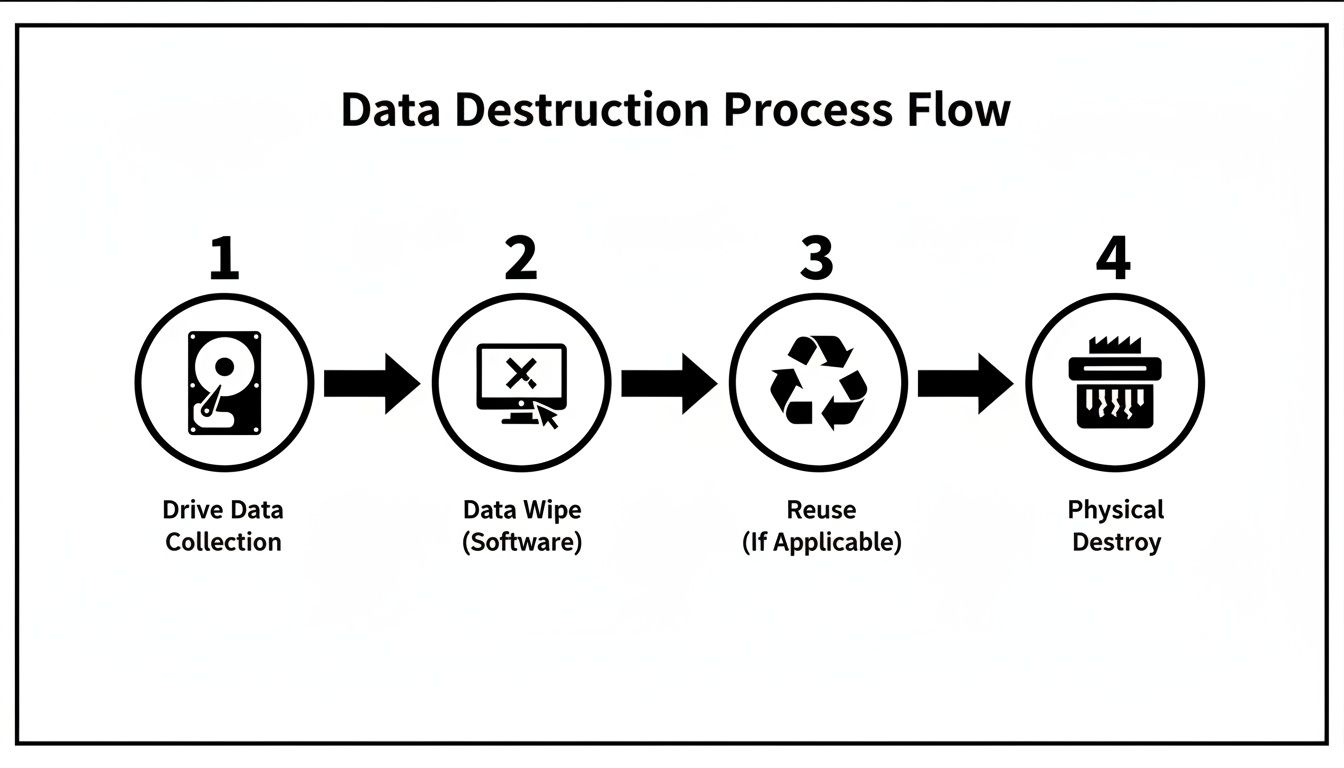
The flow chart makes it clear that software wiping is the key decision point that allows for asset reuse, while physical destruction is the final, definitive end-of-life step.
Step 4: Final Disposition and Reporting
The last step is deciding the physical fate of the asset. Depending on its condition and data classification, the device is either prepped for redeployment, resale, donation, or sent for responsible e-waste recycling and physical destruction. No matter the outcome, it must be recorded.
Finally, you close the loop by updating your ITAM system to reflect the asset's final status as "retired" or "disposed." This keeps your inventory perfectly accurate and ensures nothing ever falls through the cracks. To learn more about this final phase, check out our guide explaining what is IT asset disposition in much greater detail.
When to Partner with a Certified ITAD Provider
While hard drive wiping software gives you incredible control, some jobs are just too big, too complex, or too regulated for a do-it-yourself approach. When the stakes are high, you need a full-service partner to manage risk and guarantee compliance. That’s where a certified IT Asset Disposition (ITAD) provider comes in.
An ITAD partner handles the entire end-of-life process for you, from secure logistics all the way to final reporting. They aren't just a vendor; they're a strategic part of your risk management program, bringing expertise, infrastructure, and certifications that are simply impractical for most internal IT teams to maintain.
Scenarios Demanding an ITAD Partnership
Partnering with an ITAD expert is a smart move, especially when dealing with high volumes of hardware or strict compliance rules. Trying to handle these situations internally can drain your resources and introduce serious risks if not managed perfectly.
Consider bringing in a certified ITAD provider for:
- Large-Scale Hardware Refreshes: When your organization is retiring hundreds or thousands of laptops, servers, and other devices at once, an ITAD partner’s automated and scalable processes are essential.
- Complex Data Center Decommissioning: Shutting down a data center is a massive logistical project. ITAD specialists manage everything from asset removal and data destruction to responsible recycling, all within a secure chain of custody.
- Handling Regulated and Specialized Equipment: Industries like healthcare and finance must follow strict data handling rules (like HIPAA). Certified ITAD providers guarantee compliance and deliver the auditable proof needed to satisfy regulators.
Beyond Wiping: Value-Added Services
A true ITAD partner offers much more than just data destruction. Their services are designed to maximize the value of your retired assets while minimizing your risk and environmental footprint. This holistic approach ensures no detail is overlooked.
Choosing a certified ITAD provider transforms asset retirement from a cost center into a value recovery opportunity. By securely remarketing viable equipment, organizations can recoup a portion of their initial hardware investment while ensuring complete data security.
Key services include:
- Secure Logistics: Professional ITAD companies provide secure, GPS-tracked transportation and documented chain-of-custody protocols to prevent asset loss or theft during transit.
- Asset Valuation and Remarketing: They will assess the condition of your old hardware, perform certified wipes, and sell viable equipment on the secondary market, returning a share of the revenue to you.
- Environmentally Responsible Recycling: For assets with no resale value, certified providers ensure that all components are recycled in compliance with standards like R2 or e-Stewards, preventing hazardous e-waste from ending up in landfills.
Common Questions About Secure Data Wiping
The world of data destruction can get complicated fast. Here are some straightforward answers to the questions we hear most often from businesses trying to build a secure and compliant IT disposal plan.
Is Wiping a Hard Drive Enough to Secure Data?
For many situations, yes—but it’s all about context. If you're wiping drives to be reused inside your company in a low-risk environment, a software-based wipe using a recognized standard like NIST 800-88 is perfectly effective. It gets the job done.
But when you're dealing with highly sensitive customer data, financial records, or regulated information, wiping alone might not be enough. This is especially true for solid-state drives (SSDs), which can sometimes hold onto data fragments even after a standard wipe. For these high-stakes assets, the best practice is to combine certified wiping with physical destruction.
What Regulations Require Secure IT Asset Disposal?
Several major regulations don't just recommend secure data destruction—they demand it. Getting this wrong can lead to steep financial penalties and serious damage to your company's reputation.
A few key regulations to know are:
- GDPR (General Data Protection Regulation): This requires the complete and permanent erasure of personal data once it’s no longer needed for its original purpose.
- HIPAA (Health Insurance Portability and Accountability Act): Mandates that patient health information must be destroyed in a way that makes it absolutely unrecoverable.
- CCPA (California Consumer Privacy Act): Enforces strict rules for how businesses handle and dispose of consumer data.
Proper data sanitization isn't just a good IT practice; it's a legal requirement. A verifiable process backed by certified reporting is your best defense against non-compliance.
How Do I Verify That Data Has Been Properly Sanitized?
Verification is the final, most crucial step. Never assume a wipe was successful without proof. The software you use should always generate a certificate of data destruction.
This tamper-proof report serves as your official record, detailing the asset’s serial number, the specific erasure standard used, and confirmation of a complete, successful wipe. In the event of an audit, this documentation is your proof of due diligence.
Ready to build a secure, compliant, and fully auditable data destruction process? Dallas Fortworth Computer Recycling offers certified ITAD services designed to protect your organization from risk. Schedule your nationwide pickup today.