
Secure ITAD at Dallas Fort Worth Airport International

Your team is staring at a shutdown calendar, a stack of asset tags, and a deadline that won’t move. The server room has to be cleared. The drives have to be destroyed or sealed. The chain of custody has to stay clean. And because the equipment is moving through dallas fort worth airport international, ordinary pickup planning isn’t enough.
Airport logistics change the job.
At a normal office decommission, you might focus on pallets, truck timing, and certificates. At DFW, you also need to think about terminal geography, cargo access, security zones, customs touchpoints for international moves, and how to keep sensitive assets from sitting in the wrong place for too long. A missed handoff at an airport isn’t just inconvenient. It can create security exposure, documentation gaps, and shipment delays that ripple across a larger project.
IT directors usually get stuck in three places.
First, they treat the airport like a single facility when it behaves more like a network of connected operating zones. Second, they assume passenger-facing wayfinding tells them enough about cargo reality. Third, they underestimate how much better a project runs when the hardware path is mapped before the truck ever leaves the dock.
Introduction to DFW International for Secure IT Disposition
DFW isn’t a regional side note. Since opening in January 1974, it has grown into the busiest airport in Texas and the eighth-busiest U.S. international gateway as of 2025, generating over $78 billion in economic impact and handling a record 87 million passengers in FY2024 according to the Dallas Fort Worth International Airport overview.
That scale matters for IT asset disposition because volume changes behavior. At an airport this large, secure equipment removal works best when you think like an operations planner, not just an IT manager.
What makes DFW different for IT teams
A secure ITAD move at DFW usually has four moving parts:
- Asset control. You need a verified list of what leaves, what stays, and what gets destroyed onsite.
- Physical routing. You need to know whether the equipment should go toward a passenger-adjacent support zone, a cargo handling point, or a customs-aware export path.
- Security handling. You need the right people, badges, manifests, and timing so equipment isn’t left in a gray area between approval and movement.
- Carrier coordination. You need the outbound handoff to match the actual risk level of the assets.
If that sounds similar to a data center migration, that’s because it is. The difference is that airports compress more stakeholders into the same workflow. Facilities, security, driver teams, cargo staff, and customs-facing processes can all touch the same project.
Practical rule: If you can’t sketch the exact handoff sequence on one page, the plan isn’t ready.
A simple way to think about the job
Use this mental model. Treat each shipment like a relay race baton.
The baton starts with your internal asset owner. It passes to the decommission crew. Then to the dock team. Then to the secured vehicle. Then to the airport access point. Then to the carrier or export channel. If any handoff is vague, you’ve created risk.
That’s why teams often build a DFW-specific playbook instead of reusing a generic retirement checklist. The physical environment is too complex for shortcuts.
A good working standard is to map three things before day one:
- The equipment path from rack or closet to final handoff
- The document path from asset list to final disposition record
- The authority path showing who can release, approve, inspect, and sign
For organizations planning support in the region, DFW ITAD services can help frame the local workflow requirements before hardware starts moving.
Where readers usually get confused
Many teams hear “DFW International” and think only about international flights. For IT logistics, “international” also means the airport supports customs-sensitive movement, cross-border cargo, multilingual carrier coordination, and more scrutiny around documentation.
That doesn’t mean every shipment is complicated. It means every shipment should be planned as if an auditor may review it later.
Understanding Terminals and Cargo Facilities
A common failure point at DFW looks small at first. An ITAD team books a carrier, secures the load, and arrives on time, but the crew is aligned to the passenger view of the airport instead of the operating view. At DFW, that mistake can put serialized hardware in the wrong queue, at the wrong dock, or under the wrong access assumptions.
DFW’s terminal system works like a large campus with separate public entrances, service corridors, and freight receiving areas. Passenger traffic and cargo handling share the same airport footprint, but they do not follow the same logic. For secure IT asset disposition, that difference matters more than the gate count on a map.
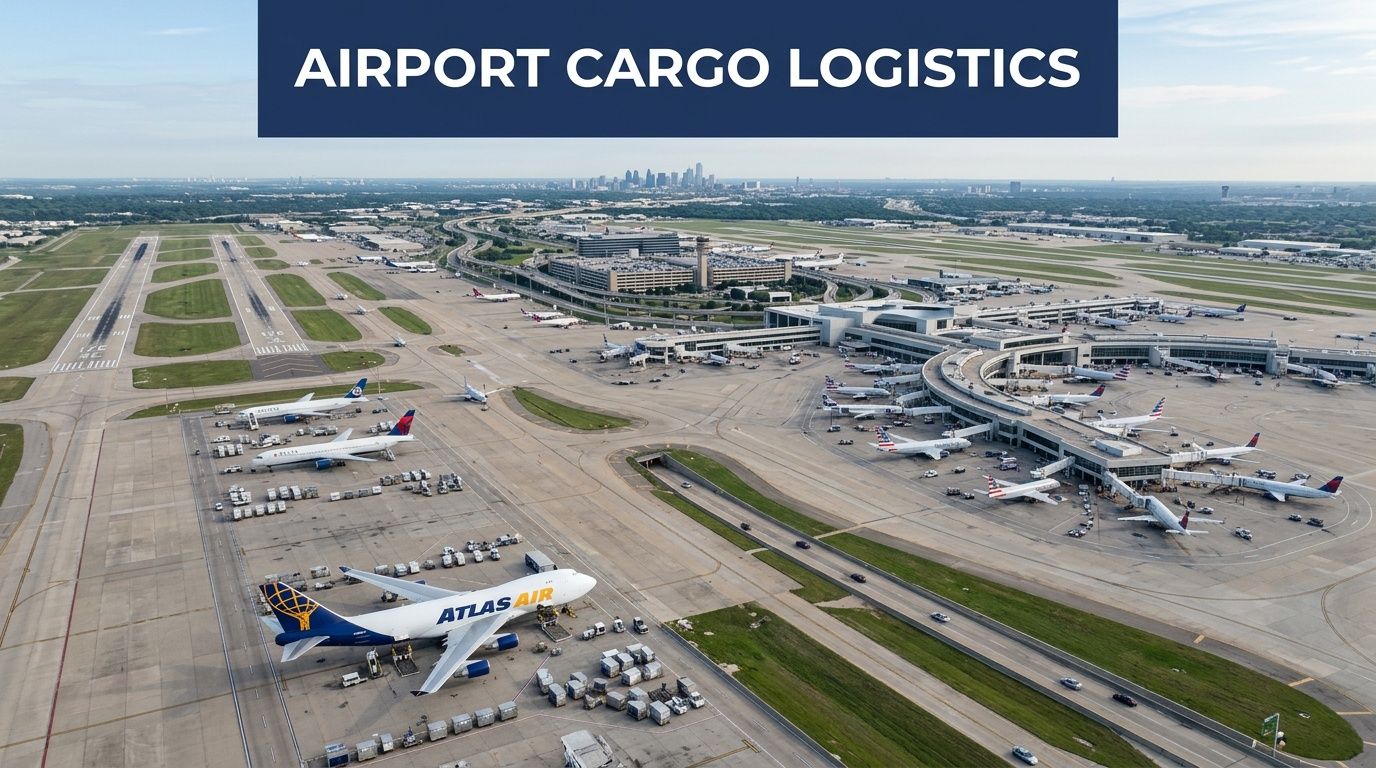
The airport itself describes DFW as a facility with five operating terminals and a sixth under development, arranged around the airport’s central circulation system, as shown on the official DFW airport maps and terminal directory. That layout is efficient for air travel, but IT directors should read it another way. A short distance on the map can still mean a long controlled path for a truck, an escort delay, or a handoff that must happen at a cargo building rather than near a passenger terminal.
How to read the terminal system
The cleanest way to interpret DFW for IT disposition is to separate public terminal identity from freight function.
| Terminal or area | What it means for IT disposition | Main planning concern |
|---|---|---|
| A, B, C, E | High-activity operating areas that may affect vendor timing, service access, and back-of-house coordination | Avoiding the assumption that public terminal access equals approved freight access |
| D | The terminal most closely associated with international passenger processing and customs-sensitive movement | Matching export paperwork, inspection readiness, and transfer timing to the shipment profile |
| F | A development and expansion area that can affect routing assumptions over time | Monitoring temporary access changes, construction effects, and revised handoff patterns |
| Cargo zones | The working side of the airport where palletized freight, screening, acceptance, and carrier procedures shape the move | Confirming dock assignment, staging order, chain of custody, and who can sign for release |
That table is built for operators, not travelers. Your team does not need a sightseeing map. Your team needs to know which parts of the airport change custody rules, timing risk, and document scrutiny.
Why Terminal D shows up so often in international ITAD planning
Terminal D matters because it is often the reference point internal teams use when they hear “international” at DFW. That can be helpful, but it can also create confusion.
International handling for retired IT hardware is rarely about dropping equipment near the terminal associated with overseas flights. It is about preparing the load for the airport processes that follow. A pallet of encrypted laptops bound for an overseas consignee needs clean serial records, export-ready descriptions, and packaging that supports inspection without breaking chain of custody. A mixed box of low-value office accessories may move with far less scrutiny.
The lesson is simple. Terminal identity tells you where international activity is centered. Cargo procedure tells you how the shipment gets accepted.
Cargo facilities are where the real control points sit
DFW publishes a dedicated cargo directory and facility references for freight users through its cargo operations resources. That matters because secure IT disposition depends less on the passenger side of the airport and more on the warehouse side. The controlling questions are practical. Which carrier accepts the load? Which building handles that carrier’s freight? What staging rules apply before acceptance? Who verifies the manifest against the pallet?
For ITAD projects, cargo handling works much like a controlled data center change window. Hardware does not “arrive.”” It is scheduled, presented, checked, and transferred through specific control points. If one of those control points is vague, the shipment slows down or gets exposed to unnecessary handling.
For readers managing larger refresh cycles, data center equipment disposal services in Dallas Fort Worth often follow this freight-first model because racks, servers, storage shelves, and network appliances behave more like managed cargo than office mailroom output.
A terminal-by-terminal mindset for secure disposition
Use four questions before you approve a DFW move.
- Which terminal family is operationally closest to the project? This helps with planning, but it does not determine the final freight handoff point.
- Which cargo facility accepts the shipment?** That answer determines dock instructions, timing, and packaging requirements.
- Does the load trigger international review or customs-sensitive paperwork? If yes, your asset list, commodity descriptions, and consignee details need tighter control.
- Are there temporary changes tied to construction or airport operations? Expansion activity can change the practical route even when the airport map looks familiar.
A clean DFW plan starts when the terminal map and the cargo workflow are matched to each other. That is the shift many IT teams miss. Once those two layers line up, secure staging, carrier selection, and final scheduling become much easier to control.
Navigating Ground Transportation and Access Routes
A secure IT asset pickup at DFW can fail even when the truck arrives on time.
Here is the common scenario. An ITAD vendor reaches the airport perimeter without trouble, follows the general terminal flow, and then loses twenty minutes because the driver was sent to the right part of the airport but the wrong operating entrance. The equipment is still in the truck, yet custody risk has already increased. Every extra stop, phone call, and repositioning step creates another opportunity for delay, confusion, or unnecessary exposure.
That is why DFW access planning works better when you treat the airport like a layered network. In IT terms, the public road gets you to the environment, the internal airport road system routes you to the right service domain, and the final access point determines whether your load reaches the correct handoff location under the right controls.
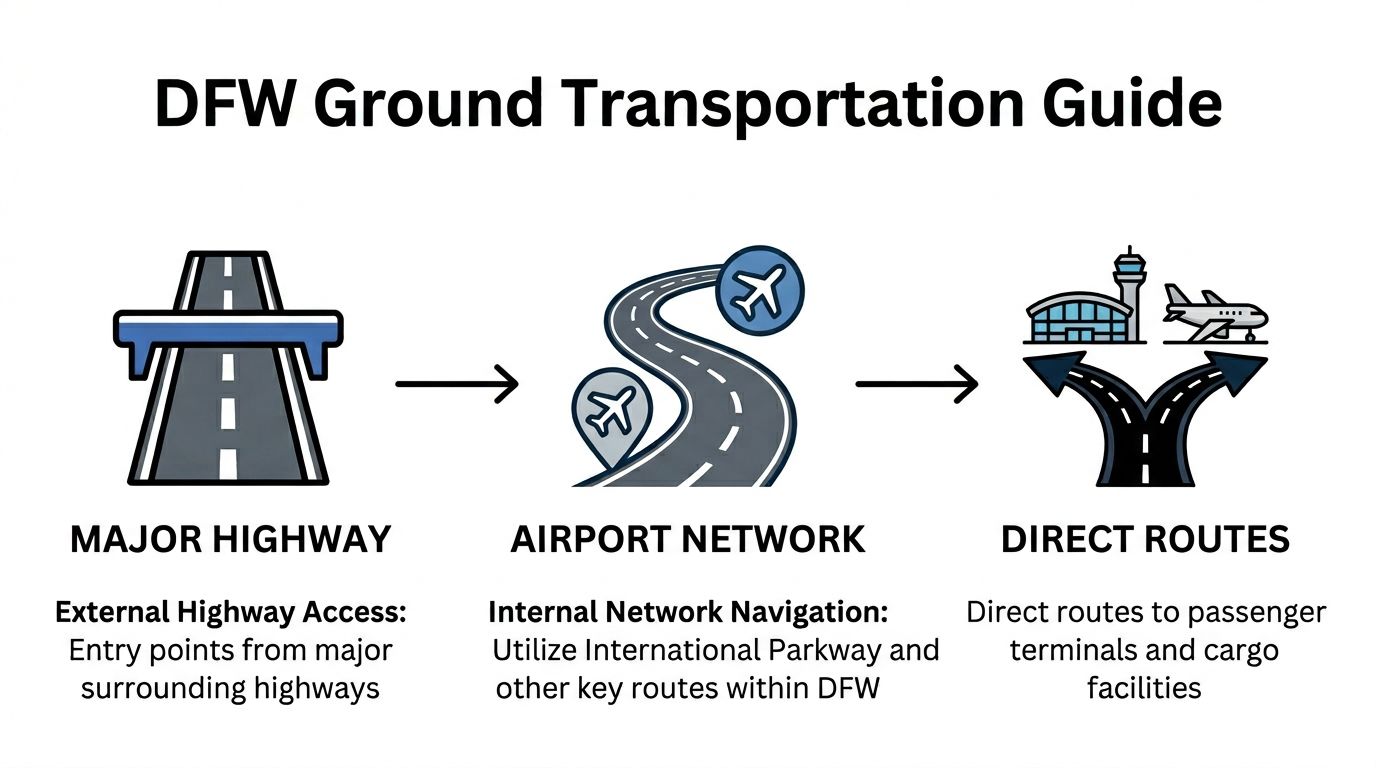
The three-layer route model
Use this model when you brief dispatch, facilities, and the receiving team.
Regional approach
The driver enters the DFW area from the surrounding highway system. At this stage, the question is not which terminal looks closest on a map. The question is which airport entry path best supports the actual cargo destination.Airport internal circulation
Once inside the airport footprint, routing becomes more specific. Terminal roads, service roads, and cargo-area approaches serve different purposes. A route that works for a passenger drop-off can be useless for a truck carrying decommissioned servers.Controlled final access
The last segment is the one that affects custody the most. In this segment, the vehicle reaches a dock, service lane, cargo building, or approved handoff point, subject to the site’s operating rules and access checks.
Teams that compress those three steps into one calendar appointment usually create bad pickup windows. The truck may be “at DFW” while still being operationally far from the actual release point.
Where Skylink helps, and where it does not
Skylink matters for people coordination inside the airport’s secure side. DFW describes it as the airport’s train system connecting all five terminals after security, which is useful if an airport contact, escort, or operations stakeholder has to move between terminals during a live shipment day, according to the DFW Airport Skylink page.
For hardware movement, it is irrelevant.
That distinction clears up a frequent planning mistake. Staff mobility inside the secure area can be fast. Asset mobility still depends on roads, vehicle access, loading controls, and the exact cargo acceptance point. If your project lead can cross terminals quickly but the truck still needs a separate service approach and check-in process, the shipment timeline must be built around the truck, not the person.
A practical route flow for secure pickups
For secure IT disposition, use a route plan that assigns ownership before release day.
| Phase | Who owns it | What to verify |
|---|---|---|
| Arrival window | Driver coordinator | Confirm airport entry timing, not just the pickup appointment |
| Internal routing | Dispatcher or site lead | Confirm the exact approach road and final zone name |
| Contact checkpoint | Onsite operations contact | Confirm who answers if the driver reaches the airport but cannot enter the final operating area |
| Asset release | IT or facilities approver | Match released items to the manifest, labels, and seal plan |
| Airport handoff | Driver and receiving party | Record custody transfer with names, time, and shipment identifiers |
The missing line in many plans is the contact checkpoint. Without it, the driver improvises. Improvised routing is how secured laptop pallets end up circling terminal roads meant for public traffic instead of heading straight to the approved receiving point.
Courier logic versus freight logic
A few boxed laptops headed to a domestic downstream processor can sometimes be handled with courier-style planning. Mixed infrastructure loads, storage arrays, loose network gear, or full rack decommissions usually need freight-style planning.
The difference is operational, not semantic.
Courier logic focuses on speed, signatures, and package count. Freight logic focuses on vehicle fit, dock availability, waiting behavior, pallet stability, and who has authority to accept the load. For airport moves, freight logic is usually the safer model because DFW access decisions are shaped by where a truck can stop, wait, and transfer custody without breaking procedure.
For organizations building a regional collection plan before the airport leg, scheduled e-waste pickup in DFW often uses that same split between small controlled collections and larger freight-managed removals.
Field note: The fastest route is the one with the fewest uncontrolled handoffs.
The confusion to remove from your team’s map
Staff and hardware should never share the same planning map.
An airport employee may move by parking access, shuttle options, or secure-side transit. A truck carrying retired firewalls, drives, and servers has a different set of constraints: approach roads, staging rules, driver identity checks, cargo acceptance timing, and documented release authority. Once your team separates human movement from asset movement, DFW becomes easier to handle. You stop asking, “How close is Terminal C to Terminal D?” and start asking, “Which road gets this load to the correct handoff point with the fewest custody risks?”
Staging Areas, Parking, and Security Protocols
A secure pickup succeeds or fails in the waiting period.
Not the loading moment. Not the final handoff. The waiting period.
That’s the slice of time when a truck is early, a dock is still occupied, a badge check is running behind, or a manifest question sends the crew back to the paperwork. If you don’t control staging, parking, and identity verification, your secure ITAD plan can unravel before the vehicle ever moves.
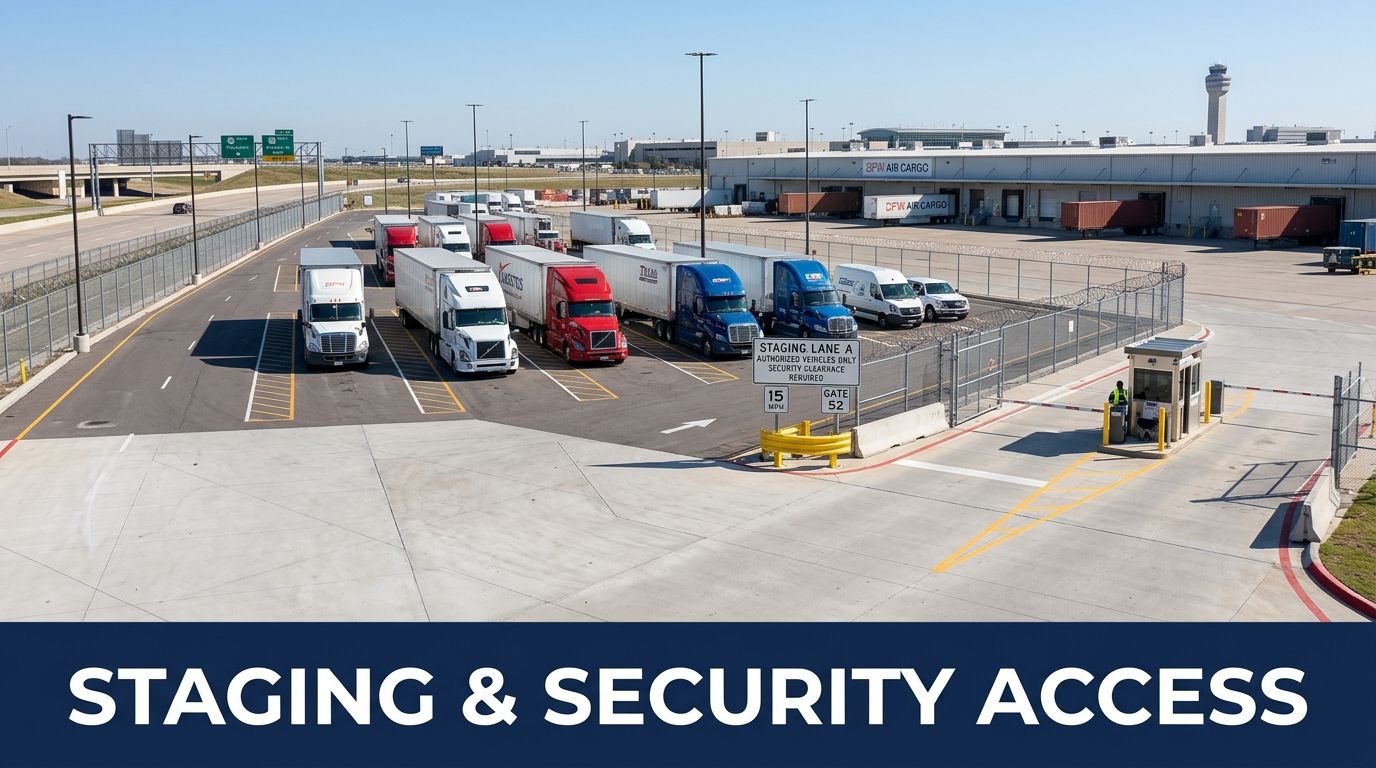
What staging should accomplish
A proper staging area does three jobs at once:
- It gives the driver a legal and predictable place to wait.
- It keeps the load out of uncontrolled public circulation.
- It creates a pause point for final document and identity review.
For IT equipment, that pause point is valuable. It lets the project lead catch small mistakes before they become custody breaks.
A working checklist for secure staging
Use this checklist before release day.
Match the vehicle to the route
Don’t assume every box truck or trailer can use the same approach and waiting pattern. Confirm the route that fits the load and airport operating area.Pre-clear the driver identity
Names, company details, and contact information should match what the releasing team expects. If the person at the wheel isn’t the person on the paperwork, fix that before loading starts.Separate public parking from controlled waiting
A general parking decision is not the same as a staging decision. Your team should know exactly where the vehicle waits before access is granted.Lock the release authority
One person should own the decision to release hardware. If facilities says yes but IT hasn’t signed off, the load shouldn’t move.Prepare for inspection questions
Mixed pallets, unlabeled drives, and vague item descriptions invite delay. The cleaner the load presentation, the smoother the security conversation.
Badge zones and manifest discipline
At airports, people often overfocus on the badge and underfocus on the manifest.
The badge determines who may enter or escort. The manifest explains what is moving and why it belongs there. For secure IT disposition, both matter. A properly identified person with vague paperwork can still stall the move.
Use plain, auditable descriptions. “Electronics” is weak. “Serialized network switches and decommissioned storage units” is stronger. If drives were destroyed onsite before transit, your paperwork should reflect that process cleanly.
If you can’t explain the load to security in one clear sentence, rewrite the manifest.
Oversized loads and sensitive media
Not every ITAD project is a few rolling bins of desktops.
A larger decommission may include rack frames, UPS components, storage shelves, kiosks, or lab-adjacent devices. Those loads create more questions about vehicle fit, route suitability, and supervised waiting. The answer isn’t to improvise onsite. It’s to pre-approve the handling logic.
Sensitive media creates a different issue. You may decide not to transport intact drives at all. Many teams reduce risk by destroying drives before the rest of the equipment leaves the site. When that’s the right call, onsite hard drive shredding in Dallas becomes part of the airport logistics plan, not a separate task.
Common delay patterns
The most frequent staging errors are simple:
| Delay pattern | Why it happens | Better move |
|---|---|---|
| Truck arrives too early | Teams treat airport loading like office pickup | Build a controlled waiting instruction into dispatch notes |
| Wrong contact at release point | Facilities, IT, and carrier contacts aren’t aligned | Name one primary and one backup contact |
| Manifest mismatch | Asset list changed after scheduling | Freeze the release list before pickup day |
| Driver lacks context | Dispatch gave an address but not the operating instructions | Give the driver a route brief, not just a location |
Airport security doesn’t reward improvisation. It rewards preparation that looks organized, deliberate, and easy to verify.
Freight Carriers and Local Logistics Partners
Choosing a carrier for IT asset shipments at DFW isn’t about brand familiarity. It’s about fit.
A good fit depends on the load, the destination, the level of custody documentation you need, and whether customs handling is part of the job. A team shipping wiped monitors to a domestic recycler has one set of needs. A team moving serialized infrastructure equipment for cross-border disposition has another.
What to compare first
When IT directors compare options, I tell them to rank five factors in order:
- Security handling
- Documentation quality
- Coverage
- Customs capability
- Operational flexibility during airport disruption
That last one matters more at DFW than many teams assume. A frequently unaddressed question is how public-sector and nonprofit entities can use DFW’s international growth for cost-effective electronics recycling partnerships during Terminal F expansions and detours, as noted in the American Airlines and DFW Terminal F announcement.
Freight Carrier Comparison for IT Asset Shipments
| Carrier | Service Level | Typical Transit | Coverage | Customs Clearance |
|---|---|---|---|---|
| FedEx | Broad freight and express network suitable for structured commercial shipping | Varies by service selected and destination | Strong domestic and international reach | Common choice when formal customs processes are needed |
| UPS | Broad parcel and freight support with enterprise-friendly account structures | Varies by service selected and destination | Strong domestic and international reach | Useful where integrated transport and brokerage coordination are important |
| DHL | International-focused network often considered for cross-border movement | Varies by service selected and destination | Especially relevant for international routing | Often attractive for globally oriented customs workflows |
| Local secure IT logistics partner | Specialized handling for retired IT, chain of custody, and recycling coordination | Depends on project schedule and receiving network | Regional pickup with broader downstream partner coverage | Best when the shipment needs ITAD-specific documentation before or beyond airport handoff |
No transit times are listed numerically here because they depend on service class, destination, customs conditions, and the nature of the shipment.
How to evaluate local partners
A general freight carrier moves goods. A good ITAD logistics partner manages risk.
Look for evidence of the following:
- Chain-of-custody forms that identify the releasing party, transport party, and receiving party.
- Asset-level reconciliation if the shipment contains serialized devices.
- Data destruction integration when media won’t travel intact.
- Insurance clarity so your legal and procurement teams know the exposure model.
- Cross-border awareness if equipment will move internationally for resale, recycling, or return.
For teams building a shortlist, IT asset disposition companies can be compared using those exact criteria rather than generic freight talking points.
A simple decision rule
Use major carriers when the shipment is already standardized, documented, and ready for ordinary freight handling.
Use a specialized IT logistics partner when the risky part of the job is everything before the handoff. That includes deinstallation, sorting, wiping records, media destruction, serial capture, pallet discipline, and exception handling.
The carrier moves the load. The ITAD partner makes the load safe to move.
That’s why many enterprise projects use both.
Scheduling Secure IT Asset Disposition at DFW International
Scheduling is where airport complexity either gets controlled or multiplied.
A rushed booking often creates three separate calendars that don’t agree with one another. IT has a shutdown window. Facilities has a dock window. The carrier has a pickup window. If those aren’t reconciled into a single operating plan, the airport environment exposes the mismatch quickly.
The scheduling sequence that works
Start with the asset decision, not the truck.
Use this order:
Freeze the scope
Confirm exactly what equipment is leaving, what stays for redeployment, and what will be destroyed before transport.Assign the destination path
Decide whether the load is domestic, international, recycling-bound, remarketing-bound, or split across multiple outcomes.Choose the airport handling logic
Identify whether the shipment belongs in a cargo workflow, an international-facing workflow, or a simpler local transfer pattern.Prepare the documents
Build the manifest, chain-of-custody form, internal release approval, and any carrier paperwork needed for the move.Book the operational windows
Align the loading team, site contact, carrier, and airport-facing handoff.Run an exception review
Ask what happens if the truck is late, the dock is occupied, or the asset list changes at the last minute.
Documents that matter most
Most secure DFW moves rely on a familiar set of records:
| Document | Why it matters |
|---|---|
| Asset manifest | Defines what is in the load and supports verification |
| Chain-of-custody form | Records who released, transported, and received the assets |
| Internal approval record | Shows the organization authorized disposition |
| Carrier paperwork | Aligns shipment handling with the transport provider’s process |
| Destruction records | Confirms media destruction when drives or storage components were handled onsite |
Keep these records consistent. If the manifest says one thing and the waybill says another, someone will stop to ask questions.
Planning around Terminal F disruption
One underserved issue in airport coverage is the lack of detailed guidance for disposing of electronics from international cargo operations during Terminal F expansion, which doubles gates to 31 and adds new customs facilities, according to the DFW and American Airlines expansion announcement.
For IT directors, the implication is practical. Construction doesn’t just affect passengers. It can alter route certainty, timing assumptions, and the reliability of “usual” handoff patterns.
Here’s how to schedule around that reality:
- Build buffer into route timing when your move depends on an international-facing area.
- Confirm the final access instruction close to pickup day instead of relying on an old dock memo.
- Name a live decision-maker who can redirect the team if the originally planned access point changes.
- Separate critical media from low-risk hardware so a route disruption doesn’t expose your most sensitive assets.
Sample timeline without fake precision
A workable schedule often looks like this in qualitative terms:
- Early planning period for scope, approvals, and destination decisions
- Operational booking period for carrier alignment and airport access coordination
- Final confirmation period for manifests, contacts, and route instructions
- Pickup day execution with live communication among IT, facilities, and transport
- Post-move reconciliation with certificates and final reporting
That may feel less exact than a calendar grid, but it’s more honest. Airport work depends on approvals, access, and changing operational conditions. Your schedule should be structured, but not brittle.
Build the plan so it can absorb one surprise without losing custody control.
Case Studies and Real-World Examples
The best way to understand DFW logistics is to see how different organizations make decisions under pressure. These examples are realistic teaching scenarios, not quantified success stories.
Financial institution using an international path
A regional financial firm had to retire storage hardware from a secured environment near the airport. The IT director’s first instinct was to book the fastest freight option available.
That would’ve been the wrong move.
The higher priority was custody clarity. The team separated intact media from already-sanitized hardware, used onsite destruction for the most sensitive storage components, and routed the remaining infrastructure through a more controlled international-capable handling path associated with Terminal D logic. The key lesson was that speed mattered less than being able to explain every transfer.
Healthcare provider with recurring equipment removal
A healthcare organization had a stream of retired lab-adjacent equipment and aging workstations leaving a support site on a recurring basis. Its problem wasn’t one giant decommission. It was inconsistency.
Some pickups were ready. Some weren’t. Some included tagged devices. Some included items that hadn’t been approved yet.
The team fixed the issue by treating each pickup like a mini airport release program. They standardized the manifest format, designated one release authority, and staged approved equipment separately from “pending review” devices. At DFW, that kind of discipline matters because mixed loads create avoidable delay.
Nonprofit with cross-border donation complexity
A nonprofit partner wanted to move reusable equipment through an international-facing workflow while ensuring devices unsuitable for donation were responsibly recycled instead. The challenge was not just transport. It was classification.
The team divided inventory into three streams:
- donation candidates
- recycling-only equipment
- data-bearing devices requiring destruction before any further movement
That prevented the common mistake of combining mission-driven reuse goals with sloppy handling. Cross-border intent doesn’t reduce compliance obligations. If anything, it makes documentation and sorting more important.
Good airport logistics isn’t about moving everything together. It’s about moving each category correctly.
These scenarios all point to the same conclusion. At dallas fort worth airport international, the strongest ITAD plans are the ones that decide the hardware path before anyone starts loading.
Conclusion and Next Steps
Secure IT asset disposition at DFW works when you treat the airport like an operating environment, not just a location on a shipping label.
The essentials are straightforward. Map the right terminal or cargo path. Separate staff movement from hardware movement. Set staging rules before the truck arrives. Choose carriers based on custody and customs fit, not name recognition alone. Lock your documents before release day. Plan for route changes around airport expansion activity.
A short action checklist helps:
- Map the asset flow from rack or room to airport handoff
- Freeze the manifest before pickup day
- Decide media handling early so sensitive drives don’t become a last-minute problem
- Confirm the actual access point instead of assuming a familiar route still applies
- Choose the carrier model that matches the risk profile of the load
- Document every transfer so final reporting is audit-ready
The bigger the airport, the more valuable discipline becomes.
DFW’s scale creates opportunity. It also punishes assumptions. If your team is moving retired servers, storage arrays, kiosks, networking gear, or lab systems through dallas fort worth airport international, a written playbook is no longer optional. It’s the control surface for the whole project.
Dallas Fortworth Computer Recycling helps organizations handle secure, compliant IT asset disposition with nationwide logistics support, certified data destruction, and practical workflows for data center equipment, enterprise electronics, and regulated devices. If your team needs help planning a pickup, decommission, or airport-adjacent retirement project, contact Dallas Fortworth Computer Recycling to coordinate the next step.