
Telecom Services Near Me: A Guide for IT Leaders

You’re probably doing this under deadline. A lease is signed, a clinic is opening, a warehouse is coming online, or a data center migration is tied to a hard cutover date. You search telecom services near me and get flooded with home internet promos, comparison sites, and generic reseller forms that tell you almost nothing about serviceability, support quality, or operational risk.
That search result page is built for households. Enterprise telecom procurement isn’t a shopping exercise. It’s a risk-management exercise with consequences for uptime, security, compliance, billing control, and the eventual retirement of every router, firewall, switch, handoff device, and circuit-related asset you deploy.
The teams that handle this well don’t start by asking who has the lowest monthly rate. They start by asking what the business can’t afford to lose, what the site needs, and which vendor can support the environment after the install crew leaves.
Beyond the Search Bar Navigating the Telecom Maze
A common failure starts with a simple assumption. Someone treats a new site like a consumer address lookup. They plug in the location, find a provider that advertises fast speeds, and assume the rest will work itself out. That approach falls apart the moment you need construction timelines, failover planning, security review, or escalation support that doesn’t route through a residential call queue.

In practice, local telecom availability is fragmented. In a representative market like Americus, Georgia, cable covers 76.8% of the area with speeds up to 1 Gbps, while satellite reaches 100% availability but is 25x slower and 7x more expensive. Fiber is available to just 4.1% of the area, according to Americus internet availability data from InMyArea. That’s the kind of patchwork IT leaders inherit. One office may have strong cable and no practical fiber option. Another may have a fiber path but weak construction timing. A third may need fixed wireless or 5G as an interim circuit.
Why enterprise buying starts with architecture
The primary question isn’t “what provider is near me.” It’s “what mix of access methods, support terms, and operational controls will keep this site stable.”
That changes the buying process immediately:
- Availability matters first: A provider’s marketing footprint doesn’t tell you whether your exact suite, floor, or building entrance can be installed on schedule.
- Performance has context: A link that’s acceptable for guest Wi-Fi may be unacceptable for voice, cloud ERP, imaging systems, or SD-WAN under failover.
- Support model is part of the product: A cheap circuit with weak escalation is often more expensive once incidents start.
- End-of-life belongs in the plan: Every telecom refresh creates hardware that has to be tracked, removed, sanitized, and retired responsibly. That’s where teams often need a parallel workflow for ITAD companies near me, not just installation vendors.
Practical rule: If the provider conversation starts and ends with speed and price, you’re still in consumer mode.
What works and what doesn’t
What works is treating telecom like critical infrastructure procurement. Build around business impact, document requirements before talking to sales, and verify everything from demarc location to billing structure.
What doesn’t work is relying on broad provider maps, verbal promises, or “business class” labels without asking operational questions. I’ve seen providers with a decent network look terrible in execution because the handoff between sales, engineering, and field operations was weak. I’ve also seen smaller carriers outperform bigger brands because they knew the building, owned the local loop, and answered tickets with engineers instead of scripts.
The search bar gets you names. Your process determines whether any of those names can support the business.
Defining Your Telecom Scope and Requirements
Before contacting providers, write the scope your own team will use to judge them. If you skip this step, vendors define your requirements for you. That usually means you end up comparing mismatched proposals and defending assumptions later.
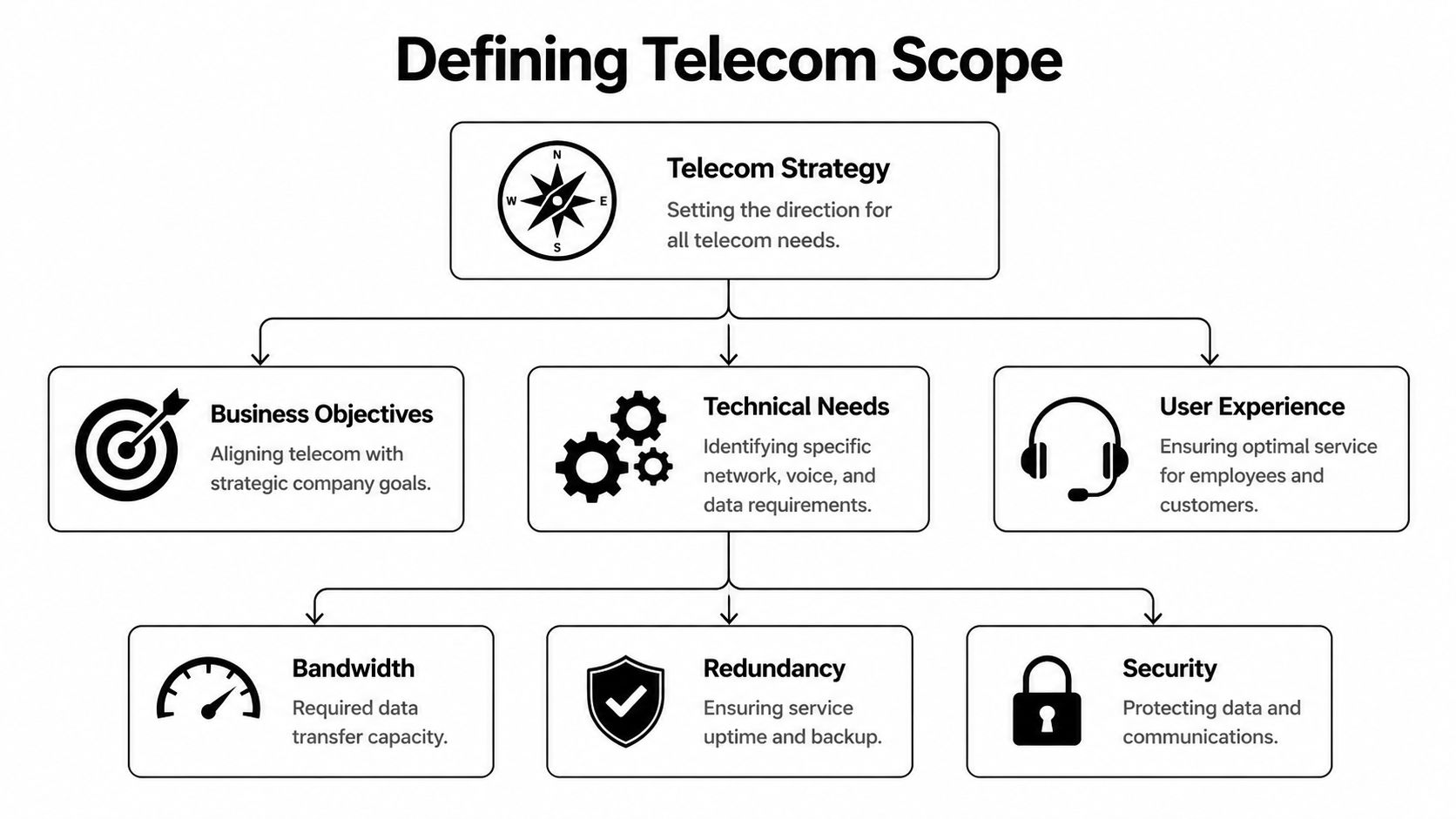
Start with geography. Coverage varies more than many internal stakeholders expect. Georgia ranks 26th nationally for internet coverage, speed, and availability, and nearly one in ten residents lacks access to broadband at 25 Mbps download / 3 Mbps upload, according to BroadbandNow’s Georgia profile. For multi-site organizations, that’s the warning label. You can’t assume the branch office, clinic, lab, or remote operations site has the same connectivity options as headquarters.
Write the business requirements first
The scope should begin with business outcomes, not carrier jargon. Ask each site owner what breaks if the circuit is unstable, delayed, or unavailable.
Capture items such as:
- Critical applications: Voice platforms, cloud EHR, ERP, VDI, security cameras, badge systems, replication, or vendor remote access.
- Hours of operation: A warehouse with overnight shifts needs different support expectations than an office that closes at five.
- Tolerance for downtime: Some locations can run on cellular backup for a short period. Others can’t operate safely without primary connectivity.
- Growth assumptions: New hires, added devices, cameras, sensors, and new SaaS traffic should already be in the request.
If your internal discovery process is loose, your provider evaluation will be loose too. This is also the right point to align telecom planning with IT asset management best practices so the hardware, contracts, and lifecycle records stay connected from day one.
Translate business needs into technical requirements
Now make the scope measurable. Don’t ask for “fast” or “reliable.” Ask for a circuit design and support model that fit the workload.
A usable requirements document typically includes:
Primary access type
State whether you prefer fiber, cable, fixed wireless, or a mix. If construction timing is uncertain, note whether an interim access method is acceptable.Bandwidth profile
Specify whether the site needs symmetrical throughput, burst capacity, or a conservative baseline with room for growth. Cloud-heavy sites often need more upstream capacity than stakeholders expect.Redundancy design
Define whether backup means a second carrier, a diverse path, a wireless failover, or an SD-WAN overlay. “Redundant” is meaningless unless you document what must be diverse.Security boundaries
Identify whether the provider will only hand off transport or also supply managed edge devices. If they touch routing, firewalls, or voice infrastructure, your security review needs to start earlier.Support expectations
Spell out incident severity levels, who can open tickets, escalation paths, and after-hours responsibilities.
Don’t issue an RFP until networking, security, facilities, procurement, and the site owner all agree on what “ready for service” actually means.
Include site-specific operational details
A good scope document includes the details that sales teams often miss and project teams later scramble to fix.
Use a short pre-RFP checklist:
- Building access: Landlord contacts, loading dock rules, riser access, badge requirements, and certificate-of-insurance needs.
- Demarc conditions: Existing handoff room, rack space, power availability, grounding, HVAC, and cabling path to your equipment.
- Legacy dependencies: Existing PRI, analog lines, alarm panels, elevator phones, fax workflows, or specialty systems that can’t be cut over casually.
- Procurement boundaries: Who buys CPE, who owns it, who supports it, and what happens at contract end.
Build the document people will actually use
The final output doesn’t need to be pretty. It needs to be precise. A working telecom scope or RFP draft should let you compare providers on the same basis, reject incomplete bids quickly, and hand a clean package to legal, security, and finance.
That discipline changes your posture. You stop acting like a buyer reacting to packages. You start acting like an operator defining acceptable risk.
Creating Your Provider Qualification Checklist
Once your scope is clear, the market gets easier to read. You’re no longer comparing logos. You’re testing whether a provider has the operational maturity to support your environment after installation, during incidents, and through future changes.
A lot of vendors can sell a circuit. Fewer can manage construction cleanly, coordinate field work, document handoffs, support enterprise change windows, and maintain a support experience your team can trust. Those differences are rarely obvious on the first call.
Look past the proposal summary
The proposal PDF usually tells you the access type, term, and price. It doesn’t tell you enough about execution. Ask how the provider runs service delivery and what tools their field organization uses.
That matters because leading telecom providers use AI-driven route planning to improve territory efficiency by 40% and boost close rates by 28%, according to McKinsey’s telecom operations analysis. I wouldn’t treat that as a magic feature by itself, but I would use it as a proxy for maturity. If a provider can explain how it schedules field teams, handles appointment density, and manages dispatch quality, that tells you a lot about how they’ll behave during install and repair work.
The questions that expose weak vendors
A capable enterprise provider should answer detailed questions without getting evasive. If the answers stay vague, assume operations are weak or fragmented.
Ask about:
- Access ownership: Do they own the local loop, resell another carrier, or mix both depending on the address?
- Cloud path awareness: Can they explain how they handle connectivity to major cloud environments and regional data centers?
- Support structure: Will you get a named account team, a service manager, or only a generic support queue?
- Change process: How are maintenance windows communicated, approved, and escalated?
- Installation governance: Who owns project management when construction, permits, or landlord coordination get messy?
- Security posture: What evidence can they provide for internal controls, privileged access, and incident handling?
- Billing controls: Can they produce invoices that map cleanly to site IDs, circuit IDs, and cost centers?
A provider that can’t explain who owns the problem at each stage usually becomes a provider that blames another team when deadlines slip.
Vendor Qualification Checklist
| Criterion | What to Ask/Verify | Weight (1-5) |
|---|---|---|
| Network fit | Verify whether the proposed service matches your required access type, bandwidth profile, and redundancy design | 5 |
| Serviceability accuracy | Ask for a formal site review, not a verbal assumption based on a coverage map | 5 |
| Installation governance | Confirm who manages permits, landlord coordination, construction dependencies, and scheduling | 4 |
| Support model | Verify ticket intake, escalation paths, after-hours coverage, and whether you get named contacts | 5 |
| Security controls | Ask for evidence of security governance, device handling practices, and change control discipline | 5 |
| Managed equipment terms | Clarify ownership, support boundaries, replacement process, and return obligations for provider-supplied hardware | 4 |
| Billing clarity | Review sample invoices and confirm circuit identifiers, taxes, surcharges, and site mapping | 4 |
| Contract flexibility | Check upgrade paths, relocation handling, early termination language, and renewal terms | 4 |
| Reporting quality | Ask what service reports, outage records, and account reviews are available | 3 |
| Field operations maturity | Ask how dispatch, technician scheduling, and appointment updates are managed | 3 |
Separate carriers from resellers
Resellers aren’t automatically bad. Some are excellent service managers with strong aggregation capabilities. The problem comes when a reseller hides the underlying carrier relationships and can’t control repair timelines.
Use this quick comparison during evaluation:
- Direct carrier model: Better when you need a tighter relationship with the network owner and want fewer parties in the incident chain.
- Aggregator or reseller model: Useful when you need one commercial interface across many sites and technologies.
- Hybrid strategy: Often best for multi-site organizations. Put critical sites with strong direct-carrier accountability and use an aggregator for lower-risk or harder-to-source locations.
Don’t ignore support rehearsals
One thing I like to do is test support behavior before signing. Send a follow-up question that requires coordination between sales engineering and operations. See how long it takes, who responds, and whether the answer is coherent.
That small test often tells you more than the polished presentation. A provider that communicates clearly before the contract usually handles onboarding better. A provider that drops details, misses callbacks, or sends contradictory answers during the courtship phase rarely improves once the order is booked.
Negotiating SLAs and Pricing Like a Pro
Teams often spend too much energy squeezing monthly price and not enough energy fixing the service terms that will govern years of support. That’s backwards. If the connection supports critical business functions, the SLA is worth more than a small discount on recurring charges.
The benchmark to keep in mind is five nines, or 99.999% availability, which translates to just over 5 minutes of downtime per year, based on telecom service research published by PMC. You may not get that standard on every access type or every site, but it gives you a serious negotiating anchor. It also forces the provider to define exactly what “available” means.

Negotiate the terms that actually protect operations
A weak SLA often sounds impressive and performs badly. It may exclude scheduled maintenance too broadly, start the outage clock too late, or offer tiny service credits that don’t reflect business impact.
Focus negotiations on these points:
- Availability definition: Is uptime measured at the provider core, the handoff, or the full service path to your demarc?
- Clock start and stop: When does the incident officially begin, and who decides when service is restored?
- Mean time to repair expectations: Don’t accept vague “commercially reasonable efforts” language if the site is operationally important.
- Latency, packet loss, and jitter terms: If voice, video, or cloud application performance matters, insist on service quality language beyond simple uptime.
- Credit mechanics: Credits should be automatic or easy to claim. If the process is burdensome, many teams won’t pursue them.
Price is only one lever
A low monthly rate can hide ugly contract economics. Providers can recover margin through install charges, unmanaged change orders, inflexible term commitments, hardware return fees, or renewal language that auto-extends at unfavorable rates.
Review the full commercial model:
| Contract area | What strong language looks like |
|---|---|
| Installation charges | Clear description of what’s included, what triggers extra cost, and who approves changes |
| Renewal terms | No silent rollover into a long extension without notice |
| Rate protection | Defined limits on non-tax increases and transparent surcharge handling |
| Upgrade path | Ability to increase service without restarting the whole commercial relationship |
| Termination rights | Reasonable exit options for chronic SLA failure, relocation, or non-performance |
| Equipment return | Documented timelines, return method, and responsibility for provider-owned gear |
Negotiation stance: Ask the provider to put accountability where the operational risk sits. If they want a long commitment, they should accept stronger remedies for missed performance.
Tie the SLA to your resilience plan
Your contract shouldn’t live in isolation. It should fit your broader continuity model, including failover behavior, incident escalation, and recovery planning. Teams that already maintain data center disaster recovery processes usually do better here because they already think in terms of service dependencies and recovery windows rather than vendor promises.
That also helps in mixed-access environments. If one site relies on cable with wireless backup and another uses dedicated fiber, your SLA expectations may differ by site class. That’s fine. The mistake is pretending all locations carry equal business risk and then accepting generic language for all of them.
Red flags during contract review
Some contract signals should slow you down immediately:
- The SLA is buried in an attachment and sales can’t explain it in plain English.
- Credits are capped too low to create meaningful accountability.
- Provider maintenance exclusions are broad enough to absorb most real incidents.
- Repair commitments depend on access type in ways not disclosed during sales.
- Escalation rights are unclear and depend on unnamed teams or portals.
A signed order form isn’t the win. A contract that still works during an outage is the win. The monthly number matters, but once the circuit is carrying production traffic, the business will remember outages, missed repair windows, and billing fights long after it forgets the discount.
Managing Site Readiness and Vendor Onboarding
The contract is signed. Now the actual operational work starts. Good deployments fail all the time because the internal site wasn’t ready, the vendor assumed someone else owned a dependency, or nobody documented the handoff between install and steady-state support.
This phase needs project management discipline, not casual email coordination.
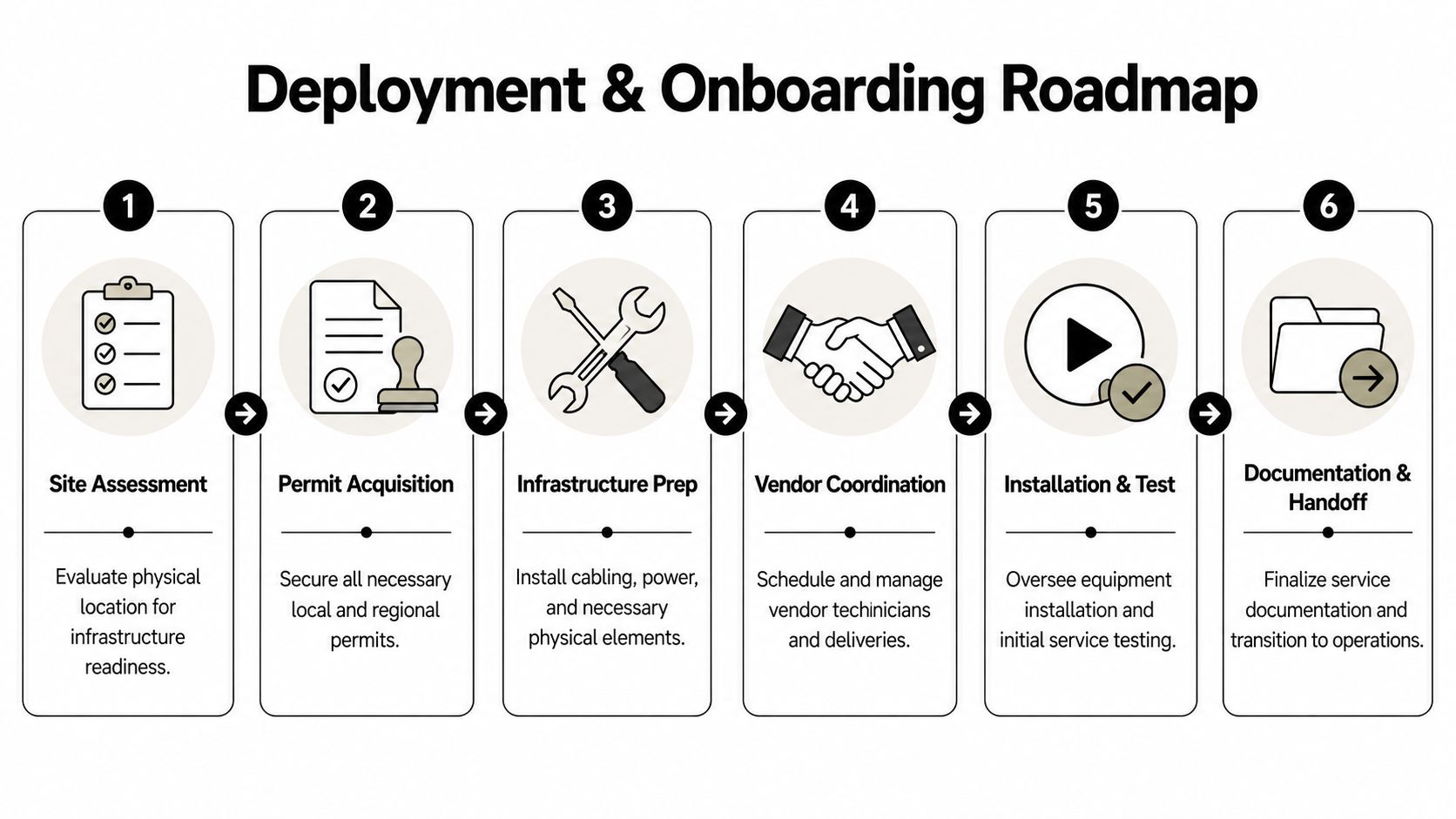
Get the physical site ready before the truck rolls
The provider can install only what the site can support. That sounds obvious, but plenty of projects stall because the riser wasn’t accessible, the demarc room had no power, the rack wasn’t available, or facilities didn’t know the carrier was coming.
Run a pre-install review that covers:
- Space and power: Confirm rack units, power type, grounding, cable management, and environmental conditions.
- Cabling path: Verify the route from demarc to your network gear, including any internal conduit or structured cabling work.
- Building permissions: Coordinate access windows, escorts, insurance paperwork, and any landlord-specific rules.
- Equipment boundaries: Decide exactly where provider gear ends and your team’s managed environment begins.
A lot of avoidable friction disappears when networking, facilities, and property management all review the same deployment worksheet.
Build one shared project plan
Don’t let every party manage a separate timeline. Create one operating document with milestones, owners, dependencies, and issue tracking.
A strong deployment plan usually includes these milestones:
Serviceability confirmed
The provider verifies the install method, building entry, and expected delivery path.Construction or permitting identified
If outside work is required, the team documents who owns approvals and communication.Internal site prep complete
Rack, power, labeling, patching, and local contacts are ready before the field date.Equipment receipt and staging
Any customer-managed edge devices are configured, labeled, and matched to the service order.Turn-up and testing window
Your team validates handoff, routing, failover, and application-level behavior before declaring success.Operational handoff
Support contacts, billing references, portal access, and escalation paths are documented.
If no one owns the cutover checklist, the cutover checklist owns you.
Test more than the circuit light
A green handoff port doesn’t mean the service is production-ready. Your validation plan should include the pieces that matter to the business.
Use a practical acceptance test:
- Transport verification: Confirm the delivered handoff matches the ordered service.
- Routing validation: Check expected pathing, failover behavior, and any managed edge configuration.
- Application checks: Test the systems that matter, such as voice, VPN, cloud application reachability, badge systems, or device telemetry.
- Monitoring integration: Add the circuit and provider-managed components to your alerting and inventory records.
- Documentation capture: Save circuit IDs, support numbers, demarc photos, equipment serials, and install notes.
This is also the right time to coordinate broader infrastructure work if the telecom deployment is part of a relocation or platform shift. Teams handling data center migration services usually know that handoff discipline matters as much as the physical move. The same principle applies here.
Onboard the provider like a long-term operator
Once service is live, make sure your operations team knows how to work with the vendor. Too many organizations stop at “installed” and never train the people who will deal with billing, support, and incident management.
Create an onboarding pack with:
- Who can open tickets
- How severity is assigned
- Escalation path by time of day
- Portal access and permissions
- Invoice coding instructions
- Maintenance notification contacts
- Hardware ownership records
- Circuit inventory references
A clean onboarding process shortens every future outage and every future billing dispute. It also stops knowledge from living only in one project manager’s inbox.
The Full Lifecycle Vendor Audits and Asset Disposition
A telecom service isn’t finished when traffic starts flowing. It enters governance. That means regular performance review, contract accountability, hardware tracking, and a controlled process for retiring what no longer belongs in production.
Most organizations are decent at acquisition and uneven at disposal. That gap creates security and compliance risk.

According to the enterprise telecom e-waste figures cited in Philly Community Wireless material, U.S. enterprise telecom e-waste surged 18% in 2025, yet only 12% of this equipment is recycled compliantly. For IT leaders, that’s not just an environmental story. It’s a data security story. Decommissioned routers, firewalls, switches, appliances, and telecom-adjacent gear often retain configuration data, logs, credentials, or other sensitive information if they’re handled casually.
Audit vendors after go-live
A provider should face structured review after deployment. Not endless meetings. Useful operational reviews.
Look at:
- Incident history: Were outages handled according to the contract and escalation model?
- Chronic trouble patterns: Are there recurring flaps, missed appointments, or unresolved performance complaints?
- Billing quality: Do invoices align with the circuits and terms you ordered?
- Change transparency: Are maintenance events communicated in a way your team can plan around?
- Accountability: Does the provider bring root-cause analysis and corrective action when problems repeat?
Strong vendor management means treating telecom carriers the way you treat any other critical supplier. Performance gets reviewed. Exceptions get documented. Repeated failures trigger action.
Build decommissioning into the lifecycle
When you replace telecom hardware, don’t leave the old gear stacked in a closet, sent back without records, or mixed into general e-waste handling. Enterprise telecom assets need the same chain-of-custody discipline you’d expect for servers or laptops.
A sound retirement process includes:
Asset identification
Match each device to a site, service, owner, and contract status before removal.Data handling decision
Determine whether the device stores configurations, credentials, logs, or regulated data that require sanitization.Removal documentation
Record serial numbers, photos if needed, date removed, and who released the equipment.Disposition path
Separate provider-owned returns from customer-owned assets slated for destruction, reuse, or recycling.Compliance evidence
Retain certificates, shipping records, audit trails, and disposition outcomes.
For regulated environments, that’s not optional. Healthcare, public sector, labs, and multi-site enterprises all need the ability to prove what happened to retired equipment. If your organization is still asking what that controlled retirement process should look like, start with a formal understanding of what is IT asset disposition.
The telecom strategy most teams miss
The best telecom strategy spans the full asset lifecycle. It starts with requirements, continues through provider qualification and SLA discipline, and ends with documented decommissioning. That last step is where security, compliance, finance, and sustainability finally meet.
Teams that ignore asset retirement usually pay for it twice. First in operational clutter, because no one knows what was removed or who owns it. Then in risk, because old telecom gear tends to disappear into closets, cages, and storerooms where controls are weak and records are worse.
Dallas Fortworth Computer Recycling supports organizations that need secure, compliant retirement of telecom and IT hardware across the full lifecycle. If your team is planning a network refresh, site closure, carrier migration, or data center decommissioning, Dallas Fortworth Computer Recycling can help with nationwide pickup, certified data destruction, audit-ready chain of custody, and responsible electronics recycling built for enterprise and public-sector requirements.