
Data Center Disaster Recovery: A Practical Guide
It’s usually the same moment that forces this conversation. A storage array throws alerts. A hypervisor cluster goes unstable. A ransomware note appears on a file share someone swore was isolated. Leadership asks one question: how fast can we get back?
That’s where most organizations discover whether they have a real data center disaster recovery capability or a document that looked reassuring during the last audit. Recovery isn’t just about backups. It’s about decisions made long before the outage, including what matters most, how fast each system must come back, who owns each recovery step, and what happens to damaged or obsolete hardware after service is restored.
The part many teams miss is the end of the lifecycle. Recovering production is only half the job. Failed drives, retired servers, damaged edge gear, and temporary replacement equipment create a second wave of risk. If you don’t handle decommissioning with the same discipline as failover, you can restore operations and still walk into a compliance failure.
Foundational Risk Assessment and Impact Analysis
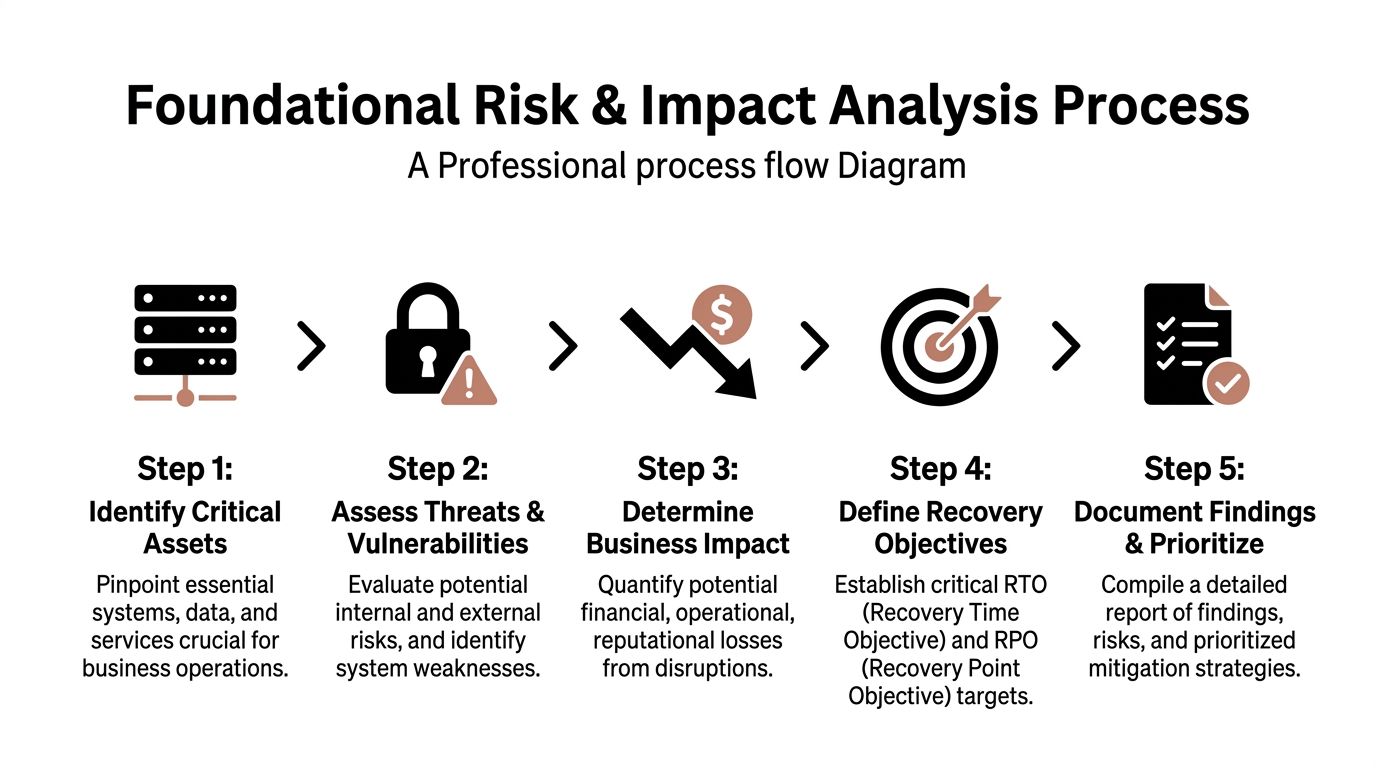
A recovery plan fails early, long before anyone declares a disaster, if the organization cannot answer four questions with precision: what stopped, what it broke, how long the business can operate that way, and what data cannot be lost. That is the job of risk assessment and business impact analysis.
Business Impact Analysis (BIA) identifies which business functions are disrupted when a system fails, how fast the disruption becomes unacceptable, and which dependencies sit behind that service. Recovery Time Objective (RTO) defines the maximum tolerable downtime. Recovery Point Objective (RPO) defines the maximum tolerable data loss. If business owners and infrastructure teams interpret those terms differently, recovery priorities will conflict under pressure.
Start with business services, then trace the supporting stack beneath them. Teams that begin with a server list usually miss shared dependencies and overstate the importance of isolated systems. A service map exposes what needs to come back together: applications, databases, storage, identity, DNS, certificates, network paths, cloud services, and outside vendors.
Start with services, not servers
A patient portal is a useful example. On paper, it looks like one application. In practice, recovery may depend on Active Directory or Entra ID, MFA, the EHR integration layer, database clusters, certificate services, DNS, load balancers, internet edge connectivity, and backup validation. Miss one dependency and the portal is still down, even if the front-end VM is running.
A simple tiering model helps force honest decisions.
- Tier 1 systems support revenue, safety, regulated operations, or public-facing services that cannot stay offline for long.
- Tier 2 systems matter to daily operations but can run on documented workarounds for a limited period.
- Tier 3 systems can wait until core services are stable and verified.
This prevents the common failure mode where every application owner asks for near-zero downtime. Budget, staffing, and architecture never support that across the board.
Build the BIA with business owners in the room
Infrastructure teams can estimate restore times, replication options, and failover complexity. They should not set business tolerance alone. Finance can define how long billing can stop before cash flow is affected. Clinical leadership can define when delayed access becomes patient risk. Legal, security, and compliance teams can define where retention, breach notification, chain of custody, or regulatory reporting obligations start to apply.
Use direct questions during workshops:
- What stops first when this service fails?
- What degrades next if the outage extends?
- What manual workaround exists, and how long can staff sustain it?
- What data can be recreated, and what data is unrecoverable if lost?
- What security or regulatory exposure appears if recovery is delayed or incomplete?
Plain-language impact statements work better than abstract scores. “Warehouse staff cannot print shipments.” “Clinicians cannot access current records.” “The call center cannot authenticate users.” Those statements drive better recovery targets because they describe operational failure, not a spreadsheet label.
Set targets your budget and controls can support
Short RTOs usually require duplicate infrastructure, tighter replication, stronger orchestration, and repeated testing. Short RPOs require frequent backups, disciplined replication, storage integrity checks, and clear validation steps after recovery. Each choice affects cost, administrative effort, security exposure, and audit scope.
That trade-off needs to be explicit. I have seen leadership approve aggressive recovery targets and then decline the secondary connectivity, licensing, and test windows needed to meet them. The result is a plan that passes review and fails during an outage.
Asset visibility also matters more than many teams admit. If the inventory is incomplete, the BIA will be incomplete. Unknown storage shelves, unsupported hypervisors, forgotten branch appliances, and untracked software dependencies all slow recovery and create security gaps. Strong IT asset management best practices improve DR planning because they show what exists, what is still supported, what contains regulated data, and what should have been retired already.
A practical classification for the patient portal might look like this:
| Service | Likely Tier | Recovery expectation |
|---|---|---|
| Patient portal login and access | Tier 1 | Restore first with identity dependencies |
| Clinical data integration layer | Tier 1 | Recover in lockstep with backend data services |
| Reporting dashboards | Tier 2 | Delay until core access and transactions stabilize |
| Archived analytics workloads | Tier 3 | Recover after business-critical services |
This analysis determines recovery order under stress. It also sets the baseline for security controls, evidence collection, and post-event review.
Threats need to be specific
Generic threat labels produce weak plans. “Cyberattack” does not tell an operations team whether to isolate replication, rebuild identity, verify backups for encryption, or replace compromised hardware. Break the risks into operationally useful categories such as ransomware, account compromise, destructive malware, cloud misconfiguration, failed patching, power loss, cooling failure, storage corruption, fiber cuts, flood exposure, and vendor outages.
Each threat changes the recovery path. A power event may favor failover and facility checks. Ransomware may require forensic hold, credential resets, validation of backup immutability, and tighter approval controls before anything is restored to production. A hardware fault may trigger replacement logistics and chain-of-custody requirements for failed media.
Include decommissioning risk in the initial assessment. Failed drives, damaged appliances, temporary replacement gear, and retired backup systems still contain data, credentials, configuration details, or audit evidence. After service is restored, those assets do not become harmless scrap. They become a security, privacy, and compliance problem that needs documented handling from the start. That is why the DR lifecycle should begin with impact analysis and end with secure, compliant disposition of hardware affected by the event.
Designing Your Disaster Recovery Architecture
Most DR architecture debates collapse into ideology. One camp wants everything mirrored in real time. Another wants the cheapest possible standby environment. Neither approach is useful. The right design follows the application tiers and recovery targets already established.
For most organizations, the answer is mixed architecture. A single model across all workloads usually wastes money or accepts unnecessary risk. Core identity, transactional systems, and tightly coupled production services need faster recovery than archival systems, dev environments, or internal reporting tools.
What the site models actually mean
A cold site gives you space, connectivity, and a basic recovery location, but little or no running production-ready infrastructure. It’s the cheapest option to maintain, but recovery is slower because hardware provisioning, restoration, and configuration happen under time pressure.
A warm site keeps some infrastructure and replicated data available, but not necessarily in a fully synchronized production state. It offers a middle ground. Cost is higher than a cold site, but the operational burden is still manageable for many mid-size organizations.
A hot site maintains near-ready production capability with synchronized or closely replicated systems. It’s the fastest path to recovery and usually the most expensive to build, secure, monitor, and test.
DRaaS adds another option. It can make sense when a team wants cloud-based failover for virtualized workloads without owning and operating a full secondary facility. But DRaaS isn’t magic. It still depends on application compatibility, network design, data consistency, identity integration, and tested runbooks.
Comparison of Disaster Recovery Site Architectures
| Attribute | Cold Site | Warm Site | Hot Site |
|---|---|---|---|
| Infrastructure readiness | Minimal | Partial | Near production-ready |
| Recovery speed | Slowest | Moderate | Fastest |
| Data currency | Restore from backup or delayed replication | Replicated on a schedule or partially synchronized | Closely synchronized or continuously replicated |
| Cost to maintain | Lowest | Moderate | Highest |
| Operational complexity | Lower day to day, high during recovery | Moderate | Highest ongoing |
| Best fit | Lower-tier systems, archival workloads | Important business apps with some delay tolerance | Tier 1 services with tight recovery expectations |
That table is useful only if you map it to real workloads. Don’t choose “hot site” because leadership hates downtime. Choose it where the impact justifies the spend.
Match architecture to service tier
A practical alignment often looks like this:
- Tier 1 goes to hot site, highly automated secondary environment, or a DRaaS design that supports aggressive recovery objectives.
- Tier 2 often fits a warm site with scheduled replication and documented restoration order.
- Tier 3 usually belongs in lower-cost recovery patterns, including backup-based restoration to a cold environment.
Effective application design is paramount. A modern virtualized web service may move cleanly into a DRaaS model. An older application with hardware dependencies, licensing constraints, or undocumented integrations may resist cloud failover and need a different strategy.
Buy recovery speed only where outage impact justifies it. Everywhere else, buy clarity, order, and tested restoration.
One of the best ways to keep this honest is to tie architecture choices to migration and lifecycle planning. When teams refresh infrastructure or consolidate facilities, they often inherit unsupported gear, undocumented interconnects, and brittle failover assumptions. Good data center migration best practices reduce that risk because they force dependency mapping before a crisis exposes it.
Trade-offs that matter in the real world
Cost versus readiness is obvious, but there are subtler trade-offs. Hot environments can create false confidence if teams don’t test the full application chain. Warm environments can be very effective if the recovery sequence is well documented and restoration order is disciplined. Cold environments are viable when the business has real tolerance for delay and the restoration process is mature.
Management overhead also matters. Every replicated environment adds monitoring, patching, credential management, vulnerability exposure, and audit scope. If you build a secondary environment your team can’t maintain, you’ve created more failure points, not resilience.
Compliance scope grows with architecture complexity. Replicated copies of production data, backup repositories, cloud failover images, and temporary recovery environments all need the same rigor around encryption, access control, logging, retention, and eventual destruction. Teams often price the hardware and forget the governance.
Where hybrid designs win
A hybrid approach is usually the most defensible. Keep the critical systems in a fast-recovery architecture. Protect the next tier with lower-cost standby. Restore the rest from validated backups. That lets you spend on what the business needs, not on a theoretical ideal.
For example, an ERP authentication layer and transactional database might warrant near-ready failover, while reporting services and historical exports can wait. Security tooling should also be part of the architecture, not bolted on after. Immutable backups, isolated backup administration, privileged access controls, and clean-room recovery procedures belong in the design phase.
A good DR architecture doesn’t try to eliminate every outage. It narrows blast radius, shortens recovery of essential services, and avoids overspending on systems that can wait.
Creating Actionable Runbooks and Response Plans
A DR plan fails at the exact moment people have to improvise. Under pressure, memory gets unreliable, assumptions multiply, and small omissions become outages inside the outage. That’s why runbooks matter. They convert architecture into actions people can execute when alerts are firing and leadership is asking for updates every few minutes.
Preparedness is weaker than many teams admit. Only 30% of organizations have fully documented disaster recovery strategies, only 16% recover within a day after ransomware, 18% take over a month, and 35% of businesses lose at least one mission-critical application post-outage, according to Infrascale’s disaster recovery statistics. Those numbers line up with what seasoned operators see in practice: the missing ingredient usually isn’t intent. It’s operational detail.

Write for tired people under stress
Good runbooks are short, explicit, and ordered. They don’t assume the reader remembers dependencies, ticket flows, exception handling, or who approves a failover. If a critical step lives only in one engineer’s head, it doesn’t exist.
Every runbook should answer these questions immediately:
- What event triggers this runbook
- Who owns command during execution
- Which systems are in scope
- What prerequisites must be confirmed
- What exact steps happen in order
- How success is validated
- When escalation happens
- How communications are sent
- What gets documented for audit
I prefer checklists over narrative prose for the execution portion. During an incident, no one wants to parse a long paragraph to figure out whether storage replication must be paused before application failover.
Separate plans by scenario
One “master DR runbook” is usually too broad to be useful. Teams need scenario-specific playbooks because ransomware, regional power loss, storage corruption, and accidental deletion do not follow the same path.
A ransomware runbook should focus on containment first. It needs isolation steps, account protection, decisions about shutting down or segmenting affected systems, backup integrity validation, clean recovery environment requirements, and legal or compliance notifications. It should also define who can authorize restoration from known-good backups and how forensic preservation is handled.
A site outage runbook looks different. It should start with event confirmation, facilities and provider status, failover decision authority, network rerouting sequence, restoration order by application tier, external communications, and criteria for eventual failback.
A hardware failure runbook can be narrower. It needs spare availability, vendor escalation, replacement workflow, data integrity checks, and a clear line between component replacement and full service recovery.
The best runbook is boring. Every step is obvious, every owner is named, and no one has to translate strategy into action during the outage.
Include communication as part of recovery
Technical teams sometimes treat communication as an executive problem. That’s a mistake. Communication is part of operational control. If users don’t know what changed, they overload the service desk, duplicate work, or reconnect systems in ways that interfere with recovery.
A practical runbook includes prewritten templates for:
- Internal IT updates with current status, systems affected, next checkpoint, and known blockers
- Business stakeholder notifications with service impact and expected workaround
- Executive summaries with decisions required and risk exposure
- Third-party coordination messages for cloud providers, colocation staff, telecoms, hardware vendors, and managed service partners
Keep these in the same controlled repository as the technical runbooks. Don’t make incident command hunt through email folders for the last outage notice someone sent two years ago.
Make the document itself operationally safe
The runbook has to be available when production systems aren’t. Store controlled copies where responders can reach them if identity, file shares, or collaboration platforms are degraded. Also maintain version control. Teams often discover too late that they’re holding an old runbook with retired server names and former staff contacts.
For environments with regulated or aging infrastructure, the response plan should also identify what happens to failed equipment once it’s removed. A practical server decommissioning checklist belongs alongside recovery documentation because disks, blades, and backup appliances can’t just sit in a corner after an event. They need chain of custody, disposition control, and auditable data destruction.
A simple runbook skeleton
Use a repeatable skeleton, then adapt it by scenario:
- Trigger and scope
- Decision authority
- Immediate containment or failover steps
- Dependency checks
- Recovery execution sequence
- Validation tests
- Stakeholder communications
- Evidence collection and logging
- Decommissioning and replacement handling
- Criteria for closure and review
That structure keeps the team grounded. In a real incident, clarity beats elegance every time.
Implementing a Robust Testing and Maintenance Cadence
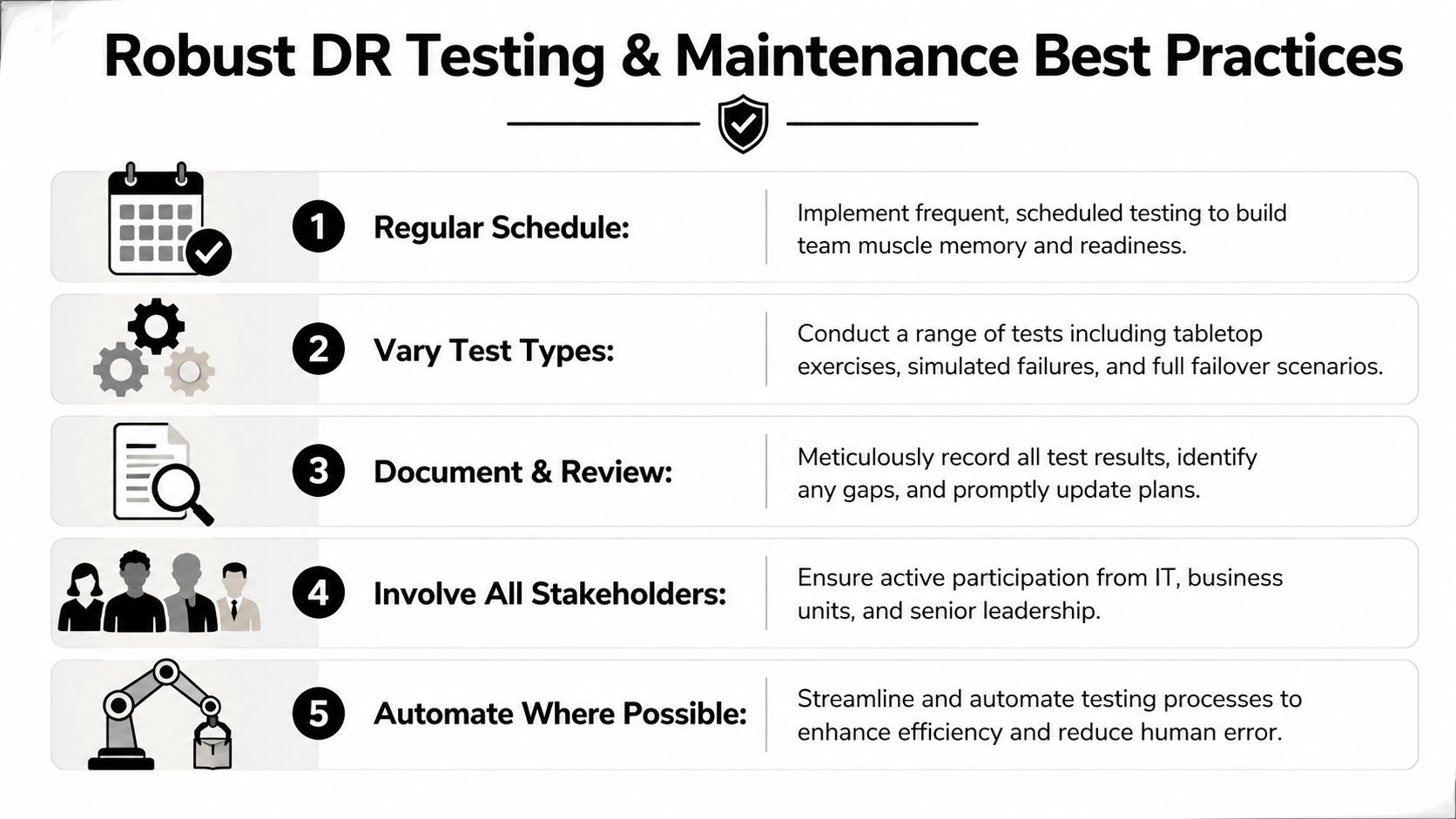
A DR plan usually looks solid until the first timed recovery exercise starts. Then the actual problems show up. Service accounts have expired, replication scopes no longer match production, the firewall rule added during a late-night change was never documented, and no one can confirm whether restored data still meets retention and access-control requirements.
That is why testing has to be scheduled, measured, and tied to change management. Audit signoff alone does not prove recoverability. Repeated execution does. In regulated environments, it also proves that recovery actions preserve evidence, maintain least-privilege access, and keep sensitive data under control during failover and restoration.
Match the test to the failure you are trying to expose
A useful program does not run the same exercise every quarter. It uses different test types for different risks, because a tabletop session will expose governance gaps that a backup restore test will never catch.
- Tabletop exercises test decision-making, escalation paths, communications, and regulatory notification thresholds.
- Technical walkthroughs verify that runbooks still match the actual environment, including identity dependencies, network paths, and recovery order.
- Backup restoration tests confirm that data can be restored, mounted, scanned, and validated without breaking security controls.
- Partial failover exercises test a business service, application tier, or dependency group with less operational risk than a site-wide event.
- Full failover simulations test the entire chain, including recovery time, data consistency, access controls, monitoring, and rollback.
Each format has a cost. Full simulations provide the best proof, but they consume staff time, carry change risk, and can disrupt production if they are poorly isolated. Tabletop exercises are cheaper and faster, but they can create false confidence if the team never validates the technical steps.
Measure execution quality
Testing only helps if the team records what happened. Capture recovery start and stop times, failed steps, approval delays, security exceptions, manual interventions, and validation results. Record who had access to restored systems and whether that access matched policy. If regulated data was included in the exercise, document where it was restored, who handled it, and how it was removed afterward.
I look for friction, not theater. If a recovery step depends on one senior engineer remembering an undocumented workaround, the process is still fragile.
Tooling matters here. CMDB records, backup logs, ticket history, orchestration outputs, and asset inventories should all feed the after-action review. Teams that maintain accurate lifecycle records through IT asset management software practices have an easier time validating hardware ownership, replacement status, and cleanup tasks after a test.
Maintenance follows production change
Annual review cycles are too slow for live infrastructure. The DR plan should be updated after material changes to applications, storage, identity systems, vendors, network architecture, or compliance obligations. If production changes every month and the recovery plan changes once a year, the plan is already drifting out of date.
Set a cadence with three parts. Run scheduled exercises. Trigger targeted reviews after significant changes. Close every test or incident with assigned corrective actions, owners, deadlines, and evidence retention requirements.
The final point often gets missed. Recovery testing should also confirm what happens to failed, replaced, or temporarily deployed hardware after the event. If the team can restore service but cannot account for removed drives, retired appliances, or emergency replacement gear, the DR process is incomplete. Resilience includes secure cleanup, documented chain of custody, and preparation for compliant decommissioning once recovery work is done.
Managing Compliance and Secure Decommissioning Post-Event
Most DR guides stop at service restoration. That’s too early. The full lifecycle ends when damaged, failed, replaced, or obsolete hardware has been securely removed from service, sanitized, documented, and processed in a way that satisfies both security and environmental obligations.
This matters more now because recovery environments are increasingly distributed. A key challenge in modern DR is decommissioning across hybrid edge-core architectures. Edge DR adoption has surged 35% in North America, 70% of operators report gaps in nationwide asset recovery logistics, and 60% of outages are tied to remote configurations costing over $100k, according to CTRLS’ analysis of edge resilience and recovery logistics. In practical terms, that means gear is failing and being replaced in more locations than many central IT teams can directly control.

Recovery creates a second risk surface
After a disaster event, teams often have a pile of technology that no longer fits cleanly into operations:
- failed drives removed during emergency rebuilds
- damaged servers from a site incident
- temporary replacement hardware
- retired backup appliances displaced by a new architecture
- edge systems shipped back from remote sites
- storage media pulled for forensic review
Every one of those assets may contain sensitive data. Some also fall under regulatory, contractual, or internal retention requirements. If they leave controlled custody without documented sanitization, your DR event can turn into a reportable security incident.
That’s why decommissioning belongs inside the recovery plan. It’s not a facilities cleanup task. It’s part of risk management.
What compliant post-event handling looks like
The process should be structured and auditable.
First, inventory the removed assets. Record serial numbers, asset tags, location, system association, data sensitivity, and reason for retirement. During an incident, it’s easy for failed drives and loose equipment to become orphaned inventory. That’s exactly how chain of custody breaks.
Next, classify the required disposition path. Some assets may be candidates for repair and controlled reuse. Others need certified destruction because the media cannot be sanitized with confidence or because policy requires physical destruction.
Then, secure the handoff. Storage devices and servers waiting for disposition need locked staging, restricted access, and transport documentation. Remote and edge environments need the same discipline, which is where organizations often struggle most.
Finally, retain proof. Audit trails matter. Certificates of data destruction, recycling documentation, chain-of-custody records, and internal approvals should all be attached to the incident or recovery record.
Restoring workloads while losing control of retired hardware is not a successful recovery.
Select disposition partners as part of DR planning
If your DR plan depends on replacing failed hardware quickly, it should also define who handles the outgoing assets and how. This is especially important for healthcare, government, labs, and nonprofits with regulated or donor-sensitive data.
When evaluating a partner for post-event decommissioning, look for:
- Nationwide logistics capability so remote and edge assets don’t sit unmanaged for weeks
- Documented chain of custody from pickup through final processing
- Certified data destruction options for drives, arrays, and embedded storage
- Environmental compliance processes that reduce landfill exposure and unmanaged e-waste
- Clear audit documentation that your compliance and security teams can retain
- Experience with data center projects rather than only office equipment pickups
This work should align with your broader data center decommissioning process. If decommissioning only starts after the outage, the organization is already reacting too late.
Treat decommissioning as part of resilience
The strongest DR programs treat recovery, security, compliance, and asset disposition as one operational system. That approach reduces hidden risk. It also improves budget decisions, because teams can retire fragile legacy gear intentionally instead of waiting for it to fail during an emergency.
There’s a practical benefit here too. When failed and obsolete assets are removed through a controlled process, the rebuilt environment becomes easier to audit, easier to secure, and easier to test. Recovery leaves less debris behind. That’s a sign of mature operations.
If your team needs a partner to close the final loop after a recovery event, Dallas Fortworth Computer Recycling provides nationwide IT asset disposition, certified data destruction, and data center decommissioning services for organizations that need secure, compliant retirement of technology. For IT leaders managing outages, refresh cycles, edge equipment returns, or post-incident cleanup, that kind of auditable chain of custody helps keep disaster recovery from ending in a second preventable risk.