
Best Telecom Solutions For Businesses Near Me 2026

Your phone system still works, but support tickets keep coming. Calls drop during peak periods. Conference rooms behave differently from site to site. The firewall is newer than the core switch, the carrier contract auto-renewed again, and nobody is fully sure which circuits feed which closets. Meanwhile, the business wants cloud apps, better remote access, cleaner reporting, and fewer outages.
That’s the point where teams often start searching for telecom solutions for businesses near me. The mistake is treating that search like a simple vendor hunt. It isn’t. A telecom upgrade touches network design, contracts, security controls, user workflows, branch operations, and the uncomfortable question that gets ignored until the last minute: what happens to the old routers, switches, phones, firewalls, and cabling when the new environment goes live?
Your Guide to Modernizing Business Telecom
Legacy telecom rarely fails all at once. It degrades in ways that create operational drag. Voice quality gets inconsistent. Failover procedures exist on paper but not in practice. Branches get different service levels because they were purchased in different years by different teams. Old hardware stays in service because replacing it feels riskier than keeping it.
That’s why a telecom refresh should be treated as a business infrastructure decision, not a carrier shopping exercise. The U.S. telecom services market was valued at USD 468.08 billion in 2023 and is projected to grow at a 6.6% CAGR through 2030, with the business segment advancing at the fastest rate, according to Grand View Research’s U.S. telecom services market analysis. That matters because providers are investing heavily, product bundles are changing, and buyers have more architectural choices than they did a few years ago.
The upside is real if you approach the project correctly. A modern environment can support remote operations, unify voice and collaboration, improve resilience across locations, and make security controls easier to enforce. The downside is also real if you rush it. Teams that skip discovery often end up with better bandwidth but worse operational control.
A sound plan has four traits:
- It starts with facts. You need a clear inventory of circuits, handoffs, cabling, contracts, and dependencies.
- It tests provider claims. Sales decks are easy to produce. Escalation paths and outage procedures are harder.
- It prices the full lifecycle. Monthly recurring cost is only one line item.
- It includes retirement from day one. Old telecom gear often contains sensitive configuration data and credentials.
If your team needs help defining that end-to-end roadmap, a telecom consulting services team in Dallas can help structure the project before procurement starts.
Practical rule: If you can’t explain how new service will be cut over and how old equipment will be retired, you don’t have an upgrade plan yet. You have a quote.
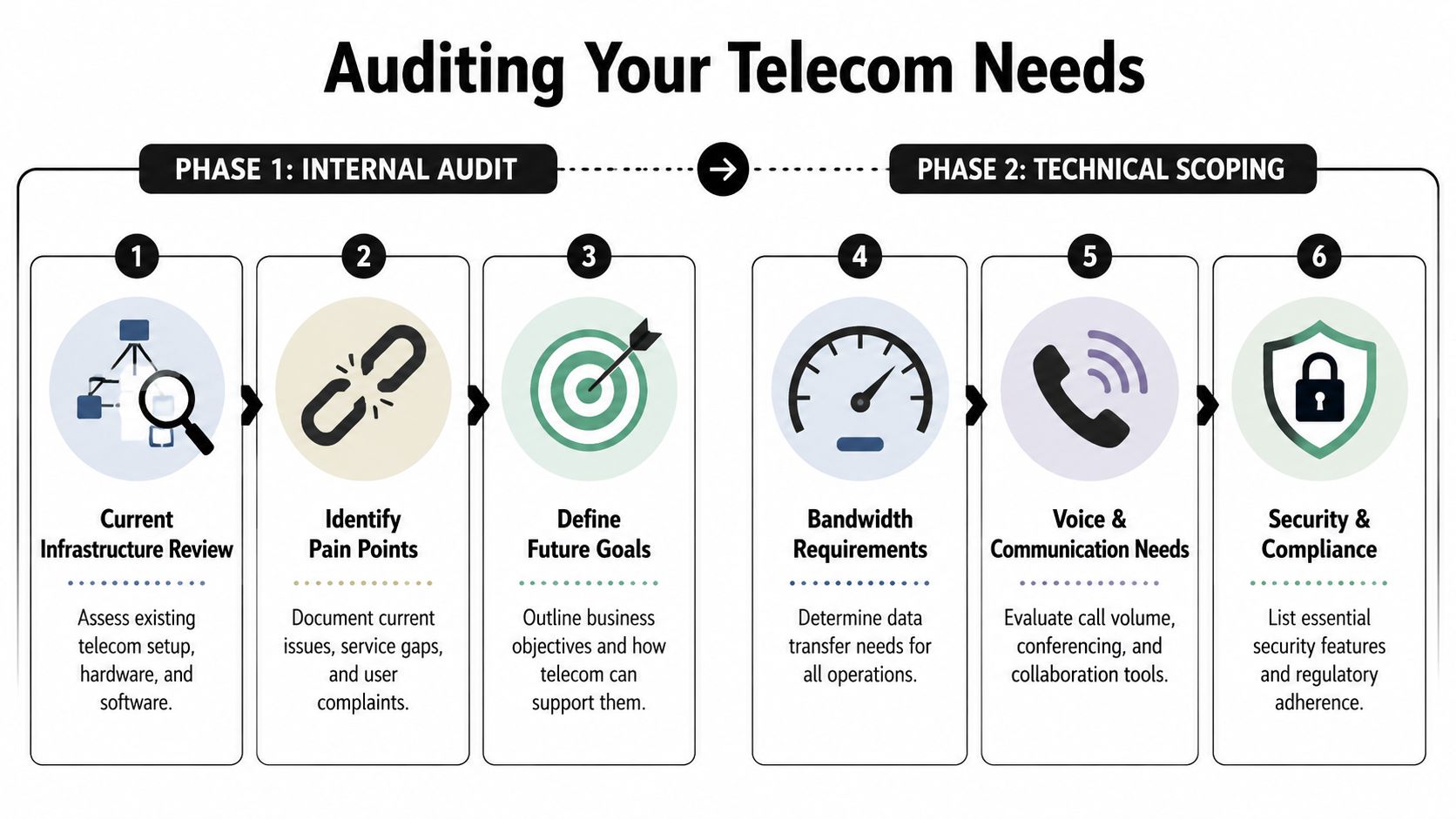
Laying the Groundwork by Auditing and Scoping Your Needs
Before you compare providers, audit what you already own and what the business needs next. This step prevents expensive mistakes. Most failed telecom projects aren’t caused by bad intentions. They’re caused by bad assumptions.
The first assumption is that your current environment is documented well enough. It usually isn’t. Teams often have partial diagrams, outdated closet labels, and contract notes scattered across ticketing systems, shared drives, and inboxes. That’s manageable until migration week, when someone discovers an undocumented handoff feeding a critical site.
Audit the environment you actually have
Start at the physical layer, not the billing portal. Walk the MDFs and IDFs. Record every provider demarc, switch, router, firewall, voice appliance, UPS dependency, patch panel, and cross-connect that supports telecom traffic. Identify where circuits terminate and where cabling changes media type.
This step matters even more in facilities with older structured cabling. A common pitfall in decommissioning projects is incomplete cabling documentation, with 67% of projects experiencing delays due to manual tracing that increases labor costs by 30% to 40%, according to Dale Electric’s communications guidance. In practice, that means your cabling audit isn’t just for installation planning. It directly affects cutover risk and the secure retirement of legacy assets.
Use a discovery worksheet that captures more than serial numbers:
- Circuit details: carrier, service type, term dates, demarc location, failover role, and business owner.
- Hardware dependencies: what each router, switch, SBC, firewall, or voice gateway supports, and what breaks if it’s removed.
- Cabling paths: CAT5, CAT6, and fiber routes, patching conventions, cabinet locations, and unlabeled runs that need tracing.
- Operational pain points: dropped calls, congested links, recurring tickets, conference room issues, and branch-specific reliability complaints.
- Contract traps: notice periods, auto-renewals, early termination language, and equipment return obligations.
A lot of teams search for nearby providers too early. It’s smarter to build your baseline first, then compare vendors against it. If you’re evaluating local options, this directory of local telecom companies is more useful after you’ve documented your current state.
Scope the environment you need next
Don’t design a one-to-one replacement unless the business has remained entirely unchanged. Most organizations now need some mix of cloud connectivity, hybrid work support, site resiliency, UCaaS integration, wireless backup, or segmented connectivity for specialized devices and regulated workflows.
Translate business goals into technical requirements. If the finance team expects better call routing across offices, define that as call flow logic, survivability, and administration rights. If operations wants resilient branch connectivity, define failover behavior and acceptable degradation during a circuit event. If the security team wants stronger controls, define how traffic will be segmented and monitored.
A useful scoping model looks like this:
Business criticality
Which sites generate revenue, support regulated workloads, or carry time-sensitive operations?Application profile
Which applications are latency-sensitive, voice-heavy, cloud-dependent, or locally hosted?Growth assumptions
Which offices may expand, consolidate, relocate, or shift to lighter footprints?Management model
Will your internal team run the environment, or do you need a provider or MSP to own day-to-day changes?Retirement plan
Which assets will be reused, wiped, removed, recycled, or held for rollback?
The best telecom designs are built backward from business operations. They aren’t built forward from whatever package a provider wants to sell this quarter.
Turn discovery into a scorecard
Once the audit is complete, convert it into a vendor scorecard. That scorecard should separate hard requirements from preferences. A hard requirement might be branch failover, documented escalation paths, support for regulated workflows, or coexistence during migration. A preference might be a unified invoice or a single support portal.
Keep the scorecard blunt. If a provider can’t meet a requirement, don’t let a polished proposal hide that fact. Teams get into trouble when “mostly supports” gets treated the same as “supports.”
Use short categories so decision-making stays clean:
| Audit output | Why it matters |
|---|---|
| Current topology | Prevents hidden dependencies from surfacing during cutover |
| Cabling map | Reduces tracing delays and supports secure decommissioning |
| Contract inventory | Avoids surprise fees and timing conflicts |
| Pain point log | Keeps selection tied to business problems, not marketing language |
| Future-state requirements | Stops the project from becoming a like-for-like replacement |
How to Find and Vet Local Telecom Providers
Once the internal scorecard exists, the search for telecom solutions for businesses near me gets easier and more honest. At that point, you’re not asking, “Who sells telecom?” You’re asking, “Who can deliver this exact operating model in my geography, on my timeline, with acceptable risk?”
That changes where you look. Search results alone won’t tell you whether a provider owns meaningful local infrastructure, leases everything through another carrier, or depends on outsourced field teams for on-site work. Those details matter when there’s an outage, a porting issue, or a cutover problem at a branch.
Build a shortlist from real operating signals
Start with peer recommendations from other IT leaders in your region, especially those with similar site counts and compliance pressure. Then compare that input against local business publications, regional engineering presence, and the provider’s ability to discuss your market without reading from a national script.
There’s a major difference between a national provider with a local sales office and a regional operator with local engineering depth. Neither model is automatically better. National carriers may offer broader bundling and standardized support frameworks. Regional firms may respond faster on construction, field dispatch, or custom routing. The right answer depends on your environment.
Use these filters before issuing an RFP:
- Local operational footprint: Ask who performs installs, truck rolls, escalation management, and after-hours support in your area.
- Commercial flexibility: Check whether they can align terms with branch openings, lease expirations, and phased migrations.
- Architecture fit: Confirm they can support your preferred design, not just their default package.
- Support realism: Find out how changes are handled after implementation. Many problems surface months later, not on launch day.
If you need a broader benchmark while narrowing candidates, this roundup of managed telecom services near me can help frame what service models are available.
Write an RFP that forces useful answers
A weak RFP invites brochure language. A strong RFP forces providers to explain how they’ll operate in your environment.
That’s especially important now because enterprise telecom subscriptions are surging at a 4.15% CAGR, and businesses are increasingly buying bundled services such as cloud storage and cybersecurity that can increase revenue per account by 6% to 8%, according to Mordor Intelligence’s U.S. telecom market analysis. Bundles can be useful, but they also make proposals harder to compare. Your RFP should separate must-have network capabilities from optional add-ons.
Ask providers to answer in plain terms, with diagrams and service assumptions where appropriate. Don’t accept “best effort” wording on core requirements.
| Category | Key Question |
|---|---|
| Network design | How will you architect primary and backup connectivity for each site in our environment? |
| Local delivery | Which parts of the service do you own directly, and which parts rely on third parties? |
| Cutover support | Who is on point during migration weekend, and what’s the escalation chain if porting or circuit activation slips? |
| Voice and UC | How do you handle coexistence between legacy voice systems and the target platform during transition? |
| Security | What security controls are included by default, and which require separate products or licensing? |
| Reporting | What operational reporting will we receive for uptime, incidents, changes, and usage? |
| Contracting | What notice periods, hardware return terms, and non-recurring charges should we plan for? |
| Asset retirement | What dependencies remain on legacy equipment after service activation, and how do you document them for removal? |
Test how they think, not just what they sell
A provider’s answers should reveal whether they understand business operations. Good vendors ask clarifying questions about branch survivability, call flows, regulated data, and handoff timing. Weak vendors jump straight to speed tiers and seat counts.
Look for signs of operational maturity:
- They challenge assumptions. If your request creates a single point of failure, they say so.
- They define ownership. They can explain where provider scope ends and your team’s scope begins.
- They discuss rollback. Every migration plan should include a path to recover if activation or voice porting goes sideways.
- They acknowledge asset dependency. They know old gear often stays in place temporarily for coexistence, logging, or fallback.
Ask every finalist the same questions in the same format. You’re not just comparing service. You’re comparing how clearly each team can operate under pressure.
A surprising amount of vendor quality shows up in response discipline. If a provider can’t return a clean, direct answer set during procurement, don’t expect precision during an outage.
Verifying SLAs Security and Compliance Claims
The shortlist often signals progress. The due diligence phase is where projects get protected. Providers can all promise uptime, support, and security. What matters is the language inside the SLA, the evidence behind the controls, and the exceptions hidden in order forms or service exhibits.

Read the SLA like an operator
Don’t stop at the uptime figure. Read how the provider defines outage, what services are included, how maintenance windows are handled, and what the remedy is. Service credits may look fine in a contract and still be meaningless during a real incident.
Pay attention to terms that affect day-to-day user experience:
- Latency and jitter treatment: Voice, video, and interactive cloud apps don’t fail the same way bulk data traffic does.
- Packet loss language: Some providers only commit to metrics within their own backbone.
- Measurement method: Ask who measures performance, over what interval, and from which network edge.
- Exclusions: Planned maintenance, third-party dependencies, customer equipment, and force majeure language can narrow coverage quickly.
If your team runs distributed sites or supports regulated asset removal, resilience has to be more than a bullet point. A 2025 Gartner survey found that 40% of mid-size IT directors cite network outages as a top risk in e-waste disposition logistics, as summarized in Astound’s industry page. That’s a reminder to ask providers exactly what redundancy they offer for workflows like chain-of-custody tracking, pickup coordination, and confirmation of certified data destruction.
For environments that can’t tolerate downtime during migration or decommissioning, it helps to review continuity planning alongside a data center disaster recovery strategy, especially when telecom changes intersect with infrastructure retirement.
Ask for proof of security controls
“Secure by design” is not proof. Ask for the documents that show how security is governed and how incidents are handled. The right packet depends on your industry, but the principle is the same: require evidence.
Request items like these:
- Third-party audit reports: If a provider references audited controls, ask for the current report under NDA if needed.
- Network security architecture: You want enough detail to understand segmentation, management access, logging, and administrative boundaries.
- Incident response procedures: Review notification timelines, severity classifications, and customer communication practices.
- Change management process: Determine how they approve, document, and roll back production changes.
- Access control model: Ask who can administer your environment and how those privileges are reviewed.
Healthcare, public-sector, and other regulated buyers should also verify whether the provider can support the compliance obligations you already carry. If your workflows involve protected data, don’t assume contractual support is available. Ask whether they’ll sign the required agreements and how they handle subcontractors.
Security claims are easy to market and hard to operationalize. The useful question isn’t “Are you secure?” It’s “Show me how your controls work during routine change, incident response, and customer offboarding.”
Validate support and escalation under stress
Many telecom problems don’t begin as outages. They begin as odd partial failures. One site has one-way audio. A branch loses failover. A newly provisioned location works for data but not for voice registration. That’s when support quality matters.
During diligence, ask each finalist to walk you through a realistic event. Use a scenario tied to your environment, such as a branch circuit failure during equipment pickup or a voice issue during a planned migration window. The response should tell you who gets paged, what triage data is available, when on-site dispatch happens, and how customer communication is handled.
A provider that can describe the operational mechanics of those moments is much safer than one with polished but abstract claims.
Modeling Costs and Planning the Migration
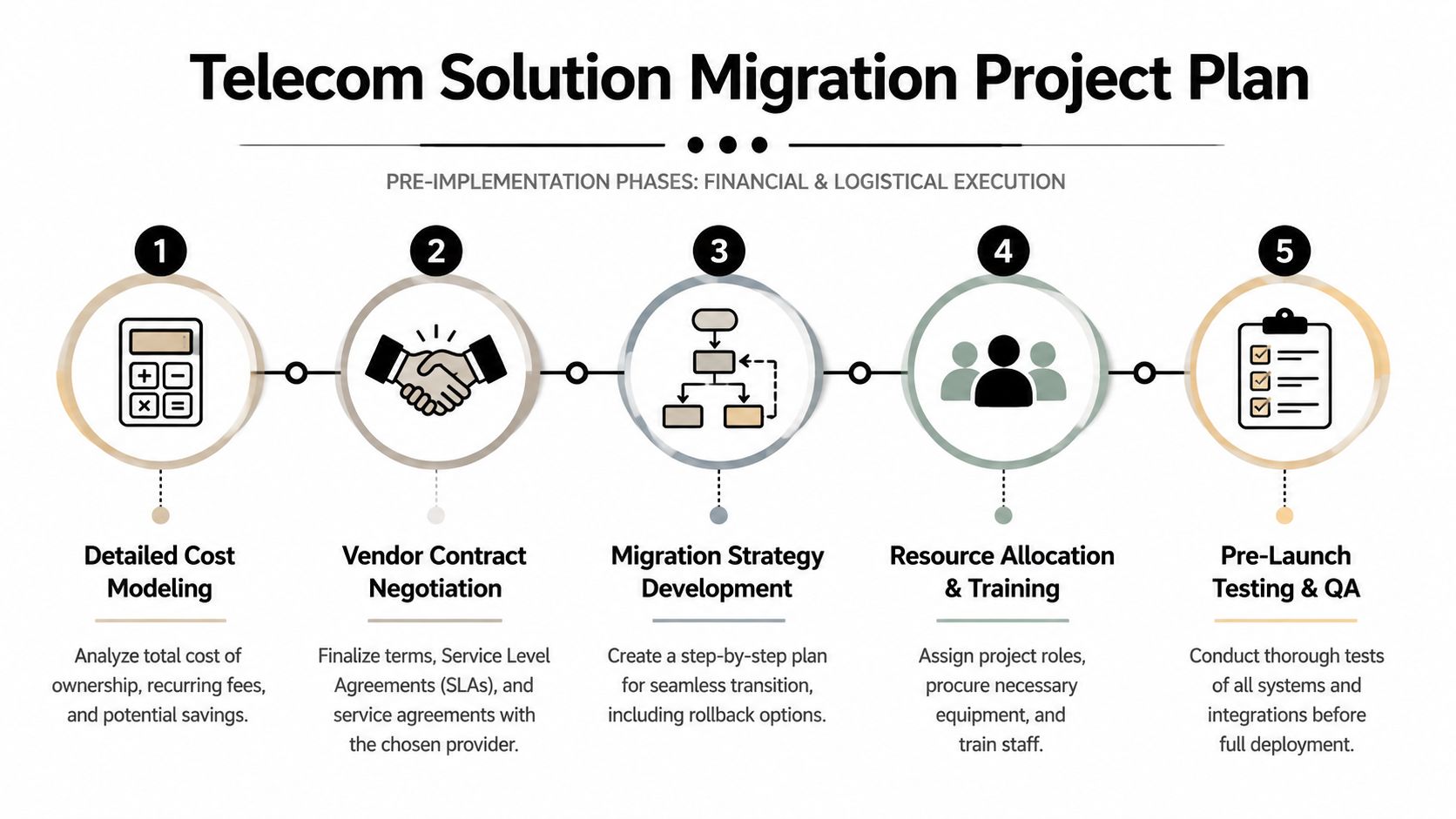
The proposal with the lowest monthly charge often becomes the most expensive project. Telecom costs hide in professional services, hardware dependencies, early renewals, construction uncertainty, user disruption, and legacy equipment that nobody budgeted to retire properly.
Treat pricing as total cost of ownership, not just recurring service.
Build a real cost model
Separate costs into recurring, one-time, and transition categories. Recurring charges are usually the cleanest line item. Transition costs are where budgets drift.
A useful model includes:
- Recurring service charges: access, voice seats, managed equipment, support tiers, and optional security features.
- One-time implementation costs: installation, activation, cabling remediation, construction, and hardware replacement.
- Internal labor: engineering time, testing, project management, after-hours cutover coverage, and post-launch cleanup.
- Training and adoption: admin training, help desk preparation, end-user communication, and workflow changes.
- Legacy environment costs: temporary overlap, return shipping, contract termination exposure, and storage of retired devices pending final disposition.
The retirement line item needs to be explicit. Old telecom gear doesn’t disappear because a new provider starts billing. Switches, routers, handsets, firewalls, and appliances often remain on-site for rollback, configuration review, or phased shutdown. If you don’t assign responsibility for removal and disposal, they tend to sit in closets, unsecured and undocumented.
There’s also a coordination advantage to planning retirement early. Organizations that coordinate between telecom providers, MSPs, and certified recyclers report 45% to 55% cost savings on disposition through bulk scheduling and optimized logistics compared to ad-hoc removals, according to Cloudtango’s MSP market guidance. That doesn’t just lower cost. It reduces scheduling friction and shrinks the window where retired assets remain accessible.
Choose the migration pattern that fits the business
A phased rollout is safer for distributed environments, but it extends coexistence and operational complexity. A flash cutover compresses the project timeline, but the risk concentration is much higher. Neither approach is universally right.
Use business context to decide:
| Migration approach | Best fit | Main trade-off |
|---|---|---|
| Phased site rollout | Multi-site organizations with mixed contracts and varied readiness | Longer coexistence and more interim support work |
| Department-by-department cutover | Headquarters or campuses with manageable user segmentation | Temporary complexity in call routing and support |
| Flash cutover | Smaller, well-documented environments with tight executive alignment | High pressure on one migration window |
| Parallel run with rollback | Critical operations where interruption cost is high | More hardware overlap and more coordination |
Put governance around the cutover
A good migration plan is specific about ownership. Someone owns carrier coordination. Someone owns internal firewall changes. Someone owns end-user communications. Someone owns asset collection after equipment is powered down. If those assignments are fuzzy, tasks get missed.
Use a RACI matrix and keep it practical. Include telecom provider, internal infrastructure team, security, desktop support, facilities, procurement, and whoever is responsible for retired hardware. Then define milestones that matter operationally, not just contractually:
- Design approval
- Circuit readiness and construction check
- Configuration validation
- Pilot testing
- User acceptance
- Production cutover
- Rollback expiration
- Asset retirement and documentation closure
Field note: The migration isn’t over when users can place calls. It’s over when the rollback window closes, the old hardware is accounted for, and every retired asset has a documented next step.
That final point gets skipped constantly. Teams celebrate go-live, then spend months chasing old devices, unresolved billing, and orphaned equipment.
Closing the Loop with Secure Asset Retirement and Recycling
Most telecom guides stop at installation. That’s where many compliance problems begin.
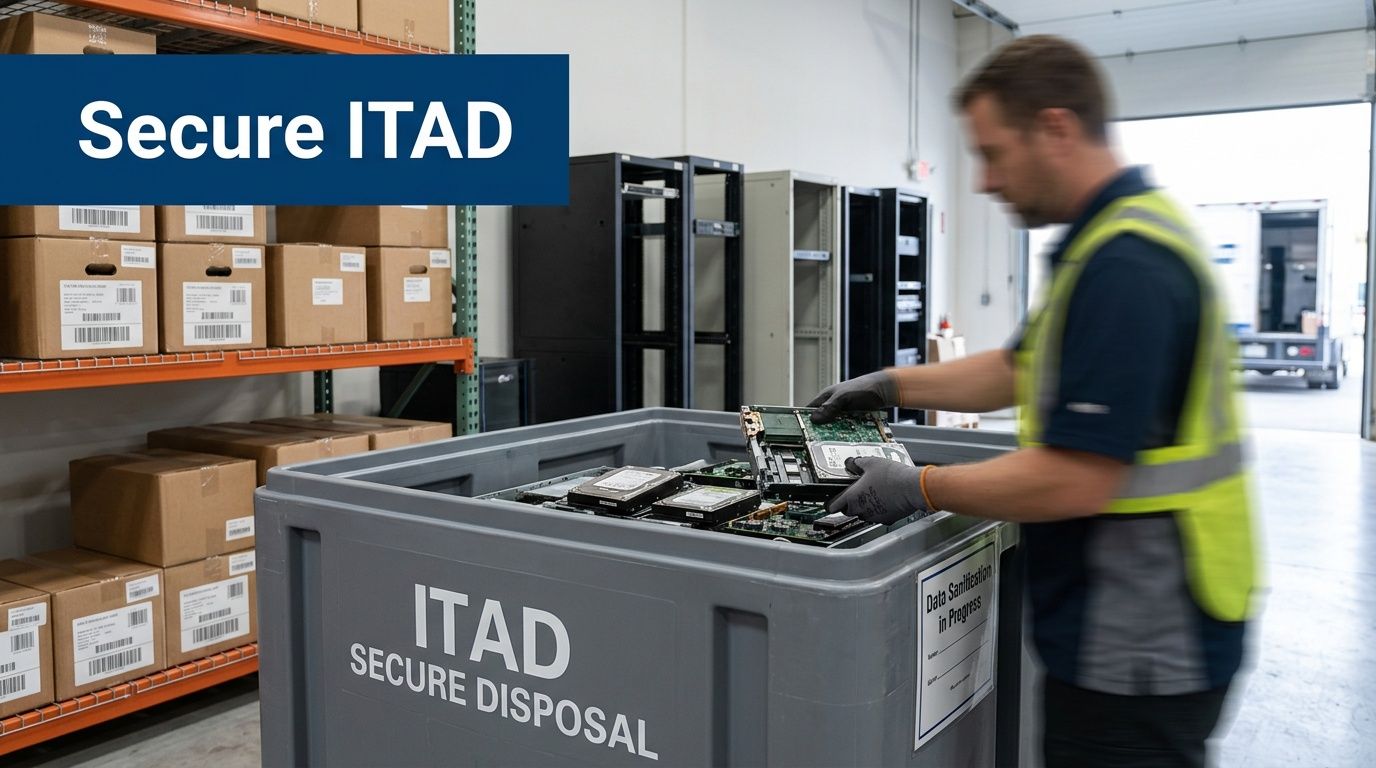
Routers, switches, firewalls, SBCs, VoIP phones, wireless controllers, and conference appliances can hold sensitive information. Even when they don’t store user data in the way a laptop or server does, they often retain configurations, credentials, network maps, certificates, call settings, logs, and management details that you wouldn’t want exposed. Leaving that gear on a shelf or sending it through informal disposal channels creates unnecessary risk.
Treat retirement as part of the project plan
Secure asset retirement should be scheduled during migration planning, not after cutover. That means identifying which devices will be:
- Held briefly for rollback
- Removed immediately after validation
- Returned to a provider or lessor
- Sanitized and remarketed
- Destroyed or recycled because reuse isn’t appropriate
This is also where chain of custody matters. Regulated organizations need proof that equipment moved from production use into a controlled retirement process. Facilities teams, desktop support, and network engineers should all know where equipment goes once it leaves a rack, closet, or branch office.
A disciplined retirement workflow includes labeled collection points, serialized inventory reconciliation, approved packaging for transport, and documented handoff. It also requires a decision about data destruction before equipment starts moving. Waiting until devices pile up in storage usually leads to gaps.
Ask for documentation, not promises
An ITAD partner should provide evidence of process. That includes documented chain of custody, data destruction records appropriate to the device type, and downstream handling that aligns with your environmental and compliance expectations.
If you’re evaluating providers, review their electronics recycling certifications and documented controls before scheduling pickup. Certifications don’t replace due diligence, but they’re a practical starting point for confirming that the recycler operates within a formal framework.
The operational benefit is straightforward. Your telecom team can focus on stabilization and optimization while the retirement stream is handled in a controlled, auditable way.
Old network gear is still part of your security perimeter until it has been sanitized, documented, and removed through a controlled process.
Don’t leave financial value and liability mixed together
Some retired equipment may still have reuse or recovery value. Some won’t. The mistake is mixing potentially remarketable assets with noncompliant e-waste in an untracked holding area. That creates accounting confusion, audit issues, and security exposure all at once.
Clean separation works better. Inventory the gear, determine disposition class, document data handling requirements, and move the assets through approved channels. When teams do this well, they reduce clutter, shorten closeout time, and avoid the recurring “What’s still in that closet?” problem that follows rushed telecom projects for years.
Building a Future-Proof Telecom Strategy
A strong telecom upgrade doesn’t start with provider logos or end at circuit activation. It starts with an honest audit of your environment, moves through disciplined provider vetting, and survives scrutiny on SLAs, security, and compliance. Then it gets executed with a cost model that includes migration friction, not just monthly spend.
The last step is what separates a tidy project from a risky one. You need a plan for retiring old hardware, preserving chain of custody, and closing the loop on equipment that no longer belongs in production.
That’s the answer to the search for telecom solutions for businesses near me. You’re not just buying connectivity. You’re redesigning how your organization communicates, how it handles outages, how it supports distributed operations, and how it retires obsolete technology without creating a security or compliance problem on the way out.
A future-proof strategy manages the entire lifecycle. Procurement, deployment, operations, decommissioning, and documented disposition all belong in the same plan.
If you’re upgrading telecom and need a reliable way to handle the old equipment, Dallas Fortworth Computer Recycling can help you close the project securely. Their team supports organizations that need compliant IT asset disposition, certified data destruction, data center decommissioning, and responsible electronics recycling, so retired telecom hardware doesn’t become the weak link in an otherwise well-run infrastructure upgrade.