
IT Asset Lifecycle Management Your Complete 2026 Guide
You already know the symptoms.
A laptop assigned to an employee who left months ago still appears in one spreadsheet but not another. A network switch is running in a branch office with no clean ownership record. A stack of retired drives sits in a storage room because nobody wants to guess whether they've been wiped, tagged, or approved for pickup. Then audit season gets close, and routine asset tracking suddenly becomes a board-level risk conversation.
That's where IT asset lifecycle management stops being an administrative chore and starts acting like a control system.
Most organizations don't struggle because they lack equipment. They struggle because they lack a disciplined way to govern equipment from request to retirement. Hardware gets bought, deployed, patched, reassigned, forgotten, and eventually removed, but not always through one documented path. The result is predictable. Costs drift upward, support becomes reactive, and the final stage, where sensitive devices leave your control, gets treated like a cleanup task instead of a security event.
From Asset Chaos to Strategic Control
A new IT manager usually inherits the same scene. Procurement has purchase records. The service desk has tickets. Security has endpoint data. Finance has depreciation schedules. Facilities may have a room full of retired gear. None of those views fully match.
That mismatch causes real operational drag. Teams overbuy because they don't trust the inventory they have. They hold onto aging devices because replacement criteria aren't clear. They postpone retirement because secure handoff and documentation aren't fully defined. Then old equipment accumulates in closets, cages, and back offices, carrying both data risk and disposal risk.
What unmanaged assets actually look like
In practice, asset chaos rarely arrives as one dramatic failure. It shows up as:
- Ghost inventory that remains on the books after the device is gone, repurposed, or cannibalized.
- Orphaned endpoints that still have credentials, policies, or software entitlements tied to them.
- Retired equipment in limbo because wiping, chain of custody, and final disposition were never assigned clear ownership.
- Confused refresh decisions made from age alone instead of usage, support status, and business need.
The operational problem quickly becomes a governance problem. If a device handled regulated data, then retirement without documentation isn't just sloppy. It's indefensible.
Old devices don't become low risk just because they're unplugged. In many environments, they become harder to account for the moment they leave active use.
That's why mature teams treat lifecycle management as a business process, not a purchasing process. They don't just ask what to buy. They ask how the asset will be tracked, maintained, reassigned, retired, and documented all the way through disposition.
Why this matters beyond IT
A disciplined lifecycle approach also changes how leadership sees IT. Instead of a cost center that reacts to failures, IT becomes the function that controls spend, reduces exposure, and closes the loop on physical technology risk. That includes the environmental side of retirement, where secure handling and responsible downstream processing need to work together. If you're tightening your end-of-life process, it helps to understand the broader business benefits of e-waste recycling in the same operating model.
The turning point for most organizations is simple. They stop thinking in terms of devices and start thinking in terms of governed state changes. Once every asset has a known status, a responsible owner, and a documented path to final disposition, asset management starts producing control instead of noise.
What Is IT Asset Lifecycle Management Really
A new manager usually notices the problem when a simple question turns into a week of chasing people. Which laptops are still assigned. Which servers are under support. Which retired devices were wiped and documented properly. If those answers live in procurement emails, help desk tickets, finance records, and someone's spreadsheet, the organization does not have lifecycle management. It has fragmented custody.
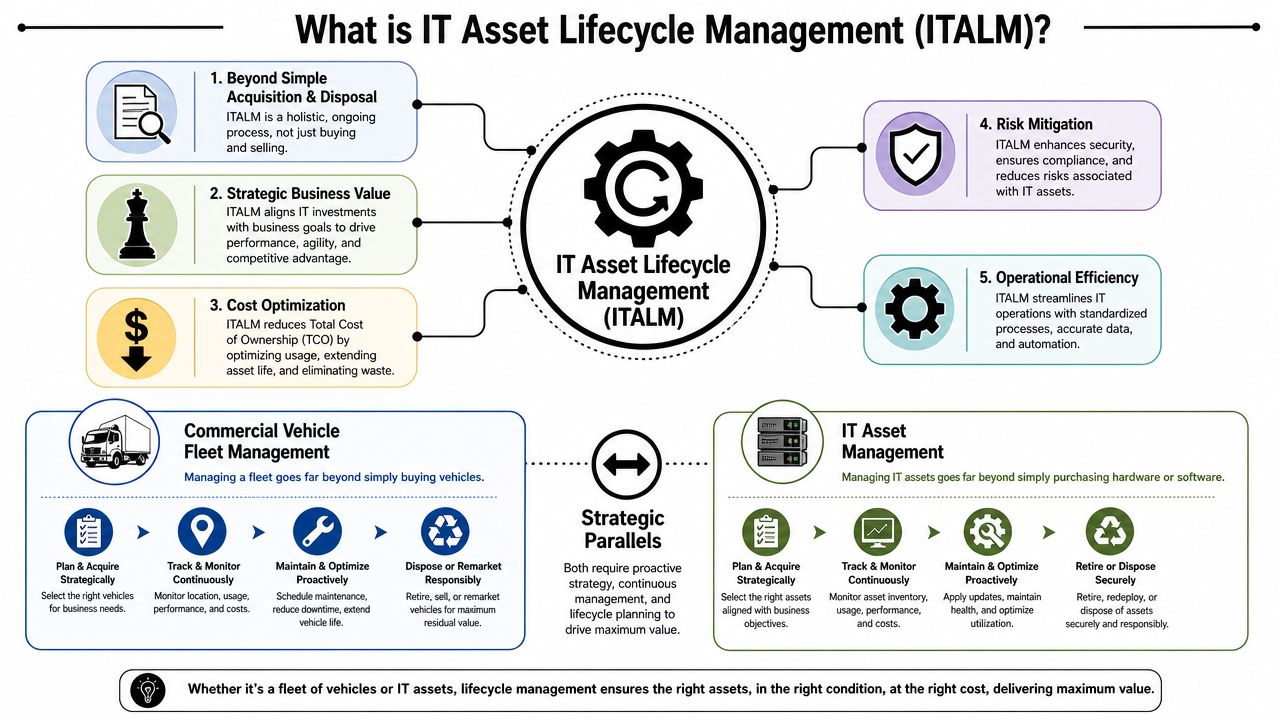
IT asset lifecycle management is the operating discipline that keeps every technology asset under control from request through final retirement. It covers planning, acquisition, active use, support, reassignment, and end-of-life handling under one set of rules, records, and approvals.
It's a management system for cost, risk, and accountability
Teams that treat ITALM as inventory control miss its value. The point is not to count devices. The point is to govern decisions at each state change in an asset's life.
That distinction shows up fast in day-to-day operations. Planning affects standardization, support burden, and long-term replacement cost. Deployment affects security baselines, ownership records, and software licensing accuracy. Maintenance affects uptime, patch compliance, and repair-versus-replace decisions. At the end of life, the pressure shifts to chain of custody, data sanitization, audit evidence, and downstream handling.
Good lifecycle management gives IT, finance, security, and procurement one shared record of what happened, who approved it, and what comes next. Without that structure, each team builds its own version of the asset record. That is where write-offs get messy, refresh cycles slip, and retired equipment creates compliance exposure long after it stopped producing business value.
Why mature organizations treat it as governance
The modern IT risk environment puts more weight on transitions than many managers expect. Running assets is only part of the job. Handing them off, reassigning them, and retiring them cleanly often creates more control failures than daily use.
I have seen this play out in otherwise capable teams. They purchase well, deploy well, and support well, then lose discipline when equipment leaves service. A laptop sitting in a storage room without a wipe record is not a closed ticket. It is an open governance issue.
That is why ITALM needs clear ownership, documented status changes, and evidence that follows the asset through the end of its life. If you want a tighter view of that final handoff, this guide on what IT asset disposition means in practice explains how retirement moves from a physical task to an auditable business process.
Operational view: Good ITALM turns one-time purchases into controlled workflows with clear ownership, support decisions, retirement checkpoints, and proof that the asset is actually out of the organization's risk perimeter.
The five-stage lens
A practical way to judge any asset program is to ask five questions:
- Planning. Is there a valid business need, and does the asset fit technical and policy standards?
- Acquisition. Were the right model, terms, warranty, and support path approved?
- Operation. Who is using it, where is it, and what business service depends on it?
- Maintenance. Is it still secure, supportable, and worth continued investment?
- Disposition. Can the organization prove sanitization, chain of custody, and final retirement?
Many guides stop at disposal. Strong programs do not. They treat disposition as the point where governance is tested, because at that stage, records, security controls, compliance obligations, and vendor accountability all have to hold up under audit. An asset's life is only complete when the organization can prove that retirement was handled correctly.
The Five Stages of the IT Asset Lifecycle
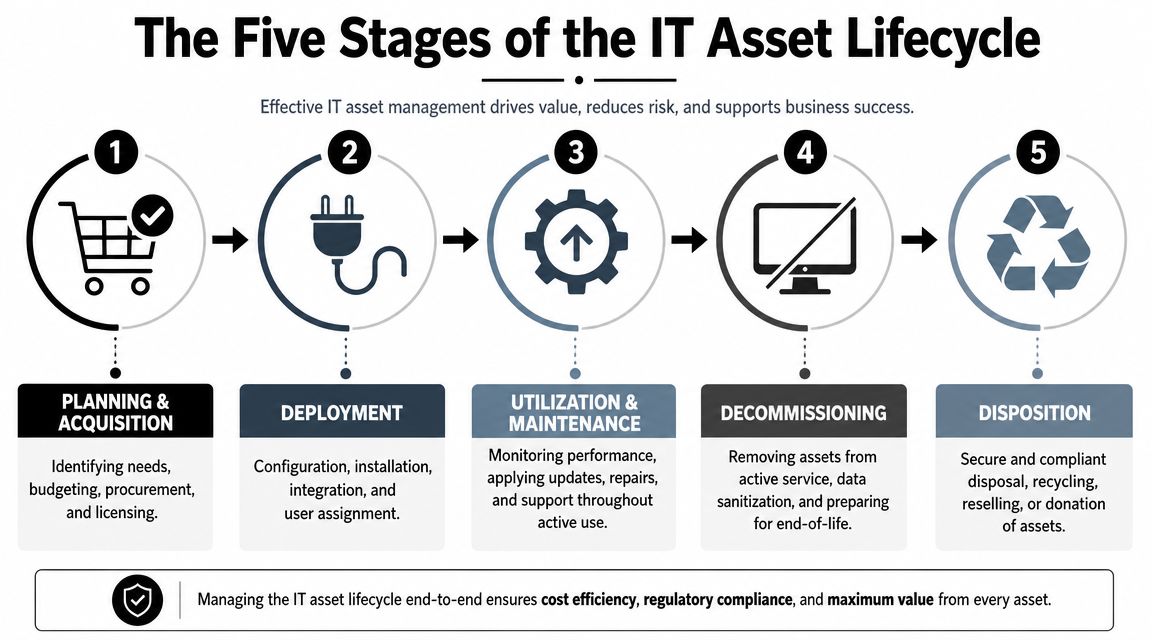
A lifecycle model only works when each stage has a clear objective and exit criteria. Teams get into trouble when assets move forward informally, especially between active use and retirement. The five stages below create a practical operating rhythm.
Planning and acquisition
The first stage decides whether the organization is setting itself up for control or for cleanup later. Planning should define business need, technical standards, support expectations, software compatibility, warranty terms, and retirement path before the order is placed.
Good planning also narrows your hardware catalog. If every department buys a different model because it was available or convenient, support complexity rises immediately. Standardization makes deployment easier, patching cleaner, and replacement decisions faster later on.
Common mistakes in this stage include buying for unit price instead of total lifecycle fit, ignoring downstream disposal requirements, and failing to assign ownership at the time of request.
Deployment
Deployment is where an asset becomes operational. This is more than unboxing and handing it over. It includes imaging, configuration, identity assignment, tagging, encryption, enrollment in endpoint tools, and a clean update of the central asset record.
If the deployment process is weak, the organization starts active use with incomplete data. That missing information follows the asset for years. By the time retirement comes, nobody is fully certain who used the device, what data classes touched it, or what software entitlements are still attached.
A clean deployment checklist usually includes:
- User assignment tied to a named person, function, or location.
- Security baseline including encryption, patch status, and endpoint controls.
- Asset record completion with serial, tag, model, purchase data, and support details.
- Network and software registration so the device is visible to support and security teams.
Utilization and maintenance
This is the longest stage, and it's where most of the value is either realized or wasted. Assets in service need continuous monitoring, routine patching, incident support, repairs, and periodic review of whether they still fit business need.
The important shift is to evaluate assets by evidence, not habit. Modern ITALM frameworks emphasize that retirement decisions should be driven by data such as performance degradation or end-of-support status, not just age, as explained in Virima's guide to asset lifecycle management.
That principle changes refresh discussions. A device isn't automatically done because it reached a calendar milestone. It should be replaced when supportability, security posture, or operating cost no longer make sense.
Refresh schedules should be informed by condition and risk. Calendar age is only one signal.
Decommissioning
Decommissioning is the controlled exit from active service. During this phase, teams remove the asset from production use, preserve required records, revoke access, recover licenses where applicable, and prepare the device for sanitization.
A common failure here is treating decommissioning as identical to disposition. It isn't. Decommissioning means the business has stopped using the asset. Disposition means the organization has completed the approved end-of-life path with evidence.
For infrastructure teams, this stage may also include rack removal, configuration backup where appropriate, dependency checks, and reconciliation against the configuration database.
If you're handling aging hardware in bulk, a dedicated process for end-of-life IT equipment helps define the difference between taking a system offline and fully retiring it.
Disposition
Disposition closes the lifecycle. At this point the organization needs documented proof of what happened next: reuse, refurbishment, resale, recycling, or destruction. Data-bearing assets require verified sanitization or destruction before any downstream movement.
This stage is where asset records should be finalized, not abandoned. If the only proof you have is that a pickup happened, you do not have a closed lifecycle.
IT asset lifecycle stages and key actions
| Stage | Primary Objective | Key Actions |
|---|---|---|
| Planning and acquisition | Buy the right asset under the right standards | Define need, approve standards, budget, vendor selection, ownership assignment |
| Deployment | Put the asset into service with complete records | Configure, secure, tag, assign, enroll in management tools, document status |
| Utilization and maintenance | Keep the asset productive and supportable | Monitor health, patch, repair, review usage, manage warranty and support |
| Decommissioning | Remove the asset from active use safely | Revoke access, recover licenses, update records, isolate for retirement workflow |
| Disposition | End the lifecycle with proof | Sanitize or destroy data, document chain of custody, reconcile inventory, route for reuse or recycling |
Building Your ITALM Governance and Policy
Most lifecycle problems aren't caused by missing tools. They're caused by missing rules.
An organization can buy a CMDB, run endpoint management, and still fail at asset control if no one has defined who approves standards, who updates records, who authorizes retirement, and who signs off on final disposition. Governance is what turns scattered activities into a program.
Start with one source of truth
Every serious ITALM program needs a central asset registry. Not a collection of exports. Not a purchasing report plus a service desk report plus a storage-room spreadsheet. One system of record with accountable updates and defined status values.
That registry should answer basic operational questions quickly:
- Ownership and location. Who uses the asset, and where is it now?
- Lifecycle state. Is it planned, deployed, in repair, pending retirement, or disposed?
- Security relevance. Did it store sensitive data, and what handling policy applies?
- Financial and support context. What was bought, when, and under which support terms?
Industry data shows why this matters. 87% of organizations say poor asset visibility increases security risk, according to Cloudaware's review of IT asset lifecycle management. That's the direct link between weak inventory discipline and weak security posture.
Policy has to define handoffs
A workable policy doesn't need to be long. It needs to be enforceable. The strongest lifecycle policies usually define handoffs, because handoffs are where evidence disappears.
A practical governance model assigns clear responsibility to specific roles:
- Procurement or sourcing controls approved vendors, standards, and purchase records.
- IT operations owns deployment, tagging, maintenance workflows, and state changes.
- Security defines sanitization requirements and retirement controls for data-bearing assets.
- Finance reconciles capitalization, write-downs, and retirement records.
- Business managers confirm user assignment and timely return of equipment.
If nobody owns the transition between “in use” and “retired,” the organization is relying on memory at the highest-risk point of the lifecycle.
That policy should also require documentation for reassignment, storage, loaner use, remote returns, and final removal from service. Without those controls, even a good inventory tool degrades into a partial truth.
Auditability is built, not added later
Teams often think about evidence when an audit is already coming. By then, it's mostly too late. Auditability is created by routine documentation, not by cleanup.
That's why I push managers to build lifecycle governance around routine actions rather than annual reviews. Every change in status should trigger an expected record update. Every retirement request should trigger an approved disposition path. If you want a practical baseline, these IT asset management best practices align well with the controls most IT leaders need to formalize first.
A policy that no one follows is shelfware. A policy tied to actual workflows becomes a control.
The Final Stage Done Right Secure Disposition
A laptop leaves the company, but the record stays open. A server is pulled from a rack, but nobody can show who approved the retirement. A batch of drives goes to a recycler, and six months later audit asks for proof of sanitization. That is where weak lifecycle management turns into a governance problem.
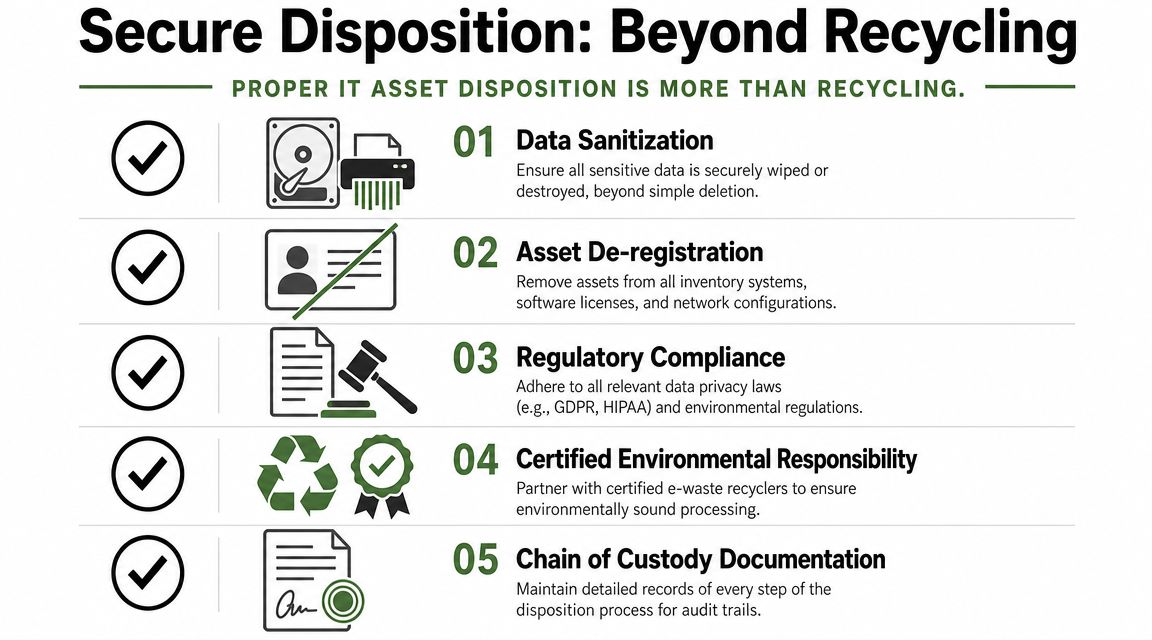
Many teams treat the last stage as cleanup. It is a control point. Disposition decides whether an asset exits your environment with documented authorization, verified data handling, and a record that will hold up under audit.
Why programs break down at the end
Procurement gets attention because money is leaving the business. Deployment gets attention because users are waiting. Retirement often happens out of sight, usually in storage rooms, shipping areas, or one-off cleanup projects. That lower visibility creates higher risk.
The problem is not just whether equipment gets recycled. The problem is whether the organization can prove the full disposition path. That means who released the asset, how data was sanitized, where custody changed, what downstream action was approved, and when the inventory record was closed. If any of that is missing, the lifecycle record is incomplete.
This is also where many guides stop too early. They say "disposal" and move on. In practice, disposition is the auditable process that protects the business from data exposure, policy failure, and avoidable audit findings.
What secure disposition includes
A sound process uses several controls in sequence.
- Approved intake and segregation. Retired assets should enter a controlled workflow, not sit in mixed storage with active or unverified equipment.
- Data sanitization decisioning. Some media can be wiped and verified. Some should be shredded or otherwise destroyed based on asset type, condition, and data sensitivity.
- De-registration. Remove devices from inventory, endpoint tools, service contracts, and any system that still treats them as active.
- Transfer tracking. Every custody change should be documented with dates, parties, and asset identifiers.
- Final disposition reporting. The organization should be able to show whether each asset was reused, resold, recycled, or destroyed.
One control deserves special attention. Chain of custody documentation gives you defensible evidence for the point where equipment leaves internal control. Without that record, teams end up rebuilding the story from spreadsheets, email, and vendor pickups.
Risk test: If audit selects one retired laptop or one decommissioned server, your team should be able to produce the approval, serial-level handling record, transfer history, and final processing evidence in minutes.
Wiping, destruction, and downstream proof
New IT managers often ask whether wiping or physical destruction is the better choice. The answer depends on the asset and the policy. Verified wiping preserves remarketing or reuse value. Physical destruction makes more sense for failed media, highly sensitive systems, and cases where verification is not reliable enough. Good programs do not force one method onto every asset class.
The same trade-off applies after sanitization. Refurbishment and resale can recover value, but only if the organization has documented approval, clean asset records, and confidence in the sanitization method. Recycling is appropriate for equipment that has no further use, but it still requires traceable handling and environmental accountability.
When I review a disposition provider, I look for operational evidence, not broad promises:
- How do they record intake at the serial or asset-tag level?
- Which sanitization and destruction methods do they support for different media types?
- What proof do they return after processing?
- How do they control downstream vendors and final material handling?
- Can they handle specialized categories such as data center gear or regulated equipment?
Dallas Fortworth Computer Recycling is one example of a provider in this space that offers ITAD and electronics recycling services, along with documented handling and data destruction options. The point is not the brand name. The point is choosing a partner whose process can stand up to internal review, legal scrutiny, and external audit.
Disposition is where control becomes visible
A disciplined final stage reduces breach exposure, closes inventory cleanly, clears out dormant equipment, and gives finance and security a retirement record they can trust. It also gives leadership a more accurate picture of what the organization still owns, what has left service, and what risk remains in storage.
This is why secure retirement should be treated as a strategic advantage. The organizations that handle disposition well do not just remove old equipment. They keep custody clear, data handling provable, and compliance risk under control until the asset is fully and formally out of the business.
ITALM in the Real World Sector Specific Examples
Theory gets easier when you can see where it breaks in live environments. The same lifecycle framework works across industries, but the pressure points differ.

Enterprise remote workforce
A mid-size enterprise with remote staff usually feels lifecycle stress at the endpoint layer first. Laptops are shipped, reassigned, returned late, or not returned cleanly after role changes. The inventory challenge isn't technical. It's procedural.
The strongest teams build a closed-loop process around employee events. New hire means approved device standard, recorded assignment, and baseline configuration. Role change means reassessment of device need and access. Separation means retrieval, de-registration, sanitization, and status closure.
The hard question is refresh timing. A critical real-world ITALM issue is when to replace assets under budget pressure and security risk, and the better decision balances total cost of ownership against the risk of outdated hardware, as explained in HP's discussion of the IT asset lifecycle. In a remote fleet, that usually means replacing devices based on supportability, user impact, and risk exposure, not because a fixed anniversary date arrived.
Healthcare and laboratory settings
Hospitals and labs face a different problem. A retired device may not look important to a non-clinical observer, but it can still hold regulated information or sit inside a workflow that affects patient care and documentation.
That changes the retirement threshold. Biomedical devices, workstations tied to diagnostic environments, and storage media from clinical systems need more than general IT cleanup. Teams need clear decommission approvals, secure data handling, and records that stand up to compliance review. Disposition also has to account for specialized equipment, not just standard endpoints.
A practical mistake here is mixing regulated and non-regulated retirement streams. The more defensible approach is to separate them early and apply stricter documentation by default.
Government and public sector
Public-sector teams usually have less tolerance for undocumented movement. Chain of custody, approved vendors, and records retention all carry more weight because external review is part of normal operations.
For these environments, the final stage is often the make-or-break stage. A device can be removed from service correctly and still create exposure if final handling records are incomplete. Strong agencies treat retirement like a controlled records event. Equipment is not merely taken away. It is transferred, verified, reconciled, and closed.
Public-sector asset management gets stronger when every retirement record can answer three questions fast: what left service, who handled it next, and what proof closed the file.
Nonprofits and budget-constrained organizations
Nonprofits usually need the same controls with tighter financial constraints. They can't afford waste, but they also can't afford casual handling of retired equipment. That makes reuse and refurbishment attractive when policy allows, especially for non-sensitive or properly sanitized assets.
The key is not to confuse thrift with informality. Even when an organization extends asset life or participates in donation programs, it still needs inventory discipline, decommission approval, and proof of secure handling before an asset changes hands.
In these environments, lifecycle maturity often starts with simple gains: fewer duplicate purchases, better reassignment before new buying, and a documented path for equipment that no longer fits primary use. The organizations that manage this well don't necessarily spend more. They govern transitions better.
Your Path to Strategic Asset Mastery
Good IT asset lifecycle management brings order to a part of IT that often becomes fragmented by habit. Procurement buys. Operations deploys. Security patches. Finance depreciates. Then retirement arrives and everyone assumes someone else owns the last mile.
That's the gap to close.
A mature program treats every asset as part of one controlled journey. It begins with planning, gains discipline through standard deployment and maintenance, and ends only when the organization has proof of secure retirement and final disposition. That approach reduces waste, improves operational predictability, and gives leadership a defensible position when auditors, regulators, or internal stakeholders ask what happened to specific equipment.
What to focus on first
If you're building or repairing your program, start with the controls that improve visibility and handoffs:
- Clean up the asset registry so one lifecycle state exists for every tracked asset.
- Standardize deployment and reassignment workflows so records stay reliable after day one.
- Set refresh criteria based on support, performance, and risk instead of habit.
- Formalize retirement and disposition ownership so devices don't stall in storage limbo.
The biggest shift in mindset is this. The lifecycle does not end when equipment stops serving a user. It ends when the organization can prove the asset was removed, sanitized, transferred, and processed correctly.
Why the last stage deserves the most scrutiny
Leaders often spend more energy on what to buy than on how to retire it. That's backwards. The final stage carries concentrated risk because the asset may still hold data, still appear in financial records, and still create environmental liability if downstream handling isn't controlled.
The strongest lifecycle programs don't treat disposition as a cleanup task. They treat it as the final audit point that validates every upstream control. If planning was disciplined, deployment was documented, and maintenance was tracked, then disposition should close the loop with equal rigor.
That's where strategic asset mastery really shows up. Not in how much gear you own, but in how completely you control its path from request to documented exit.
If your team needs a partner for the last mile of the lifecycle, Dallas Fortworth Computer Recycling works with businesses, healthcare organizations, government entities, and nonprofits that need secure IT asset disposition, certified data destruction, and documented chain-of-custody support for retired technology.