
A Practical Guide to the Data Center Decommissioning Process
The data center decommissioning process is the systematic shutdown and removal of all IT infrastructure from a facility. This is a massive undertaking, covering everything from inventory and data destruction to logistics and compliant recycling. When done right, what starts as a high-risk technical project becomes a secure, orderly, and financially smart transition.
Why Your Decommissioning Process Needs a Real Strategy

Moving out of a data center is so much more than just powering down servers and packing boxes. It’s a high-stakes project driven by major business decisions—a migration to the cloud, consolidation after a merger, or an upgrade to more efficient hardware.
Without a formal strategy, a controlled exit can quickly spiral into a chaotic and expensive mess.
Think of it as building a data center, but in reverse. Every single connection, piece of hardware, and byte of data that was so carefully installed now needs to be accounted for, unplugged, and securely removed. One small misstep can expose your entire organization to serious consequences.
The Real Risks of an Unplanned Exit
An ad-hoc approach is a recipe for disaster. We're not just talking about technical hiccups; the risks have serious financial and legal fallout that can haunt the business for years. Trying to handle this internally without specialized experience is like asking your accountant to rewire the building—critical details will be missed.
Key Risks in Data Center Decommissioning
Let's break down exactly what's at stake. The table below outlines the primary risk categories we see in the field and the proven strategies to get ahead of them.
| Risk Category | Potential Impact | Mitigation Strategy |
|---|---|---|
| Data Security | Catastrophic data breach from lost or improperly sanitized drives. Reputational ruin. | Implement certified data destruction (wiping, degaussing, shredding) with a documented chain-of-custody for every single asset. |
| Regulatory Compliance | Millions in fines for violating HIPAA, GLBA, SOX, or GDPR. Legal action and brand damage. | Partner with a certified ITAD vendor who understands specific compliance requirements and provides Certificates of Destruction. |
| Financial Loss | Missed value recovery from resalable assets. Inflated project costs from inefficient logistics and poor planning. | Conduct a thorough asset inventory and value assessment. Work with a partner who has established remarketing channels for used equipment. |
| Operational Disruption | Unplanned downtime for interconnected systems. Project delays that impact migration timelines and budgets. | Develop a detailed project plan with clear dependencies, stakeholder roles, and phased shutdown schedules. |
| Environmental Liability | Fines for improper e-waste disposal. Negative impact on corporate sustainability and ESG goals. | Ensure all non-reusable electronics are recycled through an R2 or e-Stewards certified facility. |
Each of these risks can derail a project, but a strategic approach turns them into manageable tasks.
The reality is that decommissioning is a specialized field. Just as you'd hire an expert to build your data center, you need a certified partner to dismantle it. This ensures every asset is tracked, every byte of data is destroyed, and every piece of hardware is handled in a compliant and environmentally responsible manner.
The demand for these specialized services is exploding. The global data center decommissioning market is projected to hit USD 19.94 billion by 2032. This growth is a direct result of cloud migration, stricter data privacy laws, and a corporate focus on sustainability.
Ultimately, a strategic process is about mitigating risk and maximizing value. By working with experienced IT asset disposition companies, you can transform a daunting operational headache into a secure, compliant, and even profitable venture.
Building Your Decommissioning Blueprint and Team

A successful data center decommissioning is won long before a single server is unplugged. I've seen it time and again: the most common failures—scope creep, budget overruns, and security gaps—almost always trace back to a weak plan. Rushing into the physical work without a solid blueprint is a direct path to costly, avoidable mistakes.
This initial phase is where you translate a high-level goal, like "move to the cloud," into a concrete, actionable project. It’s all about building the foundation that will support every step that follows, from asset tagging to final recycling. Without it, you just have a collection of disconnected, chaotic tasks.
Defining Your Project Scope and Goals
First things first, you have to ask the most important question: What does success actually look like for this project? The answer is almost never as simple as "the data center is empty." A well-defined scope goes beyond the obvious to establish measurable goals that align with what the business is trying to achieve.
Are you trying to maximize the financial return on retired assets? Is the primary driver a hard deadline to get out of a leased facility? Or is your number one priority bulletproof data security and compliance? Your answers here will dictate every single decision you make down the line.
Think about which of these drivers is most important for your project:
- Value Recovery: The main goal is to offset project costs by reselling functional equipment. This means you need a meticulous plan for testing and grading assets early in the process.
- Speed and Efficiency: A tight timeline is breathing down your neck. This dictates a focus on streamlined logistics and might mean prioritizing on-site data destruction to avoid transportation delays.
- Risk Mitigation: If you're in a highly regulated industry like healthcare or finance, success means zero data security incidents and perfect, audit-ready documentation. No exceptions.
Once your goals are crystal clear, it's time to draft a project charter. This isn't just corporate busywork; it's a vital document that outlines the project's scope, objectives, budget, key players, and high-level timeline. Think of it as your North Star, keeping the team aligned and preventing the dreaded scope creep that derails even the best-laid plans.
A well-crafted project charter is your best defense against mid-project changes and misunderstandings. It forces every stakeholder to agree on the mission from day one, turning ambiguity into a shared understanding of the finish line.
Assembling Your Cross-Functional Dream Team
No single department can pull off a data center decommissioning alone. It is fundamentally a team sport that requires expertise from all corners of the organization, plus a seasoned external ITAD partner. Assembling this team early is absolutely critical for a smooth operation.
Your internal team acts as the core decision-making body. They bring the institutional knowledge and make sure the project aligns with company policies. Each person brings a necessary perspective to the table—the legal team's input on data retention policies is just as crucial as the IT team's knowledge of server dependencies.
Here’s a look at who you’ll need at the table and why.
Decommissioning Project Roles and Responsibilities
Bringing together the right people from these departments ensures all bases are covered, from the technical details to the legal fine print.
| Role/Department | Primary Responsibilities | Key Contribution |
|---|---|---|
| IT/Infrastructure | Identifies all hardware, maps system dependencies, and manages data migration. | Provides the technical expertise to safely power down systems without disrupting live operations. |
| Information Security | Defines data destruction standards (e.g., NIST 800-88), oversees chain of custody, and validates compliance. | Ensures no sensitive data leaves the facility intact, protecting the company from a breach. |
| Finance/Procurement | Manages the project budget, tracks asset value, and handles vendor contracts. | Focuses on cost control, maximizing ROI from resold equipment, and ensuring financial accountability. |
| Legal/Compliance | Advises on regulatory requirements (HIPAA, GDPR, etc.) and data retention policies. | Mitigates legal risk by ensuring the entire process adheres to industry and governmental regulations. |
| Facilities Management | Coordinates physical site access, power-down sequencing, and site restoration. | Manages the building logistics, from loading dock access to ensuring the empty space meets lease-end conditions. |
Having this team in place from the start prevents last-minute surprises and ensures a much smoother execution.
The Power of a Communication Plan
With a diverse team in place, a formal communication plan is non-negotiable. This plan needs to define how, when, and with whom information will be shared. It should establish a regular meeting schedule, a clear protocol for escalating issues, and a central spot for all project documentation.
This structure prevents silos from forming. It makes sure the finance team knows about logistical delays and that the IT team understands the security team's documentation requirements.
When everyone is informed, the entire data center decommissioning process runs more efficiently, with fewer surprises and a much higher chance of success. Choosing an experienced ITAD partner that provides certified services, like those following R2 standards for electronics recycling, can streamline this even further, as they bring proven processes and reporting to the table.
Mapping Your Assets for a Flawless Takedown
You can't secure what you can't see. That simple truth is the absolute cornerstone of a successful data center decommissioning. Before a single cable gets unplugged, you need a comprehensive, detailed, and completely accurate inventory of every single asset in that facility.
This isn’t just a box-checking exercise; it’s a forensic audit that lays the foundation for your data security, financial recovery, and regulatory compliance. Rushing this or doing a half-hearted job is like navigating a minefield blindfolded. You're almost guaranteed to miss something critical, whether it’s a forgotten server holding sensitive data or a valuable piece of networking gear that gets mistakenly scrapped.
Starting the Comprehensive Audit
The first real move is a two-pronged audit: one physical, one digital. A physical walkthrough is non-negotiable. Your team needs to be on the floor, armed with scanners and a clear plan, ready to touch every rack, cabinet, and corner of the data center.
This is where you establish ground truth. Every server, switch, PDU, and storage array must be identified. As they work, your team will build a master asset list—a spreadsheet or database that becomes the single source of truth for the entire project.
At a minimum, your initial physical inventory needs to capture:
- Asset Type: Server, Switch, Firewall, Storage Array, etc.
- Manufacturer and Model: Dell PowerEdge R740, Cisco Catalyst 9300, etc.
- Serial Number: The unique identifier for tracking and chain of custody.
- Physical Location: Data Center ID, Row, Rack Number, and U-position.
While that's happening, a digital discovery has to run in parallel. Use your existing asset management tools and network scanners to pull configuration details, software licenses, and system dependencies. The goal is to cross-reference the digital record with the physical one, immediately flagging any "ghost" servers or discrepancies that need to be investigated.
A common pitfall we see is businesses relying solely on an outdated CMDB or old inventory spreadsheets. In our experience, up to 20% of assets recorded in these systems are either physically missing or have been moved without documentation. A physical audit is the only way to get a true picture.
Building the Master Asset List
Once you have the raw data from your audits, the real work begins: building the master asset list. This is much more than a list of serial numbers; it’s an intelligent map of your entire infrastructure. For each asset, you need to enrich the basic information with critical operational and financial data.
This means adding columns for things like:
- Hardware Configuration: CPU type, RAM amount, number and type of hard drives.
- Data Sensitivity: A classification (e.g., Public, Internal, Confidential, Restricted) that flags the asset for specific data destruction protocols.
- Dependencies: What other systems or applications rely on this piece of hardware?
- Disposition Plan: The intended outcome for the asset—Resale, Recycle, or Redeploy.
This detailed list becomes your playbook. For example, a server tagged with "Confidential" data and a "Resale" disposition plan immediately signals that it requires on-site, NIST 800-88 compliant data erasure before it can leave the facility. Without that level of detail, that same server could easily be shipped off-site with sensitive data still intact, creating a massive security risk.
The Critical Role of Asset Tagging
With your master list taking shape, the next step is to physically tag every single item. This creates an unbreakable link between the physical asset and its digital record in your inventory. Using serialized, tamper-evident asset tags is crucial for establishing a secure chain of custody.
Each tag's unique number is scanned and logged against the corresponding serial number in your master list. From this point forward, every time that asset is moved, sanitized, or processed, its tag is scanned, creating a time-stamped, auditable trail.
This meticulous tracking prevents assets from "walking away" and gives you the hard documentation needed to prove compliance during an audit. It’s the evidence that shows you handled every piece of equipment—especially those containing data—according to your security policies and regulatory requirements.
For a deeper dive into the specifics of equipment retirement, you can check out our comprehensive server decommissioning checklist that details these steps.
This mapping and tagging phase is intense and detail-oriented, but its value cannot be overstated. It transforms a chaotic collection of hardware into a manageable, trackable, and secure inventory, setting the stage for a flawless and risk-free takedown.
Executing the Teardown with Precision
With a solid plan and a complete asset map in hand, it's time to shift from strategy to the hands-on work. This is the physical teardown, where precision and sticking to the plan are everything. Every move—from powering down the first server to loading the last pallet—has to be deliberate, documented, and secure. Anything less risks operational chaos and data security failures.
The real work starts with the final, scheduled migration of any live workloads. This is a carefully choreographed dance, usually done during off-peak hours to keep business impact at zero. Once the last byte of production data is safely in its new home, the technical shutdown can get underway, following a strict, predefined order to avoid damaging equipment.
The Systematic Power-Down Sequence
Shutting down a data center isn't like flipping a master switch. It’s the reverse of the power-up process. You have to follow a logical sequence, starting from the applications and moving down the stack to the physical hardware and, finally, the core power infrastructure.
An unplanned shutdown can lead to data corruption or even fry the hardware. For instance, abruptly cutting power to a Storage Area Network (SAN) before its connected servers are properly shut down can corrupt the entire file system—a nightmare scenario even if that data was slated for destruction.
A typical sequence looks like this:
- Application and Service Shutdown: First, terminate all running software and services on the servers.
- Server Power-Down: Gracefully shut down the operating systems of all servers.
- Storage and Network Deactivation: Next, power off storage arrays, SAN switches, and network switches.
- Rack-Level Power Cut: Turn off the Power Distribution Units (PDUs) in each rack.
- Core Infrastructure Shutdown: Finally, decommission the Uninterruptible Power Supplies (UPS) and Computer Room Air Conditioners (CRAC) in coordination with your facilities team.
This methodical approach ensures a clean and safe shutdown, preserving the integrity of any hardware you plan to resell or redeploy.
Ensuring Irreversible Data Destruction
Once the hardware is powered down, the most critical phase begins: certified data destruction. This is a non-negotiable step in any data center decommissioning process. A single drive slipping through the cracks can lead to a catastrophic data breach. Your choice of destruction method must align with the data sensitivity you defined during asset mapping.
The industry benchmark for data sanitization is the NIST 800-88 standard, which outlines three primary ways to make data unrecoverable.
Choosing the right data destruction method is a balance of security requirements, cost, and logistics. For highly sensitive data, on-site physical destruction offers the highest level of assurance by eliminating the chain-of-custody risk associated with transporting live data.
Let's break down the most common methods.
| Destruction Method | Description | Best For | Key Consideration |
|---|---|---|---|
| Data Wiping | Software-based overwriting of data with random characters. | Reusing or reselling drives. | Slower process; requires drives to be functional. |
| Degaussing | Uses a powerful magnetic field to destroy data on magnetic media. | Quick disposal of HDDs. | Ineffective on Solid-State Drives (SSDs). |
| Physical Shredding | Physically destroys the drive into small, irrecoverable pieces. | Highest security needs; damaged or non-functional drives. | Renders the drive completely unusable. |
For many organizations, a hybrid approach works best. For example, functional, high-value servers intended for resale can undergo certified data wiping. You can explore a detailed guide on how to properly wipe a hard drive to understand the technical side of things. Meanwhile, older drives or those containing top-secret data are best handled with on-site shredding.
This workflow shows the foundational asset mapping steps that must happen before the physical teardown, making sure every device is accounted for.
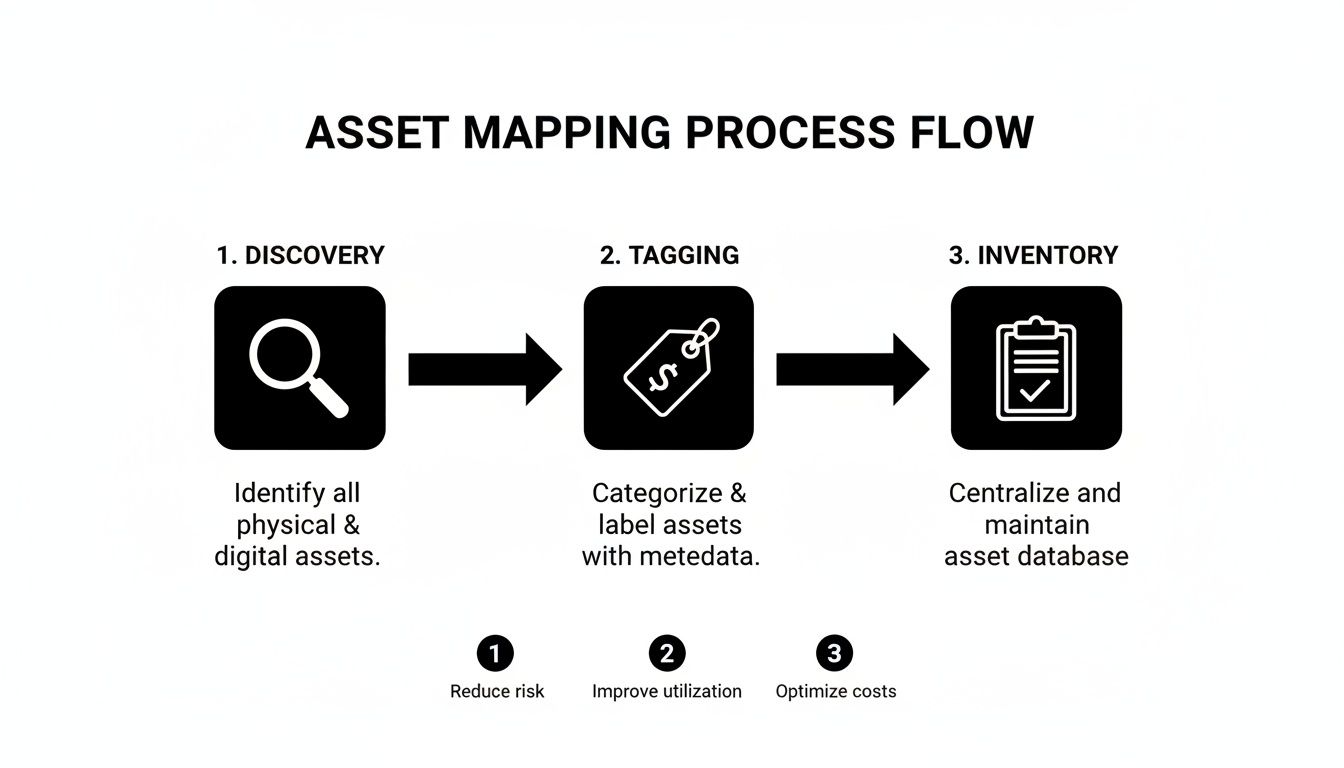
This process visualizes how a structured discovery, tagging, and inventory process creates the reliable master asset list needed for a secure execution.
Mastering Logistics and Secure Transport
Once data has been verifiably destroyed, the physical de-racking and transportation can begin. This is a labor-intensive job that requires specialized equipment and expertise. Mishandling heavy servers can cause injury and damage valuable components, killing their resale potential.
The logistics plan should meticulously detail:
- De-installation: The process of carefully removing servers, switches, and cabling from racks.
- Packing: Using anti-static materials and custom-fit pallets to protect sensitive electronics during transit.
- Secure Transport: Employing dedicated, sealed, and GPS-tracked vehicles to move assets from your site to the ITAD facility.
Every single step must be tracked against your master asset list. As each pallet is packed and loaded, its contents are scanned, maintaining the chain of custody you established with your asset tags. This ensures that the server recorded in Rack 12, U-position 5 is the exact same one received and processed at the recycling facility. Without this level of detail, proving compliant disposition becomes nearly impossible.
Turning Old Assets into Value and Compliance Wins
Once the last server is pulled from the rack and its tag is scanned, the job isn't over. This is where a data center decommissioning shifts from logistics to value recovery and risk mitigation. The goal now is to make sure every single piece of hardware is sorted, evaluated, and sent down a secure, documented path—either for resale or for responsible recycling.
This final stage is all about turning what looks like a massive disposal headache into a win for your budget and your company's reputation. With the right ITAD partner, you can offset project costs and prove your commitment to environmental responsibility.
Sorting Assets for Maximum Value Recovery
Not everything you pull out of a data center is scrap. A surprising amount of hardware, from CPUs and RAM to entire networking switches, still has a healthy value on the secondary market. The first step is to methodically sort and test every asset against your master inventory list.
This is where technicians separate equipment that can be resold from what needs to be broken down. Each piece is tested to determine its functional condition and cosmetic grade.
Based on that hands-on assessment, assets are funneled into three main categories:
- Remarketable: This is the good stuff. Fully functional and cosmetically sound equipment that can be refurbished and find a new home.
- Harvestable: Partially working gear where valuable components—like processors, memory modules, or power supplies—can be salvaged and sold.
- Recyclable: End-of-life or completely non-functional assets that have to be responsibly dismantled and recycled.
The key to getting the best financial return is partnering with an ITAD vendor who has deep and established global resale channels. They know exactly which models are in demand and where, ensuring you get fair market value that can often cover a big chunk of the project's costs.
The Non-Negotiable Need for Certified Recycling
For any equipment that has truly reached the end of its life, calling the local scrap guy is a non-starter. Data center hardware is packed with hazardous materials like lead, mercury, and cadmium. If it's dumped improperly, you're looking at steep environmental fines and a PR nightmare.
That’s why working with an R2 or e-Stewards certified facility is an absolute must. These certifications are the gold standard for electronics recycling, guaranteeing your partner follows strict, audited protocols for:
- Environmental Safety: Proper handling and disposal of all hazardous materials.
- Data Security: Maintaining a secure chain of custody from your door to final disposition.
- Worker Health: Protecting their employees from exposure to harmful substances.
Choosing a certified recycler is your assurance that your e-waste is managed responsibly and won't end up poisoning a landfill somewhere. For businesses wanting to dig deeper, understanding the specifics of certified data center equipment recycling shows just how critical these processes are.
The global e-waste regulatory environment also dictates how this is handled. North America currently leads the data center decommissioning market, driven by the sheer density of facilities—the U.S. alone has over 5,300 data centers—and strong data security and environmental laws. Meanwhile, the Asia-Pacific region is growing fast as new infrastructure comes online. This is why you need a partner who understands the specific compliance rules where you operate, which you can explore further in global market reports on data center decommissioning.
Closing the Loop with Final Documentation
The final piece of any professional data center decommissioning project is a thick folder of paperwork. This isn't just bureaucracy; it's your auditable proof that every asset was handled securely and in full compliance with every relevant regulation. It’s the documentation that lets you sleep at night.
This final report should tie directly back to your master asset list, creating a closed loop for every single tagged item.
Your documentation package absolutely must include:
- Certificates of Data Destruction: An itemized list confirming every data-bearing device was sanitized or physically destroyed according to NIST 800-88 standards.
- Certificates of Recycling: Official proof that all non-reusable assets were processed by a certified recycling facility.
- Detailed Asset Settlement Report: A clear financial breakdown showing the value recovered from resold equipment, with transparent reporting on any revenue-sharing agreements.
- Complete Chain-of-Custody Log: The final, end-to-end record that tracks every asset from its spot in the rack to its ultimate destination.
This documentation isn't a formality—it's your shield. It proves you did your due diligence and protects you from future legal or financial trouble, all while demonstrating a serious commitment to data security and environmental stewardship.
Common Questions About Decommissioning
Even with the most detailed playbook, every decommissioning project brings its own unique set of questions. Here are a few of the most common things we hear from IT and facilities managers, along with some straight-ahead answers.
What Is The Typical Decommissioning Timeline?
This is always the first question, and the honest answer is: it depends. A small project, say cleaning out a few racks in a server closet, might only take a couple of days. But a full-scale facility shutdown with hundreds of servers and tangled dependencies can easily stretch across several weeks or even months.
A few key variables will always dictate your schedule:
- Size and Density: The sheer volume of servers, networking gear, and storage arrays that need to be physically handled.
- Data Destruction Method: On-site shredding is incredibly fast, but if you need multi-pass data wiping, you have to account for the time it takes to process each individual drive.
- Logistical Complexity: Things like site access rules, security checkpoints, and coordinating with building management all add time to the clock.
It's always smart to build some buffer time into your project plan. You never know when you'll run into an unexpected issue.
How Can We Recover Value From Old Equipment?
Many IT leaders are pleasantly surprised to learn that not all retired hardware is just e-waste. Far from it. Functional components like CPUs, RAM, and enterprise networking switches often hold significant value on the secondary market. A good ITAD partner can test, grade, and find a new home for those assets through their remarketing channels.
A transparent, revenue-sharing model is the sign of a trustworthy partner. This ensures you get a fair market return on your resalable equipment, which can often offset a big chunk of the project's total cost.
What Certifications Should We Look For In A Partner?
Choosing the right ITAD partner is probably the most critical decision you'll make, and their certifications are your best tool for vetting them. Don't just take their word for it—ask to see the actual certificates.
Keep an eye out for these essential credentials:
- R2v3 or e-Stewards: These are the gold standards for responsible electronics recycling. They guarantee that your equipment will be handled in an environmentally safe way with secure downstream tracking.
- NAID AAA: This is the benchmark for secure data destruction. It validates a vendor’s process through rigorous, unannounced audits, so you know their security claims are legit.
A partner with these certifications has proven they're committed to handling your assets securely and responsibly.
Can We Witness The Data Destruction?
Absolutely. For organizations with strict security controls or heavy regulatory burdens, nothing provides better peace of mind than seeing the destruction happen with your own eyes. Many ITAD vendors offer on-site services where your team can watch the physical shredding or data wiping as it happens, completely eliminating any chain-of-custody worries for your most critical data.
Navigating the complexities of a data center exit requires a partner with proven experience and a commitment to security. Dallas Fort Worth Computer Recycling offers end-to-end decommissioning services, ensuring every asset is handled with precision, compliance, and accountability. Learn how we can manage your project by visiting us at https://dallasfortworthcomputerrecycling.com.