
Recycling in Austin Texas: Your B2B E-Waste Guide

If you're the IT manager who inherited a locked closet full of retired laptops, failed SSDs, decommissioned switches, and two servers nobody wants to sign off on, you already know the problem. The equipment is out of production, but the risk is still active.
For Austin businesses, retired electronics are rarely just a recycling task. They sit at the intersection of data security, chain of custody, audit readiness, and day-to-day operational drag. A finance laptop with cached reports, a storage array from a clinic, or a firewall pulled during an office move each carries a different disposal requirement. City recycling information usually speaks to residents. It does not answer the questions an Austin IT team has to answer before anything leaves the building.
Austin's sustainability goals matter, and they set the local context. But business e-waste decisions are judged less by good intent and more by documentation, data destruction, and downstream handling. That is why a general recycling program and an IT asset disposition process are not the same thing.
The environmental stakes are still real. The volume and impact of discarded electronics continue to grow, which is why many IT teams start by reviewing the broader environmental impact of electronic waste before they tighten internal disposition procedures.
The practical standard is simple. If an asset ever stored company data, treat disposition as a controlled security and compliance process first, then as a recycling decision.
The E-Waste Challenge for Austin Businesses
It usually starts the same way. A stack of retired laptops is sitting in a locked room after a refresh, two failed switches are still in the rack because nobody wants to own the sign-off, and an office move is coming up fast. At that point, "recycling" is no longer a facilities task. It is an IT risk decision with legal, security, and operational consequences.
That distinction gets missed in Austin. City materials do a decent job covering household recycling, but they do not answer the questions an IT manager has to answer before equipment leaves company control. What data was stored on the asset? Who approved disposition? What chain-of-custody record exists? Where does the material go after pickup? For businesses, those are the questions that matter.
Austin's push toward waste diversion sets the local backdrop, and that is useful context. But municipal progress does not reduce a company's exposure if a decommissioned server leaves without a serial-number inventory, a destruction record, or a recycler that can explain downstream handling.
Practical rule: If an asset ever stored company data, treat disposal as a security event first and a recycling event second.
That rule changes the workflow. Pickup speed stops being the main buying factor. Scrap value becomes secondary. Internal teams sort assets by risk level instead of treating everything with a plug the same way. A display can follow one path. An executive laptop, SAN shelf, or multifunction printer hard drive needs another. If you need a quick primer on the broader harm caused by unmanaged devices, this overview of the environmental consequences of electronic waste provides useful background.
What businesses usually get wrong
Several failure points come up again and again in Austin B2B cleanouts and refresh cycles:
- They let retired assets accumulate. Once equipment sits for months, inventory accuracy drops and ownership gets fuzzy.
- They group low-risk and high-risk devices together. A monitor, a VoIP phone, and a laptop with cached financial data should not move through the same process.
- They choose vendors on payout alone. Higher recovery value means little if the recycler cannot produce destruction records, exception reporting, or a clear downstream chain.
- They treat paperwork as an afterthought. Missing manifests and weak asset logs create problems during audits, cyber reviews, and internal investigations.
Austin businesses do not need another reminder to recycle. They need an ITAD process built for commercial reality: documented custody, defensible data destruction, and logistics that do not create more work for the IT team.
Navigating Austin's E-Waste Regulatory Landscape
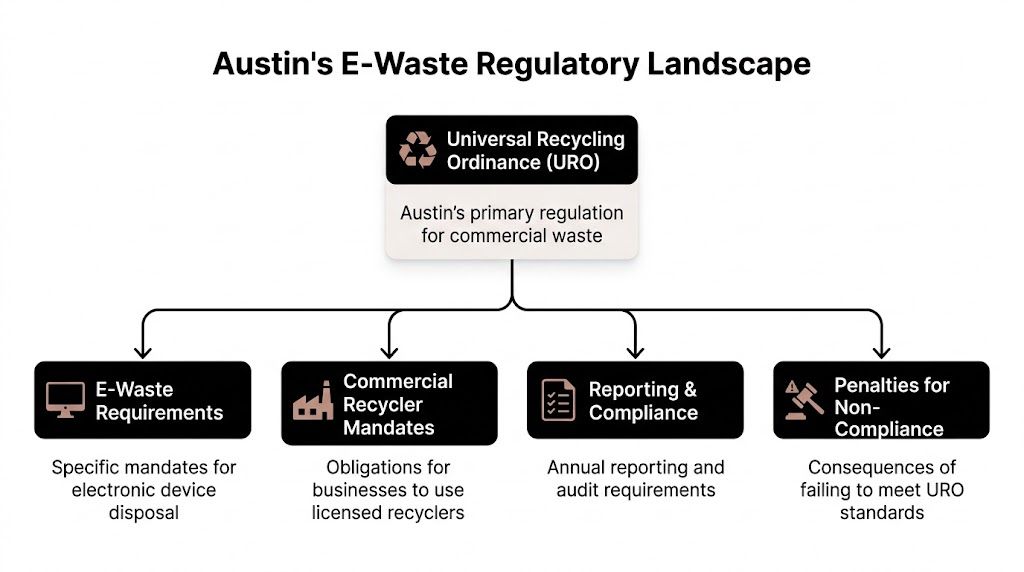
A common Austin scenario looks like this. Facilities has a recycling program in place for the building, IT has a stack of retired laptops in a storage room, and everyone assumes the same vendor can handle both. That assumption creates risk fast. For commercial electronics, city recycling expectations are only one part of the decision. Data security, chain of custody, and downstream handling matter just as much.
Most Austin businesses do not operate inside the same system residents use. Retired business electronics usually move through private haulers, private recyclers, and vendor-managed service chains rather than standard city collection.
An audit covered by the Austin Monitor's reporting on Austin Resource Recovery and zero-waste goals described how much of the city's waste activity sits outside direct city-managed collection. For IT managers, the practical point is clear. Business e-waste is largely your company's responsibility to control, document, and defend.
Where Austin rules help, and where they stop
Austin's commercial recycling rules are useful for one reason. They force waste diversion into normal building operations, which gets property managers, facilities teams, and tenants talking about process instead of treating disposal as an afterthought.
That still leaves a major gap for businesses with retired IT assets.
City rules do not tell your team how to classify data-bearing devices, verify drive destruction, document serial numbers, manage leased equipment, or confirm where material goes after pickup. Those are the issues that matter during a security review, contract dispute, cyber incident, or internal audit. A general recycling vendor may be enough for cardboard and pallets. It is often the wrong fit for laptops, servers, network gear, and copiers with embedded storage.
For Austin businesses, the operating model is straightforward:
- Local policy creates the baseline. Your site is expected to manage waste responsibly.
- Your company controls the electronics process. Vendor selection, approval flow, and documentation stay with you.
- Your records determine whether the process holds up. If the asset list, handoff documents, and destruction evidence are weak, good intentions will not help later.
The compliance framework an IT manager should use
When advising companies in Austin on electronics recycling, I do not start with vendor marketing. I start with scope and exposure. Which devices are leaving service, what data may still be present, who approves release, and which obligations apply beyond city recycling rules.
Use this framework.
Local operating requirements
Austin's commercial recycling expectations affect how buildings and tenants structure waste programs. They matter for coordination with facilities and property management. They do not replace an ITAD process.
Texas-specific electronics rules
State requirements can affect how covered equipment is handled and what service standard your vendor should meet. If your team needs a baseline on Texas electronics recycling requirements and service considerations, review that before scheduling a pickup.
Federal, contract, and sector obligations
Environmental handling rules are only one layer. Privacy obligations, customer contracts, records retention, and industry controls can all affect disposition decisions. Healthcare groups, public entities, schools, and research operations usually need tighter approval and reporting than a standard office cleanout.
A device is not compliant because it left the office. It is compliant when custody, data destruction, and downstream handling are documented well enough to stand up to review.
Questions to settle before you call a recycler
Strong IT managers treat e-waste as a controlled disposition project, not a cleanup event. Settle these questions internally first.
| Internal issue | Why it matters | Who should answer |
|---|---|---|
| Which devices may still contain data | Determines destruction method and handling controls | IT and security |
| Are any assets under lease or return obligations | Prevents unauthorized destruction or resale | Procurement and finance |
| Do any devices come from regulated operations | Changes documentation and approval requirements | Compliance and legal |
| Who signs the handoff paperwork | Establishes accountability at pickup | IT leadership or facilities manager |
That is the gap city guidance rarely addresses for businesses. Residential resources explain where items can go. Austin IT leaders need a process that proves what happened, who handled it, and whether the outcome meets security and compliance requirements.
Preparing Your IT Assets for Secure Disposition
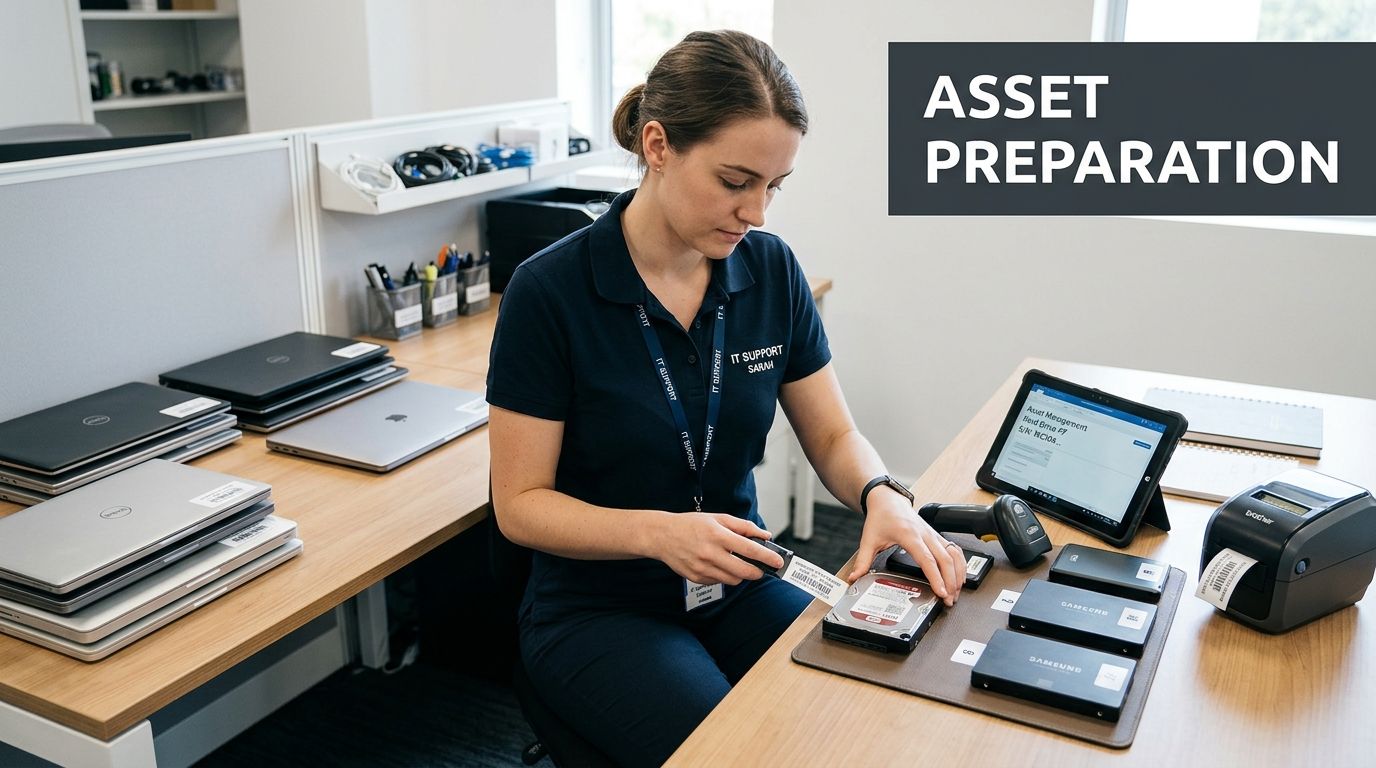
A smooth pickup starts days before the truck arrives. If your team waits until the morning of collection to identify drives, separate reusable laptops, or figure out who has sign-off authority, the process gets messy fast.
Good preparation does three things at once. It reduces data risk, speeds up vendor handling, and produces cleaner records for audit files. It also prevents the most common operational problem in e-waste projects, which is losing control of what left the building.
Build the inventory before you move anything
Start with an internal asset list. It doesn't have to be fancy, but it does have to be reliable. For each item slated for disposition, capture the device type, manufacturer, model, serial number if available, internal asset tag, current location, and assigned business unit.
If the asset list from your CMDB is outdated, don't pretend it's accurate. Reconcile it with what is physically on site. A manually verified spreadsheet is better than an elegant but wrong export.
Include a simple status field such as:
- Ready for reuse evaluation
- Data-bearing and requires destruction
- Peripheral with no storage
- Damaged and recycle only
- Pending approval or legal hold review
That status field solves a lot of confusion on pickup day.
Separate assets by sensitivity, not by convenience
A common mistake is grouping devices by form factor alone. That's fine for loading a pallet. It isn't enough for risk control.
Sort devices into practical risk classes:
- High sensitivity: Executive laptops, servers, storage arrays, backup devices, workstations from finance, HR, legal, healthcare, or R&D.
- Moderate sensitivity: Standard user laptops, desktops, thin clients, printers with storage, networking gear with saved configs.
- Low sensitivity: Monitors, keyboards, docking stations, cables, and accessories with no embedded storage.
- Special handling: Broken drives, swollen batteries, legacy media, or anything that may need a custom destruction path.
If your team can't tell whether a device stores data, assume it does until someone technical verifies otherwise.
Lock down internal chain of custody
Most chain-of-custody failures happen before the recycler arrives. Devices get moved to a hallway. A department lead drops off a few more laptops without updating the list. Someone removes drives for "temporary safekeeping" and never logs the change.
Use a short internal procedure:
- Assign one owner: One person in IT should control the disposition list and approve additions.
- Choose one staging area: Use a locked room or secured cage, not an open office corner.
- Log every movement: If an asset changes location or status, update the list immediately.
- Restrict access: Facilities and office staff can help with logistics, but IT should control data-bearing devices.
- Freeze the manifest: The evening before pickup, finalize the list and flag exceptions separately.
If you're erasing drives in-house before handoff, use a consistent method and document it. If your team needs guidance on pre-transport sanitization, this walkthrough on how to completely wipe a hard drive is a practical reference.
What to have ready for the recycler
A well-run handoff usually includes these items:
- The asset manifest with enough detail to identify each device.
- Internal approval showing the equipment was authorized for disposition.
- Handling notes for sensitive, damaged, or unusual items.
- Pickup contact details for the person who will sign custody over.
- Site logistics instructions such as dock access, freight elevator constraints, and security check-in rules.
When these basics are done well, the rest of the process gets simpler. When they're skipped, the recycler ends up sorting your internal controls problem in the parking lot.
How to Select a Certified Electronics Recycler
Choosing an electronics recycler is closer to hiring a security-sensitive operations partner than booking a junk haul. The wrong vendor can expose your company to data loss, undocumented downstream disposal, and reporting gaps that surface months later.
Plenty of companies claim they "recycle responsibly." That phrase means almost nothing on its own. What matters is whether the provider can prove process control, certification scope, insurance coverage, and downstream accountability.
Certifications are the floor, not the finish line
For B2B electronics, the two certification names widely recognized are R2v3 and e-Stewards. Both signal that a recycler has gone beyond casual scrap handling. But a logo on a website isn't enough.
You need to verify that the certification is current, applies to the relevant facility, and covers the services you need. A company may market secure disposition broadly while subcontracting major parts of the process. That doesn't always make them unsuitable, but it does mean you need to know exactly who performs collection, data destruction, refurbishment, and downstream material processing.
If your team wants a baseline on what certified processing should involve, review the standards expected from an R2 certified electronics recycler.
What separates a real ITAD partner from a scrap hauler
The fastest way to evaluate a vendor is to listen to how they answer operational questions. Serious providers answer directly. Weak providers stay vague.
Ask about:
- Data destruction methods: Can they explain wiping, degaussing, shredding, and when each is appropriate?
- Serialized reporting: Will they return asset-level records, not just a weight ticket?
- Chain of custody: Who handles pickup, and how is custody documented at every handoff?
- Insurance: Do they carry coverage relevant to environmental liability and data-related risk?
- Downstream transparency: Can they identify where non-reusable material goes after primary processing?
- On-site options: Can they support projects where drives or devices must be destroyed before leaving premises?
- Exception handling: What happens when assets arrive damaged, unlabeled, or inconsistent with the manifest?
A recycler who can't describe downstream handling clearly is asking you to trust a blind spot.
Electronics Recycler Evaluation Checklist
| Evaluation Criteria | What to Ask/Verify | Red Flag |
|---|---|---|
| Certification status | Ask for current certification details and facility scope | They mention certification generally but won't verify scope |
| Data destruction capability | Ask which media they can wipe, shred, or otherwise destroy securely | They offer one method for every asset type without explanation |
| Asset reporting | Ask whether reports are serialized by item, not just summarized | They only provide a generic receipt |
| Chain of custody | Ask who signs, tracks, and transports assets from your site | Pickup is handled casually or by unknown third parties |
| Insurance coverage | Ask for proof of relevant insurance and policy types | They dodge the question or provide incomplete documentation |
| Downstream vendors | Ask where materials go after initial sorting or processing | They say it is "proprietary" and provide no transparency |
| Resale and reuse controls | Ask how reusable assets are tested and cleared for release | They discuss resale value before data controls |
| Audit readiness | Ask for sample certificates and reporting packages | They don't have standard documentation templates |
How to interview vendors without wasting a week
You don't need an elaborate procurement event to screen recyclers well. A disciplined shortlist call often reveals enough to eliminate weak options.
Use a simple sequence:
First, ask for sample documentation. That includes chain-of-custody forms, certificates of destruction, settlement reports if reuse value is involved, and proof of certification.
Second, ask them to describe a pickup from your kind of site. A downtown Austin office tower, a healthcare clinic, a campus environment, and a data center all have different logistics. Competent vendors know the difference.
Third, test for specificity. If answers stay broad, that's a warning sign. Good providers know their process in detail because they repeat it every day.
The best recycler isn't always the cheapest quote or the one promising the highest resale return. The best recycler is the one whose process still looks defensible after your legal team, security team, and finance team all ask hard questions.
Mastering Data Destruction and Certification
Data destruction is where many electronics recycling programs either become defensible or fall apart. If your company retires even a modest volume of laptops, desktops, servers, or drives, this isn't a side issue. It's the core control.
The right destruction method depends on the media type, the sensitivity of the data, and whether the asset is intended for reuse or total destruction. Teams get into trouble when they apply one blanket rule to every device.
Comparing the main destruction methods
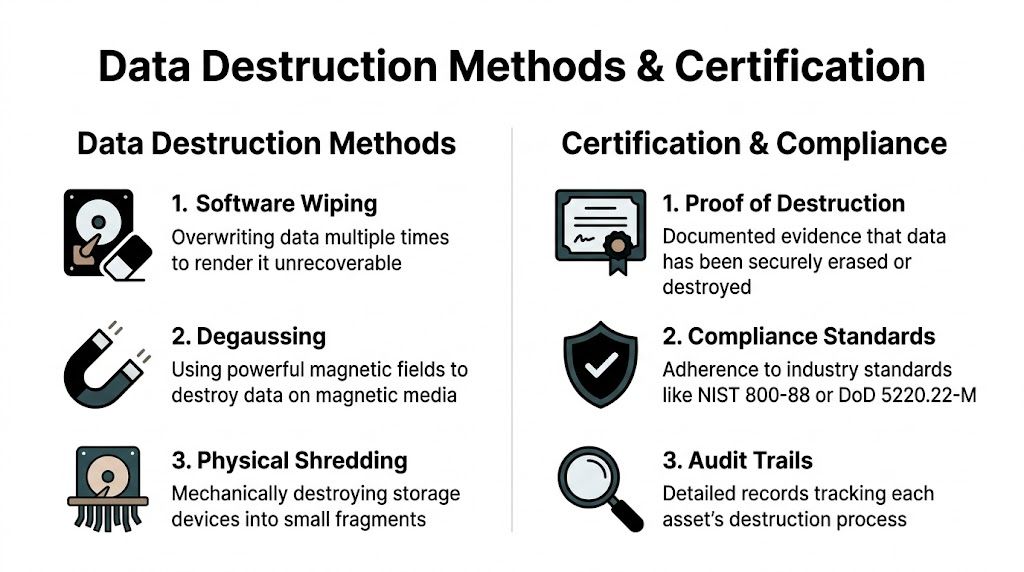
The three most common paths are software wiping, degaussing, and physical shredding. Each has a place.
| Method | Best fit | Main advantage | Main limitation |
|---|---|---|---|
| Software wiping | Reusable drives and devices that can still return value | Preserves the asset for remarketing or redeployment | Requires the media to be functional and properly processed |
| Degaussing | Certain magnetic media where reuse is not the priority | Disrupts magnetic data storage rapidly | Not appropriate for every media type and usually ends device reuse |
| Physical shredding | High-risk media, failed drives, and destruction-first programs | Strong finality and straightforward disposition | Eliminates reuse value completely |
Software wiping is often the best option when you want both security and asset recovery. It supports reuse, which can matter for newer laptops, desktops, and some enterprise hardware. But it only works when the process is controlled, validated, and documented.
Degaussing fits narrower cases. It can be useful for magnetic media when an organization wants decisive destruction without preserving equipment for resale. The catch is that many IT teams use the term loosely. If a vendor recommends degaussing, ask exactly which media it applies to and what evidence they provide afterward.
Physical shredding is the blunt instrument. For failed drives, high-sensitivity storage, or organizations with strict destruction policies, it makes sense. It also ends any chance of value recovery, so it should be chosen intentionally rather than by habit.
Security and reuse are not enemies. They can work together when wiping is verified and reporting is strong.
Match the method to the asset
Use a decision logic your team can defend:
- Executive and regulated-user laptops: Wipe if allowed by policy and if the device is functional. Shred embedded or removed drives when policy requires destruction.
- Failed hard drives and SSDs: Physical destruction is usually the cleanest path because the media can't be reliably processed for reuse.
- Enterprise storage from sensitive environments: Treat conservatively. Many organizations prefer destruction because risk tolerance is low.
- Commodity office desktops headed for resale: Verified wiping often provides the best balance of security and residual value.
Don't let convenience drive this choice. Let data classification and policy drive it.
The certificate matters as much as the method
A destruction process that leaves no auditable evidence is weak protection. You need a Certificate of Data Destruction that ties the outcome back to specific assets or media.
A strong certificate usually includes:
- The customer name and service date
- A clear description of the destruction method
- Serialized identifiers when available
- A statement that the media was processed according to the provider's documented controls
- Authorized signoff from the processor
If the recycler provides only a generic statement that "material was destroyed," that's not enough for most business environments. You want evidence that maps to your inventory and supports internal audit, external review, or incident response questions later.
For a practical example of what this documentation should support, review this guide to a certificate of destruction for hard drives.
What to reject immediately
Some vendor behaviors should end the conversation:
- They can't explain the difference between wiping and physical destruction
- They promise destruction certificates but can't show a sample
- They use vague language about "industry standard erasure" without naming their process
- They discourage serialized reporting because it is "too detailed"
- They push the same method for every asset type regardless of risk
A good data destruction program isn't built on slogans. It's built on method selection, device-level control, and evidence you can keep.
Streamlining Logistics from Pickup to Final Reporting
Pickup day is where policy meets reality. Gear has to leave the premises, and that movement is where chain of custody can either hold or break.
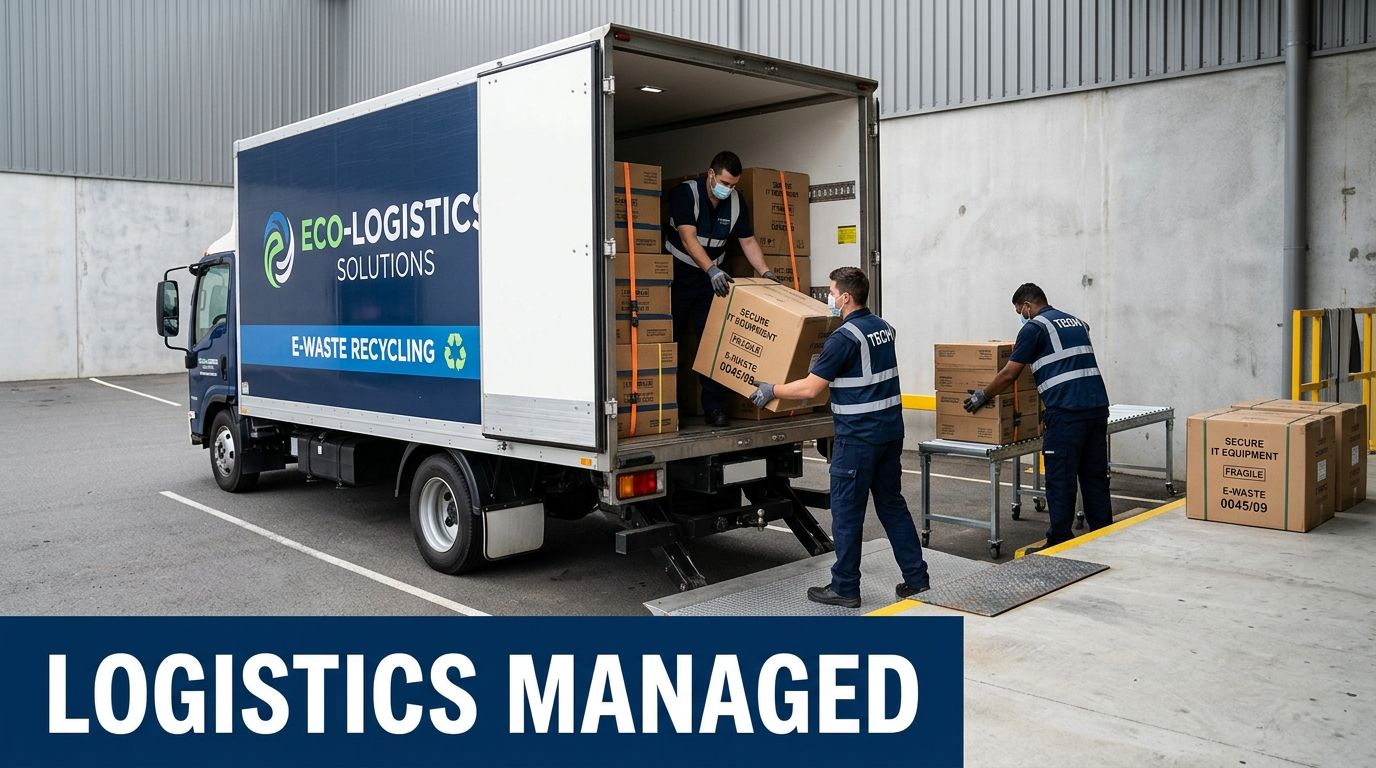
A secure e-waste pickup shouldn't feel improvised. The recycler's team should know where they're going, what they're collecting, who is authorized to release it, and how each handoff gets documented. If your team feels like it's managing confusion in real time, the prep or the vendor process is weak.
What a controlled pickup looks like
Before the truck arrives, confirm the service window, site contact, loading point, and any building requirements such as COI submission, dock reservations, freight elevator access, or security check-in procedures. Austin office buildings and mixed-use properties often have tighter access rules than suburban warehouse sites, so don't assume the vendor can sort that out on arrival.
At handoff, the recycler should work from a documented list or intake process, not memory. If your inventory is serialized, the vendor should be prepared to receive against that structure or create a traceable intake record that ties back to your manifest.
Look for these basics:
- Identified personnel: You should know who is collecting the assets.
- Controlled loading: Devices aren't left unattended on the dock.
- Signed transfer record: Your representative and the vendor both acknowledge the handoff.
- Exception notation: Missing, damaged, or extra items get documented immediately.
What chain of custody should include
A good chain-of-custody document doesn't need to be complicated. It needs to be specific.
At minimum, it should reflect:
| Chain-of-custody element | Why it matters |
|---|---|
| Pickup date and location | Anchors the transfer to a real event |
| Releasing party and receiving party | Identifies who accepted responsibility |
| Asset list or shipment description | Connects custody to actual equipment |
| Signatures or equivalent confirmation | Proves transfer was acknowledged |
| Notes on exceptions | Preserves discrepancies before transit |
The safest time to resolve an inventory discrepancy is before the truck door closes.
Questions to ask the logistics team
On the day of service, ask practical questions, not generic ones.
- Where will assets be secured during transit?
- Will anything be consolidated with other customer loads before intake?
- How are serialized assets matched to final reporting?
- What happens if the counts at intake differ from the pickup manifest?
- When should you expect reporting, certificates, and any value recovery summary?
Those questions tell you a lot. Strong teams answer calmly and specifically because they have a standard operating procedure behind the answer.
Final reporting is part of the service, not a courtesy
Pickup isn't the finish line. Final reporting is what turns the event into a usable business record.
For most organizations, the reporting package should include intake confirmation, processed asset detail, data destruction evidence where applicable, and disposition outcome by asset class. If devices were reused, resold, recycled, or destroyed, the records should show that clearly enough for finance, security, and audit stakeholders to understand.
When the logistics chain is disciplined from the loading dock to final documentation, recycling in Austin Texas stops being a recurring fire drill and becomes a repeatable operating process.
Calculating the ROI of Compliant E-Waste Recycling
An Austin IT manager usually sees the cost first. There is a pickup fee, internal coordination time, and pressure to clear space fast. The mistake is stopping the analysis there.
A compliant e-waste program pays back in three places that matter to a business. It reduces the chance of a data exposure tied to retired devices. It gives finance, legal, and compliance teams records they can use. It can also return some value from equipment that still has secondary-market life.
The return comes from avoided cost and retained value
Resale matters, especially if laptops, network gear, and mobile devices are retired on schedule and still meet reuse criteria. But resale alone rarely justifies the program. For most Austin businesses, the bigger financial return comes from preventing expensive exceptions.
Those exceptions are familiar. Missing serial numbers during an audit. Old drives sitting in storage because nobody approved a disposition path. Business units handing off equipment informally, then asking IT to reconstruct what happened months later. Every one of those problems consumes staff time and increases risk.
A disciplined ITAD process cuts that waste. It shortens the time assets sit idle, reduces ad hoc decision-making, and gives leadership a documented answer when questions come from auditors, customers, or internal security teams.
Where strong ROI actually shows up
The organizations that get the best return usually execute a few basics consistently:
Retire assets on a schedule
Equipment moved out during planned refresh cycles usually has more remarketing value and creates fewer internal delays.
Match the disposition path to the data risk
A low-value monitor and a laptop with regulated data should not move through the same approval path.
Use a recycler that can document every material step
The financial benefit of a lower service quote disappears fast if reporting is incomplete or downstream handling is unclear.
Treat disposition as an operating process
When IT, security, procurement, and facilities each know their role, fewer assets get stranded in closets, labs, or storage rooms.
Store final records where other teams can retrieve them
ROI drops when staff have to chase certificates, manifests, or asset histories every time a question surfaces.
Good ITAD programs reduce labor, shrink exposure, and make asset retirement easier to govern.
The trade-offs are real
Maximum resale value and maximum speed do not always align. If a business waits too long to retire devices, condition declines and market value falls. If it rushes assets out without proper review, it creates chain-of-custody and reporting problems that cost far more later.
The same goes for destruction decisions. Destroying everything may feel safer, but it can eliminate legitimate value recovery from reusable devices. Reusing everything is not the answer either. High-risk assets, damaged media, and equipment with unclear ownership should be routed conservatively. The right program makes those decisions deliberately, not at the loading dock.
Build the internal case in business terms
Security leaders care about controlled data destruction and fewer unknowns around retired assets.
Finance cares about asset accountability, cleaner write-off support, and any value recovered from qualified equipment.
Compliance and legal care about records that show what left the business, how it was handled, and when final disposition occurred.
Operations cares about a repeatable process that does not pull engineers and support staff into cleanup work every quarter.
That is the true return on investment. Better control over assets, data, risk, and reporting.
If your Austin organization needs a secure, documented path for retiring IT equipment, Dallas Fortworth Computer Recycling helps businesses manage electronics recycling, data destruction, and end-to-end IT asset disposition with a focus on compliance, chain of custody, and operational efficiency.