
Secure ITAD at Dallas / Fort Worth International Airport

You’re often handed this job after everything else has already gone wrong.
A refresh is underway. A lease is ending. A network closet near the airport has to be cleared before another contractor arrives. A data center cage needs to be decommissioned without interrupting adjacent operations. Someone in procurement assumes retired laptops are just a pickup request. Someone in security assumes the recycler can “figure out the paperwork.” Meanwhile, you’re the one who has to make sure no drive disappears, no badge issue stalls the truck, and no undocumented disposal decision becomes your compliance problem later.
That challenge gets sharper around dallas / fort worth international airport because DFW isn’t just an airport. It’s a high-control operating environment tied to cargo flows, terminal access rules, vendor oversight, building management, and tight timing windows. Standard ITAD playbooks often break there. They assume a normal office dock, simple curb access, and a straightforward release process. DFW rarely gives you that.
Navigating IT Asset Disposition at DFW Airport
If you manage IT assets anywhere in the DFW airport orbit, start by treating disposition as an operations project, not a recycling errand.
That means you define the pickup path, access authority, packaging method, chain-of-custody checkpoints, and final documentation before anyone touches a server, switch, laptop cart, badge printer, kiosk terminal, or medical device. That discipline matters at an airport campus with constant movement and layered security.

DFW’s scale is the first reason. Dallas/Fort Worth International Airport handled 87,817,864 passengers in 2024, ranked as the world’s third-busiest airport, drives over $78 billion in annual impact for North Texas, supports 684,000 jobs, and serves over 260 destinations according to the DFW airport overview. In practice, that means your retired hardware is moving through one of the densest logistics environments in the country.
What makes DFW different
A normal office pickup usually fails at DFW for four reasons:
- Access isn't simple. Building management, airport security, tenant rules, and receiving dock restrictions may all affect the same loadout.
- Timing matters more. A pickup that misses its slot can spill into traffic congestion, dock conflicts, or staffing changes.
- Assets carry more exposure. Devices may contain airport operations data, passenger service information, healthcare records, or contractor credentials.
- The handoff chain is longer. More people often touch the process, from facilities and security to freight and environmental teams.
The practical first move
Before you schedule anything, write down three things:
- Where the assets physically sit
- Who controls access to that space
- What has to be proved after removal
Most problems happen because teams answer only the first question.
Practical rule: If you can't name the approving contact, the loading point, and the documentation requirement, the pickup isn't ready.
A lot of airport-adjacent organizations also underestimate how much easier the job becomes when electronics disposition is scoped separately from furniture liquidation, general cleanout, and scrap hauling. Keep those workstreams apart. Mixed loads create custody gaps, inventory errors, and arguments about what left the site.
For organizations trying to map a secure path for airport-area pickups, this guide to DFW electronics recycling is a useful starting point because it frames electronics removal as a controlled IT workflow rather than a bulk waste task.
Understanding DFW's Unique Logistics Ecosystem
DFW works better if you think of it as a city within a city.
IT managers sometimes picture a single airport perimeter with a few terminals and cargo buildings. Operationally, that mindset is too small. You’re dealing with a wide campus where roads, terminals, service areas, freight zones, and secure access points all have their own rhythms. An ITAD move that looks easy on paper can fail because the wrong truck arrives at the wrong side of the property, or because the pickup crew hasn’t been matched to the actual handoff point.
Infrastructure shapes the plan
DFW’s airside capacity tells you something important about the landside environment too. DFW has seven runways, including four primary parallel runways that are 13,400 feet long, supporting 24/7 operations for heavy cargo aircraft. Its infrastructure also includes the Skylink train with a 7-minute inter-terminal transit according to AOPA’s DFW airport details. For ITAD, that translates into a huge, continuously active operating footprint.
You shouldn’t read that as “shipping is easy.” You should read it as “coordination matters.”
At large hubs, there’s always movement. Cargo, tenant deliveries, maintenance vehicles, airport vendor traffic, and time-sensitive service windows compete for the same practical space. That creates friction for retired IT equipment, especially if you’re moving anything bulky, serialized, fragile, or regulated.
What the campus means for ITAD
Here’s the mental map that usually works:
| Area type | What it means for IT assets | Common mistake |
|---|---|---|
| Terminal or public-facing business area | Tight timing, limited staging, high visibility | Bringing loose assets without sealed containers |
| Office or admin building near the airport | Easier access, but often dock and badge controlled | Assuming building staff can approve removal |
| Cargo-linked facility | Better for palletized moves and larger loads | Failing to align paperwork with freight timing |
| Data center or technical room | Highest chain-of-custody sensitivity | Mixing deinstall, packing, and transport roles |
This is why generic junk removal logic doesn’t hold up. Airport-area pickups work best when the pickup team knows whether the site behaves like a terminal tenant, an office property, a warehouse, or a controlled technical environment.
The route matters as much as the recycler
I’ve seen the same pattern repeatedly. Teams spend time evaluating data destruction standards, then give almost no attention to the physical route from rack to truck. That’s backwards in an airport environment.
A strong logistics plan usually covers:
- Pickup point verification so the truck reaches the correct entrance, dock, or service road
- Asset staging rules so equipment isn’t left unattended in public or mixed-use space
- Packaging decisions based on fragility, serial tracking, and whether items will be resold, destroyed, or recycled
- Driver check-in procedure so the handoff doesn’t stall at a security desk
- Escalation contacts for site access, freight timing, or load discrepancies
If the route from server room to vehicle crosses uncontrolled space, treat that path as part of your data security plan.
For airport-area projects, it also helps to choose partners that already understand pickup coordination instead of learning the campus on your time. This practical page on e-waste pickup in DFW reflects that operational focus.
Managing Security and Compliance for Electronics at DFW
Most ITAD failures around airports aren’t dramatic. They’re procedural.
A drive leaves without being logged. A vendor shows up without the right site contact. A pallet sits too long in a mixed-access room. Building management signs off on dock use, but nobody confirms who can authorize device release. None of those mistakes look major in the moment. All of them become serious once an auditor, legal team, or internal security review asks for the chain of custody.

DFW creates a special version of that problem because airport sustainability goals are visible, but specific guidance on compliant e-waste disposal for the airport’s many on-site businesses and vendors is lacking, which creates uncertainty and raises non-compliance risk, as reflected on DFW’s ESG page. That gap matters. IT managers still have to retire assets correctly, even when the site environment doesn’t hand them a clean electronics disposal playbook.
Security risk starts before the truck arrives
Many teams focus on destruction at the end of the process. The bigger exposure often starts earlier.
A retired device can still contain:
- Stored credentials
- Network maps or configuration files
- Passenger service or tenant operations data
- Healthcare or lab records
- Procurement and contract information
- Access control or badge system data
That means your risk window begins at internal decommissioning, not at downstream shredding or wiping.
What works and what doesn't
The contrast is usually straightforward.
| What works | What doesn't |
|---|---|
| Named approver for release | Verbal “facilities said it’s fine” |
| Serialized inventory before pickup | Counting devices at the loading dock |
| Sealed containers or controlled pallets | Loose laptops in open carts |
| Handoff signatures at each transfer point | One blanket signature for the entire project |
| Clear destruction decision by asset class | Deciding on-site under time pressure |
The airport setting raises the cost of improvisation. Public visibility is higher. Security expectations are higher. If something goes sideways, more stakeholders will ask questions.
Compliance isn't just environmental
A lot of teams hear “e-waste” and narrow the issue to environmental handling. That’s only part of it.
At DFW, a compliant ITAD plan usually has to satisfy multiple internal concerns at once:
- Information security needs proof that data-bearing devices never drifted outside control.
- Facilities or site operations need a pickup that doesn’t disrupt building flow.
- Procurement and finance need asset accountability for retired equipment.
- Environmental or ESG teams need confidence that disposition followed responsible downstream practices.
- Leadership needs the project closed without surprises.
That’s why chain of custody has to be treated as a live operational control, not a line item on a final certificate.
Key takeaway: In a high-security environment, undocumented disposal is a security problem first and a recycling problem second.
If your organization handles especially sensitive equipment, define in advance which assets require certified data erasure, which require physical destruction, and which can move into reuse evaluation. Don’t let pickup crews make those calls informally at the site.
A good planning reference for that side of the process is secure data destruction in DFW, especially when you need the disposal workflow to align with internal security review.
Your Step-by-Step Guide to ITAD Logistics at DFW
ITAD projects around DFW go smoother when you run them in a fixed sequence. Not because every site is identical, but because every site punishes missing steps.
The airport’s growth and hub role also complicate movement of specialized equipment. DFW’s rapid growth and position as a global hub with key unserved international routes can strain logistics for transporting specialized IT and medical equipment, which makes experienced chain-of-custody planning more important, as discussed in this review of unserved routes and DFW growth pressures. For IT leaders, the practical lesson is simple. Don’t assume sensitive assets will “move like normal freight.”
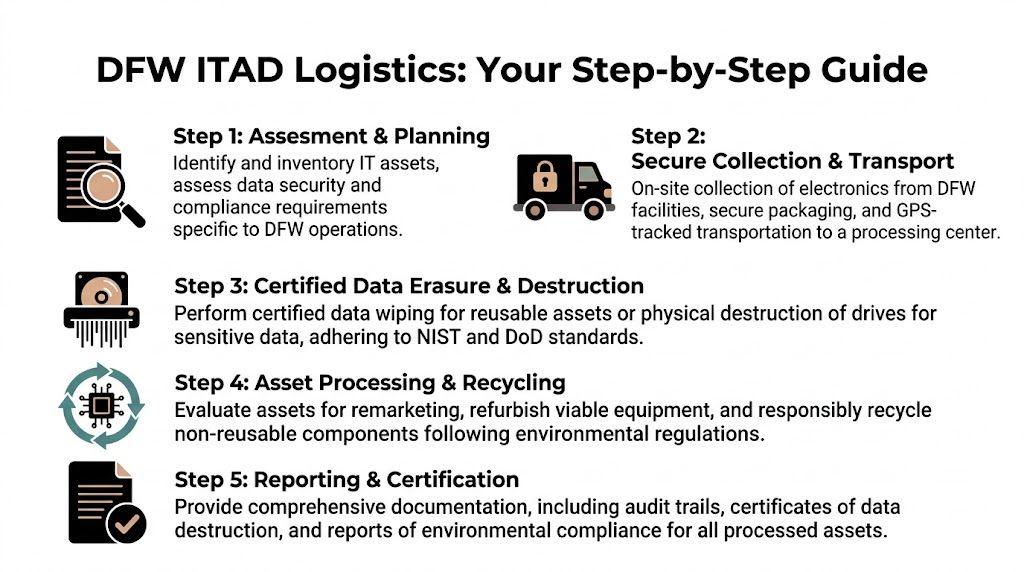
Step 1 Assess the asset and access picture
Start with the inventory, but don’t stop there.
Create a working list that separates:
- Data-bearing devices such as laptops, desktops, servers, storage arrays, and removable media
- Network equipment including switches, firewalls, wireless controllers, and telecom gear
- Peripherals and support hardware such as monitors, docks, scanners, printers, and POS devices
- Specialized equipment including medical, lab, kiosk, or industrial systems
Then add the site variables beside that inventory:
| Planning item | Why it matters |
|---|---|
| Exact room or cage location | Tells the pickup team what tools and labor are needed |
| Elevator, dock, or cart path | Prevents delays and unsafe improvisation |
| Security contact | Avoids truck check-in failures |
| Release authority | Confirms who can legally hand over equipment |
| Data handling instruction | Prevents confusion between reuse and destruction |
If there are multiple stakeholders, use one approval sheet. Don’t let security, facilities, and IT each maintain separate versions of “what’s leaving.”
Step 2 Choose the right project model
The right workflow depends on where the assets sit.
Scenario A for office or admin space near DFW
This is the most common airport-adjacent job. Think user devices, network gear, conference room hardware, and small server closet retirements.
A clean approach looks like this:
- Confirm who controls the building entrance and dock.
- Inventory and label assets before pickup day.
- Remove any non-IT items from the load.
- Stage equipment in a locked room near the exit path.
- Require signature-based handoff at pickup.
What usually fails here is casual staging. Devices get moved into a hallway, mailroom, or shared loading area “for convenience.” That creates loss and mix-up risk immediately.
Scenario B for data center decommissioning
Airport logistics in this scenario become much less forgiving.
Decommissioning a rack row, cage, or infrastructure room requires a tighter sequence:
- Pre-remove dependencies. Confirm power, network, app, and storage dependencies are closed.
- Freeze the scope. Don’t let teams add “one more cabinet” during loadout.
- Separate deinstall from disposition. If a cabling team, facilities crew, and ITAD provider are all involved, define handoff moments.
- Use serialized packing. Servers, drives, rails, PDUs, and network gear should be traceable as they leave the site.
- Control the loading zone. Restrict who can enter during active removal.
A decommissioning project goes off track when three teams assume the other one is documenting the move.
Scenario C for scheduled drop-off to a secure recycling facility
This can work well for smaller, pre-approved loads when your team already has transport controls in place.
It works best when:
- the assets are already inventoried,
- packaging is secure and consistent,
- the transport chain is documented,
- and someone from your side remains accountable until formal intake.
It doesn’t work well for loosely packed mixed electronics or for highly sensitive loads that shouldn’t leave direct custody without pickup documentation.
Step 3 Prepare assets for movement
This stage gets overlooked because it feels administrative. It isn’t.
Preparation should include:
- Internal data handling decision
- Asset tag capture
- Removal of batteries or accessories only when policy requires it
- Separation of reusable equipment from destruction-only media
- Photographs for high-value or complex loads
- Packaging matched to fragility and handling path
For racks or dense technical rooms, I recommend walking the route in advance. Measure doors, inspect thresholds, and confirm whether elevators require booking. It’s much easier to solve path problems before a team is standing there with unmounted equipment.
Step 4 Execute the pickup with controlled handoffs
The handoff sequence matters more than speed.
A reliable pickup day usually includes:
| Stage | Control point |
|---|---|
| Driver arrival | Verify identity and site contact |
| Site entry | Match personnel to approved access |
| Asset review | Confirm load against prepared inventory |
| Packaging check | Ensure containers or pallets match plan |
| Load transfer | Capture signatures at release |
| Departure | Record destination and responsible party |
For airport properties or nearby facilities with layered oversight, insist on one on-site lead from your organization. Don’t leave the handoff to whichever employee happens to be nearby.
Step 5 Close the project with documentation
A pickup isn’t complete when the truck leaves. It’s complete when your records support the story from retirement to final processing.
Your closeout file should usually include:
- Asset inventory
- Pickup date and release record
- Chain-of-custody documentation
- Data destruction records where applicable
- Recycling or downstream processing records
- Internal approval trail
This is especially important for healthcare, government, and regulated environments where retired equipment may be reviewed long after the project is forgotten operationally.
For large removals, airport-adjacent technical sites, or cage and rack retirements, this reference on data center equipment disposal services in Dallas Fort Worth is aligned with scoped decommissioning work.
Best Practices for Scheduling a Flawless ITAD Pickup
A smooth DFW-area pickup usually depends less on the recycler’s truck and more on the quality of your internal prep.
Teams often think the hard part is choosing a vendor. The hard part is giving that vendor a site, schedule, and handoff design that won’t collapse under normal airport-area friction. Delays usually come from missing operational details, not from lack of disposal capacity.
Schedule for control, not convenience
The most convenient time for your internal team isn’t always the best time for the move.
If the site sits near airport traffic pressure, shared vendor docks, or active tenant operations, choose a window that gives you room to solve surprises. You want enough staff available to release equipment, verify inventory, and respond if building management changes instructions at the last minute.
A good scheduling request should answer:
- Who will meet the truck
- Where the truck should enter
- Which door, dock, or elevator is approved
- Whether building security needs names in advance
- What the fallback contact is if the primary person is unavailable
Pre-stage without losing control
Pre-staging helps, but only when it’s done in a controlled way.
Good pre-staging means equipment is moved closer to the exit path while staying in a locked, access-limited space. Bad pre-staging means devices are stacked in a hallway, open dock area, or shared receiving room where anyone can touch them.
Use this quick comparison:
| Better practice | Risky shortcut |
|---|---|
| Locked conference room or secure storage area | Open common area |
| Palletized or containerized devices | Loose mixed piles |
| Final inventory check before release | “We’ll count it at pickup” |
| One release owner | Multiple informal handoff people |
Give your ITAD partner the right information
If you want a pickup team to move fast without cutting corners, send the right details early.
The minimum useful briefing includes:
- Asset types and approximate volume
- Whether drives are present
- Any items needing destruction-only handling
- Photos of the pickup area
- Dock restrictions or height limits
- Security check-in rules
- Whether pallet jacks, carts, or liftgate access are needed
That information changes staffing, equipment, vehicle choice, and timing. Without it, crews improvise. Improvisation is exactly what you’re trying to eliminate.
The fastest pickup is the one that doesn't require on-site guessing.
Use an internal pre-pickup checklist
Before the pickup day, confirm these points internally:
- Approvals are documented
- Inventory is current
- Data-bearing assets are identified
- Accessories and non-IT scrap are separated
- Route to exit is clear
- Site contact is available for the full window
- Building or security desk has been notified if required
If one of those items is unresolved, reschedule before you create a messy handoff. It’s better to move a pickup than to create an incomplete custody record under pressure.
How Dallas Fortworth Computer Recycling Simplifies DFW Logistics
DFW-area ITAD gets easier when the partner understands that this work lives at the intersection of security, logistics, and documentation.
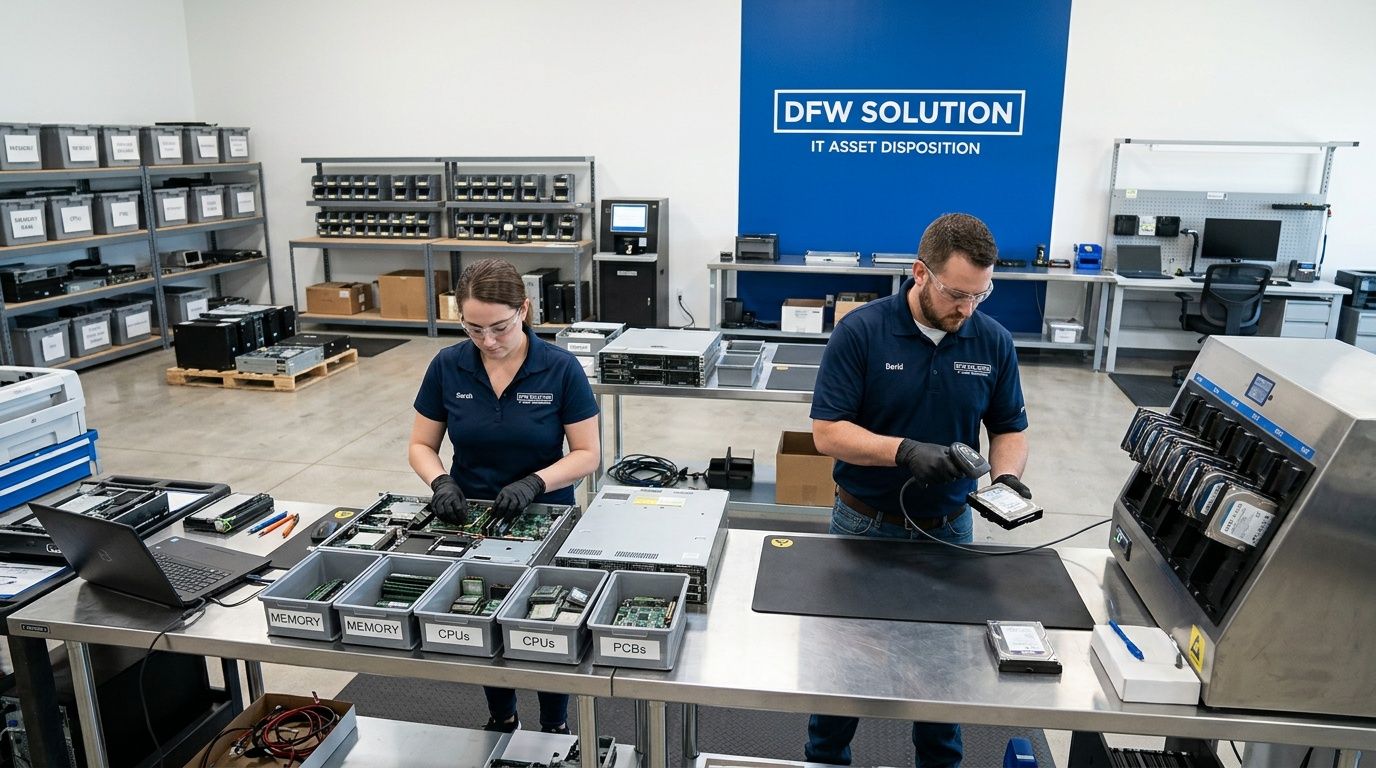
Dallas Fortworth Computer Recycling is built for that kind of work. The company serves organizations that need secure, compliant retirement of technology, including IT equipment disposal, certified data destruction, data center decommissioning, and handling for specialized medical and laboratory equipment. Their operating model fits what airport-area organizations need most. Clear service windows, practical logistics, and documented workflows that support auditability instead of vague promises.
Why that matters around DFW
At or near the airport, the usual weak points are predictable:
- Pickup teams arrive without enough site context
- Documentation doesn't match the actual load
- Sensitive assets are mixed with low-risk scrap
- Projects stall because building access wasn't planned properly
A specialist with local familiarity reduces those avoidable errors. That’s what makes a difference in airport-adjacent offices, technical facilities, healthcare environments, and public-sector sites where the chain of custody has to stay intact from first touch to final record.
What a better process looks like
The practical advantage is process discipline.
Dallas Fortworth Computer Recycling focuses on:
| Need | Operational response |
|---|---|
| Secure retirement of data-bearing equipment | Certified data destruction workflows |
| Large technical removals | Data center decommissioning support |
| Regulated or specialized equipment | Tailored handling for medical and lab assets |
| Audit readiness | Documentation and reporting designed for review |
| Simple scheduling | Responsive service windows and coordinated pickups |
That structure matters because DFW logistics punish ambiguity. If the provider can’t translate your site conditions into a clear pickup plan, the risk stays on your side.
The fit for IT leaders
For IT directors and infrastructure managers, the value isn’t marketing language. It’s reduced operational drag.
You need a partner that can understand what’s leaving, how sensitive it is, who must sign off, and what proof you’ll need after the fact. That’s the job. Recycling is only one outcome within that larger control process.
Organizations evaluating a practical local option can review IT asset disposition services in Dallas Fort Worth, Texas to see how that service model aligns with secure pickups, decommissioning, and compliant downstream handling.
Your DFW ITAD Logistics Questions Answered
How do pickups work inside a secure airport facility or controlled property
Start with the site authority, not the recycler. Confirm who controls access, who can approve removal, and where the physical handoff can happen. Then align the pickup team to that process. In secure environments, the release path should be documented before the truck is scheduled.
What if the equipment includes medical, lab, or highly specialized systems
Treat those assets as their own project class. Don’t combine them with general office electronics unless the handling plan is explicitly designed for that mix. Specialized devices often require tighter internal review, clearer data handling decisions, and more careful packaging.
Should we wipe devices before pickup or rely on downstream destruction
That depends on your internal policy and the sensitivity of the asset. The important part is deciding in advance. Don’t leave the site with uncertainty about whether an item is going to remarketing evaluation, certified erasure, or physical destruction.
What documentation should building management or security have
Give them the minimum needed to support movement without creating confusion. Usually that means pickup date, company name, authorized contacts, vehicle or crew details if required, and a clear description of where the load will exit. Internally, maintain the fuller asset and custody record on your side.
What's the biggest mistake IT teams make near DFW
They assume electronics pickup is a routine facilities task. It isn’t. At airport-adjacent sites, retired hardware is a security-controlled asset movement with compliance implications. Teams that treat it that way have far fewer surprises.
If you need a secure, well-documented path for retiring IT equipment at or near dallas / fort worth international airport, Dallas Fortworth Computer Recycling can help you plan pickups, data destruction, decommissioning, and compliant downstream handling with the operational discipline these projects require.