
Dell or HP: An IT Director’s Lifecycle Comparison (2026)
If you're deciding between Dell or HP during a major refresh, you're probably not choosing between two laptops. You're choosing a procurement model, a support structure, a repair path, a residual value profile, and an end-of-life risk posture that will stay with your team for years.
That changes the conversation.
Most dell or hp comparisons stay trapped in consumer logic: screen quality, processor options, chassis feel, maybe a benchmark or two. A C-suite decision can't stop there. For an IT director, the right question is whether the platform helps your organization buy predictably, deploy at scale, support users without friction, and retire assets without exposing data or creating avoidable disposal cost.
A device fleet is a lifecycle system. The vendor you choose influences standardization, field support, thermal behavior under sustained load, parts availability, resale potential, and how efficiently a recycler can process retired equipment. Those aren't side issues. They are the business case.
Beyond the Box A Strategic Framework for Choosing Dell or HP
The most useful way to evaluate Dell or HP is to stop thinking in model numbers first and think in lifecycle control points. Procurement is one control point. Support is another. Security and remote management are separate controls. End-of-life handling is the last one, and it is usually underweighted until a lease return, an audit, or a data center decommissioning forces urgency.
A senior team usually sees hardware as a capital line item. IT operations lives with the operating consequences. Finance sees the invoice once. Infrastructure, security, help desk, and compliance teams absorb the downstream effects for the rest of the asset’s life.
Three questions usually reveal the better fit:
- How much customization do you need: Highly standardized branch fleets and highly customized engineering fleets are different buying problems.
- How much do you rely on direct vendor accountability: Some organizations want a single OEM relationship. Others want a channel partner to integrate hardware, services, and local support.
- How important is controlled retirement: If you operate in healthcare, government, finance, or any environment with regulated data, end-of-life process quality matters as much as in-life performance.
The strongest refresh plans connect those decisions before purchase. A finance team that's modeling only acquisition cost misses the maintenance burden. A security team that focuses only on firmware protections may miss weak retirement workflows. A sustainability team that reports on e-waste may discover too late that device construction affects recycling efficiency and reuse rates.
For organizations building that full view, a lifecycle lens similar to these IT asset management best practices is more useful than a spec-sheet showdown.
Practical rule: If your hardware evaluation ends at deployment, you haven't finished the business case.
| Decision Area | Dell | HP | Executive Implication |
|---|---|---|---|
| Buying model | Often aligned with direct engagement and configuration flexibility | Often aligned with channel and partner-led delivery | Choose based on your operating model, not user brand preference |
| Support orientation | Suits organizations wanting tighter OEM relationship | Suits organizations that value partner ecosystems | Escalation paths differ in practice |
| Repairability focus | Often associated with modular enterprise lines | Often competitive in mainstream enterprise fleets | Affects downtime and reuse horizon |
| Sustained workload behavior | Strength in some performance-heavy classes | Strength in some thermally sensitive enterprise scenarios | Match to workload, not marketing |
| End-of-life handling | May include more complex infrastructure mixes | May be simpler in more client-heavy environments | Impacts ITAD planning and recycler workflows |
Understanding the Core Philosophies of Dell and HP
A global refresh can fail long before the first device ships. The problem usually starts earlier, when leadership treats Dell and HP as interchangeable hardware vendors instead of distinct operating models. Their products can overlap. Their institutional habits often do not.
Dell's roots in direct sales and build-to-order manufacturing shaped a company that tends to favor configuration control, tighter OEM engagement, and operational efficiency. HP developed through a broader portfolio strategy and a large partner ecosystem, which tends to show up in standardized offers, channel reach, and stronger alignment with reseller-led delivery. For a CIO or CFO, that difference affects more than the purchase order. It influences approval paths, inventory strategy, service escalation, refresh timing, and the residual value you can recover at end of life.

Dell's operating logic
Dell usually fits organizations that want to specify hardware closely at the point of purchase and manage the OEM relationship with less dependence on intermediaries. That orientation has made Dell a frequent choice in environments where device standards are centralized but role requirements still vary across engineering, field operations, executives, and secure-access users.
The strategic implication is straightforward. Dell's model can reduce friction for enterprises that already have mature procurement governance, strong endpoint management, and internal staff who want direct accountability from the manufacturer. That same model can be less attractive if your organization expects a reseller or managed service provider to absorb design, integration, and first-line support complexity.
This philosophy also tends to translate well in infrastructure environments where standardization and serviceability matter at the same time, including dense compute designs such as blade server deployments.
HP's enterprise identity
HP's enterprise posture is broader and often more ecosystem-driven. The company has long operated across PCs, print, and enterprise technology, and that breadth has historically reinforced a channel-oriented motion. In practice, HP often aligns well with organizations that buy through established partners, regional resellers, or global integrators and want procurement, deployment, and support wrapped into a larger services relationship.
That distinction matters because channel strength is not just a sales preference. It can affect contract structure, deployment consistency across regions, and how quickly problems reach the right escalation point. For some enterprises, that model improves execution because the partner already understands site readiness, security policy, imaging requirements, and disposal controls. For others, it introduces another layer between IT and the OEM.
| Strategic Trait | Dell Tendency | HP Tendency |
|---|---|---|
| Commercial orientation | More direct OEM engagement | Stronger alignment with partner-led delivery |
| Configuration philosophy | Greater emphasis on order-time flexibility | Greater emphasis on standardized channel-ready offers |
| Operating strength | Fits centralized procurement and internal IT control | Fits partner-supported rollout and services coordination |
The non-obvious point is that these philosophies carry through the full asset lifecycle. A direct model can simplify standards enforcement and change control. A partner-centric model can simplify multi-site rollout and bundled services. Both choices also affect downstream ITAD planning, because device consistency, parts reuse, documentation quality, and chain-of-custody coordination all influence how much value remains when assets leave production.
Executives making a Dell or HP decision should evaluate the vendor's philosophy against their own operating model, not against a short list of technical specifications. That is where long-term cost, compliance exposure, and end-of-life recovery begin to diverge.
Comparing Enterprise Procurement and Support Models
Procurement is where dell or hp stops being an abstract debate and becomes an operating choice. Two companies can offer comparable hardware on paper and still create very different realities for sourcing, approvals, service escalation, and cost predictability.
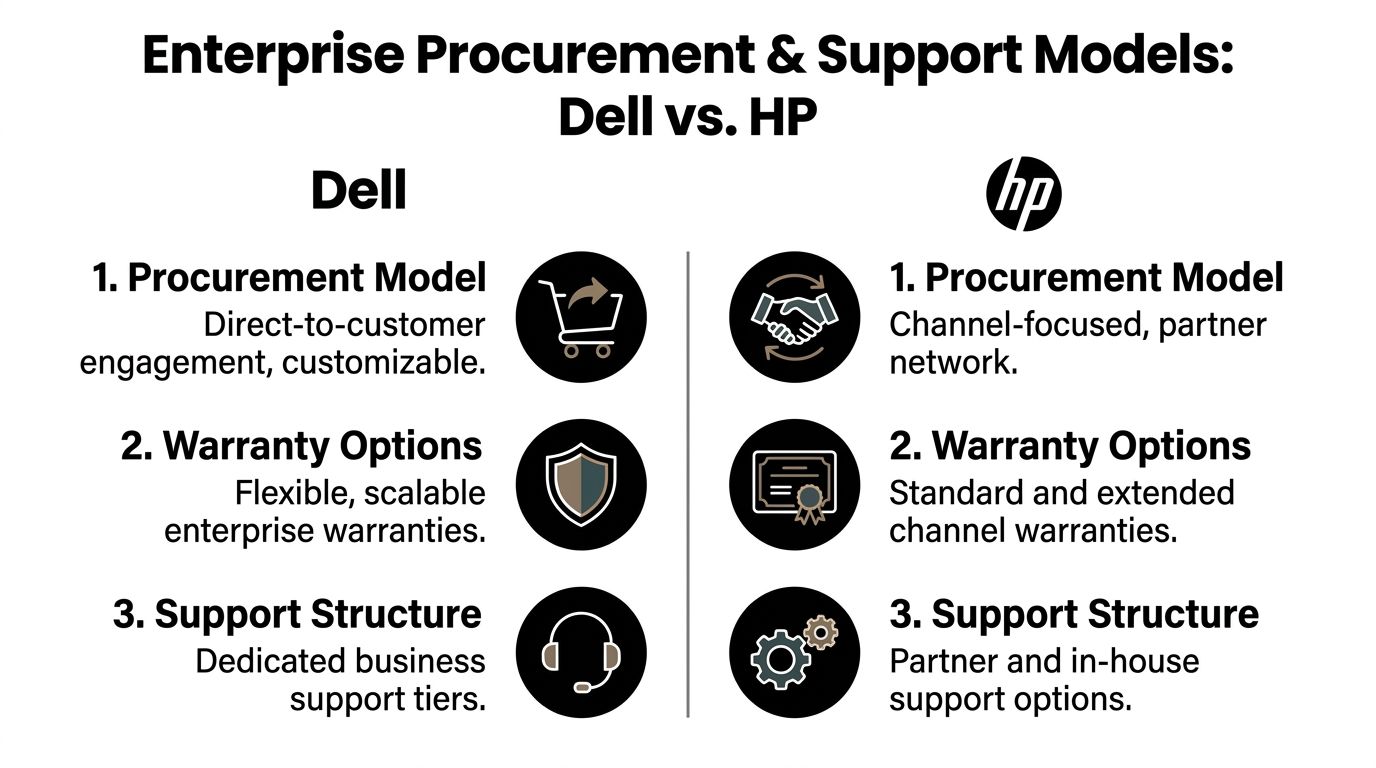
The issue isn't direct versus partner-led purchasing. The issue is where complexity lives. With one model, your team carries more of the OEM relationship directly. With the other, a channel partner may absorb some integration and support friction. Neither is universally better.
Where Dell usually fits better
Dell tends to appeal to organizations that want procurement precision. If your team uses tightly governed standards but still needs variations by business unit, geography, or role, Dell's direct heritage often maps well to that requirement.
That usually matters in environments such as:
- Large distributed fleets: Where IT wants central control over approved configurations.
- Engineering or developer populations: Where storage, memory, graphics, or docking requirements vary by role.
- Organizations with mature internal procurement teams: Where the buyer doesn't need a partner to translate business needs into hardware standards.
A direct model can also simplify accountability. If there is a defect pattern, service issue, or configuration mismatch, your team may have fewer layers between itself and the manufacturer.
Where HP often has an advantage
HP often fits organizations that rely on channel relationships. That can be practical, not just procedural. Many enterprises already buy software, networking, implementation services, and support through a strategic partner. In those cases, HP can slot neatly into a larger sourcing framework.
That often helps with:
- Bundled procurement motions: Hardware, imaging, rollout, and support can move through one partner.
- Standardized office productivity fleets: Especially when extreme customization isn't a priority.
- Regional support preferences: Some organizations value a local or established partner relationship more than direct OEM engagement.
The procurement decision should reflect your internal capacity. If your team wants to own standards fully, direct engagement can be efficient. If your team wants a partner to absorb coordination work, channel strength matters more.
Support and repairability matter more than list price
List price gets executive attention. Support design determines whether users stay productive.
The most overlooked issue in dell or hp decisions is repairability over time. According to this analysis of HP and Dell laptop comparison factors, B2B durability and repairability are critical TCO variables, and expanding right-to-repair legislation in the EU and US in 2025 favors modular enterprise designs like Dell Precision, potentially reducing disposition costs by up to 40% through extended reuse.
That doesn't mean Dell wins every support conversation. It means repair path is no longer a side issue.
| Support Consideration | Dell | HP | Why It Matters |
|---|---|---|---|
| Custom fleet alignment | Often stronger when config control is key | Often stronger when partner standardization is key | Reduces procurement exceptions |
| Escalation path | Often more direct | Often shared with partner ecosystem | Affects incident speed and ownership |
| Repairability emphasis | Frequently stronger in modular enterprise lines | Can vary more across business and consumer-oriented lines | Changes downtime and reuse economics |
| Warranty experience | Best when tied to direct account management | Best when paired with strong reseller support | Depends on who manages the relationship day to day |
If retirement value matters, support strategy should include downstream recovery planning from day one. Teams looking at vendors through that lens usually also evaluate IT asset disposition companies before refresh contracts are finalized, not after devices pile up in storage.
Procurement teams negotiate price. Infrastructure teams live with the support model. Good refresh governance forces those groups to make the decision together.
Performance and Reliability Across Product Classes
A refresh fails financially when procurement treats all Dell or HP systems as interchangeable. The primary risk is mismatch. A laptop that performs well in a reviewer test may still create higher support load, shorter useful life, or weaker resale recovery once it is deployed across thousands of users with different duty cycles.
The better comparison starts with role, thermal behavior under sustained use, service history, and what happens at retirement.
Dell vs. HP Enterprise Hardware Comparison
| Product Class | Dell Model Series | HP Model Series | What to Evaluate |
|---|---|---|---|
| Servers | PowerEdge | ProLiant | Stability under continuous load, component serviceability, and workload fit |
| Corporate desktops | OptiPlex | EliteDesk | Standardization, image consistency, and low-touch support performance |
| Enterprise laptops | Latitude | EliteBook / Elite x360 | Sustained responsiveness, thermals, battery behavior, and mobility fit |
| Professional workstations | Precision | Z by HP | Certified application performance, GPU options, and lifecycle durability |
Enterprise laptops: sustained load matters more than peak speed
One of the clearer records in the source set compares an HP Elite x360 1040 with a Dell Latitude 7450 in sustained stress testing. In the published performance test document on Scribd, both systems reached full CPU utilization, while the HP recovered thermally faster and showed lower GPU strain during the test sequence.
That distinction matters in enterprise use. Large office fleets spend more time in video calls, browser-heavy workflows, endpoint security scans, and background sync than in short benchmark bursts. A system that recovers heat more efficiently often holds user-perceived responsiveness better over a full workday, which can reduce complaints that never appear in a formal failure report.
The same test notes a tradeoff in how each unit handled load. The Dell maintained a higher clock speed with fewer processes active, while the HP handled a broader process load at a lower clock speed. For IT leaders, that points to a practical conclusion. Device selection should reflect user profile density, not a generic view of performance.
Role-based implications
A broad knowledge-worker fleet often benefits more from thermal consistency and stable multitasking than from isolated peak results.
- General office users: HP's behavior in the cited test suggests an advantage where long periods of mixed, moderate workload are common.
- Heavier multitaskers: A Dell configuration with more memory may fit users running larger local datasets, multiple browser sessions, or light virtualization.
- Mobile executives and field staff: Heat, fan behavior, chassis durability, and recovery after sustained use often matter more than benchmark headlines because they influence satisfaction, ticket volume, and how long a device remains deployable.
The better enterprise laptop is usually the one that stays predictable in year three, not the one that posts the strongest short-run score in week one.
Workstations should be judged by certified performance, not consumer branding
For engineering, media, analytics, and design teams, the cleaner comparison is Dell Precision versus HP Z. Consumer-oriented lines such as XPS, Alienware, and OMEN can show strong raw performance, but they are not the primary basis for enterprise workstation standards. Certified drivers, ISV validation, sustained GPU behavior, memory capacity, and parts availability matter more than a marketing label built around enthusiast demand.
That distinction has downstream implications. Workstations usually stay in service longer, hold more residual value, and contain more sensitive local project data than standard office endpoints. Teams planning a refresh in this class should define sanitization and disposition procedures at the same time they define the build standard, including a documented process for how to completely wipe a hard drive before reuse or retirement.
Servers and desktops require a reliability lens tied to operations
The source record does not provide benchmark percentages for PowerEdge versus ProLiant or OptiPlex versus EliteDesk, so a disciplined recommendation should stay focused on criteria an infrastructure team can validate in pilot and production.
For servers, reliability is operational before it is theoretical. The right questions are straightforward:
- How often do firmware updates introduce friction in your environment?
- How quickly can technicians replace common failure components on-site?
- How stable is the platform under your actual virtualization, storage, or edge workload?
- How much variance appears across configured builds over a three to five year term?
For desktops, the analysis shifts. Raw compute gaps are usually less important than image stability, port consistency, acoustics, and the number of incidents generated by docking, display, and peripheral issues. A desktop fleet with fewer configuration exceptions often delivers lower support cost even if the hardware differences look minor on paper.
The non-obvious conclusion is that performance and reliability are procurement inputs, not just engineering inputs. If a device class runs cooler, lasts longer, and retains enough value for redeployment or stronger ITAD recovery, that affects total cost of ownership as much as any benchmark chart. In many organizations, the right answer is mixed standardization by class. One OEM may fit mainstream client computing better, while the other fits specialized compute or workstation roles with less operational risk.
A Deep Dive into Manageability and Security Features
For infrastructure teams, manageability is where hardware becomes operationally scalable. Security is where it becomes governable. The dell or hp decision often narrows once you ask a simple question: which ecosystem gives your administrators better control with less friction?
Server-side control
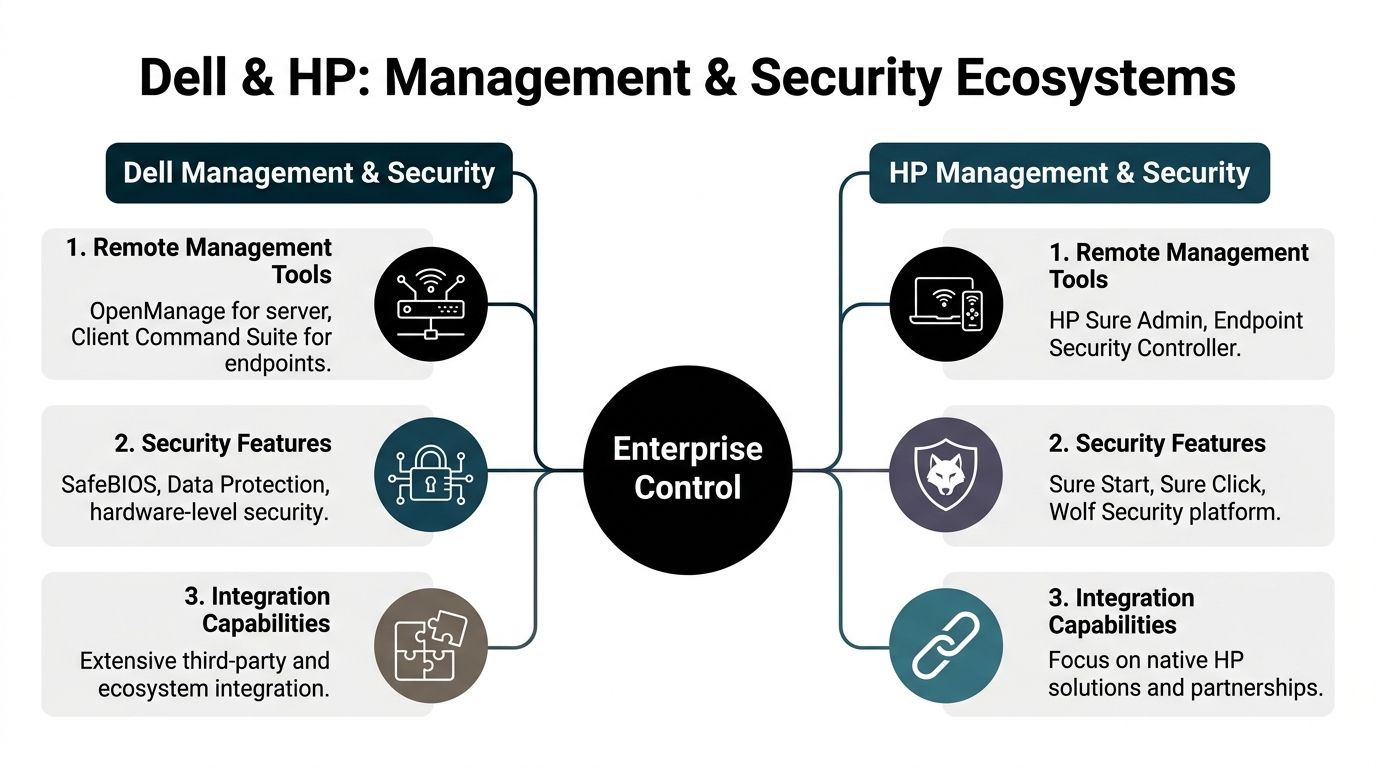
At the server layer, the comparison usually centers on Dell iDRAC and HP iLO. Both exist to give administrators remote visibility and control over systems when an OS is unavailable, a deployment fails, or a distant site needs intervention without a truck roll.
The practical differences often show up in team familiarity and ecosystem fit:
| Management Need | Dell Orientation | HP Orientation |
|---|---|---|
| Remote server administration | Commonly associated with iDRAC workflows | Commonly associated with iLO workflows |
| Client endpoint tooling | Dell Command-style endpoint management ecosystem | HP endpoint and firmware management ecosystem |
| Ecosystem preference | Often favored by teams wanting broad integration flexibility | Often favored by teams preferring tight native platform alignment |
For a data center operator, this isn't a branding issue. It affects provisioning speed, remote remediation, and how quickly the team can standardize runbooks across locations.
Endpoint governance
On endpoints, the winning platform is often the one your desktop engineering team can automate with fewer exceptions. BIOS updates, driver packaging, firmware consistency, and image maintenance create hidden labor if the tooling fights your existing endpoint framework.
Dell is often seen as strong where IT wants broad integration and centralized command discipline. HP often stands out where native platform cohesion and endpoint security layers are central to the design. The deciding factor is less feature count than administrative effort per thousand endpoints.
A pilot should test more than deployment. It should test what happens six months later when you push firmware updates across the fleet.
Security architecture and retirement risk
Both vendors market hardware-level protections, BIOS integrity controls, and endpoint security suites. The strategic issue for leadership is that security doesn't end at runtime. It extends to asset retirement.
That's where infrastructure and ITAD planning intersect. A system with strong firmware protections still becomes a risk if the retirement process is weak, undocumented, or inconsistent. Before assets leave your control, teams need a repeatable standard for media sanitization and validation, especially if systems are being remarketed, redeployed, or recycled after internal use. A practical baseline starts with documented procedures for how to completely wipe a hard drive, but governance has to go beyond a one-off erase task.
Security teams should ask one extra question during vendor selection: which platform will be easier to retire with evidence, not just easier to deploy?
What executives should ask the team
Instead of asking which OEM has "better security," ask for answers to these:
- Can the infrastructure team manage servers remotely with one consistent workflow?
- Can endpoint administrators automate BIOS and driver governance without exception handling at scale?
- Can security and compliance teams document retirement controls with the same rigor they apply to deployment controls?
Those questions surface the operational truth faster than any feature matrix.
Analyzing Total Cost of Ownership and End-of-Life Value
Most refresh decisions still overweight purchase price and underweight disposal economics. That's a mistake because the last phase of the asset lifecycle can either recover value or create cost, delay, and compliance exposure.
A serious dell or hp analysis sets itself apart from a buyer's guide because hardware isn't just acquired. It is warehoused, patched, repaired, reassigned, depreciated, collected, sanitized, transported, resold, dismantled, and recycled. Every one of those steps has cost implications.
TCO is a lifecycle math problem
A lower initial quote can still become the higher-cost fleet if the devices are harder to repair, suffer more downtime under your actual workload, or lose reuse value sooner. Likewise, a premium device can be justified if it stays in service longer, supports role reassignment, or retains stronger remarketing appeal.
The available evidence makes one point impossible to ignore. Global e-waste reached 62 million tons in 2024, and only 22% was properly recycled. The same source notes that Dell and HP together hold roughly 35% of the market and that partnerships with recyclers capable of recovering 90%+ of materials are important for compliant disposition, according to CRN's 2025 PC sales and e-waste discussion.
That creates a strategic implication many teams miss. OEM choice affects not only user experience, but also how expensive and operationally difficult retirement becomes at scale.
Why end-of-life should influence the initial buy
There are four reasons to bring ITAD into the refresh decision before purchase orders are approved:
Residual value isn't evenly distributed
Some systems are easier to remarket because they align with secondary-market demand. Standardized business laptops, modular workstations, and higher-spec units often have more attractive reuse paths than highly specialized or low-end devices.Material complexity affects processing
The verified data notes that hardware material complexity influences ITAD processes. More complex infrastructure mixes can increase sorting, dismantling, and logistics burden.Data-bearing components change the risk profile
Storage handling, audit trails, and chain of custody become more demanding as device counts rise and configurations diversify.Sustainability reporting is getting harder to fake
Organizations increasingly need evidence of what was reused, recycled, and destroyed, not just a statement that assets were "disposed of."
If your refresh RFP doesn't ask what happens in year four or five, it isn't a lifecycle RFP. It's a purchase transaction.
The hidden executive question
The hidden question in a Dell or HP refresh isn't "Which costs less?" It is "Which choice leaves us with fewer ugly surprises when the fleet exits service?"
That includes:
- Storage sanitization complexity
- Pickup and consolidation logistics
- Likelihood of redeployment inside the business
- Channel for resale of reusable parts and systems
- Documentation quality for auditors and regulators
Even simple planning choices matter. Standardized fleets are easier to collect and process than years of ad hoc exceptions. Devices with healthy secondary demand are easier to monetize. Repairable systems can extend use long enough to shift retirement timing into a more orderly cycle.
Organizations that understand this often build a resale and retirement assumption directly into refresh economics. They also map likely remarketing channels in advance, especially for components and systems that still hold value in the aftermarket. A practical starting point is understanding where to sell computer parts as part of a broader ITAD strategy rather than treating resale as an afterthought.
My strategic conclusion on TCO
If your environment is highly regulated, geographically distributed, or infrastructure-heavy, end-of-life simplicity deserves board-level attention. Not because sustainability is fashionable, but because unmanaged retirement creates audit risk and stranded value at the same time.
Between Dell and HP, the better TCO decision is rarely the one with the lower opening quote. It's the one that best balances support burden, reuse horizon, and retirement discipline across the whole fleet.
How to Make the Final Decision for Your Organization
A CIO signs a three-year refresh on attractive unit pricing. Eighteen months later, the outcome is determined elsewhere. Ticket volume, procurement friction, imaging consistency, exception handling, and end-of-life recovery decide whether the standard was a sound strategic choice or an expensive compromise.
The final decision between Dell and HP should reflect how your organization buys, supports, governs, and retires hardware. Brand preference is secondary. Operating model fit is what protects long-term value.
Choose Dell when configuration control supports the business case
Dell usually fits organizations that want a direct relationship with the manufacturer and tighter control over how systems are specified across different user groups. That matters when endpoint strategy is closely tied to engineering requirements, application demands, or internal sourcing discipline.
Dell tends to make more sense for:
- Complex enterprise fleets with distinct user personas and hardware requirements
- Engineering, developer, and technical teams that need customized configurations
- Organizations with mature internal procurement and endpoint management functions
- Workgroups where premium displays, graphics options, or higher-spec mobile workstations support revenue-producing work
This is often the better path when IT wants to set standards centrally but still allow controlled variation by role, region, or business unit. In that model, more choice is useful only if your team can govern it.
Choose HP when standardization reduces operational drag
HP often fits organizations that place a higher value on repeatability than on configuration breadth. If your procurement motion runs through a reseller, MSP, or established channel partner, HP can align well with a service model built around standardized deployments and bundled delivery.
HP tends to make more sense for:
- Organizations that rely heavily on reseller or partner coordination
- Large productivity fleets where a smaller set of standard builds covers most users
- IT teams that want procurement, staging, deployment, and support handled through one channel
- Environments that benefit from consistent fleet behavior more than hardware customization
For many enterprises, the savings here come from lower operational variance. Fewer exceptions usually mean simpler imaging, easier sparing, cleaner asset tracking, and more predictable support outcomes.
Use an executive decision filter
A useful vendor scorecard should extend beyond performance and purchase price. It should test whether the vendor fits the way your company operates.
| Decision Question | Lean Dell if… | Lean HP if… |
|---|---|---|
| Who should own the commercial relationship? | You want direct OEM accountability and negotiation control | You want a partner to coordinate sourcing, delivery, and support |
| How much hardware variation does the business need? | User roles require tailored configurations | Most employees can work within a narrow set of standard builds |
| Where does your IT team add the most value? | Internal teams can manage vendor complexity and specification discipline | Internal teams benefit more from channel-led execution and standardization |
| What creates lower lifecycle friction? | Greater flexibility improves deployment fit and redeployment options | Fleet uniformity improves support consistency and asset control |
One more point deserves executive attention. The right answer may be a primary standard, not an exclusive standard.
Many large organizations do better with one OEM for the broad productivity fleet and controlled exceptions for specialist users. That approach often lowers support complexity without forcing designers, engineers, developers, or mobile executives into hardware that does not match their actual workload. The best final decision is the one your organization can govern from acquisition through retirement with the least waste, risk, and operational drag.
Frequently Asked Questions on Dell vs HP for IT Infrastructure
Is vendor lock-in a bigger risk with Dell or HP
Vendor lock-in usually comes less from the badge and more from your management tooling, imaging process, accessories, and support contracts. If your standards depend on one OEM-specific workflow, either brand can become sticky. Keep your endpoint policies, docking strategy, and retirement process portable.
Which is better for compliance-heavy environments
Both can work in regulated settings. The key differentiator is whether your team can document secure deployment, patching, storage sanitization, and chain of custody consistently. In healthcare, government, and similar sectors, process discipline matters more than brand marketing.
Which scales better for a fast-growing organization
Dell often fits rapid growth when you need direct control and custom configurations. HP often fits rapid growth when a channel partner can absorb procurement and rollout complexity. Growth doesn't just test supply. It tests whether your support and asset tracking model can keep up.
Which brand is usually better for resale or reuse
That depends on model class, age, configuration, and physical condition. In general, standardized enterprise-grade systems with serviceable components and clear secondary-market demand create better reuse outcomes than heavily worn or highly specialized devices.
Buy the fleet you can govern at the end, not just the fleet you can justify at the beginning.
What's the smartest way to run a final evaluation
Use a pilot with your real workloads and your real support team. Test deployment, firmware management, user support, post-load behavior, and retirement workflow assumptions. A short pilot exposes more truth than a polished vendor presentation.
If your organization is planning a hardware refresh and wants a secure, audit-ready path for retired devices, Dallas Fortworth Computer Recycling supports nationwide IT asset disposition, certified data destruction, data center decommissioning, and responsible electronics recycling for enterprise, public-sector, healthcare, and nonprofit teams. Their focus on chain of custody, reuse, and compliant processing makes them a practical partner when lifecycle planning has to extend beyond procurement.