
Data Center Disaster Recovery Plan: A Step-by-Step Guide
Only 54% of organizations have an established company-wide disaster recovery plan, according to PhoenixNAP’s disaster recovery statistics roundup. That number should change how you think about a data center disaster recovery plan. The primary risk usually isn’t the storm, outage, ransomware event, or failed storage shelf. It’s the gap between what the business assumes is recoverable and what the infrastructure team can restore under pressure.
Most DR guides stop at backups, replication, and failover. In practice, that’s only part of the job. A serious incident often leaves behind damaged servers, contaminated storage media, inaccessible cages, and retired hardware that still contains regulated data. If your plan gets applications back online but leaves compromised equipment sitting in a loading dock with no chain-of-custody, you haven’t finished recovery. You’ve shifted the risk.
A workable data center disaster recovery plan has to do four things well. It has to identify business-critical systems, set realistic recovery targets, give people executable runbooks, and prove those runbooks work under test. Then it needs a final step that many teams miss entirely: secure decommissioning and IT asset disposition for hardware that can’t safely return to service.
Conducting Your Foundational Risk and Business Impact Analysis
A DR plan fails early when the risk assessment is generic. “Power outage,” “cyberattack,” and “natural disaster” aren’t enough. You need to know which event affects which systems, in what sequence, and what the business loses when each one goes down.
A technician holding a tablet reviewing a risk assessment report inside a professional data center facility.
The scale of the problem is hard to ignore. Organizations face an average of 86 IT outages per 12-month period, with annual losses ranging from $86,000 to $86 million per company, and 100% reported revenue losses from downtime in 2025, according to Infrascale’s disaster recovery statistics for the USA. That’s why the first draft of a data center disaster recovery plan should start with business impact, not technology preference.
Build the threat list by site and by system
Start with the physical realities of the environment. A downtown colocation facility has a different threat profile than a suburban owned site. A hospital data room has different access, contamination, and uptime constraints than a finance back office.
Use three categories:
- Physical threats: Utility failure, cooling loss, fire suppression discharge, water ingress, severe weather, building access disruption.
- Cyber threats: Ransomware, destructive malware, compromised admin credentials, backup corruption, unauthorized data exfiltration.
- Human and process threats: Accidental shutdowns, bad firmware rollouts, storage misconfiguration, undocumented dependencies, vendor response gaps.
Don’t stop at naming the threat. Attach each threat to an asset set. Which VMware clusters are in scope? Which SAN volumes? Which file shares host legal records? Which switches are single points of failure? If the answer is “all production,” the assessment is still too shallow.
Tie systems to business functions
A business impact analysis becomes useful when it maps systems to outcomes the executive team recognizes. Don’t write “SQL cluster outage” and expect approval. Write “CRM sales activity stops, customer service history becomes unavailable, and finance can’t reconcile open invoices.”
A practical BIA usually includes a simple matrix like this:
| Business function | Supporting system | What breaks if it fails | Tolerance |
|---|---|---|---|
| Customer support | CRM application and SQL database | Agents lose case history and customer contact records | Low |
| Revenue collection | ERP and finance database | Invoicing, payment posting, and month-end close stall | Low |
| Internal collaboration | Email and file services | Communication slows, but business can continue temporarily | Moderate |
| Archive access | Long-term storage repository | Research and reference are delayed | Higher |
Budget conversations get easier. When leaders see that one storage controller problem can halt revenue collection and create compliance exposure, DR stops looking like insurance for unlikely events and starts looking like operational continuity.
Practical rule: If the business owner for an application can’t state the impact of four hours offline and the impact of one day of lost data, the system hasn’t been analyzed deeply enough.
Use a scenario, not a spreadsheet alone
Take a common mid-market example. The customer-facing CRM depends on a database server, an app tier, identity services, and external connectivity. Teams often overfocus on the VM backup status and forget the dependency chain. The backup may be healthy while DNS, authentication, or storage paths at the recovery site are not.
Walk the scenario through operationally:
- Database server fails during business hours.
- Sales loses account history and pipeline updates.
- Customer service can’t see recent tickets or notes.
- Finance can’t validate customer status for billing disputes.
- Executives get conflicting information because reporting pulls from stale replicas.
That’s the point where the BIA becomes real. The database isn’t “important.” It underpins multiple functions with different restoration priorities and different data sensitivity levels.
Include compliance and lifecycle risk early
A mature risk assessment also asks what happens after the immediate incident. If a flooded rack contains drives with protected health information or customer PII, the issue isn’t only system restoration. It’s containment, chain-of-custody, and secure retirement. Teams that separate DR planning from asset lifecycle management usually create cleanup chaos later.
That’s why asset inventories need more than hostname and warranty status. They should identify owner, data sensitivity, encryption state, physical location, and retirement pathway. A disciplined asset register built around IT asset management best practices makes DR decisions faster because the team already knows what can be restored, what can be replaced, and what must be handled as regulated media.
Setting Recovery Objectives and Choosing Your DR Architecture
Recovery objectives are where disaster recovery plans usually stop being theoretical. A business owner may ask for zero downtime and zero data loss. The architecture, budget, staffing model, and application design usually say otherwise.
Set that expectation early. RTO and RPO are business decisions with technical consequences.
Recovery Time Objective (RTO) defines how long a service can be unavailable before the business impact becomes unacceptable. Recovery Point Objective (RPO) defines how much data loss the business can accept, measured in time. If payroll can be down for four hours but order processing cannot, those systems do not belong in the same recovery tier. If a clinical system cannot lose any chart updates, snapshot-based recovery every few hours is already off the table.
Set RTO and RPO by application tier
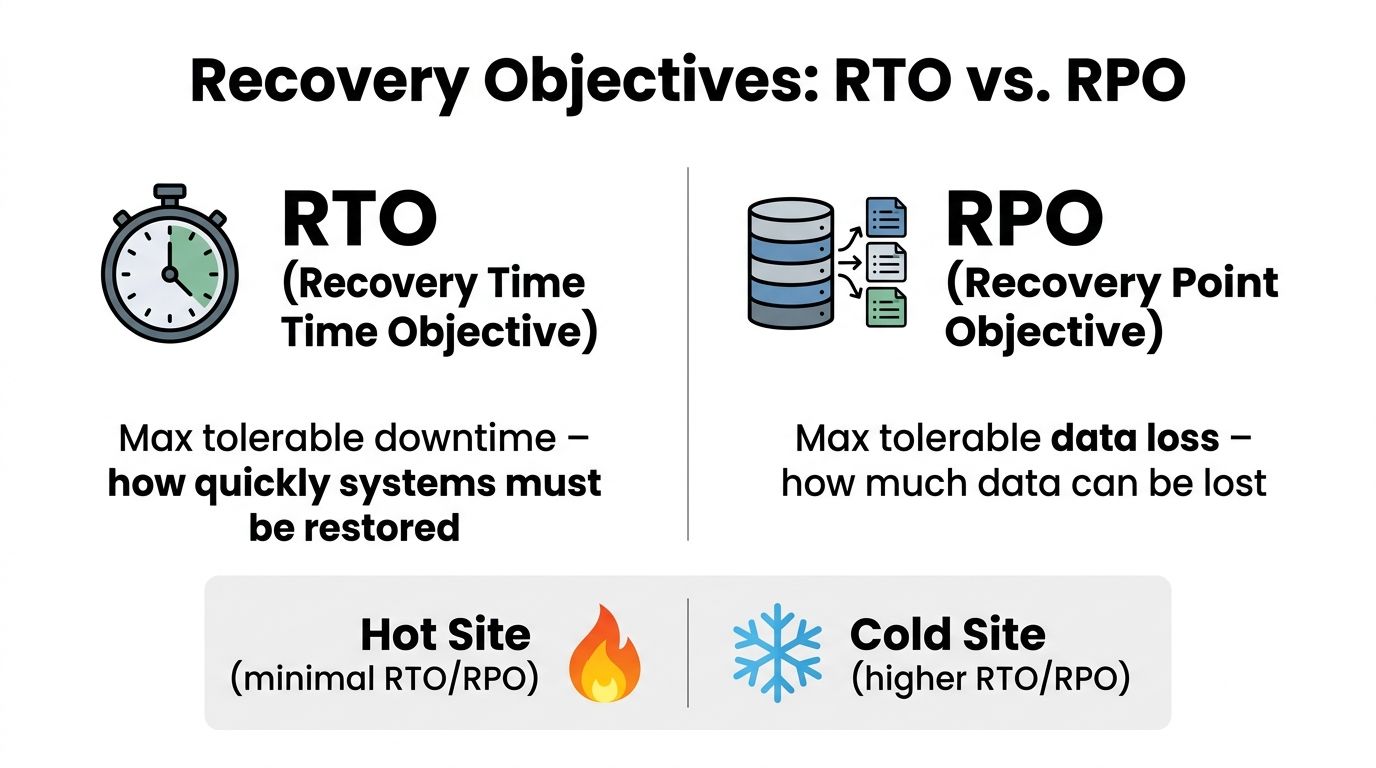
One global target across the environment is a budgeting mistake and an operational mistake. It drives expensive protection for systems the business can live without, while masking hidden dependencies in the applications that matter.
A tiered model works better:
| Tier | Example systems | RTO mindset | RPO mindset |
|---|---|---|---|
| Tier 1 | ERP, EHR, customer transaction platforms, core identity | Restore first | Minimal data loss tolerated |
| Tier 2 | CRM, file services, internal collaboration | Restore soon after core services | Short data gap may be manageable |
| Tier 3 | Test/dev, archives, nonessential reporting | Restore later | Larger data gap may be acceptable |
The hard part is not assigning the tier. The hard part is validating what the tier requires underneath. A Tier 1 application with a 15-minute RPO may also need low-latency replication, application-consistent backups, duplicate licensing, tested DNS changes, and staff who can execute failover cleanly at odd hours. Teams often approve the target and skip the supporting design.
Another common miss is treating the application as the recovery unit. Recovery usually succeeds or fails on dependencies. Identity, DNS, certificate services, storage mappings, message queues, and third-party integrations often decide whether the app is usable after failover.
Choose architecture based on operating reality
Hot site, warm site, cold site, and DRaaS each solve a different problem. The right choice depends less on product marketing and more on how much manual work your team can safely perform during an incident.
Hot site
A hot site supports the shortest recovery targets because compute, network, and data services are already standing by. It also carries the highest ongoing cost. The hidden risk is drift. If production changes every week and the recovery site changes every quarter, the organization is paying for speed it may not have.
Warm site
A warm site is often the practical middle ground. Core infrastructure is in place, replication happens on a defined schedule, and the team performs activation steps during failover. That lowers cost, but it shifts pressure to documentation, orchestration, and operator discipline. If those steps are vague, recovery times expand fast.
Cold site
A cold site can make sense for lower-tier workloads and long-retention data. It is usually a poor fit for regulated systems, customer-facing platforms, or anything with tight service commitments. I have seen cold-site assumptions collapse the moment a business owner realizes that “site available” still means rebuilding servers, restoring data, reconfiguring access, and validating application behavior under pressure.
DRaaS
DRaaS can work well for smaller infrastructure teams or for organizations spread across multiple locations. It can also reduce risk during consolidation and refresh projects, especially if older hardware is nearing end of life. The trade-off is visibility. If the environment still depends on old authentication sources, unsupported appliances, or manual firewall rules that nobody documented, outsourced recovery will inherit the same weaknesses.
The cheapest architecture on paper often has the highest labor cost during a real outage.
Design for testing, refresh cycles, and hardware failure
A recovery design that only works on the original hardware is not a sound design. Disaster recovery has to survive server refreshes, storage replacements, hypervisor upgrades, and site exits. That matters even more in environments carrying aging equipment that may fail during the incident or fail during the move to the recovery platform.
Teams already planning relocations or consolidation work should align recovery decisions with data center migration best practices. The goal is to preserve recovery behavior, not just copy application inventory into a new facility or cloud tenant.
Testability should shape the architecture choice from the start. I use three checks:
- Can the team fail over without depending on two senior engineers who happen to know the environment by memory?
- Can application owners confirm the service is functional, not just powered on?
- Can the platform recover workloads that sit on aging or soon-to-be-retired hardware without creating a compliance problem afterward?
That third question gets missed in many DR discussions. After a flood, fire event, power fault, or physical breach, some hardware should not go back into service even if it can be powered on. Damaged arrays, compromised network gear, and wet or heat-exposed drives may need forensic review, secure handling, and formal retirement. A sound DR architecture accounts for replacement paths and chain-of-custody requirements, especially for regulated media.
What works in practice
Several patterns hold up well in production.
- Works well: Recovery tiers approved by business owners and tied to specific application dependencies.
- Often fails: Aggressive RTO targets that assume login, printing, integrations, and data validation will sort themselves out after failover.
- Works well: Standard orchestration for common server and database patterns.
- Often fails: Custom recovery steps for one-off legacy systems that still run on unsupported or end-of-life hardware.
- Works well: DRaaS or warm-site designs for organizations that need consistency across many locations.
- Often fails: Treating damaged hardware as only an operations problem instead of a recovery, security, and disposal problem.
That last point deserves attention. Recovery does not end when systems come back online. If the incident leaves behind failed drives, smoke-damaged appliances, or physically compromised servers, the DR plan needs a path for secure decommissioning and compliant asset disposition. If that path is missing, the organization may restore service and still create a security incident afterward.
Developing Actionable Disaster Recovery Runbooks
A policy document won’t help at 2:17 a.m. when storage is degraded, the security team is isolating subnets, and executives are asking whether customer data is safe. At that point, the team needs a runbook. Not a vision statement. Not a governance PDF. A runbook is the document that tells named people what to do, in what order, using which systems, and who approves the next move.

Write for stressed operators, not architects
The biggest runbook mistake is writing for the people who designed the environment. Those people already know the shortcuts and assumptions. A useful runbook is clear enough that a competent engineer outside the original project team can execute it under stress.
Every runbook should answer these questions immediately:
- What event triggers this runbook
- Who owns command during the incident
- What systems are in scope
- What preconditions must be true before execution
- What stop conditions require escalation
- How success is verified by the business owner
Keep contact details, vendor support contracts, escalation trees, and administrative vault references in the same controlled document set. In an outage, scattered information burns time.
Build the sequence around decisions
A runbook is not just a list of technical tasks. It’s a sequence of decisions. That distinction matters in incidents like ransomware, where premature restoration can reintroduce the same compromise.
For a ransomware event, the runbook should separate containment, validation, and recovery:
- Containment first. Security isolates affected segments, disables compromised accounts, and preserves evidence.
- Scope confirmation. Infrastructure verifies which hypervisors, storage pools, and backup repositories are touched.
- Executive decision point. Leadership, legal, compliance, and security decide whether recovery proceeds from known-good backups or alternate infrastructure.
- Controlled restoration. Systems are restored by priority tier, with identity and security dependencies validated before application release.
- Business signoff. Application owners confirm integrity, not just availability.
That sequence prevents a common error: restoring quickly into an environment that hasn’t been cleaned.
Field note: If your ransomware runbook doesn’t define who approves reconnecting restored systems to production networks, the team will make that decision ad hoc. That’s where bad recoveries happen.
Keep role assignments concrete
Runbooks work best when responsibilities are role-based and specific. “IT team restores service” is useless. “Virtualization lead mounts recovery datastore and presents recovered VM set to the isolated recovery cluster” is actionable.
Here’s a compact model:
| Role | During a power outage | During ransomware |
|---|---|---|
| Infrastructure lead | Assess facility status, UPS/generator state, storage health | Coordinate server, storage, and recovery environment actions |
| Security lead | Validate no security event is hiding inside the outage | Isolate, preserve evidence, approve safe restoration path |
| Communications lead | Send business updates, vendor notices, user guidance | Control internal and external communications |
| Executive sponsor | Approve site failover and business continuity actions | Make legal, regulatory, and customer-impact decisions |
For regional power events, create explicit branches. One branch assumes utility restoration is imminent. The other assumes prolonged outage and site transfer. If the decision criteria aren’t written down, teams often wait too long before failing over.
Maintain a runbook package, not a single file
A mature data center disaster recovery plan usually contains multiple linked runbooks:
- Service recovery runbooks for application stacks
- Infrastructure runbooks for networking, storage, virtualization, and identity
- Incident communications playbooks for executives, users, regulators, and customers
- Decommissioning appendices for systems that are unsafe, compromised, or retired after the event
The last item matters more than commonly anticipated. During site shutdowns and hardware replacement programs, I’ve seen recoveries slowed because no one defined how to remove failed hardware from service without breaking evidence handling or compliance requirements. A disciplined server decommissioning checklist should sit beside the DR runbook package, especially for regulated environments where damaged drives and appliances can’t just be stacked in a cage for later review.
Validating Your Plan Through Rigorous Testing and Audits
A disaster recovery plan earns trust only after the team proves it under conditions that resemble a real outage. In practice, that means testing the recovery path, the approvals, the dependencies, and the evidence trail auditors will ask for later.
The testing gap is still large. Many organizations test infrequently, skip full restoration exercises, or stop at tabletop reviews, according to Invenio IT’s disaster recovery statistics analysis. I see the same pattern in the field. Backup dashboards look healthy, but the first real restore exposes stale service accounts, missing VLAN changes, expired certificates, or an application owner who cannot confirm whether recovered data is usable.
Test the restoration path, not just the documentation
Paper reviews have value, but they catch a narrow class of problems. A runbook can be current and still fail at execution because the environment drifted underneath it.
A useful validation program usually includes four test layers:
- Document review: Confirm runbooks, call trees, asset inventories, dependency maps, and escalation paths are current.
- Tabletop exercise: Walk through a realistic scenario with infrastructure, security, compliance, facilities, communications, and business owners.
- Technical simulation: Restore systems, fail over selected services, verify authentication, integrations, logging, and data integrity.
- Audit evidence review: Capture outcomes, exceptions, approvals, screenshots, logs, and remediation tickets in a form the organization can defend later.
Each layer finds different defects. Tabletop sessions expose decision delays and ownership gaps. Technical testing exposes the ugly failures that paperwork hides, like a firewall rule nobody documented or a storage snapshot policy that changed six months ago.
The best tests also include degraded conditions. Teams should practice with one dependency unavailable, one approver out of office, or one vendor response delayed. Real disasters rarely respect the clean assumptions built into test scripts.
Define pass and fail before the test starts
Many DR exercises produce weak results because the team never agreed on what success looks like. “The server booted” is not a meaningful outcome if users still cannot log in or complete a transaction.
Use pass criteria tied to business operation:
| Validation area | Example pass condition |
|---|---|
| Identity | Users authenticate with the expected access level |
| Data integrity | Business owner confirms recent records are present and accurate |
| Network access | Required internal and external connectivity works in the recovery state |
| Application function | Core transaction or workflow completes successfully |
| Logging and audit | Security and operational logs are captured in the recovery environment |
A test passes only when the service is usable in the recovery state and the organization can prove what happened.
That proof matters in regulated environments. Healthcare, public sector, finance, and critical infrastructure teams are often asked for execution records, approval history, exception tracking, and remediation closure. If that material is scattered across email, chat, and personal notes, the organization creates an audit problem even if the recovery itself worked.
Schedule tests like production changes
Serious DR testing interrupts schedules, pulls in senior staff, and sometimes creates short-term risk. That is why mature teams treat it like a controlled production event. Change windows, rollback criteria, communications plans, and named approvers should all be part of the test design.
A yearly event is rarely enough. Systems change too quickly. Firmware gets updated, certificates expire, applications pick up new dependencies, and aging hardware behaves differently under restore conditions than it did during the last exercise. That last point gets ignored too often. End-of-life infrastructure can pass routine monitoring and still fail during a power cycle or a storage failover test.
A better cadence spreads validation across the year. One quarter can focus on identity and directory recovery. Another can test application failover. Another can restore regulated datasets and verify retention, chain of custody, and logging. That approach gives teams more useful findings and fewer staged demonstrations.
Centralizing evidence helps as much as centralizing runbooks. Screenshots, test plans, change records, recovery timestamps, owner signoffs, and remediation tickets should map back to actual assets and service owners. Teams that already maintain inventory discipline through tools in the category of best IT asset management software usually have a cleaner path from test result to corrective action, especially when hardware age and lifecycle status affect DR decisions.
Audit the cleanup path, not only the failover
This is the gap many DR programs miss. Validation should not stop at “service restored.”
After a flood, fire, electrical event, security breach, or rushed site evacuation, some equipment should not return to service. It may be physically damaged, contaminated, unreliable after power loss, or subject to evidence preservation requirements. Testing should confirm that the DR process identifies those assets, isolates them correctly, and hands them off through the right compliance and security controls.
That means audits should ask questions such as:
- Which recovered assets were approved for return to production
- Which assets were quarantined for forensic review
- Which failed devices require certified data destruction or documented chain of custody
- Which asset records were updated to reflect damaged, retired, or replaced status
- Which vendors and internal owners have authority to release hardware for disposition
I have seen recoveries delayed because teams restored applications successfully but left a pile of failed drives, damaged network gear, and suspect appliances sitting in a cage with no documented owner. That is not just untidy operations. It creates legal, security, and audit exposure.
What post-mortems should actually capture
A useful post-mortem is specific. It records what failed, why it failed, who owns the fix, and when the fix will be retested.
Capture details such as:
- Which systems missed their recovery objective
- Which dependencies were missing or inaccurate
- Which manual steps introduced delay
- Which approvals, vendors, or credentials slowed execution
- Which aging or end-of-life assets failed under test
- Which hardware was flagged for forensic hold, destruction, or retirement
- Which documents were wrong at the moment the team needed them
Then route those findings into change control, architecture review, procurement planning, and asset disposition workflows. If the exercise ends with a slide that says “minor issues identified,” the organization learned very little.
Integrating Secure Decommissioning and IT Asset Disposition
Most data center disaster recovery plans end too early. They stop when applications are restored or the failover site is stable. But after a flood, fire, ransomware event, structural issue, or emergency shutdown, the organization still has a second problem: what to do with hardware that is damaged, compromised, contaminated, or no longer trustworthy.
That’s where DR and IT asset disposition (ITAD) need to meet. If they don’t, the organization can recover operations and still create a compliance incident during cleanup.

The gap is measurable. A 2023 Gartner report, cited by Encor Advisors in its discussion of data center disaster recovery, notes that 40% of organizations fail compliance audits post-disaster due to improper data destruction on retired hardware, yet only 5% of DR plans explicitly include certified ITAD protocols. That’s the blind spot many teams discover too late.
Decide which hardware is recoverable and which is evidence or scrap
After a serious incident, not every asset should return to service. Some equipment is physically damaged. Some may be electrically unstable. Some may contain sensitive data but no longer support reliable sanitization in the usual operational workflow. In cyber events, some systems may also need to be preserved for forensic review.
A practical triage model classifies hardware into four buckets:
| Asset condition | Immediate handling |
|---|---|
| Safe to return to service | Inspect, validate, reimage if needed, then redeploy under change control |
| Recoverable but not trusted yet | Quarantine for technical evaluation and sanitization decision |
| Forensic hold required | Seal, label, restrict handling, preserve chain-of-custody |
| End-of-life or physically compromised | Route to secure decommissioning and certified data destruction |
This classification should happen inside the incident process, not weeks later during cleanup. Once damaged devices start moving informally between teams, custody records degrade fast.
Chain-of-custody must survive the messy phase
The hardest period is usually the first cleanup window. Facilities wants the area cleared. Operations wants replacement gear installed. Security wants evidence preserved. Compliance wants records. If no one owns the retirement workflow, people start making local decisions that create audit problems later.
For regulated environments, the post-disaster handling process should include:
- Asset identification: Serial number, asset tag, location recovered from, and system owner.
- Condition logging: Water damage, burn damage, tamper evidence, failed boot state, or contamination concerns.
- Data classification tag: Whether the asset stored PII, PHI, financial records, legal records, or general business data.
- Custody transfer record: Every movement between data center staff, security, logistics, and disposition partner.
- Disposition method: Sanitization, destruction, resale eligibility, recycling path, and certificate retention.
If a storage device leaves the incident site without a custody record, treat that as a control failure, not a paperwork issue.
Healthcare organizations feel this pressure immediately. A water-damaged imaging workstation or failed storage array might be unusable operationally but still contain regulated data. “It doesn’t power on” is not a compliance defense. The plan needs a documented method for secure handling of nonfunctional media.
Add ITAD steps directly into the DR runbook
This is the part most plans miss. Secure decommissioning should not live in a separate retirement binder that nobody opens during an incident. It belongs in the data center disaster recovery plan itself, with triggers and owners.
A strong post-disaster decommissioning workflow usually includes:
- Declare retirement status for assets that won’t re-enter production.
- Freeze informal disposal so no equipment leaves through facilities or surplus channels.
- Inventory and photograph affected hardware before movement.
- Separate forensic-hold assets from standard retirement assets.
- Coordinate certified data destruction based on media type and condition.
- Retain certificates and logistics records with the incident record.
- Update CMDB and insurance records so retired hardware is not counted as recoverable capacity.
This is especially important during site exits and partial rebuilds. If the team is replacing racks after a disaster, there’s usually overlap between emergency restoration and long-planned retirement work. A documented data center decommissioning process keeps those streams from colliding and helps the organization distinguish between assets being restored, assets being held, and assets permanently removed from service.
Responsible disposal matters operationally too
There’s also a practical reason to formalize this work beyond compliance. Damaged and obsolete gear occupies floor space, complicates insurance claims, confuses inventory, and keeps incident tickets open. When organizations handle decommissioning methodically, the cleanup phase moves faster, audit questions are easier to answer, and replacement planning gets cleaner.
Secure disposition can also recover value when hardware is no longer needed but remains eligible for reuse or resale after proper data destruction and evaluation. That won’t apply to every disaster scenario, but the decision should be deliberate and documented, not left to whoever happens to be available in the warehouse.
A complete DR program doesn’t end when systems come back. It ends when the organization can prove three things: the business was restored, sensitive data remained controlled throughout the event, and every compromised or retired asset left the environment through an auditable path.
If your organization needs a partner for secure, compliant hardware retirement after an outage, site closure, or recovery event, Dallas Fortworth Computer Recycling provides nationwide IT asset disposition, certified data destruction, and data center decommissioning support designed for IT teams that need clear chain-of-custody and documented compliance.