
Mastering Data Center Migration Services
The moment a data center migration becomes real usually doesn't start with architecture diagrams. It starts with pressure.
An IT director gets a renewal notice on colocation space, a compliance team raises concerns about aging systems, an acquisition adds another stack to support, or the business asks for better resilience without funding another cycle of patchwork upgrades. What looked like a future infrastructure initiative turns into an immediate decision with operational, financial, and governance consequences.
That’s why data center migration services matter. They aren't just about moving racks, VMs, or storage. They help teams move risk, responsibility, and business continuity from an old environment into one that supports current needs.
The Strategic Imperative of Data Center Migration
The business case for migration has matured. What used to be treated as a one-off infrastructure project is now a recurring part of enterprise modernization.
The scale of that shift is visible in market demand. The global data center migration market is projected to grow from $12.26 billion in 2024 to $26.77 billion by 2029, driven by regulatory requirements, mergers and acquisitions, and a stronger focus on business continuity, according to global market reporting on data center migration. That tells you something important. More IT leaders are no longer asking whether a migration will happen. They’re asking how to execute one without creating new risk.
Why the mandate lands on IT now
Most first major migrations are triggered by a cluster of problems, not a single event:
- Aging infrastructure: Support contracts become harder to justify, and old hardware limits future architecture choices.
- Compliance pressure: Security and audit teams expect tighter control over where systems live, how data moves, and how retired assets are handled.
- Business change: M&A, office consolidation, and application modernization force teams to rationalize duplicate or fragmented environments.
- Cost visibility: Power, space, cooling, and staffing costs become harder to defend compared with managed, cloud, or hybrid options.
A lot of teams underestimate the last point. The migration isn’t just a move from one facility to another. It’s often the first time leadership sees the full lifecycle cost of keeping legacy systems alive.
Practical rule: If the migration discussion is only about where workloads will run next, the project is still under-scoped. It should also include compliance ownership, operating model changes, and end-of-life handling for what gets left behind.
That last piece is where many migration plans still fall short. Teams focus on the destination environment and postpone retirement planning for the source environment. In practice, those decisions belong in the same conversation. The organizations that handle migrations cleanly usually align infrastructure planning with corporate e-waste solutions early, not after equipment starts piling up in a storage room.
What good leadership looks like here
The best IT directors treat migration as a board-visible reliability project, not a technical relocation exercise. They connect architecture, legal exposure, service continuity, and disposal controls in one program.
That mindset changes the work. It leads to better sequencing, better vendor selection, and fewer “we’ll deal with that later” decisions that become audit findings later.
What Are Data Center Migration Services Really
At a practical level, data center migration services are a structured mix of planning, engineering, logistics, validation, and retirement work that moves infrastructure from one operating state to another with minimal disruption.
A simple way to think about it is a corporate headquarters move. You’re not just transporting desks. You’re relocating people, records, access controls, communications systems, and the processes the business depends on every hour. Data center migration works the same way. Servers and storage are only part of the picture. Applications, dependencies, security controls, backup chains, licensing, and shutdown procedures all have to arrive in the right place and still function.
The service is broader than the move
When vendors say they provide data center migration services, the serious ones usually cover several workstreams:
- Assessment and inventory: identifying what exists, what’s still needed, and what should be retired instead of moved
- Application and dependency mapping: making sure front-end systems, databases, identity services, and integrations stay aligned
- Target-state design: deciding what goes to cloud, what remains on-premises, and what belongs in a hybrid model
- Cutover execution: handling the actual movement, whether physical, virtual, or cloud-based
- Validation and rollback readiness: confirming service health and preserving a way back if something fails
- Decommissioning support: retiring old equipment and media in a controlled way
That final item often gets treated as separate procurement. Operationally, it isn’t separate.
The cloud question usually drives the conversation
For many organizations, cloud migration is the dominant entry point into a broader data center transformation. According to AWS Enterprise Strategy reporting on 2025 cloud migration trends, worldwide end-user spending on public cloud services is expected to reach $723.4 billion in 2025, and 94% of enterprises now use cloud computing. That’s why many migration projects start with “which workloads should move” rather than “which racks should move.”
But cloud isn’t automatically the right answer for everything. In practice, most first-time migration programs end up with a mixed estate:
| Migration pattern | Best fit | Main trade-off |
|---|---|---|
| Physical relocation | Hardware that still has business value and must remain in controlled facilities | Complex logistics and transport risk |
| Virtual platform migration | Workloads that can move with minimal application change | Hidden dependency issues can surface late |
| Cloud migration | Elastic, modernized, or geographically distributed services | Governance, cost control, and compatibility need tighter discipline |
| Hybrid migration | Estates with regulated systems, latency-sensitive apps, or staged modernization needs | More coordination across environments |
What the service should accomplish
A credible migration service should do more than “complete the move.” It should help you answer four business questions:
- What are we moving, and why are we moving it?
- What can’t go down, even briefly?
- What must be validated for compliance before and after cutover?
- What happens to the old equipment, storage, and media once the new environment is stable?
A migration that finishes without a retirement plan hasn’t finished. It has only displaced the risk.
That’s why teams should evaluate migration planning alongside data center decommissioning services from the start. Otherwise, the project creates a second unmanaged phase after go-live, and that’s often where control weakens.
The Four Phases of a Successful Migration Project
Most failed migrations don’t fail in the middle of cutover. They fail earlier, during assumptions nobody challenged.
That matters because poor planning affects up to 70% of projects, and the resulting issues can include unplanned downtime exceeding 4 to 8 hours per incident and post-migration latency spikes of 2 to 5 times the normal rate, based on migration risk analysis from Coeo Solutions. The pattern is familiar. Teams know the environment at a high level, but not at the level required to move it safely.
The fix isn’t complexity. It’s discipline across four phases.
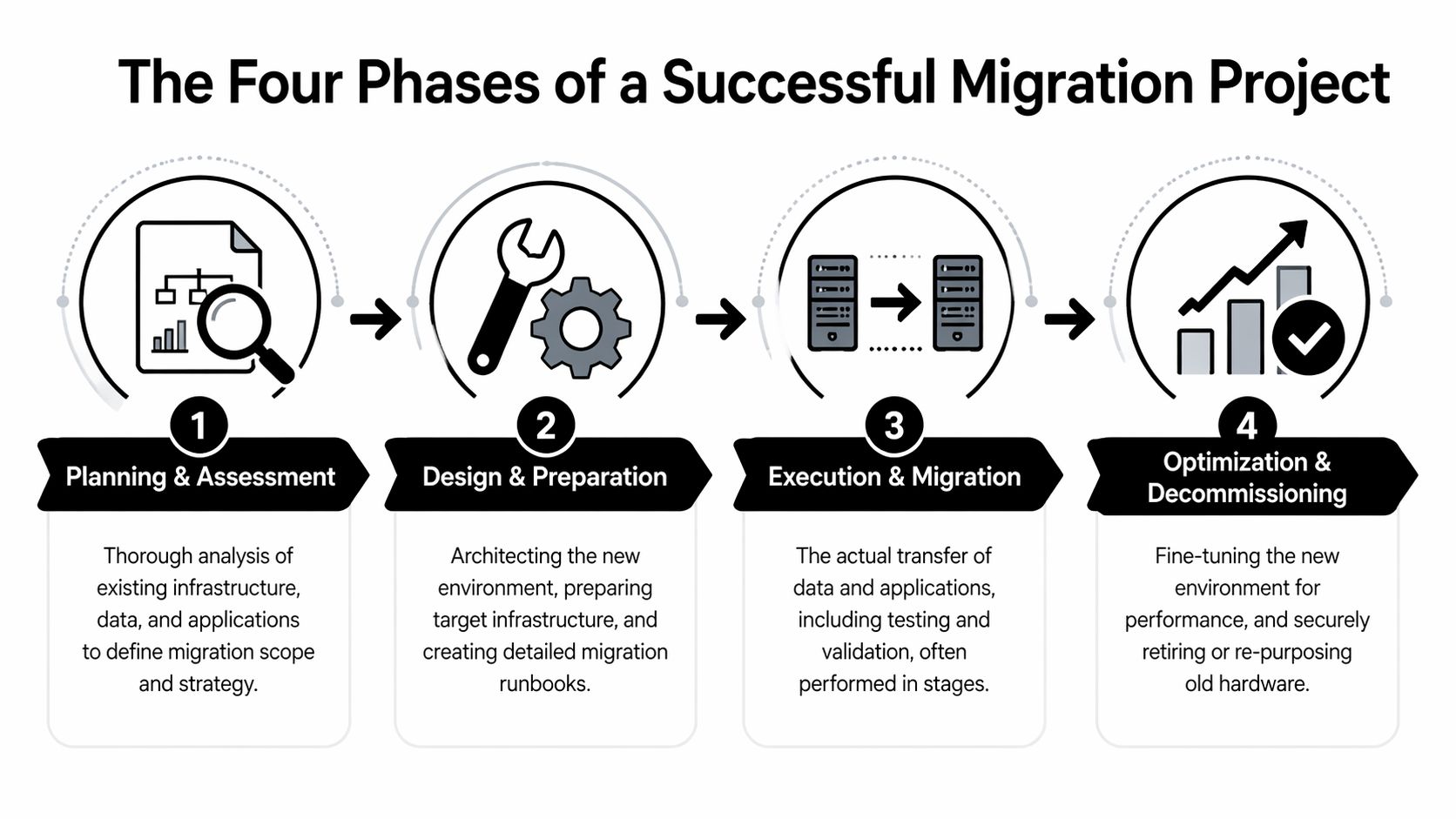
Phase 1 Planning and assessment
Start by building an evidence-based picture of the current estate. That means physical inventory, virtual inventory, application ownership, storage mapping, connectivity paths, business criticality, and support dependencies.
A discovery phase should answer questions like these:
- Which systems are in use: not just powered on, but serving a business function
- Which workloads are interdependent: identity, databases, file shares, message queues, reporting layers
- Which systems are fragile: unsupported OS versions, aging arrays, appliances with limited vendor support
- Which workloads are regulated: healthcare, government, financial, and research environments usually have stricter handling requirements
This is also where teams decide what not to migrate. Every first major migration includes assets that shouldn’t survive the move.
Phase 2 Design and preparation
Once you know the estate, design the future state and the migration path together. Don’t separate them.
This phase usually includes runbooks, wave plans, validation criteria, access models, rollback sequences, and target-environment preparation. If the destination is cloud or hybrid, identity design, segmentation, backup policy, and observability need to be settled during this phase before production traffic moves.
A strong preparation phase includes:
- Runbooks with owner names: not generic task lists, but named responsibility for each step
- Change windows tied to business reality: finance close, clinical workflows, public-sector service hours, and customer traffic patterns matter
- Rollback criteria: define the threshold for stopping, not just the path for moving forward
- Backup and replication validation: backups that haven’t been tested are paperwork, not protection
Field note: Dry runs don’t need to be perfect. They need to be honest. If a pilot exposes dependency confusion, missing credentials, or unclear ownership, that’s a success because it happened before production cutover.
Phase 3 Execution and migration
Execution is where planning quality becomes visible. Some environments move in waves. Others require parallel operation before final cutover. A few still require physical relocation of equipment, and that introduces chain-of-custody and handling controls that virtual-only teams sometimes overlook.
During the move, keep the command structure tight. One coordination lead, one decision log, one issue escalation path.
A practical execution model often looks like this:
- Freeze unnecessary change so teams aren’t debugging unrelated modifications.
- Take final validated backups or snapshots for the systems in scope.
- Move by dependency group instead of by departmental convenience.
- Validate immediately after each wave rather than waiting until the end.
- Keep rollback viable until production use is confirmed.
Common mistakes at this stage are predictable. Teams move application servers before the services they authenticate against. They assume network behavior will match the old environment. They compress too many critical systems into one cutover window because the project calendar looks cleaner on paper.
Phase 4 Validation and optimization
A workload being online doesn’t mean the migration is complete. It means the most visible step is complete.
Validation should include application functionality, performance checks, backup confirmation, monitoring verification, access reviews, and audit logging. If users can log in but jobs fail overnight, reporting breaks, or storage performance drops under load, the migration still has unresolved risk.
Use this phase to close the loop on:
- Performance baselines: compare new behavior to pre-migration expectations
- Operational readiness: support desk scripts, escalation paths, and vendor contacts
- Documentation updates: architecture, support ownership, and recovery procedures
- Source-environment shutdown planning: only after stable operations are confirmed
The migration lifecycle should end with a controlled data center decommissioning process, not an informal cleanup effort weeks later. That keeps retirement, data handling, and disposal inside the project’s governance boundary.
Navigating Critical Migration Risks and Compliance
Migration risk usually shows up in four categories at once: technical risk, operational risk, security risk, and financial risk. Treating them separately is a mistake because one often triggers the next.
A compatibility problem turns into downtime. Downtime turns into emergency change. Emergency change creates poor documentation. Poor documentation creates compliance exposure.
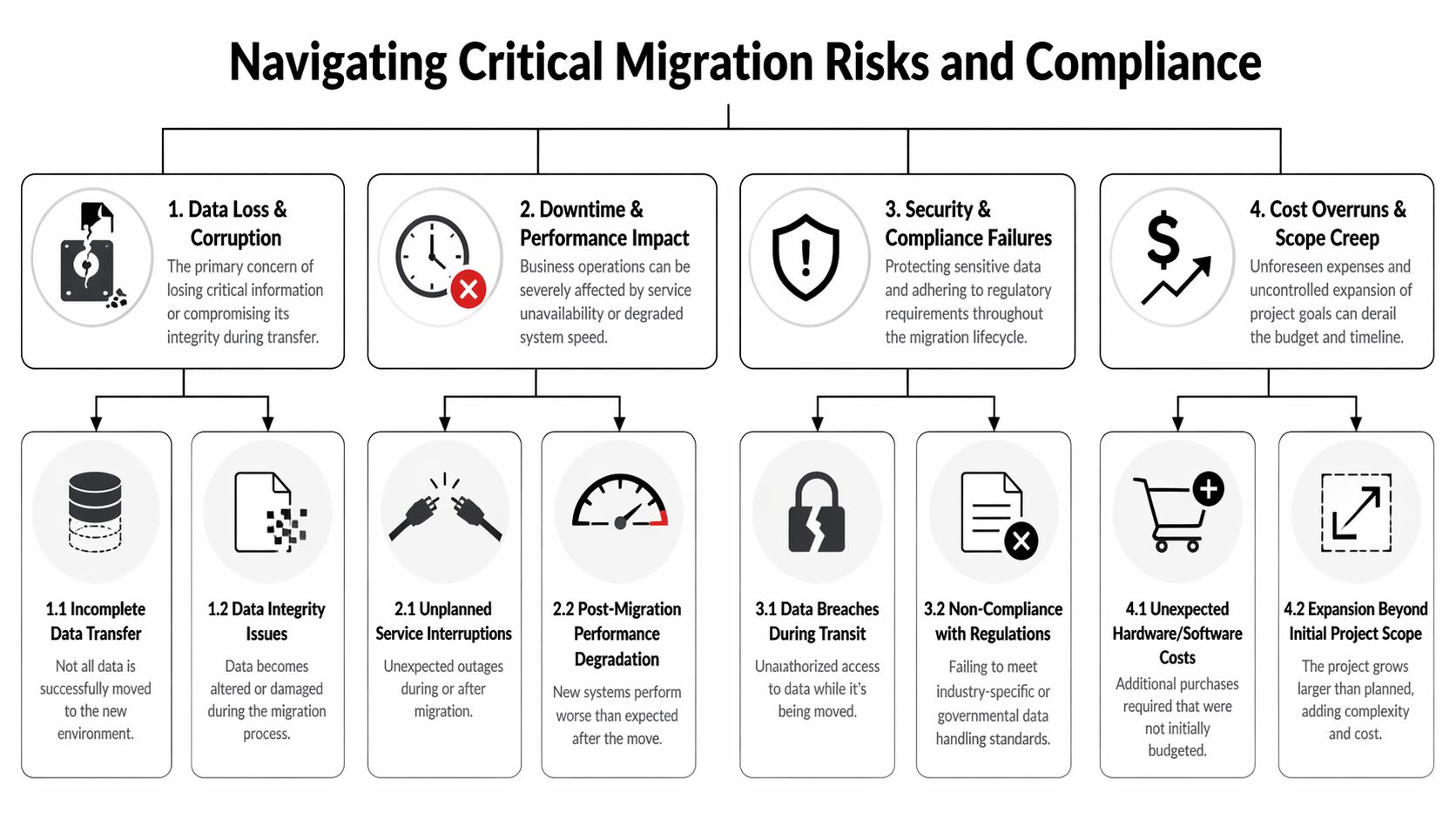
Technical risk starts with what legacy systems hide
One of the most persistent issues in data center migration services is compatibility. According to Cloudficient’s analysis of migration challenges, system compatibility issues contribute to up to 45% of migration failures, often causing project delays averaging 3 to 6 months when legacy data formats and modern platforms don’t align.
That shouldn’t be read as a niche archive problem. It’s broader than that. Older applications often rely on proprietary data structures, aging authentication methods, or assumptions about storage and network behavior that aren’t obvious until migration testing starts.
What to inspect before cutover
- Data format dependencies: legacy archives, export structures, and application-specific records often need transformation before migration.
- Schema mismatches: field structures may not map cleanly into modern target systems.
- Encoding issues: mixed character encodings can subtly degrade data integrity or searchability.
- Tool limitations: native utilities sometimes handle common cases but fail on protected, corrupted, or unusually structured files.
When I review troubled migration plans, this is often where the optimism lives. Teams assume “supported” means “interoperable.” It doesn’t.
Compatibility testing is not a documentation exercise. It’s where you prove the destination can actually consume what the source produces.
Operational risk shows up as service instability
Even when data moves correctly, services can still degrade because the operating environment changed. CPU allocation, memory profiles, storage latency, and network path changes can all create production instability after go-live.
Three red flags deserve attention:
- Cutover windows built around convenience: if the maintenance window fits the calendar better than the workload, expect pressure and shortcuts.
- No dependency-based sequencing: moving systems by team ownership instead of service dependency causes avoidable outages.
- Weak rollback discipline: if rollback exists only as a slide in a project deck, the team won’t use it when pressure rises.
Healthcare and public-sector teams should take this especially seriously. Regulated environments don’t just need service restoration. They need evidence that data handling remained controlled throughout the event.
Security and compliance risk continues after migration day
A secure migration requires more than encrypted transfer. It requires preserving accountability from the source environment through the destination environment and into retirement of the original assets.
That means asking:
| Risk area | What mature teams verify |
|---|---|
| Data in transit | Encryption controls, access restrictions, and transfer logging |
| Access changes | Role reviews, privileged access approvals, and admin account cleanup |
| Auditability | Evidence of who handled systems, when changes occurred, and what was validated |
| Legacy media | Secure retirement of drives, arrays, backup devices, and removable media |
For organizations handling regulated data, disposal controls matter as much as migration controls. Old storage left in a cage, office, or warehouse can become the easiest place for policy failure to surface. That’s why secure retirement should be aligned early with secure data destruction services.
Financial risk usually comes from scope drift
Very few first migrations fail because the approved budget was obviously too small. They fail because the original scope ignored hidden work: dependency remediation, temporary licensing, transport coordination, archive conversion, post-cutover tuning, and hardware retirement.
A practical fix is to challenge every “later” decision. If it’s necessary for final compliance, service continuity, or shutdown of the old environment, it belongs in scope now.
The Final Step Integrating Secure IT Asset Disposition
Most migration guides stop at stabilization in the new environment. That’s too early.
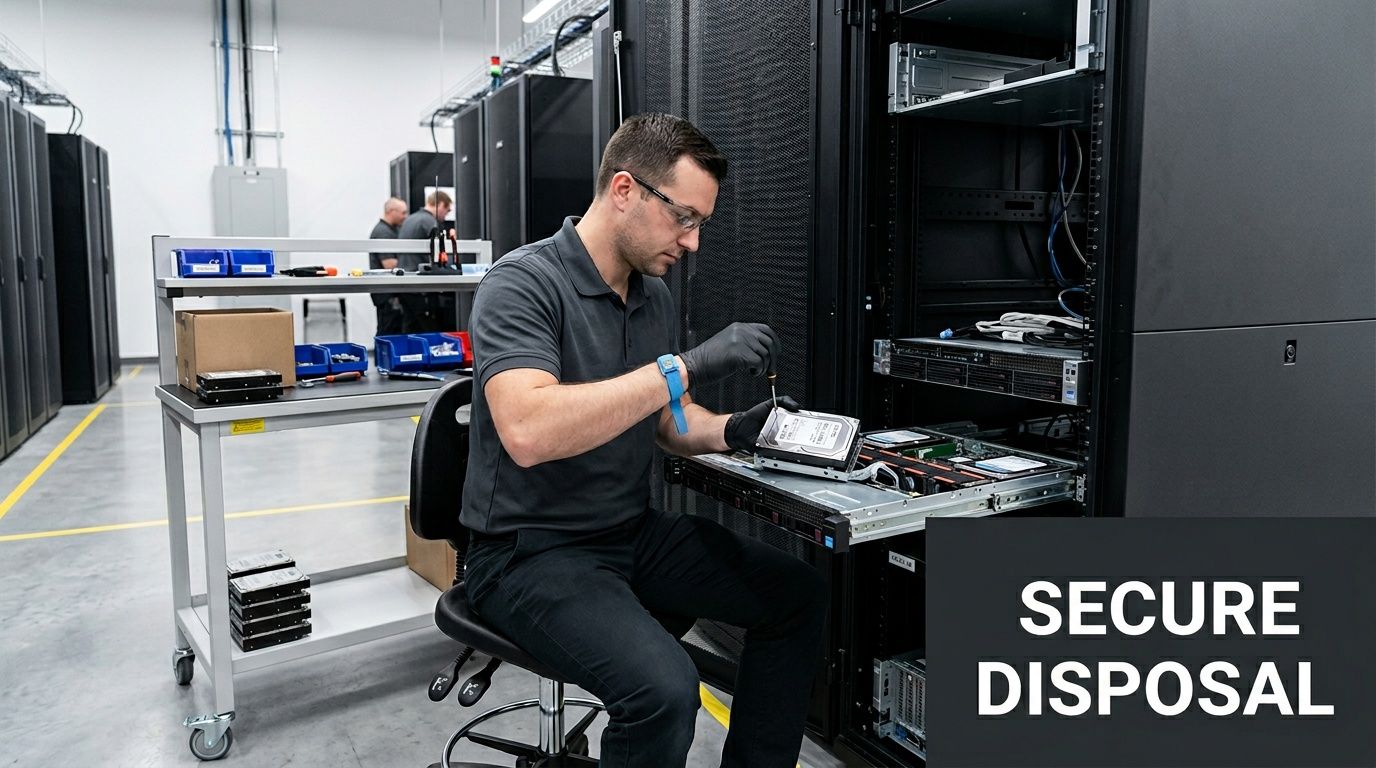
A migration isn’t complete when workloads are live. It’s complete when the old environment has been decommissioned, data-bearing assets have been handled correctly, and the organization can prove what happened to every retired device that still posed security or compliance risk.
Why this phase gets missed
Teams are usually exhausted by the time production cutover succeeds. Leadership sees the new environment working and wants the project closed. The remaining racks, arrays, backup devices, and loose drives become “cleanup.” That’s the mistake.
According to Park Place Technologies on migration relocation risks, an estimated 40% of organizations lack a formal disposal strategy for hardware post-migration, and only 17.4% of global e-waste is formally recycled. That combination creates two problems at once: security exposure and environmental exposure.
What secure disposition should include
A proper IT asset disposition, or ITAD, workstream should be built into the migration plan before execution starts. Not after.
The essentials are straightforward:
- Chain of custody: every asset removed from service should be logged, tracked, and transferred under controlled handling.
- Data destruction controls: drives, arrays, and backup media need certified treatment aligned with internal policy and regulatory expectations.
- Disposition documentation: audit trails, destruction records, and recycling or remarketing records should be retrievable later.
- Environmental handling: equipment should move through reuse or responsible recycling channels rather than defaulting to landfill-bound disposal.
Why compliance teams care
For regulated organizations, retired hardware can still hold protected data, cached records, logs, credentials, or residual configurations. If a migration project leaves those assets unmanaged, the project has moved the operational environment while leaving the governance problem behind.
That matters in sectors where chain of custody, retention control, and proof of destruction are mandatory. Healthcare, government, and research teams already know this. Many commercial organizations only discover it during an audit or after a storage room cleanup reveals untracked devices.
Retired hardware is still part of your data estate until you can prove otherwise.
The practical argument for integrating ITAD early
There’s also a project management reason to handle this up front. When ITAD is planned early, teams can decide which assets will be reused, which require immediate destruction, which can be remarketed, and which need special handling because they came from regulated environments.
That improves execution in several ways:
- It reduces clutter and confusion in the source environment during shutdown.
- It prevents unauthorized storage of retired equipment in offices, closets, and staging areas.
- It gives procurement and compliance teams documentation they can close against.
- It turns decommissioning into a governed phase instead of leftover labor.
Many organizations spend heavily to protect data in motion during migration, then weaken control once the same data sits on retired drives. That’s backwards. The final step deserves the same rigor as the move itself.
How to Choose the Right Data Center Migration Partner
The wrong partner creates polished plans and messy cutovers. The right one reduces uncertainty before the project starts.
For a first major migration, the biggest selection mistake is focusing too narrowly on technical capability. Engineering depth matters, but so do communication discipline, risk ownership, documentation quality, and the provider’s ability to support secure decommissioning once the new environment is stable.
What to evaluate before you sign
A strong provider should be able to explain its migration method in plain language. If the team hides behind generic process terms, assume the hard parts are still undefined.
Use this checklist during evaluation:
| Evaluation Area | Key Questions & Look-fors |
|---|---|
| Migration methodology | Ask how they handle discovery, dependency mapping, runbooks, pilot testing, cutover, rollback, and validation. Look for a clear sequence, not buzzwords. |
| Technical fit | Ask about experience with your mix of legacy systems, virtual platforms, cloud targets, storage types, and regulated workloads. Look for specificity. |
| Project governance | Ask who owns the command structure during cutover, how issues are escalated, and how decisions are documented. Look for named roles and communication discipline. |
| Security controls | Ask how they control privileged access, transfer logs, media handling, and evidence retention. Look for auditable workflows, not verbal assurances. |
| Compliance readiness | Ask how they support regulated data handling, chain of custody, and post-migration documentation. Look for familiarity with audit expectations. |
| Testing approach | Ask what gets tested before production and what success or failure looks like. Look for realistic pilot work, not “we validate during cutover.” |
| Rollback planning | Ask when rollback is triggered, who approves it, and how long rollback readiness is maintained. Look for operational clarity. |
| Decommissioning and ITAD | Ask whether they support source-environment shutdown, secure media handling, and documented asset disposition. Look for lifecycle thinking. |
| SLA terms | Ask what they commit to for communication, issue response, reporting, and post-cutover support. Look for measurable responsibilities. |
Questions worth asking in the first meeting
Some questions reveal maturity quickly:
- What information do you require before you’ll estimate scope confidently?
- How do you identify undocumented dependencies?
- Who runs the cutover bridge, and who has stop authority?
- How do you handle assets that should be retired rather than migrated?
- What documentation will we have at the end that we can hand to audit, security, and operations?
If a provider answers all of those with generalities, keep looking.
What good SLAs actually protect
Many migration contracts focus heavily on milestone dates. That’s necessary, but it isn’t enough.
A useful SLA should also define:
- Communication cadence: when updates are issued, in what format, and to whom
- Incident response expectations: how fast critical issues are acknowledged and escalated
- Documentation deliverables: runbooks, inventories, validation records, issue logs, and closure materials
- Post-cutover support window: who remains engaged once the workload is live
- Decommissioning boundaries: whether old-environment retirement is in scope or excluded
If the contract treats decommissioning as someone else’s problem, the organization will usually absorb that risk itself.
A migration partner should feel like an extension of your internal team, but the contract still needs to protect you from assumptions.
Your Actionable Migration Planning Checklist
If you’re starting your first major migration, don’t begin with vendor demos or architecture wish lists. Start with control.
Use the next working week to establish the basic conditions for a migration program that won’t drift immediately.
What to do first
- Name an accountable owner: one person should own scope coordination across infrastructure, security, compliance, and application teams.
- Build a current-state inventory: create a usable list of physical assets, virtual assets, critical applications, storage, and key dependencies.
- Sort workloads by business criticality: identify what can tolerate interruption, what requires tight cutover control, and what should not move in the first wave.
- Define preliminary target states: decide which systems are candidates for cloud, which stay on-premises, and which may be retired.
- Pull compliance into planning early: ask what evidence, logging, approvals, and handling standards are required throughout migration and retirement.
- Set a rule for what won’t be migrated: stale systems, unsupported appliances, and duplicate platforms should be challenged before they consume project time.
- Require rollback logic before scheduling cutover: if rollback criteria aren’t written, the cutover date isn’t ready.
- Plan end-of-life handling now: decide how servers, storage, backup media, and loose drives will be tracked, wiped, destroyed, reused, or recycled.
- Create a documentation list: runbooks, inventories, validation records, chain-of-custody logs, and closure artifacts should be identified before the project starts.
- Use a server retirement checklist: teams that need a practical handoff point can use a server decommissioning checklist to make sure shutdown and disposition work isn’t left informal.
The standard that matters
A successful migration doesn’t just move production. It leaves the organization with a cleaner operating model, clearer ownership, and fewer unmanaged assets.
If your plan covers architecture but not retirement, it’s incomplete. If it covers cutover but not evidence, it’s incomplete. If it gets systems online but leaves old hardware sitting untracked, it’s incomplete.
Dallas Fortworth Computer Recycling helps organizations close the last gap in data center migration with secure, compliant IT asset disposition, certified data destruction, and documented decommissioning support nationwide. If your migration plan needs a reliable end-of-life partner for retired servers, storage, and regulated equipment, visit Dallas Fortworth Computer Recycling.