
Server Recycling Near Me: Secure ITAD Services
You've probably got them right now. A row of retired rack servers in a back room, a few tower units under a workbench, maybe loose drives in anti-static bags that nobody wants to touch until “we have a recycling plan.”
That hardware isn't neutral inventory. It's unresolved risk.
When IT leaders search for server recycling near me, they often start with geography. The key question isn't who's closest. It's who can take custody of decommissioned servers without creating a data exposure, an audit problem, or a downstream disposal mess you can't explain later.
Your Old Servers Are a Liability Not Just Clutter
A decommissioned server still carries business consequences after it leaves production. The system may be powered down, but the drives can still contain customer data, employee records, internal financial information, credentials, logs, and archived workloads. The chassis also contains recoverable material and regulated waste streams that can't be treated like ordinary trash.
That's why server recycling for business environments isn't just recycling. It's IT asset disposition, or ITAD. The difference matters. Recycling focuses on physical end-of-life handling. ITAD adds asset control, data destruction, reporting, and defensible process.
The scale of the larger problem explains why this can't be handled casually. The world generated 62 million metric tons of electronic waste in 2022, and only 22.3% was formally collected and recycled. The same source projects annual e-waste will reach 82 million metric tons by 2030. That's from the Global E-waste Monitor summary referenced here.
What makes retired servers risky
A storage closet full of old servers creates several kinds of exposure at once:
- Data risk: Every data-bearing device needs a documented sanitization or destruction path.
- Compliance risk: If you can't prove what happened to the hardware, your disposal process may fail audit review.
- Operational risk: Untracked removals, missing serials, and informal handoffs create chain-of-custody gaps.
- Environmental risk: Sending equipment to improper downstream channels can create landfill and regulatory problems.
- Financial risk: Mixed loads handled as scrap often destroy reuse value that could have been recovered.
Practical rule: If a server ever held business data, don't treat its exit as a facilities task. Treat it as a controlled security event.
Many organizations often get stuck. They know the equipment has to go, but they delay because the process feels complicated or because local drop-off options seem built for household electronics, not enterprise infrastructure.
A better approach starts with a documented disposition plan tied to your computer equipment disposal process. Once that's in place, old servers stop being clutter and become managed assets moving through a controlled retirement workflow.
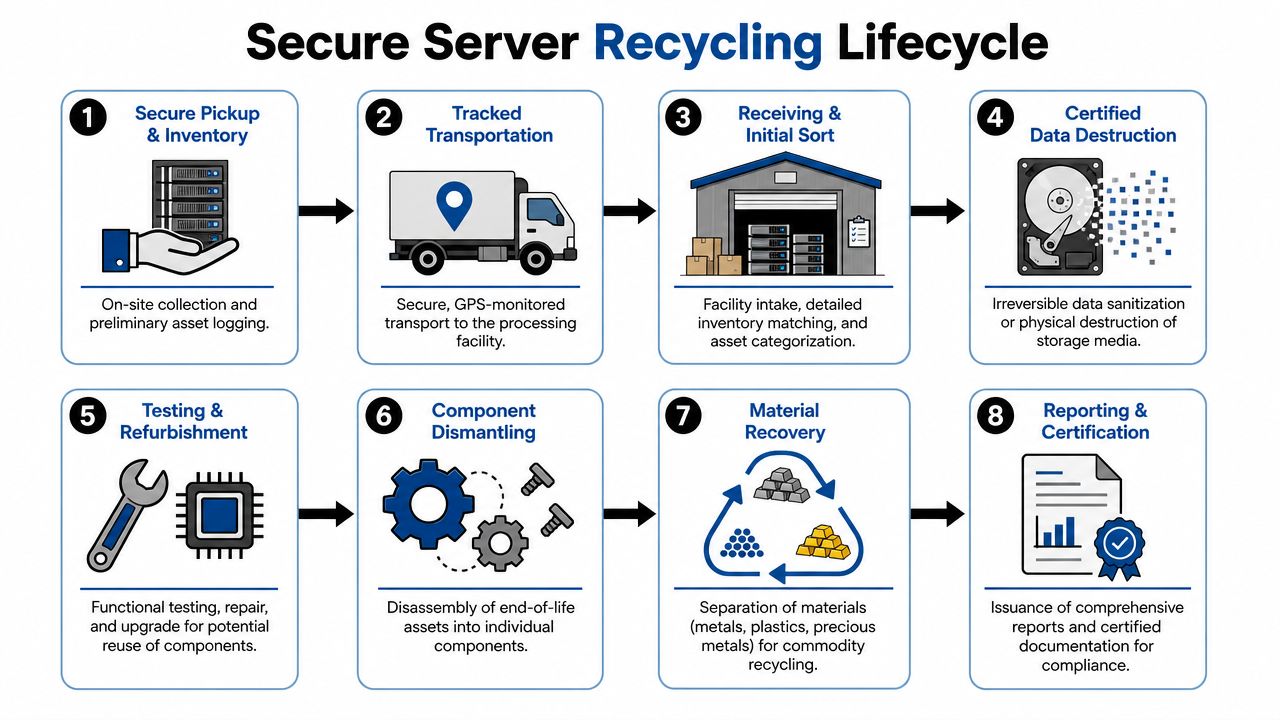
The Secure Server Recycling Lifecycle Explained
Most problems in server disposition happen between handoff points. A server is removed by one team, staged by another, transported by a third party, then processed somewhere the original owner has never seen. If those transitions aren't controlled, the paper trail weakens fast.
A secure process depends on traceability. Independent ITAD and recycling providers describe the core workflow as secure disconnect, de-racking, packaging, transport, inventory reconciliation, and serialized reporting, which is what minimizes chain-of-custody gaps and supports audit-ready records, as described in this overview of controlled electronics recycling workflows.
Here's what that lifecycle should look like in practice.
Before pickup
The job starts inside your facility, not at the recycler's dock. Servers should be identified against your asset records before anything moves. That means confirming asset tags, serial numbers, rack location, and whether any drives or removable media require separate handling instructions.
Good teams also separate equipment by disposition category. Reuse candidates, equipment bound for teardown, and media scheduled for physical destruction shouldn't be mixed together without labeling.
During removal and transport
De-racking isn't a throw-it-on-a-pallet exercise. Cabling, rails, accessories, and loose drives create opportunities for loss if technicians move too quickly or if there's no staged inventory check. Once equipment is packed, the transport leg needs to preserve accountability, not just speed.
What works:
- Controlled pickup scheduling tied to named contacts and site access procedures.
- Packaging discipline so servers, drives, and networking gear remain associated with the right inventory lot.
- Transport documentation that records custody transfer before the truck leaves.
- Receiving reconciliation that matches the outbound list to what arrived.
What doesn't work is informal loading with a generic receipt that says “miscellaneous electronics.”
Inside the processing facility
After intake, a serious provider reconciles every asset and routes it into the correct path. Some units may be suitable for refurbishment or parts harvesting. Others go directly to media destruction and materials recovery. The key isn't which path is chosen. The key is whether that path is documented by serial number and tied back to your original handoff.
A solid data center equipment recycling process should include these checkpoints:
| Stage | What should happen | Why it matters |
|---|---|---|
| Intake | Assets are received and matched to shipping records | Confirms nothing disappeared in transit |
| Sorting | Servers, storage, media, and accessories are separated | Prevents mixed handling and lost media |
| Data handling | Drives are routed to approved sanitization or destruction | Reduces breach risk |
| Reuse decision | Equipment is tested for refurbishment or component recovery | Protects residual value |
| Final processing | End-of-life materials go to approved downstream channels | Supports compliance and sustainability |
| Reporting | Certificates and serialized records are issued | Gives you audit evidence |
The vendor should be able to answer one basic question at any point in the process: where is this server right now, and who had custody before that?
If they can't answer it, they don't have a secure lifecycle. They have a disposal service.
Secure Data Destruction Is Non-Negotiable
The most common mistake in server retirement is assuming the hard part is moving the hardware. It isn't. The hard part is proving the data is gone in a way your security team, legal team, and auditor will all accept.
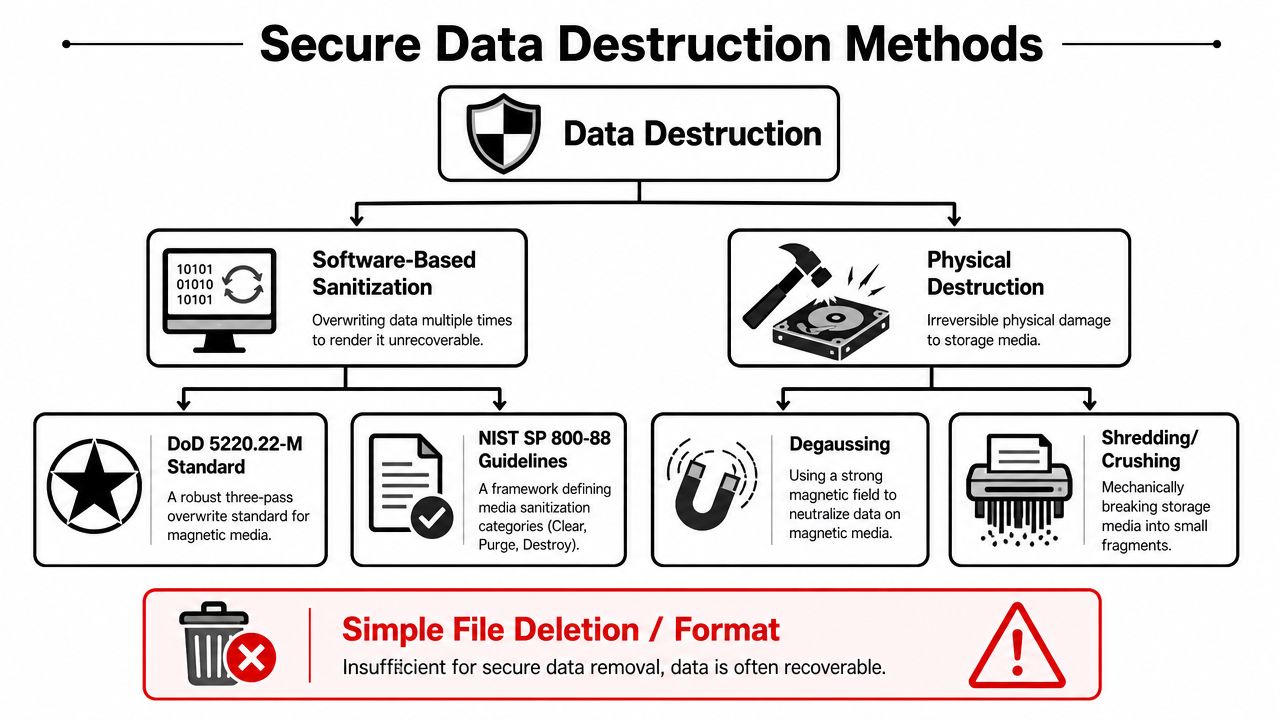
Deleting files isn't sanitization. Reformatting a drive isn't sanitization. Pulling drives and putting them in a box for “later” is how organizations lose control of the most sensitive part of the decommissioning process.
For regulated and data-sensitive environments, the benchmark is the use of NIST SP 800-88-style purge or destroy methods for HDDs, SSDs, and tapes, along with certificates that identify the asset, date, method, and technician. That standard of documentation is what creates defensible audit evidence, as summarized in this guidance on secure disposal and e-waste compliance.
What acceptable media sanitization looks like
There are different methods because different media types and risk profiles call for different controls.
- Software sanitization: Appropriate when policy allows reuse and the media supports verified purge workflows.
- Degaussing: Used for magnetic media when destruction of recorded data is required and reuse isn't the goal.
- Physical destruction: The clearest option for high-risk drives or failed media that can't be reliably sanitized by software.
The method matters less than the proof. If the provider can't tie the destruction or purge record back to the specific asset, the documentation won't carry much weight in an audit.
What your certificate needs to show
A generic “all data destroyed” statement isn't enough for serious governance. Your records should let you demonstrate what happened to each media asset without relying on memory or vendor assurances.
Look for:
- Asset identification: server serial, drive serial, or internal asset tag
- Event date: when sanitization or destruction happened
- Method used: purge, destroy, shredding, degaussing, or equivalent controlled process
- Technician accountability: named or signed verification tied to the event
- Chain-of-custody continuity: evidence that the media on the certificate is the media you released
If your internal team has to explain missing detail with “the vendor told us they handled it,” you don't have evidence. You have hearsay.
For organizations that need documented proof, a specialized service such as certified hard drive destruction belongs in the disposition scope from the start, not as an afterthought once the servers are already offsite.
How to Evaluate a Server Recycling Vendor
Search results for server recycling near me are crowded with options that look similar on the surface. A scrap hauler, a local electronics drop-off page, a used equipment buyer, and a certified ITAD provider may all say they handle servers. That doesn't mean they manage risk the same way.
One of the biggest gaps in local search results is transparency. Many pages emphasize convenience but don't explain downstream handling, reuse policy, or chain-of-custody controls. That problem is reflected in municipal and local recycling guidance reviewed here on Greenville County recycling locations, where the public-facing information often focuses on where to take equipment rather than how enterprise assets are tracked and processed afterward.
The first filter
Start by separating vendors into two categories.
The first category handles material collection. These firms may be fine for low-risk commodity electronics. The second handles enterprise IT disposition. These providers should be able to discuss serialized inventory, data destruction controls, downstream processing, and audit documentation without hesitation.
If the conversation starts and ends with weight, scrap value, or a truck schedule, keep looking.
Vendor evaluation checklist
| Criteria | What to Look For | Red Flag |
|---|---|---|
| Chain of custody | Serialized intake, transfer records, reconciliation | “We'll sort it out at the warehouse” |
| Data destruction | Clear sanitization or destruction options tied to media type | Vague promise to “wipe everything” |
| Reporting | Certificates of destruction and recycling, asset-level detail | One generic receipt for the whole load |
| Logistics | Business pickup, site procedures, packaged transport controls | You're expected to self-deliver sensitive hardware |
| Downstream handling | Clear explanation of reuse, recycling, and final processors | No answer to what happens after drop-off |
| Audit readiness | Willingness to show process controls and external review posture | Defensive responses to documentation questions |
Questions worth asking
These are the questions I'd put in front of any provider before approving a pickup:
- How do you track assets from pickup through final disposition?
- What happens to failed drives, loose media, and partially decommissioned servers?
- When do you issue certificates, and what fields are included?
- Do you separate reuse candidates from direct recycling streams?
- Who are your downstream processors, and how are they controlled?
- Can your team support multi-site pickups under one reporting structure?
One practical option in this space is a provider that offers third-party audits as part of its operating model. That doesn't replace your own due diligence, but it does show the vendor expects scrutiny instead of avoiding it.
Ask this directly: “What happens after my servers leave the dock?” If the answer gets fuzzy, the risk gets real.
Why Near Me Means Logistics Not Just Location
For households, “near me” usually means the shortest drive. For an IT director managing retired servers, it should mean the shortest path to secure pickup, documented custody, and consistent processing.
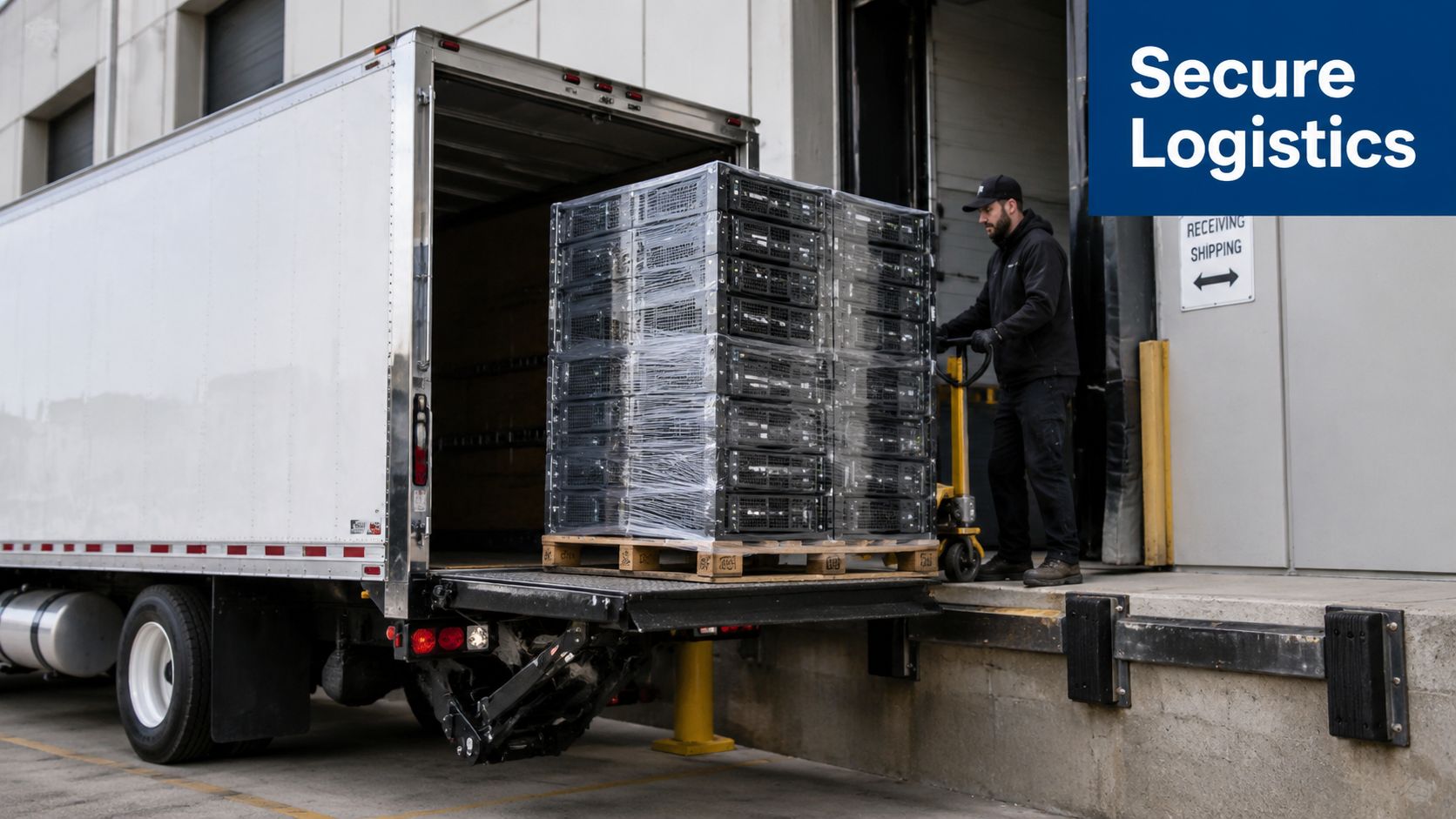
That distinction changes vendor selection. The closest drop-off center may be convenient for a desktop printer or a broken monitor. It usually isn't the right model for decommissioned enterprise servers that need inventory control, palletized transport, and coordinated documentation.
What enterprise local service actually looks like
In practice, the strongest “local” option is often a nationwide, certified partner with pickup coverage. That kind of provider meets you where the equipment is, whether that's a headquarters data room, a branch office, a clinic, or a colocation cage.
Scale matters here. Enterprise recycling centers are built for volume and process control. One example cited publicly is a 150,000 sq. ft. facility operating with a no-landfill policy, reflecting the high-throughput model that supports pickup, certified handling, and documented recycling across broad service areas, as described by CompuCycle.
Why pickup beats self-delivery
Self-delivery sounds simple until you map the risks. Your staff has to remove the equipment, stage it, load it, transport it, and trust that the receiving location understands enterprise custody requirements. Every extra handoff widens the chance of missing drives, bad receipts, and undocumented asset loss.
A logistics-first model is better because it gives you:
- Site-specific coordination instead of generic retail-style intake
- Consistent procedures across locations if your organization has multiple offices
- Processing capacity for racks, storage, networking gear, and loose media
- Centralized reporting instead of fragmented local paperwork
Dallas Fortworth Computer Recycling serves as one example of a B2B option. The company provides nationwide pickup-oriented ITAD services for organizations that need secure retirement of servers and related equipment, rather than consumer-style drop-off handling.
For enterprise buyers, “near me” should mean accessible service windows, secure pickup routes, and a facility network capable of handling the load correctly. Physical distance matters less than process distance. A provider two miles away with weak custody controls is farther from your risk requirements than a pickup partner with a disciplined national logistics model.
Meeting Compliance for Regulated Industries
In regulated sectors, server disposal sits inside larger governance obligations. Healthcare, government, finance, and research environments don't just need hardware removed. They need proof that data-bearing assets were handled according to policy and that the organization retained control throughout the disposition event.
What auditors usually care about
Auditors and compliance teams tend to ask a predictable set of questions:
- Which assets left service
- Who approved the disposition
- Who took custody
- How media was sanitized or destroyed
- What documentation was retained
- Whether the records can be matched back to internal asset inventories
That's why informal recycling fails in regulated settings. If there's no clean line from internal asset list to destruction record, your compliance team has to fill gaps after the fact.
What holds up better in review
For healthcare organizations, documented media handling supports the controls expected around protected data. For public-sector and enterprise environments, serialized custody records and disposition certificates support internal audit, records management, and procurement review. The issue isn't only whether destruction occurred. It's whether your organization can prove it happened as required.
A formal HIPAA-compliant electronics recycling process in Texas is a good example of how disposition needs to align with regulated data handling, especially when servers may contain patient, billing, or operational records.
Compliance teams don't want reassurance. They want records that survive scrutiny.
If your environment is regulated, build server disposition into your governance workflow early. Involve security, compliance, asset management, and infrastructure owners before the first rack is touched. That reduces exceptions, accelerates approvals, and keeps retired equipment from sitting in limbo where nobody quite owns the risk.
Frequently Asked Questions About Server Recycling
Can we get paid for old servers
Sometimes, yes. It depends on age, configuration, condition, market demand, and whether components are suitable for reuse. Servers with current or reusable parts may have recovery value. Equipment that's obsolete, damaged, or incomplete is more likely to move straight into recycling. The important point is to separate value recovery decisions from data security decisions. Never preserve media risk just to chase resale value.
What equipment can go with the servers
Most enterprise disposition projects include more than servers. Storage arrays, switches, firewalls, rails, PDUs, tape gear, loose drives, rack accessories, and related data center equipment are commonly handled in the same project. The best pickup plans account for mixed loads from the start so assets don't get split across different handlers.
What documentation should we expect
At minimum, expect inventory-based reporting and certificates tied to the assets processed. For data-bearing devices, you should receive records that show how sanitization or destruction was handled. For final environmental handling, you should receive recycling documentation suitable for internal files and audits.
Is drop-off ever the right option
For enterprise servers, rarely. Drop-off may work for low-risk, non-sensitive items in small quantities. It's usually the wrong fit for decommissioned business hardware that needs custody control, serialized reporting, and coordinated logistics.
How should we prepare before scheduling pickup
Start with an internal asset list, identify data-bearing media, confirm who approves disposition, and decide which assets require destruction versus reuse review. That prep work makes vendor reconciliation faster and reduces disputes later.
If your team needs a controlled, audit-ready process for retiring servers and related infrastructure, Dallas Fortworth Computer Recycling provides B2B ITAD services with secure pickup, certified data destruction, and documented recycling workflows for organizations across the country.