
Compliant Computer Recycling in Houston 2026

The room usually looks harmless. A few towers under a shelf. Retired laptops in banker boxes. Old switches, monitors, failed drives, maybe a decommissioned rack waiting for someone to “deal with it later.”
For a Houston IT director, that pile isn’t inactive inventory. It’s a backlog of unclosed risk. Every untracked hard drive is a data security problem. Every asset without a disposition record is a compliance problem. Every device that could have been remarketed or donated but instead sat for another quarter is a value recovery problem.
That’s why computer recycling in houston, at the business level, has very little to do with tossing equipment into the right bin. The primary job is IT asset disposition, or ITAD. You’re trying to retire technology in a way that protects regulated data, survives audit scrutiny, and extracts whatever value remains before true end of life.
The organizations that handle this well treat disposition like a controlled operational process. The ones that don’t usually discover the gaps later, when legal, finance, procurement, compliance, or leadership asks for paperwork that no one can produce.
Beyond the Storage Closet The Real Risks of Outdated IT Equipment
A common scenario goes like this. A refresh project finishes. New laptops are deployed. The old fleet gets stacked in a secured room with the best of intentions. Then priorities shift. Another migration starts. Someone leaves. Facilities needs the space. Finance asks whether any of those assets still have value. Compliance asks whether the drives were destroyed. Nobody has one clean answer.
That’s the point where “old computers” become a governance issue.
What’s actually sitting in that room
Most retired equipment still carries one or more of these liabilities:
- Residual data: User files, cached credentials, email archives, browser data, patient records, HR files, legal documents, or internal financial data.
- Incomplete asset records: Devices with missing serial capture, bad location history, or mismatched inventory tags.
- Mixed disposition value: Some systems are ready for scrap. Others may still be suitable for refurbishment, resale, or donation.
- Environmental exposure: Equipment contains metals and plastics that need controlled processing, not casual disposal.
Houston businesses can’t treat all of that as a janitorial problem. They need a documented ITAD process.
The three business failures I see most often
First, companies assume a quick internal wipe is enough. It often isn’t, especially when the organization can’t prove what method was used, on which asset, by whom, and when.
Second, teams focus only on removal. They book a pickup before they’ve decided whether assets should be remarketed, donated, or physically destroyed.
Third, they accept vague paperwork. “Items recycled” is not an audit trail.
Old equipment becomes dangerous when it sits in the gap between IT operations and compliance ownership.
If you’re responsible for retiring company computers, your job isn’t just to clear space. It’s to close the loop on custody, data, and reporting. That’s the difference between basic disposal and a defensible computer recycling in houston program.
Navigating Houston's E-Waste Compliance Landscape
Before you schedule any pickup, you need to know which part of the ecosystem applies to your organization and which part doesn’t.
For consumers, Texas law requires computer and television manufacturers to provide free and convenient recycling opportunities. In Houston, that broader system is supported by the City of Houston’s Westpark Consumer Recycling Center and regional programs managed by H-GAC in collaboration with TCEQ, as described by the Houston-Galveston Area Council used electronics guidance. That matters because it establishes the public infrastructure around e-waste and reinforces that this waste stream deserves controlled handling.

For business IT leaders, though, the takeaway is different. Consumer drop-off rules don’t solve enterprise risk. A company disposing of office computers, servers, storage devices, network gear, or lab equipment needs a B2B disposition workflow that produces evidence.
What Houston businesses should treat as compliance requirements
Think in terms of operating requirements, not legal trivia:
Use a defensible disposition channel
Your organization should know where assets go, who handles them, and how data is sanitized or destroyed.Separate consumer options from enterprise options
Public drop-off programs are useful in the market overall, but they’re not a substitute for pallet-scale business pickups, serialized reporting, or enterprise chain of custody.Preserve proof
If you can’t show what happened to each asset class, you’ll struggle in an internal review, customer questionnaire, insurance inquiry, or regulatory audit.
A good state-level starting point is this overview of Texas electronics recycling requirements, but your real work starts when you translate those rules into internal controls.
What documentation matters most
A compliant process usually needs more than a single recycling receipt.
Look for:
- Asset-level serialization: Match internal records to outbound disposition records.
- Chain-of-custody logs: Show custody changes from your floor to truck to processor.
- Data destruction evidence: Certificates should identify method, scope, and date.
- Final disposition reporting: You need a record of whether equipment was refurbished, resold, donated, or recycled.
Where businesses make avoidable mistakes
Houston organizations often get tripped up when facilities, IT, and procurement each own part of the process but nobody owns the whole record.
That creates gaps such as:
| Risk area | What goes wrong | What a stronger process looks like |
|---|---|---|
| Asset tracking | Devices leave without serial validation | Assets are reconciled before pickup |
| Data handling | Teams assume wiping happened | Method and result are documented |
| Vendor management | Recycler chosen on convenience | Vendor selected on certifications and reporting |
| Audit readiness | One summary receipt is filed | Full packet is archived with internal records |
Practical rule: If your documentation won’t satisfy your legal team, your cyber insurer, and your internal auditor, it isn’t finished.
The right way to approach computer recycling in houston is to treat environmental compliance, data protection, and records management as one project. If those three pieces aren’t connected, the process may look complete while still leaving your organization exposed.
Prepping Your IT Assets for Secure Disposition
Most disposition failures happen before the truck arrives. The handoff only works if your internal prep is disciplined.
Certified data destruction should follow NIST 800-88 standards, and common enterprise methods include physical hard drive shredding to 2mm particles, along with strict chain-of-custody documentation using serialized asset tags and GPS-tracked logistics, according to the Baker Institute analysis of electronics recycling and ITAD controls. That same analysis notes a typical computer contains 20 to 30% ferrous metals, 10 to 15% non-ferrous metals, and 25 to 40% plastics, which helps explain why proper downstream handling matters.
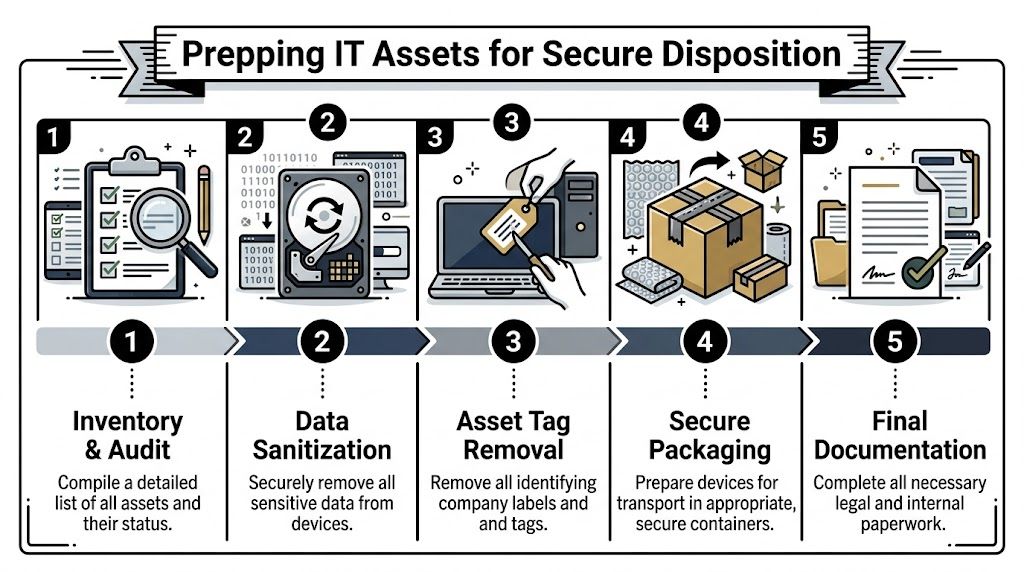
Start with the inventory, not the wipe
You need a retirement list before you need a recycling vendor.
That inventory should identify:
- Asset type and model: Laptop, desktop, server, switch, firewall, storage array, monitor, printer.
- Serial number: This is the backbone of your audit trail.
- Assigned user or department: Useful for legal hold, ownership questions, and chargeback.
- Media type: HDD, SSD, tape, removable flash, embedded storage.
- Disposition recommendation: Reuse, resale, donation, recycle, or destroy.
If your CMDB or asset platform is messy, don’t wait for perfection. Build a clean export for the retiring batch and reconcile against physical devices in staging.
Choose the right data destruction method
Not every device needs the same treatment.
Wiping
Wiping is appropriate when the device or drive may be reused, refurbished, or sold, and when the media supports reliable sanitization. For many business systems, the standard is to use a method aligned with NIST guidance and preserve a report tied to the asset serial.
If your team needs a practical overview of the process, this guide on how to completely wipe a hard drive is a useful reference point.
Degaussing
Degaussing is typically relevant for magnetic media. It can be effective, but it also changes the economics of reuse because the media won’t remain suitable for normal redeployment afterward.
Physical shredding
Shredding is the right call when data sensitivity outweighs resale value, when media is failed or inaccessible, or when policy requires destruction. In regulated environments, this is often the cleanest route for drives removed from high-risk systems.
If the organization can’t verify successful sanitization, it should assume sanitization was not completed.
Stage assets like a controlled transfer
Once the inventory is locked and the destruction path is selected, prep the equipment for pickup.
Use a staging checklist:
- Consolidate by disposition path: Don’t mix remarketing candidates with scrap loads.
- Remove loose media: Thumb drives, backup tapes, and external drives shouldn’t hide in laptop bags or keyboard trays.
- Pull accessories selectively: Power adapters may matter for resale. Broken cables usually don’t.
- Remove or cover internal labels as policy requires: Especially where tags reveal company names, building locations, or asset IDs visible in transit.
- Secure the holding area: Limit access and document who entered the cage or room.
Don’t outsource your own accountability
A recycler can execute downstream processing. They can’t reconstruct your internal controls after the fact.
Before release, your team should be able to answer four questions without guessing:
- Which exact assets are leaving?
- What data destruction method applies to each media type?
- Which assets still have recovery value?
- Who approved the release?
That discipline is what turns computer recycling in houston from a cleanout event into a secure disposition process.
Choosing Your Disposition Path Remarketing Donation or Recycling
The mistake I see most often is treating every retired asset like scrap. That’s easy, but it’s usually not smart.
A better approach sorts assets into three lanes. Remarketing for equipment with residual value. Donation for systems that still function but may not justify resale effort. Certified recycling for equipment at true end of life, damaged gear, obsolete accessories, and anything that shouldn’t reenter service.
According to EverTrade’s Houston computer recycling service overview, a more nuanced ITAD approach can offset costs by 20 to 30% through certified refurbishment and resale, refurbished electronics can retain 40 to 60% of their value, and Texas nonprofits saw a 15% rise in tech needs in 2025. Those numbers should change how IT leaders think about disposition planning.
The strategic question
Don’t ask, “How do we get rid of this stuff?”
Ask, “What is the highest-control, highest-value disposition path for each asset class?”
That usually leads to better financial outcomes and better reporting.
IT Asset Disposition Paths Compared
| Factor | IT Asset Remarketing (Resale) | Donation to Nonprofits | Certified Recycling |
|---|---|---|---|
| Primary goal | Recover value from usable equipment | Extend useful life and support community programs | Retire end-of-life equipment responsibly |
| Best fit | Newer laptops, desktops, some servers, usable networking gear | Functional systems with modest resale upside | Broken, obsolete, damaged, or nonfunctional assets |
| Data handling | Must support documented sanitization before transfer | Must support documented sanitization before transfer | Often paired with destruction where reuse is not appropriate |
| Financial impact | Strongest direct recovery potential | Indirect value through mission alignment and possible tax treatment | Lowest direct recovery, but necessary for risk and environmental control |
| Operational effort | Highest triage and grading effort | Moderate effort if donation channel is organized | Most straightforward for true end-of-life material |
| Community impact | Limited unless paired with reuse programs | Highest visible local social benefit | Environmental benefit through material recovery |
| Common mistake | Scrapping devices that still have market value | Donating equipment without adequate wiping or testing | Sending mixed loads without sorting reusable assets first |
How to make the call in practice
Choose remarketing when condition supports it
If the device is recent enough, powers on, and can be sanitized cleanly, remarketing deserves a serious look. This is especially true for business laptops, premium desktops, mobile workstations, and some current-generation server components.
The trade-off is labor. You need testing, grading, complete accessories when relevant, and a process that distinguishes actual resale candidates from wishful thinking.
Choose donation when the mission matters more than top-dollar recovery
Donation works best when the equipment is still useful but resale return is limited, or when your organization values community impact alongside disposition efficiency.
Houston already has models where reusable electronics support nonprofit outcomes. That’s a smart path when your team wants a documented social-use story without pretending every old device belongs in the secondary market.
The wrong donation program creates liability. The right one creates reuse, documentation, and goodwill.
Choose recycling when reuse would be forced or unsafe
Some assets are done. Failed drives, broken monitors, severely outdated desktops, swollen battery devices, and mixed peripheral loads usually belong in certified recycling.
Discipline matters. Recycling shouldn’t be your default for everything. But when it’s the right call, it should happen fast and through a processor that can document end handling properly.
A simple portfolio approach works best
For most Houston businesses, the strongest disposition plan is mixed:
- Remarket what still has real value
- Donate what still has practical use
- Recycle what has reached end of life
That approach does more than reduce waste. It aligns IT, finance, and compliance instead of forcing one department’s priorities onto every asset.
How to Select a Certified Computer Recycling Partner
Vendor selection is where risk either narrows or widens. A basic hauler can remove equipment from your building. That doesn’t make them an ITAD partner.
In Houston, the benchmark is high. The Houston Clean City Commission report describes CompuCycle, founded in 1996 at 8019 Kempwood Dr., as the only Texas facility capable of fully shredding electronics and separating them into raw materials including steel, aluminum, copper, plastics, and circuit boards, and notes certifications including R2:2013, ISO 14001:2015, ISO 9001:2015, and ISO 45001:2018. The report also states these standards support responsible handling and position the facility as Houston’s first and only dual-certified large-scale electronics recycler. That benchmark is outlined in the Houston Beautiful e-waste report.
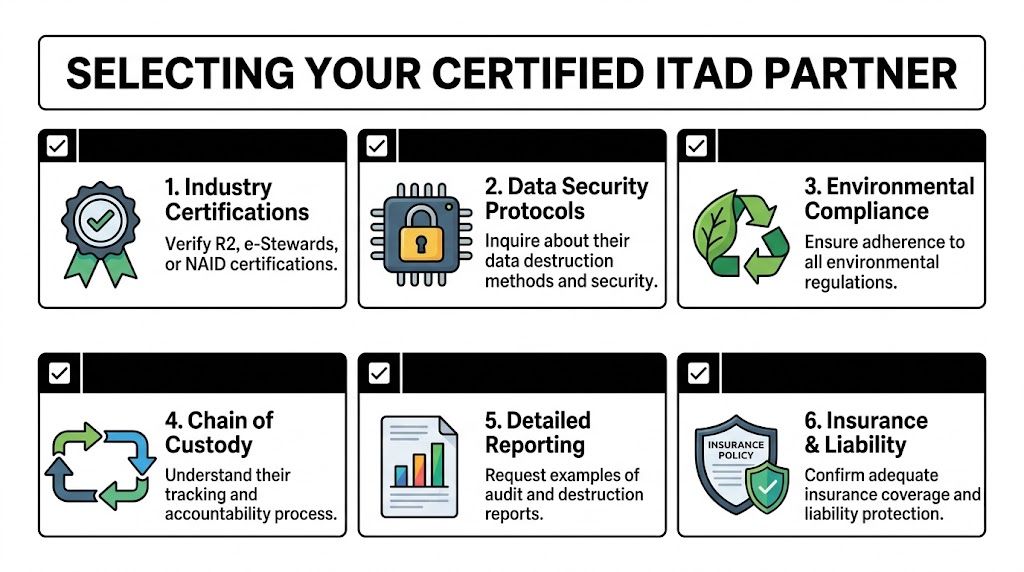
Certifications are the starting point, not the finish line
You should expect recognized certifications because they indicate process discipline. For many buyers, that begins with R2 and extends to quality, environmental, and occupational safety systems.
If you want a clear baseline for what that standard signals, review this overview of an R2 certified electronics recycler.
But don’t stop at logos on a website. Ask how those controls show up in day-to-day operations.
Questions that separate real ITAD providers from scrap vendors
Use your vendor call to test specifics:
How do you handle chain of custody?
You want a documented intake and transfer process, not a verbal assurance.Can you support serialized reporting?
Asset-level documentation matters far more than a bulk weight summary.What happens to reusable equipment?
A strong provider can explain triage, testing, refurbishment, and downstream channels.What happens to non-reusable material?
You’re looking for clarity on shredding, separation, and downstream accountability.Can you perform onsite services when needed?
For some organizations, witness destruction or onsite drive shredding matters.What does your final report packet include?
Ask for a sample before you sign anything.
What good answers sound like
Good providers describe process in operational terms. They can explain pickups, asset tagging, intake verification, destruction methods, reconciliation, exceptions, and final certificates without hand-waving.
Weak providers tend to stay broad. They talk about “green recycling,” “safe disposal,” and “industry best practices” without showing what is logged, scanned, witnessed, or reported.
Vendor screen: If a provider can’t walk you through asset-level custody and final reporting, they’re asking you to absorb their process risk.
The real standard for enterprise buyers
For healthcare, government, financial services, research, and larger commercial environments, your vendor should be able to support:
- Secure logistics
- Documented data destruction
- Downstream transparency
- Audit-ready reports
- Consistent handling across multiple sites if needed
That’s what makes a provider usable for serious computer recycling in houston. The equipment leaving your building may be old. The controls around it can’t be.
Managing Logistics and Finalizing Audit-Proof Documentation
Pickup day is not the finish line. It’s the custody transfer point.
Many otherwise capable IT teams lose control at this stage. They’ve done the inventory work, decided the disposition path, selected a provider, and staged the equipment correctly. Then they accept a generic bill of lading, wave the truck out, and assume the paperwork will sort itself out later.
It rarely does.
A gap repeatedly seen in Houston-area ITAD discussions is the lack of detail around chain-of-custody documentation, especially for regulated sectors. True B2B providers should offer serialization tracking and reporting that can integrate with enterprise asset management systems, which is especially important for pallet-scale pickups from areas like the Energy Corridor or Medical Center, as noted in the Goodwill Houston partnership discussion of B2B ITAD gaps.
Control the pickup like a formal release
Before the carrier or ITAD team loads anything, confirm:
- The pickup scope matches the approved asset list
- Building access is arranged
- Staging is separated by disposition type if required
- Your staff knows who signs the release
- Any onsite destruction services are scheduled and witnessed if policy requires
For larger projects, palletizing and shrink-wrapping can reduce counting errors and loading confusion. For higher-risk media, segregate it physically from general hardware until destruction is confirmed.
Your paperwork package should be complete
At minimum, you want a file that includes:
- Pickup confirmation
- Serialized asset report
- Chain-of-custody record
- Certificate of data destruction where applicable
- Certificate of recycling or final disposition summary
If your organization needs an example of what that evidence should look like, this guide to a certificate of destruction for hard drives outlines the standard clearly.
What to archive internally
Don’t leave the final packet in someone’s inbox.
Store it where audit, compliance, and IT leadership can retrieve it later. I recommend tying the file set back to the internal project or refresh cycle, with approval records and the original retirement inventory attached.
A clean archive usually includes:
- Internal approval to retire assets
- Inventory of released equipment
- Vendor quote or work order
- Pickup and custody records
- Final destruction and disposition documents
When the audit question comes six months later, the project is only “done” if someone can pull the full record in minutes.
That’s the operational end state you want. Not a cleared storage room. A closed file.
Your IT Asset Disposition Checklist for Houston Businesses
A reliable ITAD program isn’t one decision. It’s a repeatable sequence. The checklist below works best when you turn it into an internal SOP, assign owners, and use it for every refresh, relocation, lease return, office closure, and data center decommissioning event.
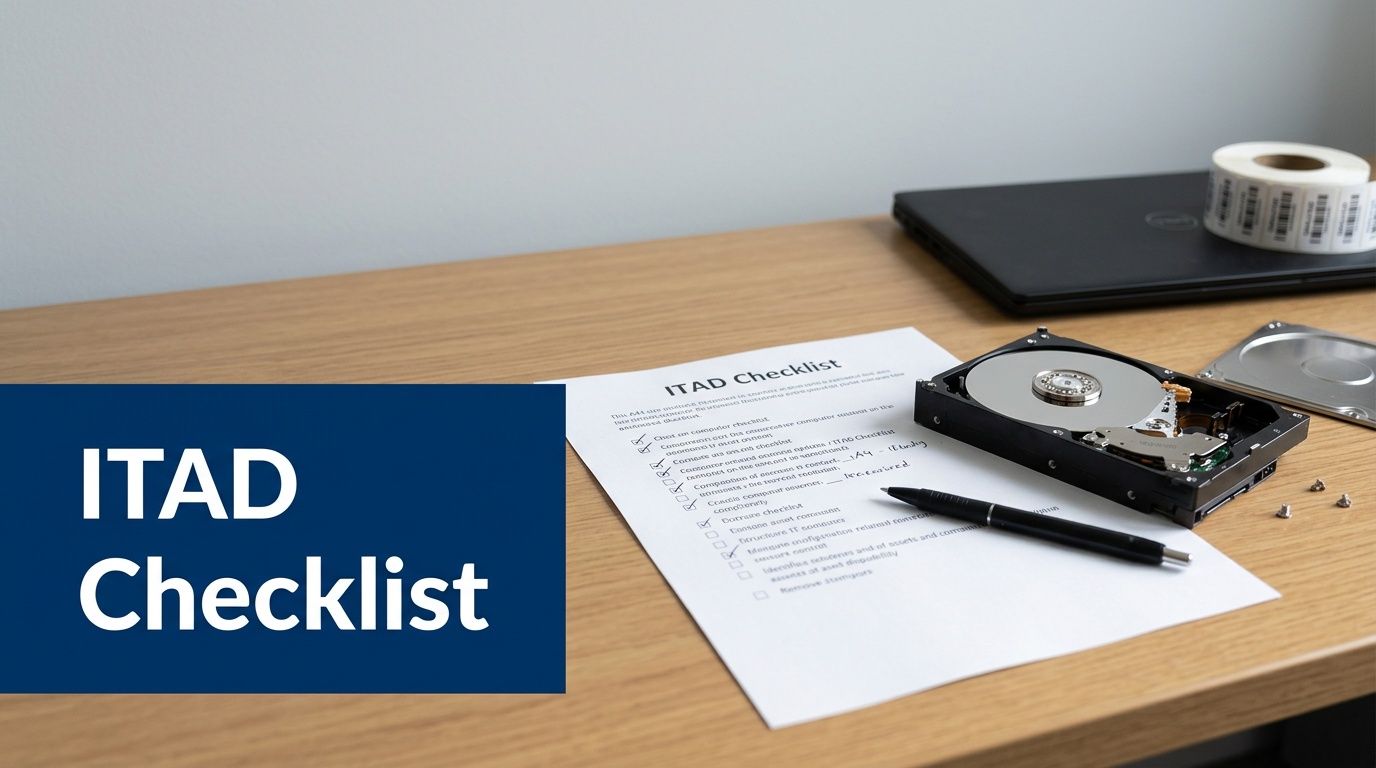
Phase one set the project rules
Confirm policy triggers
Check whether the project involves regulated data, legal hold concerns, lease obligations, or internal retention rules. “Done” means stakeholders agree on what can leave and what requires special handling.Assign one process owner
IT, compliance, facilities, procurement, and finance may all participate, but one person must control the record. “Done” means there is a named owner for approvals, pickup coordination, and final document storage.Define disposition goals
Decide whether this batch prioritizes value recovery, donation, destruction, space clearing, or a mix. “Done” means the team is not improvising asset-by-asset at the loading dock.
Phase two build the retirement inventory
Export and reconcile the asset list
Pull records from your CMDB, MDM, endpoint platform, procurement records, or spreadsheets and compare them against physical equipment. “Done” means the serial list reflects what is present.Identify data-bearing devices
Don’t limit this to laptops and desktops. Include servers, removable media, storage arrays, printers with internal storage, and network equipment where relevant. “Done” means media-bearing assets are flagged for sanitization or destruction.Group by disposition path
Separate likely resale candidates from donation candidates and end-of-life material. “Done” means staging won’t mix devices with different control requirements.
Phase three prepare assets internally
Perform or authorize data sanitization
Use the approved method for each media type. “Done” means the method is documented and tied to the asset record.Remove excluded items and loose media
Pull flash drives, backup tapes, and anything that could escape the documented process. “Done” means nothing is hiding in drawers, docks, or keyboard trays.Stage equipment in a controlled area
Restrict access and keep equipment organized for verification. “Done” means your team can count, scan, and release assets without confusion.
Phase four validate the vendor and the scope
Review certifications and process documents
Confirm the provider’s standards, reporting model, and downstream handling. “Done” means procurement and compliance are satisfied before release.Request sample reports
Ask for examples of serialized reporting, destruction certificates, and final disposition documentation. “Done” means you know what evidence you’ll receive after the project.Lock the service scope
Confirm pickup date, site contacts, building access, loading constraints, and any onsite destruction requests. “Done” means no one is surprised on pickup day.
Phase five execute the transfer
Match assets at handoff
Reconcile the shipment against your approved inventory. “Done” means discrepancies are resolved before the truck departs.Capture custody records
Keep signed pickup documentation and internal notes on release. “Done” means there is a clear handoff trail.Witness critical destruction if needed
For sensitive media, observe onsite service when policy or customer commitments call for it. “Done” means witness requirements are recorded.
Phase six close the file
Review the final report packet
Check serialized records, destruction evidence, and final disposition documents for completeness. “Done” means the paperwork answers who handled what, how, and when.Archive everything centrally
Store the packet with project approvals, inventory, and vendor records. “Done” means internal audit can retrieve the full file quickly.Update internal asset systems
Mark devices as disposed, destroyed, recycled, donated, or sold according to the final record. “Done” means your asset database matches reality.
A more detailed planning aid for infrastructure-heavy projects is this server decommissioning checklist, especially when your Houston disposition project includes racks, storage, or mixed data center equipment.
Computer recycling in houston works best when you stop treating it like waste removal and start treating it like controlled asset retirement. That shift changes everything. Your reporting gets cleaner, your data risk drops, and your organization stops carrying old hardware longer than it should.
If your team needs a B2B ITAD partner that can support secure pickups, certified data destruction, nationwide logistics, and audit-ready reporting, Dallas Fortworth Computer Recycling is built for exactly that kind of work. They serve businesses, healthcare groups, public-sector organizations, data centers, and nonprofits that need more than basic recycling. They need chain of custody, compliance documentation, and a disposition process that stands up under scrutiny.