
Texas E-Waste & Data Laws: An IT Leader’s Guide
Old equipment seldom leaves on its own. It piles up in staging rooms, network closets, branch offices, and offsite cages until someone in IT gets asked the uncomfortable question: what is on those drives, and why it is still here?
In texas, that question carries more weight than it used to. The state’s business footprint expands, infrastructure scales, and retired hardware now represents more than a disposal task. It is a security event, a compliance event, and for many organizations, a balance-sheet event.
The Growing Challenge of IT Asset Disposition in Texas
A storage room full of retired laptops and rack servers looks harmless until one examines its contents. Some assets still hold regulated data. Some contain licensed software or internal configurations. Some still have resale value. Others have already become a liability because nobody documented custody, sanitization, or final disposition.
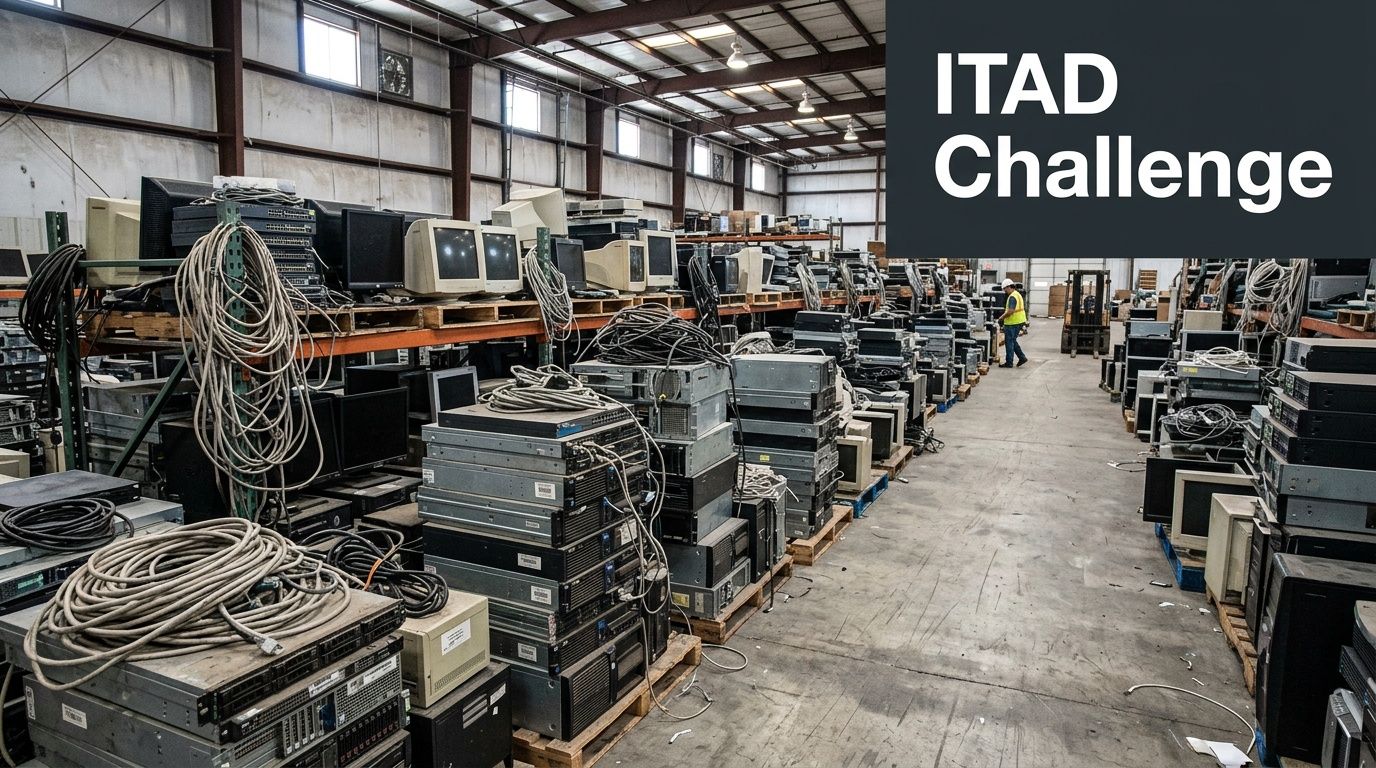
Texas amplifies that problem because the volume of equipment entering and leaving service is rising with the state itself. The 2020 Census counted over 29.1 million residents in Texas, and projections indicate an addition of 3 to 5 million more by 2036, a growth pattern tied to expanded IT infrastructure, data centers, corporate footprints, and more e-waste generation according to EBSCO’s Texas research overview.
Why texas creates a different ITAD workload
In a slower-growth environment, companies may manage with informal cleanup cycles. In texas, that approach tends to fail. Hardware refreshes happen across multiple sites. Mergers add duplicate inventories. Branch expansions produce mixed batches of desktops, mobile devices, access points, and printers. Data center growth creates another layer of retired storage, compute, and networking gear that cannot be handled like office junk.
The practical issue is not just quantity. It is mixed risk.
Some assets belong in remarketing channels. Some require certified destruction. Some contain patient, employee, financial, or citizen data. A single pallet can include all three categories. If your team treats everything as scrap, you lose recoverable value. If your team treats everything as reusable inventory, you create a data exposure.
What works and what does not
A workable ITAD program starts before pickup day. The organizations that stay in control do a few things consistently:
- Separate by data sensitivity: Enterprise storage, end-user laptops, and network appliances should not all follow the same destruction path.
- Track assets before they move: If the first accurate inventory happens after a truck leaves, your audit trail is already weak.
- Define ownership: IT, security, procurement, legal, and facilities each have a role. When nobody owns final disposition, assets linger.
What does not work is the common texas shortcut of waiting for a major refresh or office move, then calling “a recycler” to clear space. Fast removal without documented controls solves the visual problem and often creates another.
Tip: If equipment has been sitting unprocessed for months, treat it as a control failure first and a recycling project second.
Navigating Texas E-Waste and Data Privacy Regulations
Most IT leaders do not need a lecture on legal theory. They need a plain-English answer to a harder question: what does texas expect you to do before equipment leaves your control?
The answer has two parts. One covers responsible electronics recycling. The other covers protection of personal information. Your ITAD process has to satisfy both.
What texas expects on the recycling side
Texas addresses electronics recycling through state programs and environmental oversight. For business leaders, the operational takeaway is simple. You need a disposition path that avoids informal dumping, undocumented downstream handling, and vague end markets for retired equipment.
That matters because many organizations still confuse three very different activities:
Collection
Equipment leaves your building.Processing
Someone sorts, tests, dismantles, or prepares it for reuse or recycling.Final disposition
Materials are reused, remarketed, destroyed, or sent into downstream recycling channels.
A vendor can be good at collection and weak at everything after that. That gap is where environmental and reporting problems start.
If your team is reviewing state-specific recycling expectations, Texas electronics recycling guidance for businesses and organizations is a useful operational reference point because it frames disposition in terms of process, not just pickup.
What texas expects on the data side
The bigger immediate risk for most enterprises is data protection. Texas organizations that handle personal information should read asset retirement as an extension of their security program, not a warehouse task.
Under the Texas Identity Theft Enforcement and Protection Act, the standard is not “we intended to destroy the data.” The standard is whether your organization used reasonable measures to protect sensitive information during disposal. In practice, that means old drives, SSDs, backup media, copiers, and mobile devices cannot leave your custody with recoverable data still on them.
Translating law into operational duties
Legal language becomes manageable when you convert it into control points.
| Compliance area | Operational duty | Failure pattern |
|---|---|---|
| Data disposal | Sanitize or destroy media before reuse or release | Devices shipped with live data intact |
| Asset custody | Document who handled what and when | Missing serial-level transfer records |
| Recycling oversight | Verify where material goes after pickup | Vendor cannot explain downstream chain |
| Audit evidence | Retain destruction and processing records | No proof for counsel, auditors, or insurers |
The minimum controls most texas teams need
A compliant baseline includes the following:
- Written disposition policy: Define when assets are retired, who approves release, and which destruction method applies by device type.
- Media-specific sanitization: Hard drives, SSDs, tapes, and embedded storage need method-specific handling. One blanket instruction is not enough.
- Chain-of-custody records: Pickup receipts alone do not prove secure handling.
- Certificates and reports: You need documentation that can stand up in an audit, litigation hold review, or breach investigation.
Key takeaway: In texas, recycling compliance and privacy compliance are connected. If you cannot prove secure data handling, your recycling process is incomplete.
Where organizations misread the risk
A common mistake is assuming disposal law applies only when a device still works. It does not. A failed server with a damaged motherboard can still expose data if the storage media remains readable. The same goes for multifunction printers, medical devices, and lab systems with embedded memory.
Another mistake is relying on informal attestations. “We wipe everything” is not a control. A verifiable control leaves evidence. It ties the asset list to the sanitization method and ties the method to a final record your team can retain.
That is the standard to build toward. Not just removal. Not just recycling. Defensible retirement.
The Unique Risks of ITAD in a High-Growth Environment
A generic recycling vendor might be fine for loose keyboards, broken monitors, and miscellaneous peripherals. That same vendor may be a serious risk when the job involves enterprise storage, decommissioned network gear, or racks of AI and data center hardware.
Texas is not a low-density technology market anymore. The concentration of infrastructure is changing the risk profile of ITAD.
Why scale changes the risk calculation
ERCOT power demand requests surged from 56 GW to 205 GW as data center and AI projects expanded in texas, according to ConstructConnect’s report on renewable energy and texas data centers. That matters to IT leaders for one reason above all others: it signals a growing volume of high-value, data-rich hardware entering service now and exiting service later.
More hardware in the field means more retirement events. More retirement events mean more chances to mishandle data, lose custody, or delay decommissioning work because the vendor you hired was built for consumer recycling, not enterprise ITAD.
Where one-size-fits-all vendors break down
The weak points show up quickly:
- They collect without serial-level discipline: You get a pallet count, not a device-level record.
- They oversimplify destruction: Everything is “destroyed,” but nobody can explain what happened to reusable systems versus failed media.
- They lack data center workflow: They can pick up loose equipment, but they are not prepared for rack-by-rack removal, labeling, consolidation, and staged shutdown dependencies.
- They treat logistics as secondary: In texas, route planning and scheduling are part of risk control, not just transportation.
For organizations retiring larger environments, a structured data center decommissioning process matters because the project intersects with lease exits, security reviews, and infrastructure teams working against narrow maintenance windows.
What the true exposure looks like
The danger includes not only a breach headline but also the long tail of cleanup.
A mishandled ITAD project can trigger internal forensics, legal review, customer notifications, procurement disputes, and repeat work because assets were moved before they were properly inventoried. If the vendor cannot reconcile what was picked up, what was wiped, what was shredded, and what was recycled, your team inherits the ambiguity.
Tip: The higher the original value of the environment, the less you should trust a simple truck-and-pallet workflow.
High-growth texas adds operational friction
Texas growth introduces another issue. Infrastructure projects do not happen in isolation. Data center turnover, office expansions, and facility constraints create compressed timelines. Teams push ITAD to the end of the project plan, then expect it to move at warehouse speed.
Shortcuts appear at this point. Assets get staged without custody tags. Drives get separated from parent systems. Equipment sits in unsecured swing space. Someone approves release based on an old spreadsheet that no longer matches the room.
Those are not unusual mistakes. They are predictable mistakes. In a market carrying this much digital infrastructure, they become expensive ones.
A Framework for Secure and Auditable IT Asset Retirement
The best ITAD programs are boring in the right way. They are repeatable, documented, and hard to challenge in an audit. That is the standard. Not “good faith.” Not “our vendor said they handled it.” A process your security team, compliance lead, and outside counsel can all defend.
Texas offers a useful analogy. Its history includes formal agreements such as the Treaties of Velasco and the documented act of joining the United States in 1845, a reminder that important transfers require records, not assumptions, as summarized in Texas historical background on Wikipedia. IT asset retirement works the same way. If the disposition of sensitive systems is not documented, it is not fully complete.
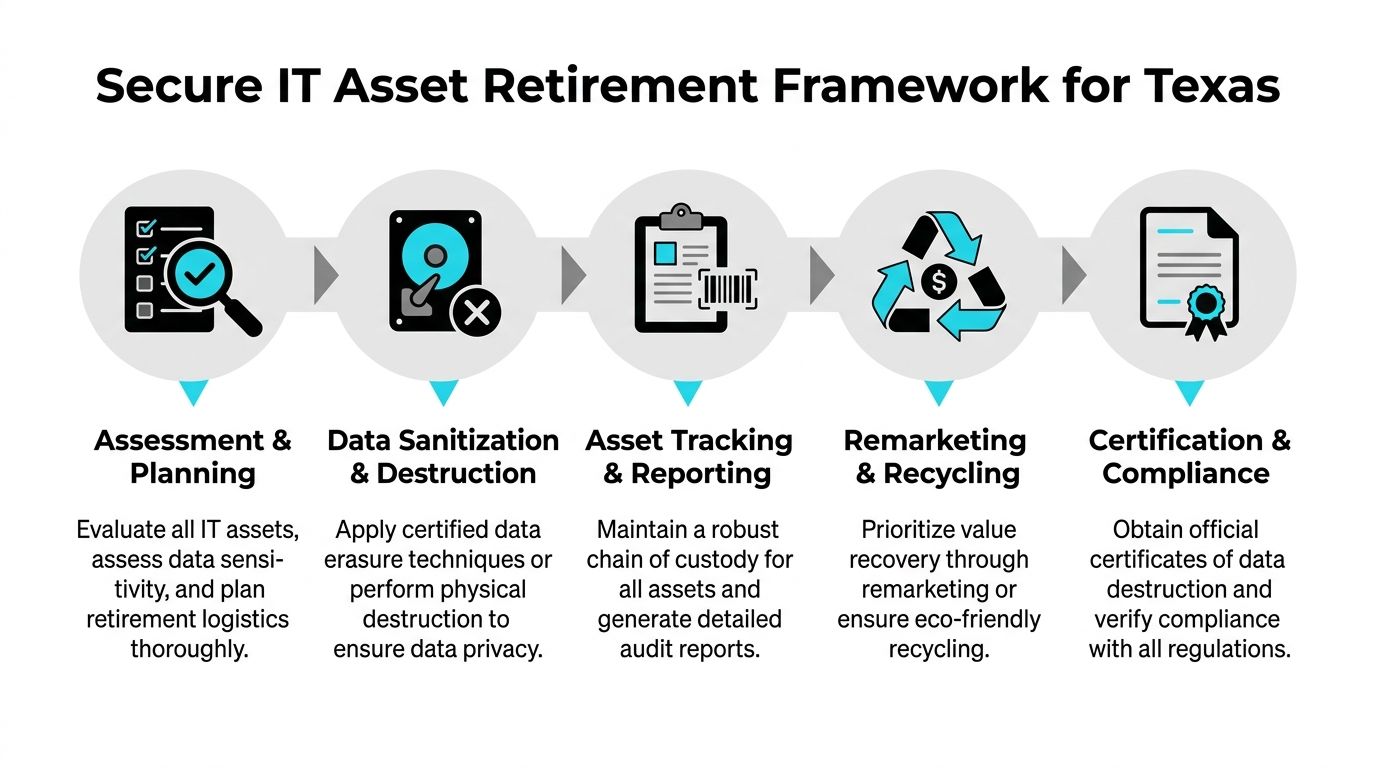
A solid operating model aligns with the core principles outlined in IT asset disposition process guidance, but execution matters more than terminology.
Start with inventory before you touch a single asset
Do not begin with trucks, boxes, or destruction instructions. Begin with a defensible inventory.
That inventory should identify asset type, serial number if available, physical location, business owner, and expected handling path. If equipment is missing identifiers, flag it before removal. If devices have mixed ownership because of mergers, leasing, or shadow IT purchases, resolve that before disposition.
This first step does two jobs at once. It narrows risk and reveals value. Some organizations discover they were about to shred equipment that could be redeployed or remarketed. Others discover unmanaged storage media mixed in with low-risk devices.
Match sanitization to media type
Not all data destruction methods fit all media. That is where many otherwise careful teams get sloppy.
Wiping
Software-based erasure fits devices that remain functional and are headed for redeployment or resale. It supports value recovery, but only when the drive can be accessed reliably and the process is logged.
Degaussing
Degaussing is useful for certain magnetic media. It is not a universal answer, and it does not replace good inventory controls. If your team uses it, make sure your records tie the exact media to the exact event.
Physical shredding
Physical destruction is the right call for failed drives, high-risk media, or assets that cannot be sanitized through software methods. It is final, which is useful from a risk perspective, but it can also eliminate residual value. Choose it deliberately, not by habit.
Key takeaway: The destruction method should follow the data risk and asset condition. It should not depend on which machine happened to be available that day.
Build custody into every handoff
Chain of custody is where many programs become fragile. Someone prints an inventory. Someone else stages the assets. A carrier signs for “miscellaneous electronics.” After that, details blur.
That is not enough for enterprise use.
Create handoffs that are specific and checkable. Use sealed containers where appropriate. Separate loose media from whole systems. Reconcile counts before departure and again at intake. If the vendor cannot maintain item-level or batch-level traceability, your audit story breaks.
Decide reuse versus recycling with intent
A disciplined ITAD program does not destroy everything by default. It makes controlled decisions.
Reuse and remarketing can offset costs and reduce unnecessary waste when devices are suitable for another life cycle. Recycling is the proper path for equipment that has reached the end of practical use or cannot be safely remarketed. The key is to make that decision after data risk is handled and documentation is in place.
Require records that survive scrutiny
Certificates of Destruction are essential. They are not ceremonial paperwork. They are evidence.
Your documentation set should show what was received, how it was processed, what destruction method was used where applicable, and what final disposition occurred. If a regulator, auditor, insurer, or customer asks later, your team should not need to reconstruct events from email threads.
ITAD Auditability Checklist
| Audit Point | Verification Method | Why It Matters for Compliance |
|---|---|---|
| Asset intake accuracy | Compare pickup manifest to internal inventory | Confirms no unexplained loss at release |
| Chain of custody | Review signed transfer records and custody logs | Shows controlled possession through each handoff |
| Data sanitization | Match device/media to wipe, degauss, or shred record | Demonstrates reasonable disposal measures |
| Exception handling | Check records for failed drives or unidentified assets | Proves high-risk items were not bypassed |
| Final disposition | Review remarketing, recycling, or destruction documentation | Confirms environmental and security closure |
| Certificate retention | Store certificates with project files and retention policy | Supports audits, legal review, and customer assurance |
What strong programs do differently
The strongest texas IT teams treat ITAD as part of governance. They set approval thresholds. They define exceptions. They involve security before pickup. They retain records in the same disciplined way they retain procurement and incident documents.
That is what makes the process auditable. Not the label. The evidence.
Choosing the Right ITAD Partner in Texas
The vendor decision gets treated as a pricing exercise. In texas, that is a mistake. Geography, industry mix, and infrastructure spread make partner selection a logistics and compliance decision first.
A provider that performs well in dense metro pickups may struggle with statewide coverage, specialized equipment, or tight custody expectations. That gap matters most when your organization operates beyond one headquarters or one simple asset class.

Texas is not one operating environment
Urban enterprise campuses, rural clinics, university systems, municipal offices, and energy infrastructure sites do not generate the same ITAD requirements. The most overlooked example is healthcare outside major metros.
Texas has 196 of 254 counties lacking a cardiologist, pulmonologist, or endocrinologist within 50 miles as of 2024, a sign of broader infrastructure strain in rural healthcare settings, according to Texas A&M reporting on underserved rural populations. For ITAD, the practical takeaway is direct. Rural hospitals and clinics often have regulated devices, limited internal logistics support, and little room for documentation mistakes.
That makes service footprint more than a convenience. It is a control requirement.
What to verify before you sign
If you are vetting IT asset disposition companies serving texas organizations, ask harder questions than “Do you recycle computers?”
Use a selection screen like this:
- Security controls: Ask how they handle devices with embedded storage, failed drives, and mixed batches from multiple departments.
- Documentation quality: Request sample manifests, exception reports, and destruction certificates.
- Logistics reach: Confirm whether they can support remote facilities, medical sites, and time-sensitive pickups with the same process discipline they use in Dallas, Houston, Austin, or San Antonio.
- Specialized equipment handling: Medical, laboratory, and industrial devices require more than generic consumer electronics sorting.
- Downstream transparency: Ask where assets go after initial intake and whether reuse, recycling, and destruction decisions are documented.
Certifications matter, but they are not enough
R2 and e-Stewards are useful signals because they show a provider works within recognized standards. They are not the whole answer.
A certified vendor can still give you weak reporting, poor communication, or a custody process that breaks down under project pressure. The reverse is also true. A vendor may talk confidently about secure destruction but fail when you ask for sample records, serial reconciliation, or escalation procedures.
The test is operational maturity.
Red flags that should stop the process
Some warning signs are obvious. Others appear only once you ask detailed questions.
| Vendor signal | What it usually means |
|---|---|
| Quotes based only on truckload volume | They may not be planning for item-level accountability |
| No clear answer on failed media | Their destruction workflow is not mature |
| Generic certificates with no project detail | Your audit evidence may be too thin |
| Vague service area commitments | Remote sites may get inconsistent handling |
| No process for regulated devices | Healthcare and public-sector projects become higher risk |
Tip: Ask the vendor to explain how they would handle one problematic asset category, such as a failed SSD from a clinic workstation or a storage array from a leased data hall. The answer usually reveals whether they understand enterprise ITAD or just electronics hauling.
The best partner behaves like an extension of your control environment
That means they can adapt to your internal approval flow, your security requirements, and your reporting needs. They know when onsite destruction makes sense and when centralized processing is more efficient. They understand that a rural pickup for a clinic may need more planning than a metro office sweep, not less.
In texas, scale without process creates exposure. The right partner closes that gap.
Putting Theory into Practice Real-World Texas Scenarios
Policy documents matter. Vendor reviews matter. But most IT leaders judge a process by one standard: does it hold up when operations get messy?
The following scenarios reflect the kinds of texas environments where ITAD either stays disciplined or falls apart.

A data center shutdown under infrastructure pressure
A colocation customer in a major texas market is exiting a cage with a fixed deadline. The hardware includes storage arrays, top-of-rack switches, backup appliances, and failed drives collected over several years. Facilities wants the room cleared quickly. Security wants proof that nothing with customer data leaves uncontrolled. Regional conditions are particularly relevant here. Texas leads the U.S. in renewable generation, but grid congestion and reliability risks can affect operations and scheduling, according to the ERCOT 2040 transmission study referenced by Texas Advanced Energy Business Alliance. For decommissioning, that means the provider needs a realistic operational plan, not just a pickup promise.
What works is a staged removal plan with serialized inventory, a media-destruction path for failed units, and clear dependency mapping so racks are not disconnected out of sequence.
A healthcare system retiring patient-facing devices
A multi-site provider is replacing nursing station PCs, tablets, printers, and older diagnostic support equipment. Some assets sit in urban facilities. Others are spread across remote sites with limited IT presence.
The common failure here is batching everything together. That creates confusion over what contains patient data, what has embedded storage, and what can be reused. The better approach is to segment the retirement stream by device function and data risk, then coordinate pickups around clinical operations so equipment does not sit unsecured in hallways or unlocked offices.
Key takeaway: In healthcare, the hardest part is rarely the truck. It is preserving custody and documentation across many small handoffs.
A state agency managing a fleet refresh
A public-sector department replaces end-user laptops across several offices. Procurement wants speed. Internal audit wants exact records. Some devices are assigned cleanly. Others were reassigned over time, and the inventory file is imperfect.
This is a classic example of why exception handling belongs in the plan. A strong ITAD workflow does not stop when a device is missing a tag or assigned to the wrong user in the spreadsheet. It captures the exception, resolves identity where possible, and documents the disposition path without losing control of the rest of the batch.
An energy firm cleaning out legacy infrastructure
An energy company consolidates office and field systems after an internal reorganization. The retired mix includes rugged laptops, network gear, and a backlog of old drives from prior projects.
The problem is not just data. It is inconsistency. Different business units followed different storage habits, labeling standards, and retirement practices. A useful ITAD engagement here starts with triage. Identify unknown media. Separate field equipment from standard office assets. Push only verified inventory into the final processing stream.
Texas organizations do not need a perfect environment to run defensible ITAD. They need a process that still works when the environment is imperfect.
For broader enterprise projects, teams benefit from reviewing operational examples tied to enterprise IT equipment recycling in texas because large retirements rarely fail on theory. They fail on execution.
Building Your Future-Proof ITAD Strategy
In texas, ITAD is not a cleanup task you hand off after the main project is over. It is part of the project. It belongs in governance, security, procurement, and operational planning from the start.
The organizations that handle it well do three things consistently.
Keep compliance tied to operations
They do not separate privacy, recycling, and logistics into different conversations. They build one disposition workflow that covers all three.
Demand evidence, not assurances
They require inventories, custody records, destruction documentation, and clear final disposition reporting. If a vendor cannot produce evidence, the process is not mature enough.
Plan for texas conditions
They account for multi-site operations, remote facilities, compressed project schedules, and mixed asset classes. They choose process discipline over fast but vague removal.
That is the strategic advantage. A mature ITAD program reduces data exposure, supports audits, improves operational efficiency, and helps recover value from assets that still have life left in them. It also keeps old equipment from becoming an unmanaged security backlog.
Technology lifecycle management does not end when the device leaves production. In texas, that is where risk becomes visible.
If your organization needs a secure, documented way to retire technology, Dallas Fortworth Computer Recycling provides B2B IT asset disposition, certified data destruction, data center decommissioning, and electronics recycling support for texas organizations and nationwide operations.