
What Is a Blade Server? A Practical Explainer for Data Centers
A blade server is a stripped-down, modular server designed to slot into a shared chassis, or enclosure. The easiest way to picture it is like a high-tech bookshelf. Each "book" is a powerful, individual server—or blade—that shares power, cooling, and networking with the other blades on the shelf. This shared design is the secret to its efficiency.
Decoding the Blade Server Concept
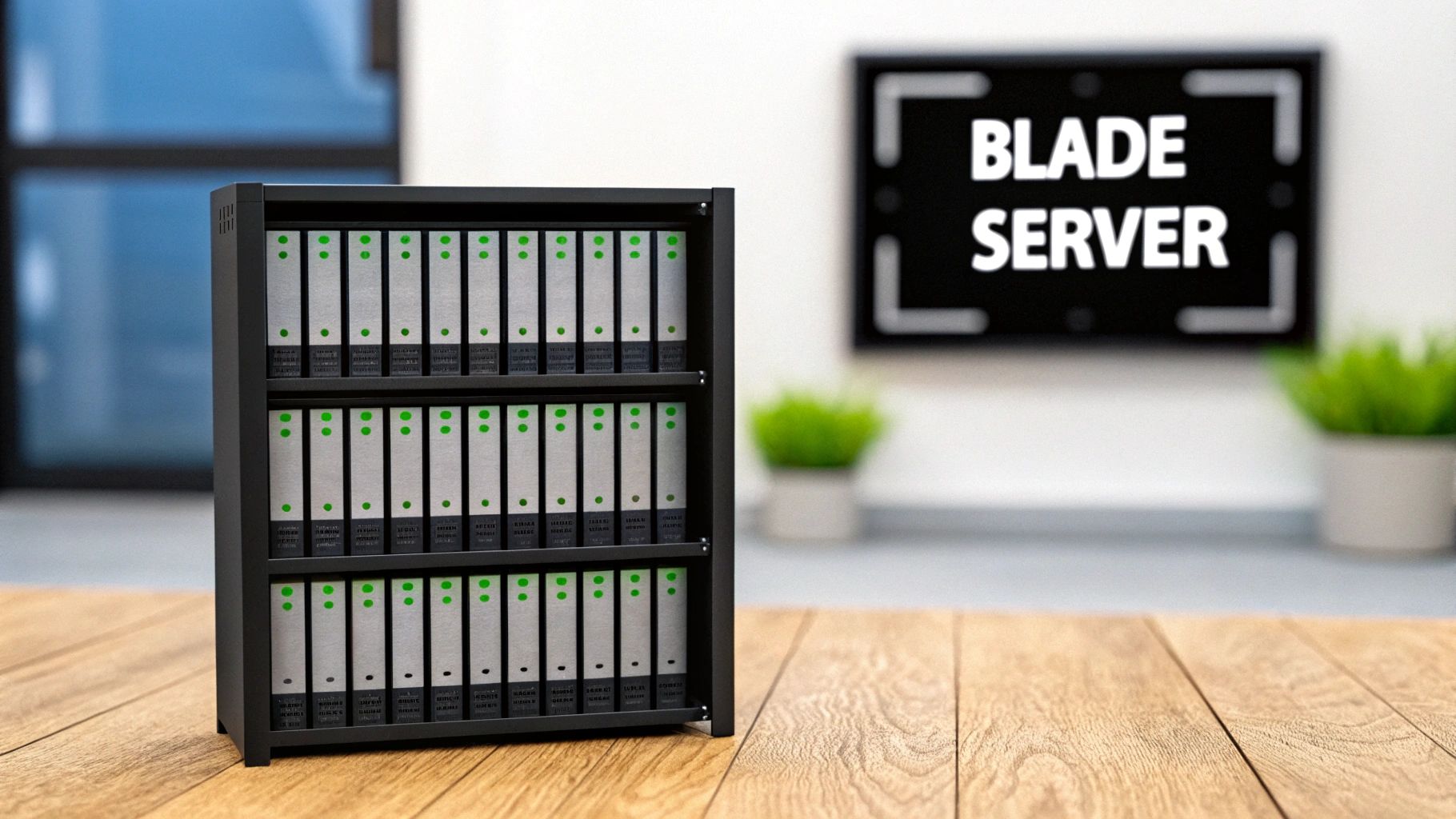
At its heart, a blade server system is all about consolidation and shared resources. Instead of every server having its own bulky power supply, cooling fans, and network cables, those components are built directly into a central chassis. The individual server blades—thin, card-like devices packed with processors, memory, and storage—slide vertically right into this enclosure.
This shared infrastructure is what really defines a blade server. It gets rid of the massive redundancy you’d find in a traditional data center filled with standalone rack servers. A single blade doesn't need its own power cord or a dedicated port on a network switch; it just pulls what it needs from the central pool provided by the chassis.
The Power of Shared Infrastructure
The biggest win with this model is a huge jump in computing density. By stripping away the clunky, redundant parts of a traditional server, you can pack way more computing power into a much smaller physical footprint. It’s an approach that has become a cornerstone of modern data center design, especially where every square foot is at a premium.
By packing multiple high-performance servers into a single compact chassis, blade servers represent a massive shift in data center computing. This design can slash space usage by up to 70% compared to traditional rack servers, making them ideal for dense enterprise environments.
This efficiency goes beyond just saving floor space. Centralizing power and cooling into a shared, optimized system also leads to significant energy savings and makes the whole setup much easier to manage.
Blade Server at a Glance
To really get a feel for what a blade server is, it helps to break down its core attributes. This quick table summarizes the key characteristics that define its powerful and efficient architecture.
| Attribute | Description |
|---|---|
| Modular Design | Individual server blades can be added, removed, or replaced without affecting other blades in the chassis, simplifying maintenance and upgrades. |
| Shared Resources | Power supplies, cooling fans, networking switches, and storage are integrated into the enclosure and shared by all blades. |
| High Density | The compact form factor allows for a large number of servers to operate within a single chassis, maximizing computing power per square foot. |
| Centralized Management | A single management module within the chassis allows administrators to monitor and control all blades from one interface. |
As you can see, blade servers represent a strategic move away from individual, self-sufficient units toward a collective, resource-sharing ecosystem. This fundamental change directly tackles many of the space, energy, and management headaches that plague legacy data centers. You can learn more about where the technology is headed by reading about the global blade server market and its projections on EnterpriseTechProvider.com.
Deconstructing Blade Server Architecture
To really understand what a blade server is, you have to look past the individual servers and see the entire ecosystem they operate in. A blade server system isn't just a stack of computers; it's a tightly integrated architecture where every piece has a critical job. Think of it like a high-performance race car—the engine is crucial, but it’s how the engine, chassis, and electronics all work in harmony that wins the race.
The real genius of a blade system is how it consolidates core functions. By centralizing power, cooling, networking, and management, this setup gets rid of the redundant components and cable spaghetti that plague traditional server racks. Let’s break down the four main components that make this possible.
The Server Blade: The Engine of the System
The heart of the entire operation is the server blade. This is the individual, modular server that houses the core computing components—CPU, memory (RAM), and usually some local storage like NVMe SSDs. Each blade is essentially a self-contained computer, stripped down to its bare essentials.
Blades are designed to be thin, compact, and hot-swappable. This means you can add, remove, or replace one without shutting down the whole system. For IT teams, this modular design is a game-changer for maintenance and scaling, letting them add or subtract computing power just by sliding blades in or out.
The Blade Enclosure: The Central Nervous System
If the blade is the engine, the blade enclosure (or chassis) is the car's frame and central nervous system all in one. This sturdy housing provides the physical structure that the blades slot into, but it does so much more than just hold them in place.
The enclosure is where all the shared resources live:
- Power Supplies: It contains large, redundant power supplies that feed electricity to every single blade, completely eliminating the need for individual power cords.
- Cooling Fans: A bank of high-capacity fans manages airflow for the entire chassis, delivering cooling far more efficiently than dozens of small, whiny fans on individual servers.
- Management Modules: A central module gives administrators a single point of control to monitor and manage every blade, simplifying system-wide updates and health checks.
This centralized model is the key to the operational efficiency that blade servers are known for.
The Midplane: The Connector Hub
The midplane is the unseen component that connects everything. It’s a large circuit board sitting at the back of the enclosure that acts as a central hub. When you slide a server blade into the front of the chassis, it plugs directly into the midplane.
The midplane is the unsung hero of blade architecture. It seamlessly routes power, data, and management signals between the blades and the shared modules, completely eliminating the tangled mess of individual network, power, and KVM cables found in traditional rack environments.
This design not only cleans things up but also boosts reliability by cutting down on the number of physical cables and potential points of failure.
Integrated Modules: Networking and Storage
Finally, the back of the enclosure has slots for integrated modules. These are specialized, hot-swappable components that provide shared networking and storage for all the blades. Instead of every server needing its own network card and cables, a single high-speed network switch module can serve the entire chassis.
Likewise, storage area network (SAN) modules can connect all the blades to a shared storage pool. This integration dramatically reduces cabling complexity and the number of expensive top-of-rack switches required, leading to a cleaner, more manageable, and more cost-effective data center. When these systems eventually reach their end-of-life, understanding the environmental impact of electronic waste becomes a critical part of responsible decommissioning.
Blade Servers vs. Rack Servers vs. Modular Servers
Picking the right server architecture is one of those foundational decisions that echoes through your entire operation, influencing everything from the physical layout of your data center to long-term TCO. The three main players on the field—blade, rack, and modular servers—each bring a completely different philosophy to the table. Getting to grips with their core differences is the only way to make sure your infrastructure can actually handle what your business needs from it.
Rack servers are the classic workhorses of the data center. Think of them as self-contained boxes, each with its own power supply, cooling fans, networking ports, and processors, all neatly packaged in a standard rectangular case. You simply bolt them into a server rack, which gives you incredible flexibility to mix and match hardware from different vendors to tackle a wide variety of specialized jobs.
Blade servers take the opposite approach, betting everything on density and shared resources. Instead of being self-sufficient, individual server "blades" slide into a central chassis that handles the power, cooling, and networking for the whole group. This consolidation is what makes them so ridiculously space-efficient for uniform, high-density computing tasks like VDI farms or high-performance computing clusters.
Distinguishing Modular Servers
Modular servers try to find a middle ground, blending the mix-and-match flexibility of rack servers with some of the density wins you get from blades. These systems typically use a shared chassis but let you slide in different "sleds" for computing, storage, or networking. They offer a happy medium, giving you better density than a rack of individual servers without locking you into the rigid, one-size-fits-all architecture of a blade system.
A simple analogy can clear things up:
- Rack Servers: A toolbox filled with individual, specialized tools. Every wrench and screwdriver is self-sufficient but takes up its own dedicated space.
- Blade Servers: A powerful multi-tool with a set of interchangeable attachments. It’s compact and efficient, but every attachment depends on that single core handle.
- Modular Servers: A customizable toolkit where you can snap different components together. It offers more flexibility than the multi-tool but more integration than the standalone toolbox.
This flowchart gives you a great visual of how a blade system's core parts—the enclosure, midplane, and individual blades—all work together to achieve that unique, high-density design.
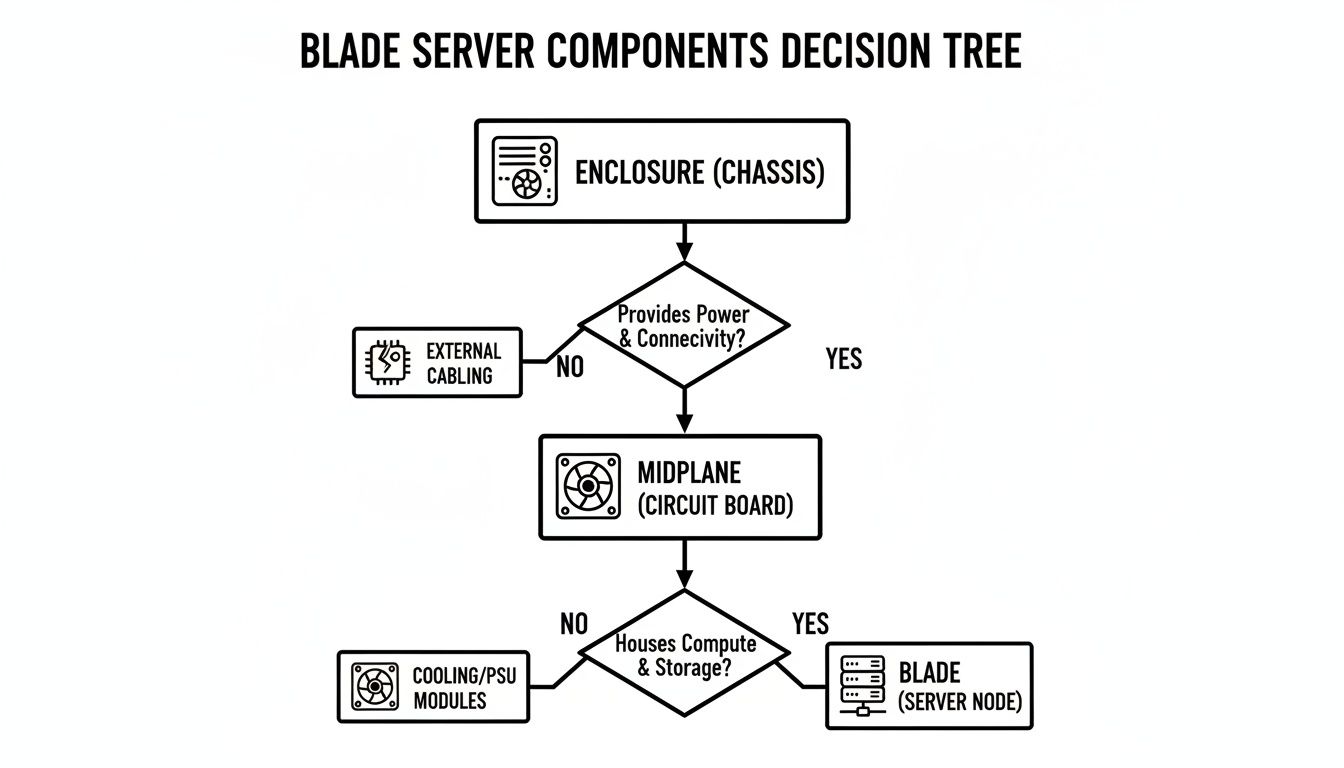
The flow from the central chassis out to the individual blades really drives home how much the system relies on those shared resources, which is the key thing that sets it apart from a rack full of independent servers.
Head-to-Head Comparison
When you start weighing which architecture is right for your needs, the trade-offs become crystal clear. The blade server market has seen explosive growth, and that tells you a lot about its value in today's data centers. Top-tier players like Cisco, Dell, and HPE control over 70% of the market, a sector valued at nearly $20 billion and expected to hit almost $32 billion by 2030. That growth is fueled by an insatiable need for dense, efficient computing. You can dig deeper into these numbers in the data center blade server market report from Data Insights Market.
But just because it's popular doesn't mean it's the right fit for everyone. A direct comparison quickly shows where each model really shines.
For organizations that need to pack the absolute most computing power into the smallest possible space, blade servers are almost always the answer. But if you need to support a menagerie of specialized hardware or want to avoid getting locked into a single vendor's ecosystem, rack servers offer flexibility that's tough to beat.
The table below breaks down the key differences across the metrics that matter most to your operations and your budget. This side-by-side view makes the strengths and weaknesses of each design philosophy pretty obvious.
Comparison of Server Architectures
| Feature | Blade Server | Rack Server | Modular Server |
|---|---|---|---|
| Physical Density | Very High | Low to Medium | Medium to High |
| Scalability | High within a chassis; adding a new chassis is a larger investment. | Granular; add one server at a time. | Flexible; add compute or storage sleds as needed. |
| Management | Centralized via a single chassis module. | Decentralized; each server is managed individually. | Centralized within the chassis, but can be more complex. |
| Power Efficiency | Excellent due to shared, efficient power supplies. | Lower, as each server has its own power supply. | Good, with shared power in the enclosure. |
| Workload Suitability | Best for uniform, high-density tasks (e.g., VDI, HPC). | Ideal for diverse, specialized, or mixed workloads. | Good for hyper-converged or scalable workloads. |
At the end of the day, the choice between blade, rack, and modular servers isn't about which one is "best" in a vacuum. It’s about which is the best fit for your specific environment, budget, and technical roadblocks. Each architecture was built to solve a different set of problems, and the right decision always comes down to a clear-eyed assessment of your organization's real-world operational needs.
Key Advantages and Disadvantages of Blade Servers
Like any technology, blade servers aren't a perfect solution for every problem. While they offer some serious benefits in the right environment, they also come with trade-offs you need to consider carefully. Any IT leader looking to make a smart infrastructure investment needs to see both sides of the story.
This means weighing the impressive gains in efficiency and density against potential downsides like high upfront costs and vendor dependency. Getting a clear picture of the pros and cons is the only way to do a proper risk-reward assessment before committing to a blade architecture.
The Compelling Advantages of Blade Systems
The most talked-about benefit of a blade server is its incredible computing density. By packing multiple servers into a single chassis, you can shrink your data center footprint in a big way. For businesses paying for expensive colocation space or working with limited room, this space-saving design is a huge financial and operational win.
This consolidation also leads to major improvements in power consumption. Instead of dozens of individual power supplies, a blade enclosure uses a few large, shared, and highly efficient ones. Combined with a unified cooling system, this can cut power and cooling costs by 30-50% compared to the same number of rack servers.
Finally, management gets a lot simpler. Rather than logging into and managing each server one by one, a blade system gives you a single point of control through the chassis management module.
This centralized approach streamlines everything from firmware updates and health monitoring to firing up new servers. For busy IT teams, this cuts down on management overhead and frees up valuable time for more important projects.
Potential Downsides and Considerations
The biggest hurdle for many organizations is the higher initial investment. While individual blades might seem affordable, the chassis itself—loaded with redundant power supplies, cooling fans, and integrated switches—is a significant upfront cost. A blade system really only starts making financial sense once you begin filling the enclosure with multiple blades.
Another critical point is the risk of vendor lock-in. The components within a blade ecosystem—the chassis, the blades, and the interconnects—are proprietary. You can't just mix and match blades from Dell with a chassis from HPE. This dependence can limit your flexibility and negotiating power when it's time for upgrades or replacements.
The chassis also creates a single point of failure. Although components like power supplies and fans are redundant, a catastrophic failure of the chassis backplane could take down every single server inside it. This makes a solid disaster recovery plan and diligent hardware lifecycle management non-negotiable. You can find helpful guidance by exploring IT asset management best practices that apply to all types of equipment.
Ultimately, deciding if a blade server is right for your data center comes down to a clear-eyed analysis of these pros and cons, measured against your specific operational needs, budget, and long-term growth plans.
When to Choose Blade Servers for Your Data Center
Knowing the technical specs of a blade server is one thing. Knowing exactly when to use one is what separates a good infrastructure decision from a great one. Blade servers aren't a one-size-fits-all solution; think of them as specialized tools built to dominate in specific environments.
Pick them for the right job, and you'll see huge gains in efficiency and density. But if you deploy them where they don't fit, you're just adding unnecessary cost and complexity.
The trick is to match their biggest advantages—high density, shared infrastructure, and unified management—with workloads that truly need them. For certain applications, blades aren't just a good fit; they're the most logical and cost-effective way to get the scale and performance you need.
High-Density Server Virtualization
One of the most common places you'll find blade servers is in a high-density server virtualization environment. This is where a single physical server hosts dozens of virtual machines (VMs), each with its own operating system and apps. To make this work efficiently, you need a ton of CPU cores and memory packed into the smallest space possible.
Blade servers are built for this. Their entire design lets you cram an incredible amount of computing power into a single chassis, creating the perfect foundation for a large VM farm. The shared, high-speed networking built right into the enclosure also delivers the low-latency communication that's so critical for VM performance.
The rise of blade servers is directly tied to virtualization and cloud computing. Enterprises adopting these high-density solutions often see their power consumption drop by 30-50% per unit compared to using standalone servers. You can explore more about these trends by reading the full report on Grand View Research.
Private Cloud and VDI Deployments
Building a private cloud or a large-scale Virtual Desktop Infrastructure (VDI) has a lot in common with server virtualization, making them perfect candidates for blade architecture. These setups depend on having uniform, easily scalable hardware, which is exactly what a blade system offers.
- Private Cloud: Blades deliver the standardized, scalable compute nodes you need to build a responsive cloud infrastructure. Need more capacity? Just slide in another blade.
- VDI: Rolling out thousands of virtual desktops demands predictable performance and high density. A single blade chassis can support hundreds of users while making the underlying hardware much easier to manage.
For both of these, the centralized management of a blade system is a massive win. Admins can provision, monitor, and update the whole infrastructure from one console—a must-have when you're managing deployments at scale.
High-Performance Computing Clusters
High-Performance Computing (HPC) is all about running complex calculations for things like scientific research, financial modeling, and AI. These workloads require a cluster of servers working together, all connected by incredibly fast, low-latency networking.
A blade enclosure is the ideal setup for an HPC cluster. The integrated high-speed interconnects (like InfiniBand) and the fact that all the blades are physically close together in the chassis keep communication delays between nodes to an absolute minimum. This tight integration lets the cluster operate like a single, powerful supercomputer.
Of course, the entire lifecycle, from deployment to end-of-life, requires careful planning. You can learn more by reading our guide on data center migration best practices.
Planning for Blade Server Decommissioning and Recycling
The lifecycle of your hardware doesn't end with a successful deployment. Every piece of equipment, including a high-density blade server system, eventually reaches its end-of-life. Planning for this final stage is just as critical as its initial installation, ensuring your organization remains secure, compliant, and environmentally responsible.
Decommissioning a blade server system is a whole different ballgame compared to retiring standalone rack servers. It’s far more complex than just unplugging a few machines. You're dealing with a dense, interconnected ecosystem where dozens of server blades are housed within a single, heavy enclosure.
This high density complicates both data security and physical logistics. Securely wiping data requires a strategy that can address every single blade, not just a handful of servers. On top of that, physically removing a fully loaded enclosure—which can weigh hundreds of pounds—from a data center requires specialized equipment and expertise to do it safely.
Why Partnering with an ITAD Expert is Critical
This is where a certified IT Asset Disposition (ITAD) provider becomes an indispensable partner. Trying to manage this process in-house can expose your organization to significant risks, from data breaches to non-compliance with environmental regulations. An experienced ITAD specialist handles the entire end-of-life process from start to finish.
A professional partner takes care of several key responsibilities:
- Secure Data Destruction: They provide certified data erasure services that meet strict standards like HIPAA and NIST, ensuring all sensitive information is permanently destroyed before any hardware leaves your facility.
- Chain of Custody: A secure chain of custody is maintained from the moment the equipment is picked up until its final disposition, giving you a detailed, auditable trail.
- Logistical Management: They have the teams and equipment needed to safely de-install and transport heavy, bulky blade enclosures and related infrastructure from your data center.
Partnering with a certified ITAD provider is the most effective way to protect your organization during the decommissioning process. They ensure that every step, from data erasure to final recycling, is handled in a way that is secure, compliant, and environmentally sound.
Maximizing Value and Ensuring Compliance
Beyond just managing risk, a key benefit of using a professional ITAD service is value recovery. They have the expertise to assess retired assets, refurbish viable components, and find secondary markets for them. This often returns a portion of the proceeds to your organization, which can help offset the costs of a technology refresh.
For a deeper dive into the process, check out our comprehensive server decommissioning checklist that covers every critical step.
Ultimately, a well-planned decommissioning strategy ensures your organization meets its legal and ethical obligations. It protects your data, complies with environmental laws like RCRA, and demonstrates a commitment to corporate social responsibility by keeping hazardous e-waste out of landfills.
Frequently Asked Questions About Blade Servers
Even after you get the hang of the core concepts, some practical questions always pop up when you're seriously considering a move to blade servers. We've gathered some of the most common ones from IT managers to help clear up any lingering doubts.
These are the real-world, day-to-day questions about managing a high-density system—from keeping things cool to figuring out hardware compatibility and planning for the long haul.
How Is Cooling Managed in a High-Density Blade Chassis?
One of the first things people worry about is heat. When you pack that much computing power into such a small space, you're going to generate a massive thermal load. Managing it isn't just a good idea; it's absolutely critical for system stability and performance.
Blade enclosures are built from the ground up with sophisticated, integrated cooling. They typically have a whole bank of powerful, redundant fan modules that work together to pull huge volumes of air through the chassis. These are far more powerful and efficient than the tiny individual fans you’d find in a standard rack server.
But the chassis itself is only half the story. Effective cooling is just as much about your data center's overall airflow design.
A blade system needs a steady diet of cool air and a clear path to get rid of hot air. A hot aisle/cold aisle setup is non-negotiable here. Without it, you’ll just end up recirculating hot exhaust, and your systems will start overheating in no time.
It's this teamwork between the chassis's internal fans and the room's layout that ensures every single blade gets the cool air it needs to run at full speed without throttling back.
Can You Mix Different Blade Types in One Enclosure?
The modular design of blade systems makes everyone wonder about mixing and matching components. It's a great idea in theory, but in practice, you're limited by the manufacturer's design.
The short answer is yes, you can generally mix different types of blades within a single enclosure, as long as they all come from the same manufacturer. This is actually one of the big advantages, as it allows for some incredibly flexible setups. For instance, you could combine:
- Compute Blades: Your standard workhorses focused on raw processing power and memory.
- Storage Blades: Blades packed with high-capacity drives to create a shared storage pool right in the chassis.
- Specialized Blades: Modules designed for specific jobs, like GPU acceleration for AI or graphics-intensive workloads.
This lets you build a highly versatile system tuned for a variety of different tasks. What you absolutely cannot do is mix blades from different vendors. The midplane, power delivery, and management interfaces are all proprietary. You can't just slide a blade from one company into another's chassis. This reality makes vendor lock-in a very real consideration you need to think about before you buy.
What Is the Typical Lifespan of a Blade System?
Planning for tech refresh cycles is a huge part of any IT budget. Blade systems are interesting because their components age at different rates, which changes the math a bit. The server blades themselves—the parts with the fast-evolving processors and memory—usually follow a typical 3-5 year refresh cycle.
The blade chassis, on the other hand, often has a much longer useful life, sometimes lasting 7-10 years or even more. This staggered lifecycle is a major financial benefit. You can perform phased upgrades, swapping out older server blades for newer, more powerful models without having to rip and replace the entire enclosure, backplane, and power supplies. For a complete overview of this process, you can read our guide on what is IT asset disposition.
When your blade servers reach their end-of-life, secure and compliant disposal is crucial. Dallas Fortworth Computer Recycling offers nationwide ITAD services to manage the entire process, from certified data destruction to responsible recycling. Contact us today to ensure your retired assets are handled professionally.