
Discover computer recycling near me Arlington TX for Secure Data Disposal
For IT managers in Arlington, searching for "computer recycling near me Arlington TX" is about much more than just clearing out a storage closet. It's a critical security function that protects your company's data and ensures you stay on the right side of compliance with every device you retire.
Why Secure Computer Recycling Matters in Arlington TX
Retiring old computers, servers, and laptops is one of the highest-risk activities for any Arlington business. Simply dropping off old equipment at a general recycler—or worse, tossing it in a dumpster—exposes your company to serious liability.
Every single hard drive, no matter how old the machine, can hold a treasure trove of confidential information. Think about it: customer lists, financial records, employee PII, and sensitive business strategies could all be sitting on those drives. A data breach from one improperly disposed asset can lead to crippling financial penalties and do permanent damage to your company's hard-earned reputation.
The Growing E-Waste Challenge
The sheer volume of electronic waste is staggering, creating a dual threat of environmental harm and security vulnerabilities. Globally, we’re on track to generate over 70 million tonnes of e-waste in 2026, and recycling rates just can't keep up.
In the US alone, businesses produced 6.92 million tonnes in a recent year, but a dismal 15% of it was actually recycled. This contributes to an estimated $37 billion annual global economic cost from mismanaged e-waste, underscoring the need for a professional IT asset disposition strategy.
Choosing a certified partner isn't just about being green; it's a core component of your risk mitigation strategy. It ensures that every device is handled according to strict data security and environmental protocols from start to finish.
Key Risks of Improper Disposal
Skipping a formal IT asset disposition (ITAD) process invites several major threats into your organization:
- Data Breaches: Retired hard drives that aren't professionally destroyed are a goldmine for data thieves. Sensitive company or customer data can be easily recovered.
- Regulatory Fines: Strict data privacy laws like HIPAA, FACTA, and GDPR don't stop applying just because a device is unplugged. Non-compliance, even from discarded equipment, can trigger substantial fines.
- Environmental Penalties: Texas has specific regulations for handling e-waste. Improper disposal can put your business in violation and result in financial penalties.
A certified, professional approach turns this liability into a secure, documented, and defensible process. It guarantees that every step, from pickup to final destruction, is tracked and compliant. To see the full picture, you can learn more about the complete benefits of e-waste recycling in our detailed guide.
This is why finding the right partner for computer recycling in Arlington is non-negotiable for any modern IT department.
Key Factors for Arlington IT Asset Disposition
To help you vet potential partners, this table breaks down the most critical factors for Arlington businesses. Think of it as a quick-reference guide for making a sound decision.
| Factor | Why It Matters for Arlington Businesses | What to Look For |
|---|---|---|
| Certifications | Provides third-party validation that the recycler meets strict security and environmental standards. | Look for R2v3, e-Stewards, and NAID AAA certifications. |
| Data Destruction | Ensures sensitive data is permanently destroyed, preventing breaches and protecting your reputation. | Offers on-site and off-site shredding, degaussing, and certified data wiping. |
| Chain of Custody | Creates an unbroken, auditable trail for every asset from your door to its final disposition. | Serialized tracking, secure transport, and detailed reporting for compliance. |
| Local Presence | A partner familiar with the DFW area, including Arlington, ensures reliable logistics and responsive service. | A physical presence in North Texas and a service area that explicitly includes Arlington. |
| Compliance Expertise | The partner should understand regulations like HIPAA and FACTA to help you meet your obligations. | Experience working with regulated industries like healthcare, finance, and government. |
Ultimately, selecting a recycler is a security decision, not a disposal one. Using these factors to guide your choice will ensure your company’s assets—and its data—are handled responsibly.
Choosing a Certified ITAD Partner in the DFW Area

When your search for "computer recycling near me Arlington TX" brings up a list of options, it's easy to think the job is done. But for an IT department, this is where the real vetting process starts. There's a huge difference between a simple scrap hauler and a true IT Asset Disposition (ITAD) partner, especially for businesses with strict data security and compliance needs.
A genuine ITAD specialist does more than just haul away old equipment—they take custody of your company's liability. Their entire process is built around security, documentation, and environmental responsibility. For an IT director in Arlington, making that distinction is critical.
The Importance of Certifications
Certifications are the most important filter you can apply. They serve as independent, third-party proof that a vendor follows rigorous operational standards. Without them, you're essentially just taking a company at its word, and that’s a significant business risk.
Look for these two key industry credentials:
- R2v3 (Sustainable Electronics Recycling International): This is the leading global standard for electronics recycling. It covers everything from data security and environmental protection to worker health and safety, ensuring no illegal exporting of e-waste.
- e-Stewards: Another top-tier certification, e-Stewards focuses heavily on preventing the export of hazardous electronic waste to developing countries and guarantees responsible, ethical processing from start to finish.
A partner holding these certifications has a documented, auditable process for managing your assets. This shifts the burden of proof from your team to theirs, giving you a defensible position in the event of a compliance audit.
Vetting a Partner's B2B Capabilities
Beyond certifications, you need a partner who is built to handle the demands of a corporate environment. A recycler that mainly serves residential customers simply won't have the infrastructure to manage a large-scale office cleanout or a complex data center decommissioning.
Ask pointed questions about their experience with businesses like yours:
- Do they have proven experience with specialized equipment like servers, networking gear, or lab instruments?
- Can they manage the logistics for multiple locations if your company has offices beyond Arlington?
- Do they offer asset remarketing programs to help you recover value from newer, functional equipment?
A dedicated B2B partner like Dallas Fortworth Computer Recycling is structured from the ground up to serve corporate IT departments. They understand the critical need for detailed chain-of-custody reporting and can provide the Certificates of Data Destruction that auditors demand. Their experience means they anticipate an IT manager's needs, from scheduling pickups that minimize operational disruption to providing the exact documentation your compliance officer requires.
A partner focused solely on business needs delivers a level of service and security that general-purpose recyclers can't match. As you evaluate your options, it's helpful to understand what a top-tier R2 certified electronics recycler provides to set a clear benchmark for your selection process. Choosing the right partner transforms computer recycling from a logistical chore into a secure, compliant, and valuable part of your IT lifecycle management strategy.
Preparing Your IT Assets for Secure Pickup
A smooth, secure electronics recycling pickup doesn't just happen on its own. The work your team does before our truck arrives at your Arlington office is what truly sets the stage for a seamless and auditable process.
Proper preparation is the first link in an unbroken chain of custody. It ensures that from the moment those assets leave your control, the entire process is efficient, accountable, and, most importantly, secure. This holds true whether you’re retiring a handful of laptops or decommissioning an entire server room.
Create a Detailed Asset Inventory
The first thing you need is a detailed inventory of every single asset scheduled for pickup. This isn't just about counting boxes; it's about documenting the specifics. This list becomes the foundational document for your entire chain of custody.
At a minimum, your inventory sheet should capture:
- Asset Type: (e.g., Laptop, Desktop, Server, Switch)
- Manufacturer and Model: (e.g., Dell Latitude 7420, Cisco Catalyst 9300)
- Serial Number: This is the most crucial piece of data for tracking each individual device.
- Asset Tag Number: Your own internal tracking number.
- Physical Condition: (e.g., Working, Damaged, Parts Only)
This detailed list allows us to provide you with documentation that perfectly matches what was collected. Any discrepancies can be flagged and resolved on the spot, closing off potential security gaps before they can even form.
Segregate and Organize Your Equipment
Once your inventory is locked in, it's time to physically organize the equipment. This simple step can dramatically speed up the pickup process, which means less disruption for your daily operations.
Group similar items together. We recommend palletizing desktops, using gaylord boxes for laptops, and keeping all your networking gear in its own area. This kind of organization helps our pickup team work quickly and load everything safely. If you have assets with different security needs—say, servers that require physical shredding versus laptops that just need wiping—separating them beforehand ensures we apply the correct data destruction method to the right equipment.
Pro Tip: Go the extra mile and label each pallet or container with the asset type and a quick count. A simple sign reading "Desktops – Qty: 50" or "Laptops for Data Wiping – Qty: 75" gives our logistics team immediate clarity and reinforces your secure, organized process.
Smaller IT equipment, especially laptops and mobile devices, is a huge source of e-waste, but it also holds significant potential for reuse. For a mid-sized Arlington firm refreshing 500 laptops, a common strategy might involve redeploying 40% internally, reselling 30%, and recycling the remainder. This approach not only cuts waste but also shows a clear return on a responsible disposition strategy.
While your certified ITAD partner will handle the final, guaranteed data destruction, performing an initial data wipe in-house is a recommended best practice. This adds a preliminary layer of security before the devices even leave your facility. For a deeper dive into this process, you can check out our guide on how to wipe a hard drive completely. This initial step reduces your risk profile from the very beginning.
Ensuring Compliant Data Destruction and Chain of Custody
For any IT leader in Arlington, the biggest fear isn't a server failing—it's a data breach from a supposedly ‘retired’ asset. This is where your computer recycling partner proves their worth. Their process for data destruction and chain of custody is the most critical service they provide, transforming a high-risk liability into a secure, auditable procedure.
Simply handing over old equipment isn't enough. You need absolute, verifiable proof that the data on those devices has been permanently and irrevocably destroyed. Without this, your organization remains exposed to significant regulatory and reputational damage.
Understanding Data Destruction Methods
Not all data destruction is created equal, and a professional ITAD partner will offer multiple methods to match your specific security requirements. The goal is to make data recovery technically impossible. Your choice really comes down to the data's sensitivity, compliance rules, and your own internal security policies.
The three primary methods you'll encounter are:
- Data Wiping: This involves using specialized software to overwrite the entire hard drive with random characters. It’s a process that meets standards like NIST 800-88 and sanitizes the drive, allowing it to be safely reused or remarketed. This can be a great way to recover value from your assets.
- Degaussing: This process exposes magnetic storage media—think traditional HDDs and tapes—to a powerful magnetic field that completely scrambles the data. It renders the drive unusable and is much faster than wiping when you're dealing with bulk destruction.
- Physical Shredding: For the highest level of security, nothing beats physical destruction. The hard drives are fed into an industrial shredder that grinds them into small, irrecoverable metal fragments. This is the required method for many government agencies and industries handling top-secret data.
This flowchart outlines the foundational steps your team can take to prepare assets before they even leave your site.
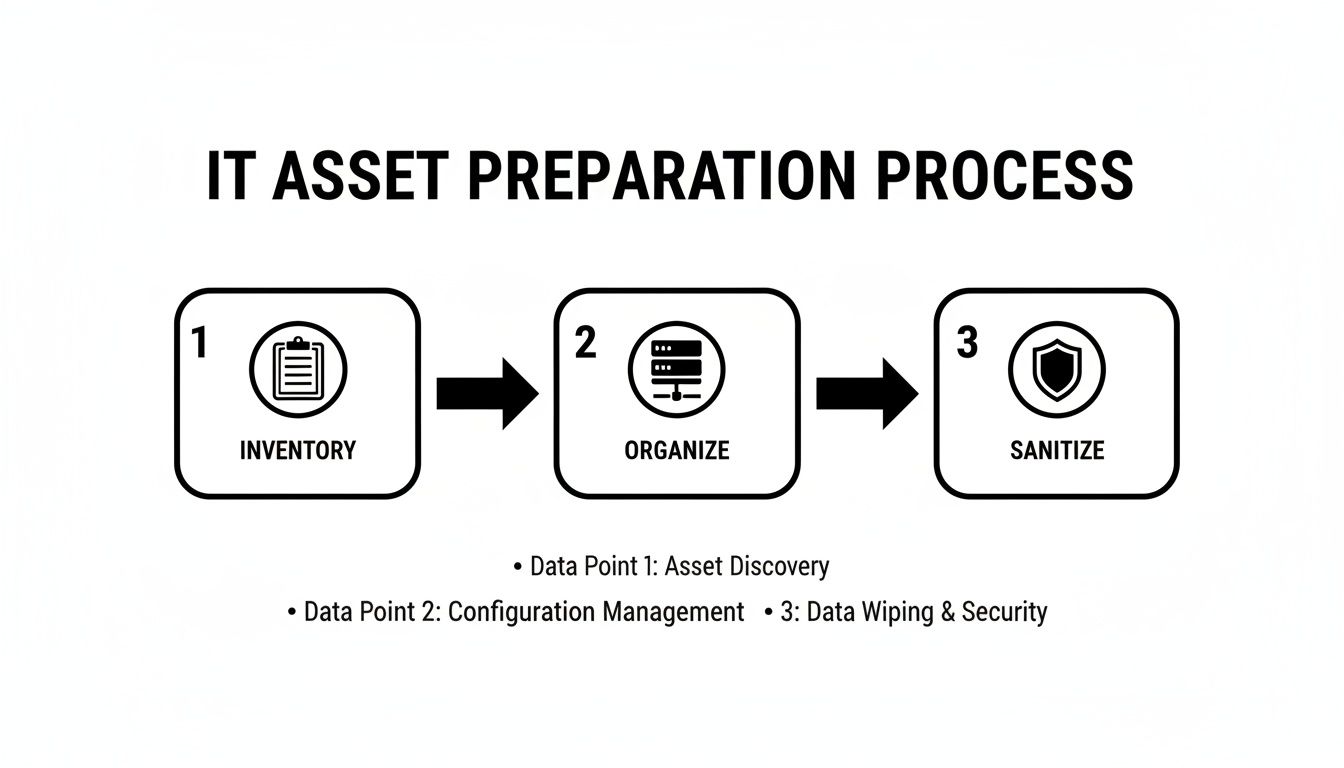
A structured approach to inventory, organization, and initial sanitization ensures a smooth handoff to your recycling partner for final, certified destruction.
The Power of the Certificate of Data Destruction
After the destruction is complete, you must receive a Certificate of Data Destruction. This document is your ultimate proof of compliance and is absolutely non-negotiable. For any IT manager facing an audit, this certificate is your golden ticket, showing you took every necessary step to protect sensitive information.
A legitimate certificate should detail:
- The unique serial numbers of every single drive that was destroyed.
- The specific method used for destruction (wiping, degaussing, or shredding).
- The date and location of the destruction.
- A statement of compliance, affirming the process met recognized industry standards.
The certificate effectively transfers liability from your organization to the ITAD vendor. It's the official record that closes the loop on your asset's lifecycle, providing the auditable evidence that your company's data was handled responsibly.
To see what this critical document looks like in practice, you can learn more about the importance of a certificate of destruction for hard drives in our detailed guide.
Finally, the chain of custody is the process that ties everything together. It’s an unbroken, documented trail that tracks your assets from the moment they leave your Arlington facility to their final disposition. A reputable partner provides serialized reporting at every stage, ensuring no device goes missing. This is especially crucial for a healthcare provider in Arlington, where HIPAA mandates stringent tracking and proof of destruction for any device that ever stored patient information.
Handling the Logistics and Costs of IT Recycling
Once you’ve prepped your assets for retirement, the next questions are always about logistics and cost. How does the pickup work at your Arlington office, and what should your business expect to budget for this service? Getting a handle on the different service models and pricing structures is the key to choosing the right approach for your project.
The two main service models are onsite services and offsite depot processing. Each one has clear advantages depending on your security requirements, operational needs, and the specific assets you're retiring.
Onsite vs. Offsite Processing
Onsite services bring the destruction capabilities right to your facility. Think of it as a mobile hard drive shredding truck parked outside your Arlington building. This is the gold standard for maximum security, as you can physically witness the destruction of your sensitive data before any equipment ever leaves your control.
Offsite processing, also called depot services, involves the secure transport of your assets to the recycler's certified facility. At the depot, every device is processed in a tightly controlled environment under constant video surveillance. This approach is often more cost-effective, especially for larger volumes or for assets that don't hold mission-critical data, because the recycler can manage the process centrally and more efficiently.
A key consideration here is trust and certification. Offsite processing is perfectly secure if you've chosen an R2v3 or e-Stewards certified partner with a documented, auditable chain of custody. This certification is your guarantee that their offsite facility meets the same high standards you would demand onsite.
Factors That Influence Your Cost
The price for professional computer recycling isn't one-size-fits-all. A few key factors will determine the final quote for your project:
- Equipment Volume and Type: The total weight or number of pallets directly impacts logistics costs. Heavier items like old CRT monitors or large enterprise servers often have different fee structures than a pallet of lightweight laptops.
- Data Destruction Method: Onsite physical shredding is a premium service due to the specialized equipment and personnel required. Software-based data wiping performed at a depot is typically a more economical choice.
- Logistics: The physical location of your assets matters. Equipment on the ground floor is easier to handle than assets on the 10th floor of a building with no service elevator, and this can influence labor and pickup costs.
Turning an Expense Into a Revenue Stream
Here’s the part many IT managers miss: professional computer recycling doesn't always have to be a net cost. In many cases, it can actually become a source of revenue for your department through asset remarketing.
If your retired equipment is still functional and has resale value—think recent-model laptops, servers, or networking gear—your ITAD partner can test, refurbish, and resell it on your behalf. You then receive a share of the proceeds, which can partially or even completely offset your recycling fees. For high-value projects, this can result in a net payment back to your company.
This value recovery model aligns perfectly with a circular economy, extending the life of electronics while providing a direct financial return to your business. It’s a powerful alternative to the old "take-make-waste" approach. The global disparity in recycling effectiveness is significant; while Europe leads with a 42.8% e-waste recycling rate, the US lags at just 15%. This gap shows why it's so important for Arlington businesses to work with certified partners who provide structured, compliant processes that mirror successful models and offer clear, audit-ready reporting. You can see how recycling rates compare and what it means for businesses in more detail.
For a streamlined process, many businesses in the DFW area find that using a single partner for both pickup and value recovery is the most efficient solution. To get a better idea of how this works, you can explore our straightforward e-waste pickup services in the DFW metroplex.
Common Questions About Arlington Computer Recycling
Even with a solid plan in place, we find that IT managers and business owners in Arlington still have practical questions about getting the job done. Here are some of the most common things we're asked when helping local businesses manage their end-of-life IT assets.
What Types of Business Equipment Can I Recycle?
When you look for "computer recycling near me Arlington TX," you'll find that a true business-to-business partner handles much more than just old desktops and laptops. You should expect them to manage your entire IT ecosystem.
We regularly handle equipment like:
- Servers and Data Center Hardware: This includes everything from blade servers and storage arrays (SANs) to full rack-mounted systems.
- Networking Gear: We take switches, routers, firewalls, and wireless access points.
- Office Electronics: This covers peripherals like monitors, printers, scanners, and even entire telecom systems, including VoIP phones.
- Specialized Equipment: Many certified recyclers also process medical devices, lab instruments, and other industry-specific electronics.
It's important to remember that B2B specialists don't handle consumer household goods like refrigerators or microwaves. Always confirm what your partner accepts—a quick consultation can clear up any questions about their capabilities and restrictions right away.
How Much Does Computer Recycling Cost for a Business?
The cost varies, and in many cases, it might not be a cost at all. If you have newer equipment that still holds value, it can often be refurbished and resold. In these situations, many partners will offer the service for free or even pay you through a value recovery or buyback program.
For older equipment that has no resale value, pricing is typically based on a few factors:
- Weight or Volume: The total amount of gear you need processed.
- Service Type: Premium services like onsite hard drive shredding have a different cost structure than a standard depot pickup.
- Logistics: Where the equipment is located can affect labor costs. A ground-floor pickup is different from a cleanout in a high-rise office.
The key takeaway is that the value from your remarketable assets can often offset, or even completely cover, the fees for recycling older gear. To get a clear picture, always ask for a detailed quote based on your specific inventory.
Do I Need to Wipe Our Devices Before Pickup?
While wiping your drives internally is a great first step, it is not a substitute for professional, certified data destruction. Think of your internal wipe as an extra layer of security, but the certified process is what guarantees compliance and fully removes your liability.
A reputable ITAD partner is required to provide secure data destruction that meets established standards like NIST 800-88. More importantly, they must provide a Certificate of Data Destruction when the job is done. This certificate is your official, auditable proof that every piece of data was handled and destroyed according to industry regulations. Without it, you're missing the documentation you need to pass an audit.
How Do I Schedule a Pickup in the Arlington Area?
We make scheduling a pickup as straightforward as possible. The process usually starts with a quick phone call or by filling out a request form on the recycler's website.
To get started, you'll just need to provide a few details:
- The types of equipment you have.
- An estimate of the quantity or volume.
- Your business's physical location in Arlington.
From there, the logistics team will coordinate with you to find a pickup time that works for your schedule and causes minimal disruption. For larger projects like a full office cleanout or data center decommissioning, they'll build out a more detailed logistics plan to ensure the entire process is seamless for your team.
Ready to create a secure and compliant IT asset disposition plan? The team at Dallas Fortworth Computer Recycling has over a decade of experience helping Arlington businesses manage their electronics responsibly. Contact us today to schedule your pickup and get a transparent quote for your project.