
DFW Computer Recycling: The IT Director’s Guide for 2026
Your server room isn't the only place where retired technology piles up. Most IT leaders also have a quieter backlog: pallets of replaced laptops, a cage full of failed drives, aging network switches no one wants to touch, and a spreadsheet that's already out of date. That backlog looks like a housekeeping problem until legal, security, finance, and facilities all get pulled into the same conversation.
That's why dfw computer recycling shouldn't be treated as junk hauling. In an enterprise setting, every retired asset creates three questions at once. Was the data destroyed in a defensible way? Was the equipment handled in a way that satisfies policy and regulation? Did the organization recover any residual value before paying to recycle the rest?
Teams that run IT asset disposition well don't start with the loading dock. They start with controls, documentation, and a decision path for every asset class. That's the difference between a disposal event and a repeatable retirement program.
The Strategic Imperative of IT Asset Disposition
The storage closet tells the truth. If it holds a mix of obsolete desktops, de-racked servers, dead UPS units, loose drives, and unlabeled accessories, the organization doesn't have a disposal problem. It has an asset retirement governance problem.
Most companies postpone this work because active projects always win. New deployments, security patches, user onboarding, cloud migrations, and budget cycles all feel more urgent than dealing with gear that's already out of production. But retired assets still carry risk. Some contain regulated data. Some contain components that need responsible downstream handling. Some still have resale value that disappears the longer they sit.
Why disposal thinking creates blind spots
When teams frame the job as "getting rid of old equipment," they usually optimize for speed and floor space. That leads to weak inventories, informal pickups, and incomplete documentation. In practice, those shortcuts create headaches later when internal audit asks for proof of destruction or finance asks why recently retired hardware generated no recovery at all.
A stronger model treats ITAD as part of infrastructure lifecycle management. Every asset enters service with a purchase record and an owner. It should leave service with the same level of traceability.
The environmental scale reinforces why this matters. In 2018, the United States generated approximately 6.9 million tons of electronic waste, but only 38.5% of selected consumer electronics were recycled, according to EPA-related figures summarized by DFW Reclaimers. For organizations in a major market, that isn't abstract. It means local decisions about retired technology add up quickly.
What strategic ITAD actually changes
A mature disposition program does four jobs at once:
- Reduces security exposure by moving devices out of uncontrolled storage and into documented data destruction workflows.
- Supports compliance with chain-of-custody records, destruction certificates, and downstream accountability.
- Improves operational efficiency because inventory, pickup, processing, and reporting follow a standard process instead of a one-off scramble.
- Preserves value by separating reusable assets from scrap before condition degrades.
The best time to plan disposition is before the refresh begins, not after the old gear starts blocking aisle space.
For DFW organizations, this matters even more because refresh cycles often involve multiple sites, remote employees, and a mix of office, data center, and specialized equipment. A practical overview of the broader business upside appears in this guide to the benefits of e-waste recycling, but the main issue for IT leadership is control. If your retirement process is informal, your risk is informal too.
The shift IT directors need to make
Stop asking, "Who can take this stuff away?"
Start asking:
- What data-bearing assets are in scope
- What destruction standard applies
- What documentation must come back
- What can be remarketed, redeployed, donated, or recycled
- Who owns signoff at each stage
That shift changes dfw computer recycling from an afterthought into a management tool. It helps security defend policy, helps compliance defend audits, and helps finance understand the full economics of asset retirement.
Understanding Your Compliance and Security Obligations
Compliance failures in ITAD rarely start with bad intentions. They usually start with assumptions. Someone assumes a quick wipe was enough. Someone assumes the recycler tracks serial numbers. Someone assumes the old lab workstation doesn't hold regulated data because it hasn't been powered on in months.
Those assumptions are expensive.
The obligations that matter in practice
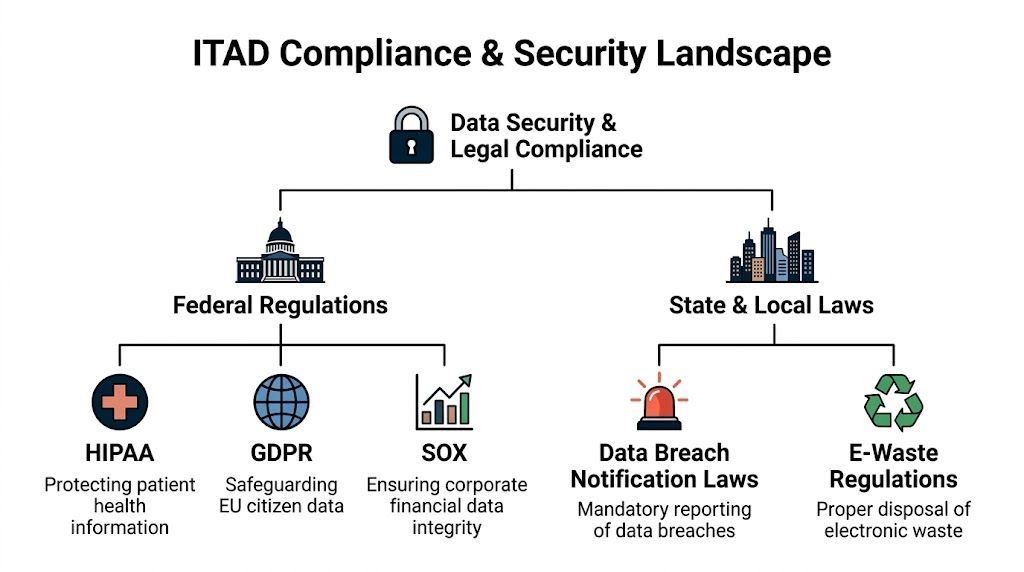
In the field, ITAD compliance comes down to two categories. First, you have data protection obligations tied to the information that may still reside on drives, mobile devices, servers, and embedded storage. Second, you have environmental handling obligations tied to how equipment and components move through downstream recycling.
Healthcare teams usually focus on HIPAA. Finance and payment environments look closely at PCI DSS. Public-sector and regulated contractors often care about documented sanitization practices that align with internal policy and audit requirements. Environmental teams care about whether retired equipment is managed through a responsible recycling channel instead of dumped into general waste.
For Texas organizations, this isn't theoretical. DFW ITAD services are positioned as a response to the broader problem that 82% of US e-waste enters landfills, and non-compliant disposal in Texas can risk fines exceeding $1M, according to MARRS IT's Dallas electronics recycling overview.
Chain of custody is the control that holds everything together
Most clients ask first about shredding. The better question is what happens before shredding.
Chain of custody means you can account for the asset from the moment it leaves your control to the moment it is sanitized, destroyed, remarketed, or recycled, with documented handoffs at each step.
Without chain of custody, certifications don't mean much. A vendor may have good downstream practices, but if your organization can't prove what was collected, who handled it, when it moved, and what was done to each data-bearing device, your audit trail has gaps.
A workable chain-of-custody process usually includes:
- Asset identification with serial numbers, tag numbers, or another unique reference before pickup
- Pickup documentation that records date, location, quantity, and the authorized releasing contact
- Transport controls so assets don't disappear between site exit and processing
- Processing records that map each device or batch to sanitization or destruction activity
- Final certification showing what method was used and when the work was completed
Questions to ask before you sign any vendor
The easiest way to test a provider is to ask operational questions, not marketing questions.
- How do you document intake for loose drives, laptops, servers, and mixed pallets?
- What happens to exceptions such as damaged drives, locked devices, or equipment missing tags?
- How are certificates issued and what identifiers appear on them?
- Who handles downstream recycling for components that can't be reused?
- Can you support specialized categories such as medical, lab, or public-sector equipment?
A vendor that can answer those clearly is usually operating from a process. A vendor that stays vague is telling you something.
Teams dealing with Texas-specific requirements can use this overview of Texas electronics recycling considerations as a starting point, but internal policy still matters just as much as state law. If your legal, security, procurement, and facilities teams all define success differently, the project will stall.
What doesn't work
Three habits cause most ITAD compliance trouble:
- Ad hoc cleanouts where facilities schedules a pickup before IT validates the asset list.
- Bulk assumptions where a pallet is treated as a single unit rather than a set of individually accountable devices.
- Incomplete closure where assets leave the building, but no one verifies destruction records against the original inventory.
If you wouldn't decommission a production server without a change record, don't retire a storage array without a disposition record.
The strongest dfw computer recycling programs are boring in the best way. They rely on repeatable controls, assigned owners, and paperwork that stands up when someone asks for it months later.
Certified Data Destruction Methods Explained
Every IT director eventually faces the same tension. Security wants irreversible destruction. Finance wants value recovery. Operations wants the fastest possible path out of storage. The right destruction method depends on which of those goals matters most for a given asset set.
Teams often get into trouble by using one method for everything. A blanket approach sounds simple, but it usually destroys remarketing value where reuse was possible or leaves too much doubt where physical destruction was warranted.
The three methods most enterprise teams evaluate
The core options are software wiping, degaussing, and physical shredding. Each solves a different problem.
Software wiping overwrites data according to a defined sanitization process. It's the best fit when the asset itself still has reuse value and you want that device to stay intact. That's common with newer laptops, desktops, and some server drives destined for resale or redeployment.
Degaussing uses a strong magnetic field to disrupt magnetic media. In practical terms, it destroys the recorded data on compatible media, but it also makes the device unsuitable for reuse. It can fit environments with strict destruction policies for traditional magnetic drives, though it isn't the universal answer many people assume.
Physical shredding is the clearest end state. The device is mechanically destroyed into very small particles, and the media isn't coming back into service.
Why certification matters more than the method name
The method alone doesn't prove anything. The control environment does.
In DFW, R2 certified facilities achieve material recovery rates over 95% by weight and provide serialized certificates of data destruction compliant with NIST 800-88 and other standards, according to Excess IT Hardware's Dallas ITAD overview. That same source notes that data recovery is impossible from particles shredded below 1mm. For a regulated environment, that's the difference between a process you can defend and one you can only describe loosely.
A security-conscious buyer should look for three things together:
- A defined destruction method
- A documented chain of custody
- A certificate tied back to specific assets or serialized media
If one of those is missing, the workflow is weaker than it looks.
Comparison of Data Destruction Methods
| Method | Security Level | Allows Asset Reuse | Verification | Best For |
|---|---|---|---|---|
| Software wiping | High when properly executed and documented | Yes | Sanitization logs and device-level reporting | Laptops, desktops, and storage planned for resale or redeployment |
| Degaussing | High for compatible magnetic media | No | Process records and destruction documentation | Magnetic drives where reuse isn't required |
| Physical shredding | Very high for end-of-life media | No | Serialized certificates and visual destruction workflow | Failed drives, sensitive media, and high-risk regulated environments |
How to choose without overcomplicating it
A clean decision tree usually works better than a policy memo.
Use software wiping when the asset has resale or redeployment value and your policy allows sanitization in place. Choose degaussing when you're handling magnetic media that won't be reused and your security requirement calls for destruction of recorded data without preserving the device. Choose shredding when the drive is failed, damaged, policy-restricted, or tied to data classes where physical destruction is the safer control.
That means one pickup can include more than one treatment path. A mature provider should be able to separate assets accordingly instead of forcing a single outcome.
What works and what doesn't
What works:
- Segmenting by asset class instead of treating all media the same
- Matching the method to the business objective such as reuse versus final destruction
- Requiring serialized reporting for data-bearing items
- Defining exceptions early for failed SSDs, damaged laptops, or unknown drives
What doesn't work:
- Assuming deletion equals destruction
- Shredding everything by default when a meaningful share could have been remarketed
- Accepting batch-level proof only for highly sensitive asset pools
- Separating sanitization decisions from finance input when residual value matters
For organizations evaluating providers, this page on secure data destruction services is useful as a checklist of the capabilities a serious partner should be able to explain clearly.
A good destruction policy isn't the harshest one. It's the one that applies the right control to the right media, every time, with proof.
The Step-by-Step IT Asset Disposition Workflow
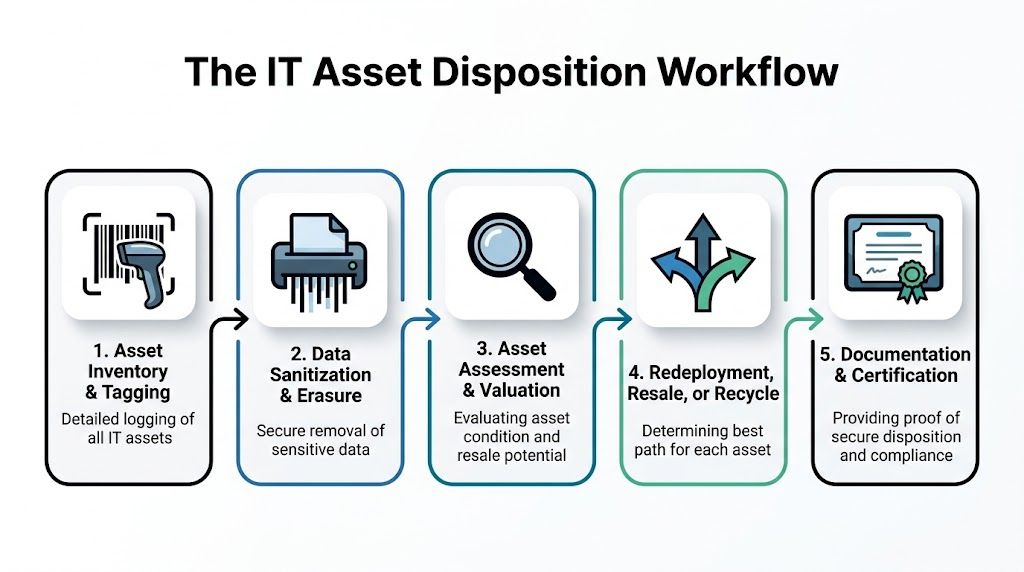
A disciplined ITAD project should feel predictable. If the process feels improvised, the documentation usually is too. The best dfw computer recycling engagements follow a workflow that operations, security, procurement, and audit can all understand.
Stage one inventory and assessment
Start with what you have, not what you think is in storage. That means collecting model, serial number when available, asset tag, device type, condition, and whether the asset contains data-bearing media. For servers and storage, note whether drives are installed, removed, or mixed in separate bins.
This step affects everything that follows. Accurate inventory improves quote quality, pickup planning, and final reconciliation.
Useful fields include:
- Ownership marker such as department, cost center, or project
- Condition note like working, failed, damaged, or for parts
- Handling flag for regulated devices or specialized equipment
- Location detail so crews know whether they are clearing a cube farm, a lab, or a raised-floor data room
Stage two scheduling and logistics
Scheduling isn't just picking a date. It's confirming dock access, building restrictions, security escort requirements, packaging needs, and whether pickups are site-by-site or consolidated.
A common failure point is incomplete site prep. If assets aren't staged, labeled, or separated by handling path, the pickup team either waits, guesses, or leaves with less than expected. None of those outcomes help you.
Field note: The smoothest projects come from a short pre-pickup call between the client's IT owner, facilities contact, and the disposition coordinator.
Stage three secure transportation
Once assets leave your site, the handoff must be documented. Pickup receipts, pallet counts, container seals if used, and named contacts matter here. If drives are being handled separately from whole systems, that split should be visible in the paperwork.
This isn't glamorous, but it's where many audit gaps begin. Teams remember the destruction certificate. They forget the transfer record that proves the certificate applies to the same hardware set.
Stage four processing and path determination
At the processing facility, assets should be triaged into clear lanes. Some will be sanitized and prepared for resale or redeployment. Some will go straight to destruction. Others may need dismantling because of damage, age, or mixed component value.
A practical path decision usually looks like this:
- Data-bearing and reusable goes to sanitization and testing
- Data-bearing and nonfunctional goes to destruction
- Non-data peripheral equipment goes to reuse or materials recovery
- Specialized equipment gets reviewed for any handling constraints before final processing
- Residual scrap moves to downstream recycling
If you need a broader framework for how these activities fit together, this explainer on what IT asset disposition is is a useful companion reference.
Stage five reporting and final certification
The last stage determines whether the project is fully closed. A proper closeout package should let you reconcile outgoing inventory with returned documentation. If finance expects value recovery, that should be shown clearly. If security expects proof of destruction, the report should identify method and asset references.
Review the closeout with these questions:
- Do all data-bearing assets appear in the final documentation
- Are there any unresolved serial mismatches or quantity exceptions
- Were reusable assets separated from scrap in a way that makes sense
- Did every site in scope produce a corresponding pickup and closure record
What works here is discipline. What doesn't is assuming the provider's final packet is automatically ready for audit. Someone on your side still needs to reconcile it.
Planning and Pricing Your DFW Computer Recycling Project
Pricing gets messy when the client and vendor are talking about different scopes. One side is thinking about a few pallets of mixed office equipment. The other is picturing serialized server removal, drive destruction, and project management across several sites. That's why dfw computer recycling pricing only makes sense when tied to asset mix, handling requirements, and logistics.

What the market pricing tells you
In Dallas, the average cost for electronics recycling is around $1 per pound, with small items costing $5-$25 and larger items like monitors at $10-$40, according to United Electronic Recycling's 2024 impact report. That gives you a baseline, not a final budget.
For enterprise work, per-pound pricing is only one piece. The actual project cost depends on whether you're recycling commodity e-waste, handling serialized devices, requiring secure destruction, managing specialty equipment, or coordinating multi-location pickups.
How to think about pricing models
Different project types favor different quote structures.
| Project type | Typical pricing logic | What to watch |
|---|---|---|
| Office refresh | Mixed per-item and bulk handling | Monitors, accessories, and loose peripherals can distort estimates if counts are vague |
| Data center decommission | Project-based scope | Labor, de-racking, media handling, and schedule windows matter more than scrap weight |
| Remote workforce collection | Unit-based coordination | Packaging, return logistics, and incomplete employee returns can drive complexity |
| Specialty equipment disposition | Custom handling review | Confirm whether nonstandard assets require separate intake or downstream routing |
Value recovery changes the economics
Too many teams budget disposition as pure cost. That's often wrong. Newer laptops, late-model servers, network gear, and some enterprise components may still have resale value if they are tested, sanitized, and routed correctly. If those assets sit in a hot storage room for months, cosmetic condition declines, battery issues worsen, and accessories disappear. The resale case gets weaker.
That means your planning should sort assets into at least three buckets early:
- Likely resale candidates that should be collected intact with chargers, rails, caddies, or other key parts
- Likely recycle-only assets that are obsolete, failed, or physically damaged
- Special handling items such as medical, laboratory, or embedded systems where intake needs more review
Teams evaluating the resale side of retirement can use this guide on where to sell computer parts to understand what tends to retain value and what usually doesn't.
Planning choices that improve the outcome
A few operating decisions have a disproportionate impact on price and project speed:
- Consolidate where possible so pickups handle meaningful volume rather than repeated small visits.
- Separate reusable gear from scrap early because mixed pallets usually get priced conservatively.
- Provide a real inventory file with counts and condition notes before quoting.
- Flag sensitive asset classes upfront so the vendor scopes the right destruction path.
The cheapest quote often assumes the least work. If your environment needs serialized reporting, specialized handling, or rigid scheduling, make sure those are written into scope before comparing prices.
For procurement teams, the right goal isn't just lower disposal cost. It's a cleaner balance of security, reporting, logistics, and recoverable value.
Environmental Impact and Community Programs
A strong ITAD program doesn't stop at risk reduction. It also gives the organization a credible environmental and community story, which matters more when procurement teams, boards, and customers ask how retired technology is handled after it leaves service.

Responsible recycling supports more than cleanup
The practical environmental case is straightforward. Electronics contain recoverable materials and components that shouldn't go into ordinary disposal streams. When organizations route retired equipment through responsible recycling channels, they reduce landfill pressure, support material recovery, and keep problematic substances out of the wrong places.
That matters in local markets as much as national ones. Dallas and Fort Worth organizations often manage large refresh cycles, branch offices, and specialized devices. A documented recycling path helps sustainability teams connect IT retirement decisions to broader ESG reporting and internal waste-reduction goals.
Reuse is often the highest-value outcome
From a practitioner standpoint, the best environmental result usually starts before shredding and before commodity recycling. If a system can be safely sanitized, tested, and reused, the organization extends the life of the equipment and reduces the need for immediate replacement manufacturing. That's good operationally and environmentally.
Community donation programs can also make sense when the equipment is still useful but not worth redeploying internally. The key is control. Donations should still follow the same standards for data destruction, asset tracking, and documentation as any other disposition path.
Practical ways organizations build this into policy include:
- Setting a reuse-first review for eligible business-class devices
- Defining donation criteria so only supportable equipment enters community programs
- Documenting the path chosen for each group of assets, whether resale, donation, or recycling
- Including sustainability stakeholders when ITAD policy is updated
A recycling program earns more trust when it explains what was reused, what was destroyed, and what was recycled, not just that everything was "handled responsibly."
The ESG benefit depends on proof
A vague sustainability claim doesn't help much. Reporting improves when IT, procurement, facilities, and compliance all use the same project records. If your documentation already captures asset counts, destruction outcomes, and recycling channels, ESG reporting becomes easier because the evidence already exists.
This is one reason mature dfw computer recycling programs outperform ad hoc cleanouts. They create data the organization can use internally, not just a cleared room. When teams align environmental goals with security controls and asset tracking, ITAD stops being a back-office task and becomes part of how the company demonstrates responsible operations.
A Disposition Project Checklist for IT Directors
Most ITAD problems can be prevented before the first pallet moves. Use this checklist to keep the project controlled and auditable.
Before you engage a vendor
- Define the project scope. Separate office refresh, data center equipment, loose media, and specialty devices so each category gets the right handling path.
- Build a usable inventory. Include asset tags, serials when available, location, condition, and whether the item contains storage media.
- Set business priorities. Decide where security, speed, value recovery, and sustainability rank for this project.
- Identify internal owners. IT, security, facilities, procurement, and finance should know who approves what.
During vendor vetting
- Verify certifications and reporting practices. Ask how the provider documents intake, destruction, and final reconciliation.
- Review chain-of-custody controls. You want to know how assets are tracked from pickup through final processing.
- Test exception handling. Ask what happens with damaged drives, missing serials, mixed pallets, and unusual equipment.
- Confirm downstream transparency. A provider should explain where non-reusable materials go after initial processing.
During execution
- Prepare the site. Stage equipment, label exceptions, and confirm dock access or building restrictions before pickup day.
- Match pickup paperwork to inventory. Don't rely on rough counts if the environment requires accountability.
- Separate by handling path. Keep resale candidates apart from scrap and apart from high-sensitivity media.
- Escalate discrepancies immediately. If counts or asset types don't match expectations, pause and correct the record.
Good ITAD execution looks calm because the difficult decisions were made before the truck arrived.
After the project closes
- Reconcile final reports against the original inventory and pickup records.
- Validate certificates for data-bearing assets and confirm the destruction method is documented.
- Review value recovery if reusable assets were in scope.
- Archive the closeout package where audit, legal, and security teams can retrieve it later.
- Capture lessons learned so the next retirement cycle runs faster.
A checklist like this keeps dfw computer recycling from becoming a last-minute cleanup. It turns it into a repeatable control process.
Frequently Asked Questions about ITAD in DFW
What should I do with leased equipment at end of term
Start with the lease agreement, not the pallet. Some lessors require return through an approved process and may have specific standards for device condition, missing components, or data sanitization. In practice, IT should coordinate the return path with procurement and legal so the organization doesn't destroy value or violate return conditions.
How should we handle remote employee devices
Treat remote assets like any other data-bearing equipment. Build a documented return workflow, verify who has custody at each step, and decide in advance whether devices will be returned to a central office, sent directly to a processor, or handled through a managed collection program. The main risk isn't distance. It's inconsistent process.
Can we recycle a very small batch, or do we need to wait for a larger project
Small batches can be handled, but waiting often creates its own risk. A few loose laptops and drives can still contain sensitive data. If you don't have enough volume for a larger project, the better approach is to establish a standing intake process so those assets don't accumulate in unsecured storage.
What about specialized medical, lab, or industrial equipment
Those assets need more review before pickup. They may contain storage media, embedded systems, unusual components, or handling requirements that differ from standard office IT. Give the vendor detailed descriptions and photos early so the right processing path can be planned before anything moves.
Should we wipe drives ourselves before pickup
Only if your process is consistent, documented, and approved by policy. Many internal wipe efforts fail because they aren't tracked well enough, exceptions aren't handled properly, or failed drives get left in a separate pile with no closure. If you do sanitize internally, document exactly what was done and how those assets remain under control until final disposition.
Is physical destruction always the best choice
Not always. It is often the right choice for failed media, highly sensitive environments, or assets with no reuse value. But if a device can be sanitized properly and remarketed or redeployed under policy, preserving the asset may be the smarter operational decision. The right answer depends on risk, value, and documentation requirements.
What should be on the final paperwork
At minimum, your closeout should let you reconcile what left your environment with what happened afterward. For data-bearing assets, you want enough detail to show the destruction or sanitization path clearly. For reusable assets, you want a transparent accounting of how they were processed. If the paperwork can't support internal review later, it isn't complete enough.
If you're planning a refresh, decommissioning a server room, or trying to bring order to years of accumulated retired equipment, Dallas Fortworth Computer Recycling is built for exactly that kind of work. They support B2B and public-sector organizations with secure IT asset disposition, certified data destruction, data center decommissioning, and responsible electronics recycling, with the chain-of-custody and reporting structure IT leaders need to reduce risk and close projects cleanly.