
How to Dispose of Old Computers Safely An Organizational Playbook
When we talk about disposing of old computers safely, we mean one thing: permanently destroying all sensitive data before that hardware leaves your sight. Just deleting files or formatting a drive doesn't cut it. To truly protect your organization and stay compliant, you need certified data sanitization methods like cryptographic erasure, degaussing, or physical shredding to make sure that information is gone for good.
The Real Risks of Improper Computer Disposal
Tossing out an old office computer feels like a minor cleanup task, but it’s a decision loaded with hidden dangers. A single mishandled device can expose your company to staggering financial penalties, severe compliance violations, and a public relations nightmare you never saw coming. This isn't just a hypothetical problem; it's a reality that has cost unprepared companies millions.
Many organizations still mistakenly believe that formatting a hard drive or dragging files to the trash bin is enough. The hard truth is that these actions often just remove the digital signposts pointing to your data, leaving the information itself intact and easily recoverable with basic software tools. This simple oversight leaves a goldmine of sensitive information wide open for the taking.
Think for a moment about what’s really stored on a typical company computer:
- Customer Information: Names, addresses, financial details, and personal identifiers.
- Employee Records: Social Security numbers, payroll data, and confidential performance reviews.
- Proprietary Data: Your trade secrets, intellectual property, and strategic business plans.
A single hard drive, carelessly discarded, could contain everything a criminal needs for identity theft, corporate espionage, or a devastating data breach that violates regulations like HIPAA, FERPA, or NIST.
The Financial and Legal Consequences
The fallout from a data breach traced back to improperly disposed assets can be catastrophic. Regulatory bodies don't care if the breach came from a sophisticated cyberattack or sheer negligence. If your customer data ends up in the wrong hands from a computer found in a dumpster, the fines are just as severe. We’ve seen companies face penalties reaching into the millions for violations stemming from discarded IT equipment.
The true cost of improper disposal goes far beyond fines. It includes crippling legal fees, the expense of customer notifications, credit monitoring services for every affected individual, and the immense—often permanent—damage to your brand’s reputation.
The Growing Environmental Crisis
Beyond data security, there's a major environmental problem brewing. Discarded electronics, or e-waste, are the fastest-growing waste stream on the planet. Old computers are filled with hazardous materials like lead, mercury, and cadmium that can leach into soil and groundwater if they end up in a landfill. You can learn more about the environmental impact of electronic waste in our detailed guide.
This issue has reached a critical point. In 2022, the world generated a staggering 62 million tonnes of e-waste, an 82% increase from 2010. Even worse, projections show it will hit 82 million tonnes by 2030. Yet, only 22.3% was documented as properly recycled, leaving billions in recoverable resources buried in landfills. You can dive deeper into these findings and learn more about the global e-waste problem.
This dual threat of data exposure and environmental harm makes a formal IT Asset Disposition (ITAD) plan non-negotiable. It’s no longer just an IT best practice—it's a fundamental part of modern corporate governance and risk management.
Building Your IT Asset Disposition Policy
Wingin' it with computer disposal is a direct threat to your business. Without a clear, documented IT Asset Disposition (ITAD) policy, you're leaving data security and legal compliance entirely to chance. A solid policy is your playbook, making sure every device is handled the same secure way from the moment it’s retired until you have a certificate of destruction in hand.
This isn't just about writing a document to file away. It's about building a living process that actively protects your organization. The policy clarifies expectations, locks down who's responsible for what, and creates a defensible audit trail. When an auditor asks how you handle old equipment, a well-built ITAD policy is your best answer.
Defining Asset End-Of-Life Criteria
First things first: you have to get rid of the guesswork. Your policy needs to spell out exactly what makes an asset "end-of-life." Without objective rules, perfectly good equipment gets tossed too soon, while old, insecure machines hang around on your network for far too long.
Set specific triggers for retiring an asset. These should be simple and measurable so they're applied consistently across the board.
- Age-Based Thresholds: Set a standard lifespan. For example, laptops are retired after four years, and servers after six.
- Performance Metrics: Define the bare minimum for performance. If a machine can no longer run required software without lagging, it’s out.
- Support Obsolescence: The moment a device stops getting security patches from the manufacturer, it's automatically flagged for disposal.
- Damage or Repair Cost: If a repair costs more than a set percentage (like 50%) of a new replacement, it’s time to retire it.
This kind of structured approach means your decisions are based on data, not feelings. It also makes forecasting your hardware budget a whole lot easier.
Establishing a Secure Chain of Custody
Once a device is flagged for retirement, your policy has to dictate every single step of its journey. A secure chain of custody is the unbroken, documented trail that follows an asset from an employee's desk to its final destruction. For security and compliance, this is non-negotiable.
This is where data breaches happen. A single server forgotten in a storage closet or a box of old laptops left on a loading dock is a massive vulnerability just waiting to be exploited.
Your chain of custody protocol needs to be as strict as your live network security. It must document who touched the asset, when they touched it, where it was stored, and how it was moved.
To lock this down, your policy must require:
- Secure On-Site Storage: Designate a specific, locked, access-controlled room for retired assets. The janitor's closet doesn't count.
- Asset Tagging and Logging: Every single device must be tagged and logged into a disposition manifest before it moves. This log needs the serial number, asset tag, and former user.
- Authorized Personnel: Clearly state who is allowed to handle, move, and sign for these assets. Keep this list short—just specific IT or security team members.
- Vendor Hand-Off Protocol: Spell out the exact process for transferring assets to your ITAD partner, including mandatory signatures and manifest reconciliation right at the pickup point.
Assigning Clear Roles and Responsibilities
A policy is useless if people don't know what their job is. Fuzzy responsibilities lead to dropped balls and gaping security holes. Your ITAD policy must assign specific duties to individuals or teams.
Think about who owns each piece of the puzzle:
- IT Department: Usually handles identifying assets for retirement, doing initial data wipe checks, and managing the disposition log.
- Security/Compliance Team: Owns the audit process, vets vendor certifications, and ensures the policy meets rules like HIPAA or NIST.
- Department Managers: Are responsible for telling IT when an employee is leaving so their equipment can be collected immediately and securely.
- Facilities/Operations: May get involved in coordinating the physical pickup logistics with your certified vendor.
By mapping out these duties, you build a system of accountability. Everyone knows their part in protecting the company, which is how a policy becomes standard practice. To see how these pieces come together in a larger strategy, take a look at our deep dive on what IT asset disposition is.
Integrating Compliance and Handling Exceptions
Finally, your specific regulatory needs have to be baked directly into the policy. If you're in healthcare, the policy must explicitly require HIPAA-compliant data destruction. If you're a defense contractor, NIST 800-88 standards must be your baseline.
Your policy also needs a game plan for the weird stuff. Create an exception-handling process for specialized gear like R&D prototypes or devices holding sensitive intellectual property. This might mean mandating on-site shredding or requiring a C-level executive to sign off before disposal. A little foresight here prevents your most valuable assets from slipping through the cracks of your standard workflow.
Picking the Right Data Sanitization Method
With your ITAD policy locked in, the next big decision is how to permanently destroy the data on your retired computers. Hitting 'delete' or even formatting a drive is a rookie mistake—it leaves sensitive information wide open for recovery. To safely dispose of old equipment, you need an ironclad, verifiable method that wipes every last bit of data for good.
The right choice comes down to a few key factors: the type of hard drive you're dealing with, your company's security rules, and whether you want to reuse the hardware or send it straight to recycling. Let's dig into the three professional-grade techniques you need to know.
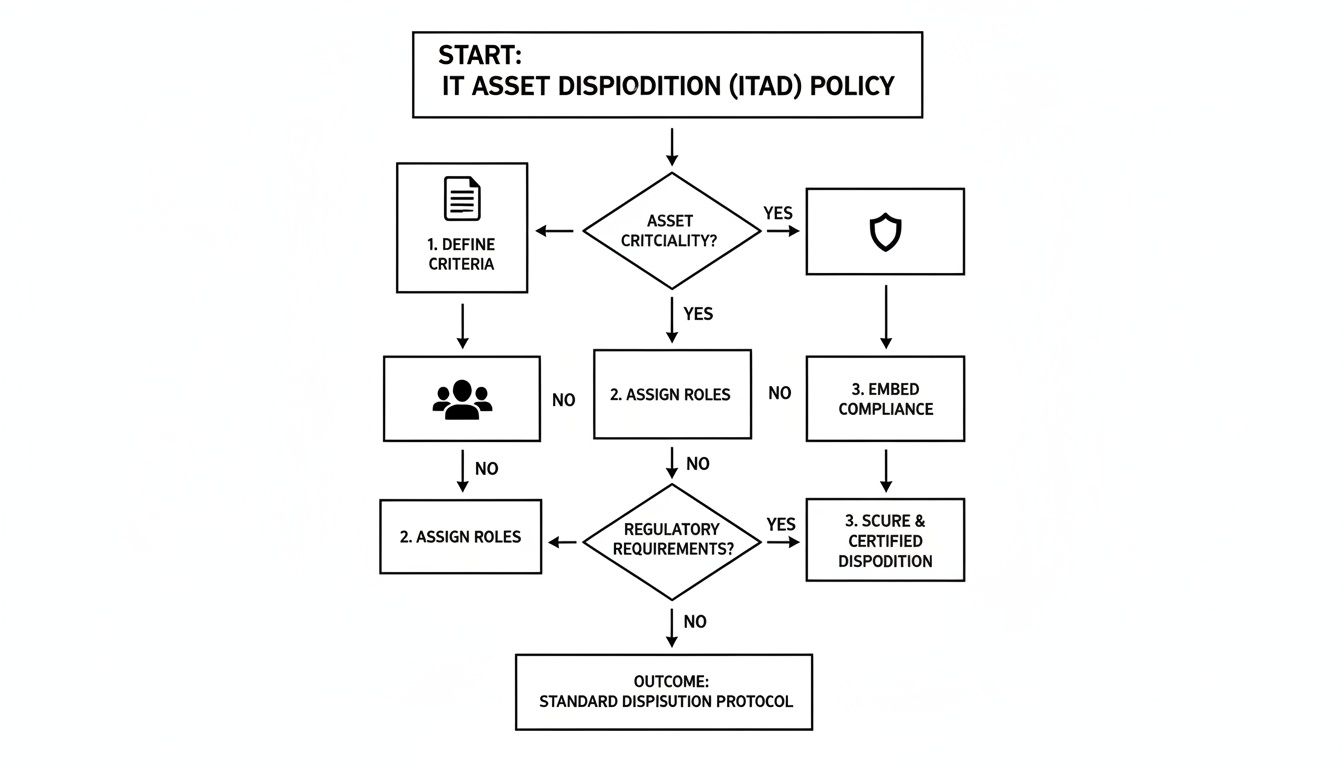
This process isn't random. A solid ITAD policy—where you define the rules, assign roles, and build in compliance checks from the start—makes choosing the right data destruction method a simple, repeatable step instead of a last-minute guess.
Cryptographic Erasure for Modern Drives
Modern solid-state drives (SSDs) and self-encrypting drives (SEDs) are a different breed than old-school magnetic hard drives. Traditional wiping software just doesn't cut it. It can easily miss data hidden away in over-provisioned space or bad blocks. That's where cryptographic erasure (CE) shines.
Instead of overwriting data, CE works by instantly destroying the unique encryption key that makes the data readable. Once that key is gone, all that's left is a jumbled mess of useless ciphertext. It's incredibly fast and sanitizes the entire drive without causing any physical wear and tear.
When to use it: Cryptographic erasure is the undisputed champion for SSDs and SEDs. It aligns perfectly with standards like NIST 800-88 and is the go-to method when you want to reuse or sell the hardware, as the drive remains fully functional.
For anyone handling patient information, CE is also a recognized technique for meeting HIPAA's tough data destruction mandates. If you want to dive deeper, we have a whole guide on the specifics of wiping SSD drives effectively.
Degaussing Magnetic Media
For your older gear—think traditional spinning hard disk drives (HDDs) and backup tapes—degaussing is a powerful and efficient option. A degausser is a machine that unleashes a massive magnetic field, completely scrambling the magnetic coating on the drive's platters where your data lives.
This process essentially wipes the slate clean, rendering the drive totally inoperable. It’s a fantastic method for knocking out large batches of magnetic drives quickly.
Just remember two critical points:
- It does nothing to flash-based media like SSDs.
- The drive is permanently disabled afterward.
This makes degaussing a perfect fit for old magnetic drives headed for the recycling pile, but a non-starter for any hardware you hope to redeploy.
Physical Destruction: The Final Word
When you need absolute, undeniable proof that data is gone, or if a drive is too old or damaged for other methods, physical destruction is the ultimate answer. We're not talking about taking a hammer to it in the parking lot. This involves industrial shredders that grind the media into tiny, shredded pieces.
It’s the most visually satisfying method—it’s tough to argue about data recovery when you’re looking at a pile of metal confetti. This is often the required method for government agencies and companies handling highly classified information.
You generally have two ways to go about it:
- On-site Shredding: Your ITAD partner brings a mobile shredding truck right to your facility. You can watch the drives get destroyed with your own eyes, which provides the tightest possible chain of custody.
- Off-site Shredding: The vendor securely transports the drives to their own facility for destruction. They'll follow up with a certificate of destruction, often including video evidence of the shredding process.
A defense contractor retiring servers with classified data would almost certainly demand on-site shredding to meet Department of Defense rules. On the other hand, a standard corporate office retiring laptops might find cryptographic erasure is more than enough security and is much more cost-effective. Your decision will always come back to your company's risk tolerance and compliance needs.
Data Sanitization Methods at a Glance
To make the choice clearer, here’s a quick breakdown of the three main data destruction methods. This table lays out how each one works, where it excels, and what it means for compliance and hardware reuse.
| Method | How It Works | Best For | Compliance Level | Allows for Reuse? |
|---|---|---|---|---|
| Cryptographic Erasure | Destroys the encryption key, rendering all on-drive data permanently unreadable ciphertext. | Modern SSDs, SEDs, and devices slated for resale or redeployment. | High (NIST 800-88, HIPAA, etc.) | Yes |
| Degaussing | A powerful magnetic field scrambles the magnetic domains on platters, erasing the data. | Traditional magnetic HDDs and backup tapes that will be recycled. | High (for magnetic media) | No |
| Physical Destruction | Industrial shredders or crushers pulverize the storage media into small fragments. | Damaged drives, high-security needs, and end-of-life media. | Highest (visually verifiable) | No |
Ultimately, having these options allows you to create a flexible yet secure ITAD program. You can apply the most cost-effective method (like CE) where possible, while reserving more extreme measures (like shredding) for your most sensitive assets.
How to Vet Your ITAD Disposal Partner
Your IT Asset Disposition (ITAD) vendor is your last line of defense for your data. After you've built a solid policy and chosen your sanitization methods, you hand over your retired computers—and all the risk that comes with them—to this partner. Getting this decision wrong can instantly unravel all your careful planning, so this isn't a choice to be taken lightly.
Handing over a truckload of hard drives is a massive act of trust. You need absolute certainty that your partner's processes are just as secure, if not more so, than your own. A vague answer or a missing certification isn’t a minor detail; it’s a major red flag signaling a weak link in your security chain.
Look for Key Industry Certifications
The first and most important filter for any potential ITAD vendor is their certifications. These aren't just fancy badges for their website; they are hard-earned proof that the vendor has been audited by a third party and meets rigorous standards for data security, environmental responsibility, and worker safety.
You should immediately look for two primary certifications:
- R2 (Responsible Recycling): This is a widely recognized standard that dictates how electronics are handled, from data destruction to downstream recycling. It ensures hazardous materials are managed properly and that the entire process is transparent.
- e-Stewards: Often considered the most stringent standard, e-Stewards has a zero-tolerance policy for exporting hazardous e-waste to developing countries. It also has incredibly strict data security and worker safety protocols.
But don't just take their word for it. Always take a few minutes to verify a vendor's certification status directly on the R2 or e-Stewards websites. Any legitimate partner will expect you to do this. Our guide on what it takes to become an R2 certified electronics recycler offers a behind-the-scenes look at the commitment required to earn this credential.
Critical Questions to Ask Potential Vendors
Once you’ve confirmed their certifications, it's time to dig deeper into their day-to-day processes. The quality of their answers will tell you everything you need to know about their competence and transparency. A true professional will have clear, confident answers ready.
Here are the non-negotiable questions you must ask:
- How do you document the chain of custody? They need to describe a detailed process that includes serialized asset tracking, secure transport in locked vehicles, and documented hand-offs at every single stage.
- Can we witness the data destruction process? A reputable vendor will offer on-site shredding or welcome you to witness the destruction at their facility. If they hedge or flat-out refuse, walk away.
- What does your Certificate of Destruction include? A legitimate certificate is more than a simple receipt. It must list the serial numbers of every sanitized or destroyed device, the specific method used, and the date it happened.
- Who are your downstream recycling partners? No single vendor handles every single material. They should be able to give you a transparent list of their downstream partners and prove that those partners are also certified and audited.
The global e-waste problem is massive and only getting worse. A staggering 17.4% of global e-waste was formally recycled in 2019, a figure expected to stagnate around 20% by 2030 even as e-waste volumes soar to nearly 75 million metric tons. This stark reality underscores the need to select certified partners who can prove they are part of the solution, not the problem.
Evaluating Their Security and Reporting
Finally, assess the vendor's own physical and digital security. A partner handling your most sensitive data should operate like a fortress, plain and simple.
Ask about their facility's security measures. Are there security cameras? Access controls? Are all employees background-checked? Their facility should be as secure as a data center.
Also, ask about their reporting capabilities. A top-tier partner will provide you with a secure online portal where you can track your assets in real-time and access all your documentation, from the initial pickup manifest to the final certificates of destruction. Vague or incomplete reporting is a clear sign of a sloppy operation.
Deciding Between Reuse, Donation, and Recycling
Not every retired computer needs to be turned into a pile of shredded metal. A smart disposition strategy isn't just about data security—it’s about balancing that security with environmental stewardship and even financial returns. The trick is to stop thinking in terms of a single "recycling" bin and start building a decision-making framework that sends each machine to its best possible destination.
It's all about knowing when to reuse, when to donate, and when to send a machine for responsible recycling.

For every device, the decision really boils down to three things: its age and condition, its fair market value, and your organization's specific security policies. When you evaluate each machine against these criteria, you build a process that is both responsible and financially sound. A newer laptop might be perfect for remarketing, while an old server packed with sensitive data demands nothing less than complete physical destruction.
When to Remarket or Redeploy Assets
The most financially savvy option is often to remarket newer, high-value equipment. Laptops, servers, and networking gear less than three years old can frequently be resold, letting you recoup a portion of your original investment.
The same logic applies to redeploying assets internally. Moving a still-capable machine from a power user to someone in a role with lower computing demands is a simple way to extend its useful life and push back new procurement costs.
Consider these quick checks for remarketing:
- Asset Age: Is the equipment under three years old and still supported by the manufacturer?
- Functional Condition: Does it power on and operate without any major issues?
- Cosmetic Condition: Is it free from significant physical damage that would tank its resale value?
If a machine checks these boxes, your ITAD partner can perform certified data sanitization (like a cryptographic erase) that preserves the hardware’s functionality, getting it ready for the secondary market.
The Value of a Secure Donation Program
Donating functional but older computers is a fantastic way to support your community and boost your company’s reputation. Many nonprofits and schools are working with shoestring budgets and can put your retired equipment to great use.
But this path comes with a massive warning sign.
Donated assets require the exact same level of certified data sanitization as devices headed for destruction. A data breach from a donated computer is just as damaging as one from a device found in a landfill.
Your ITAD partner absolutely must manage the sanitization process and provide a full Certificate of Data Destruction before any hardware is handed over to a charity. This is the only way to ensure your generosity doesn't accidentally become a huge liability.
Identifying Assets for Responsible Recycling
When a computer is too old, too damaged, or holds data so sensitive that reuse is off the table, responsible recycling is the only answer. This is the end of the line for devices that have no resale value or would pose an unacceptable security risk if they remained intact.
Proper computer equipment recycling ensures that hazardous materials like lead and mercury are managed safely and valuable commodities are recovered.
Globally, e-waste recycling rates are shockingly low. Europe leads at 42.8%, but only 22.3% of the 62 million tonnes of e-waste generated in 2022 was properly collected worldwide. The US lags even further behind at a mere 15%. This is why it’s so critical for businesses to partner with certified recyclers to meet their environmental stewardship goals.
By setting up this simple decision matrix, you can make sure every piece of equipment is handled the right way. You’ll maximize financial return, support the community, and sleep well knowing your organization’s environmental and data security duties are always met.
Common Questions About Safe Computer Disposal
Even with a rock-solid disposal plan, questions always pop up when it's time to get rid of old machines. IT managers and business leaders need straight answers to handle the final steps of their ITAD process with confidence. Here are a few of the most common ones we hear.
Is Wiping a Hard Drive Enough to Be Compliant?
No, just deleting files or running a basic “wipe” utility is almost never enough for real security or compliance. You need professional data sanitization.
Regulations like HIPAA and data security standards like NIST require methods that render data completely unrecoverable. This means using certified software for cryptographic erasure or turning to physical methods like degaussing or shredding. To close the loop, you must get a Certificate of Data Destruction from your vendor. That certificate is your proof for any audit.
What Is the Difference Between R2 and E-Stewards Certifications?
Both are top-tier certifications for electronics recyclers, but there’s one major difference in their philosophy. E-Stewards enforces a strict, zero-tolerance policy that completely bans the export of hazardous e-waste to developing countries.
R2 (Responsible Recycling) also holds recyclers to incredibly high standards but does allow for the export of tested, working equipment and some non-hazardous materials under very specific, controlled conditions.
While both certifications ensure a high level of security and environmental care, companies with a zero-export policy or a higher sensitivity to risk often lean toward an e-Stewards certified partner. Always verify a vendor's certification directly on the certifying body's website.
How Do I Handle Computer Disposal Across Multiple Locations?
Managing IT disposal for a multi-site company is all about finding a partner with a national logistics network. Using different vendors for each office is a recipe for inconsistent security and a logistical nightmare.
Look for a single vendor that can coordinate pickups across all your locations. They should provide clear instructions for your teams on how to package and prep equipment for transit, ensuring a secure chain of custody from every single site. The best partners will also provide consolidated reporting for your entire organization, which makes the audit process much simpler.
Can We Securely Donate Old Computers to Charity?
Absolutely. Donating equipment is a fantastic way to support your community, but security has to come first. Any computer destined for donation must undergo the same certified data sanitization process as a machine headed for the shredder. There are no shortcuts here.
Work with your ITAD partner to perform certified data erasure on every single device. This ensures your organization's sensitive data is gone for good while allowing the hardware to get a second life. Many reputable ITAD vendors can even manage these donation programs for you, making the process both secure and a great reflection of your company's social responsibility.
At Dallas Fortworth Computer Recycling, we provide nationwide, certified IT asset disposition services that help organizations safely and compliantly dispose of their old computers. Our secure, documented process ensures your data is destroyed and your equipment is handled responsibly. To create a secure disposal plan for your organization, learn more at https://dallasfortworthcomputerrecycling.com.