
Houston Computer Recycling: A Business Guide

Your storage room probably tells the story already. A stack of retired laptops from the last refresh, a row of monitors nobody wants, a few old desktops from accounting, and maybe a server or two that got pulled from a rack months ago and never formally retired. In a lot of Houston organizations, that pile sits longer than anyone intended because the hard part isn’t moving it. The hard part is disposing of it in a way that protects data, satisfies compliance, and doesn’t turn into an unexplained cost center.
That’s where houston computer recycling stops being a facilities issue and becomes an IT risk management function. If you’re the IT Director, you don’t need a vendor whose service is limited to hauling equipment away. You need a documented disposition process that stands up when legal asks for proof, when an auditor asks for timestamps, and when finance asks why one batch generated value and the next one became a fee.
Beyond the Storage Closet The Real Risks of Business E-Waste
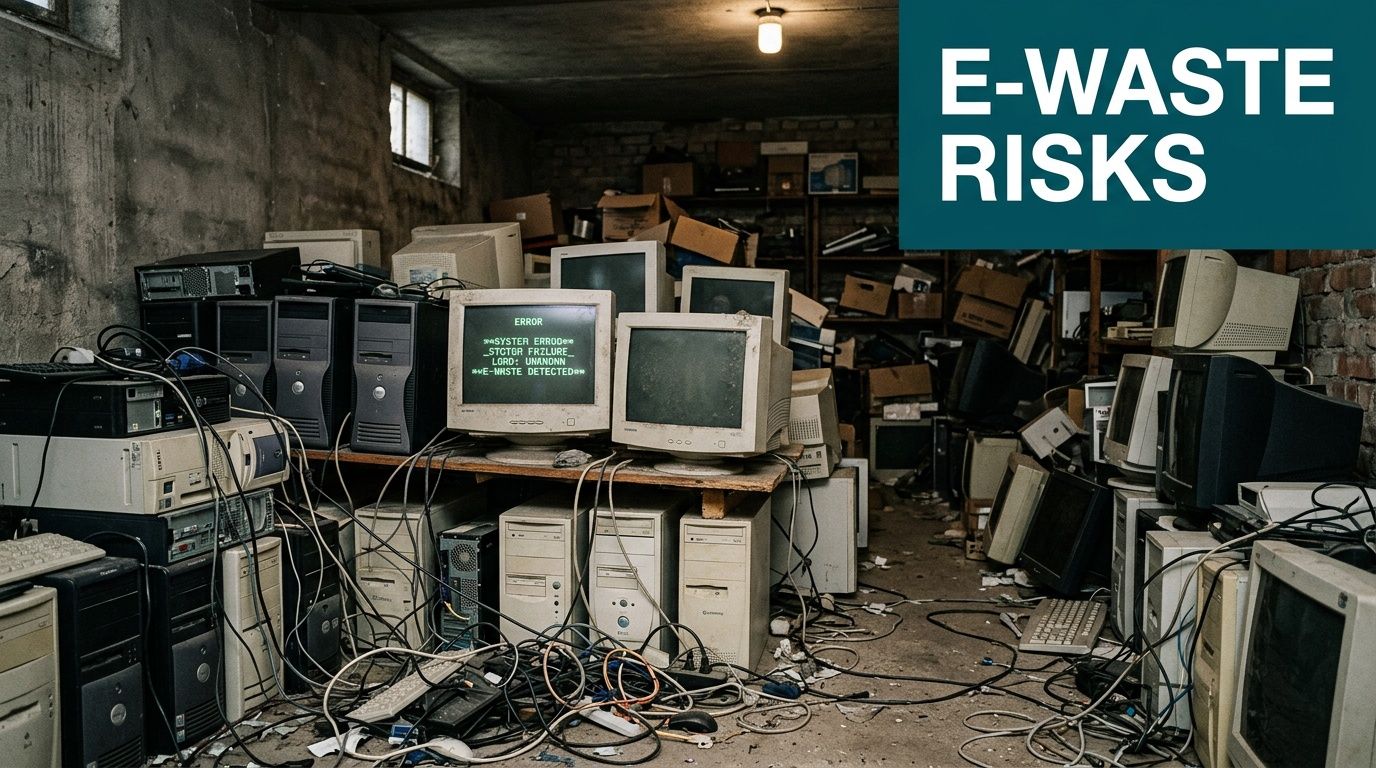
A room full of old hardware looks harmless until you think about what’s in it. Those devices may still hold client data, employee records, saved credentials, cached files, browser sessions, or internal documents. Even when a machine is powered off and forgotten, the liability stays attached to the asset until you can prove it was sanitized or destroyed.
That’s why experienced teams treat retired equipment as part of the cybersecurity program, not as office junk. A forgotten hard drive is still a data-bearing device. An old firewall appliance still needs a disposition record. A printer with onboard storage still deserves the same discipline as a laptop.
Why business recycling is different from consumer drop-off
Texas requires computer and TV manufacturers to offer free recycling to consumers, but that framework doesn’t cover business disposition needs. The same regional guidance notes that the EPA estimates only 15 to 20% of e-waste is properly recycled, which leaves a large share outside secure, auditable channels in a market as active as Houston (H-GAC used electronics guidance).
For an IT department, that changes the question. The issue isn’t, “Where can I drop this off?” It’s, “Who will document custody, sanitize data to a recognized standard, and give me records I can retain?”
If you’re operating across offices in Texas, it also helps to understand the broader state situation before you finalize policy. This overview of Texas computer recycling requirements and options is useful for aligning internal procedures across locations.
Practical rule: If a device ever touched company data, don’t let it leave your control without a documented chain of custody.
The risks that get missed most often
Some risks are obvious. Others only show up later, usually when the original people involved have moved on.
- Data exposure risk: Laptops, desktops, servers, SSDs, backup media, copiers, and network gear can all hold sensitive information.
- Compliance exposure: HIPAA, SOC 2, ISO 27001, PCI-DSS, and internal security policies all depend on evidence, not assumptions.
- Operational drag: Old hardware consumes storage space, confuses asset records, and makes refresh projects harder to close.
- Reputational damage: If equipment leaves through an informal channel, you may never know where it went or what happened to it.
ITAD is the right frame
The better term for this work is IT Asset Disposition, or ITAD. That framing matters because it changes the standard. Disposal sounds like removal. ITAD means controlled retirement of technology assets with security, environmental handling, reporting, and financial accountability built in.
In Houston, that distinction matters more than ever because large healthcare systems, energy firms, schools, logistics operators, and public entities all retire equipment at scale. The organizations that handle it well don’t wait until the room is overflowing. They build a repeatable process and treat every retirement event like an auditable project.
Preparing Your IT Assets for Secure Recycling
Most disposition problems start before pickup day. The vendor gets blamed, but the issue is usually internal: incomplete inventory, mixed device categories, unclear ownership, or no documented handoff. Good outcomes start with internal preparation.
The simplest way to reduce risk is to decide that nothing leaves your building without being listed, assigned, and classified. That gives you control before any recycler touches the equipment.
Build the handoff packet first
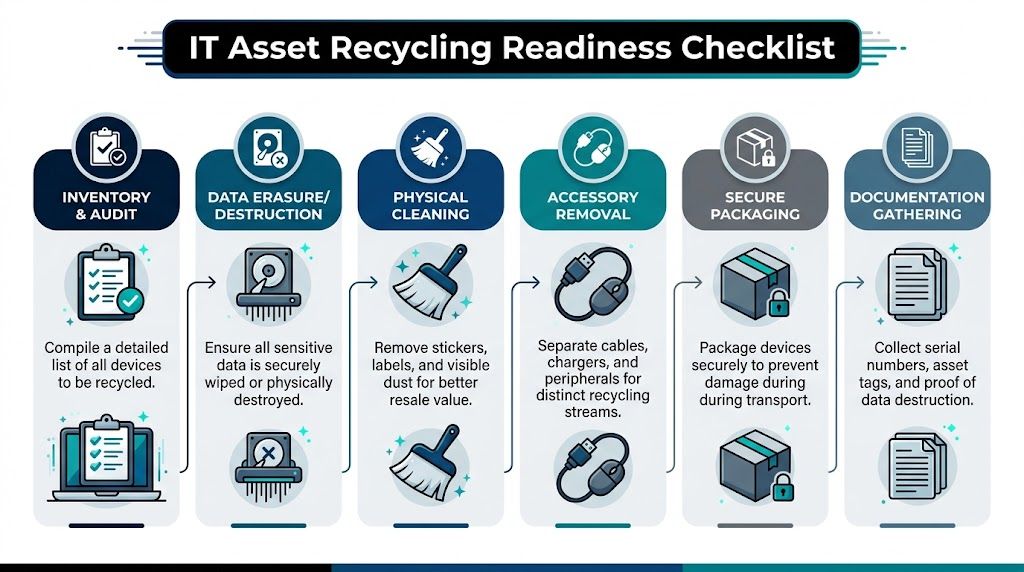
Start with a master inventory. At minimum, include device type, manufacturer, model, serial number, internal asset tag, current location, assigned department, and whether the unit is known or suspected to contain data. If you manage multiple sites, keep location codes consistent so the final vendor report can be matched back to your internal asset register without manual cleanup.
Then separate assets into sensible groups. Laptops and desktops usually follow one path. Servers, storage arrays, network appliances, and failed SSDs often require stricter handling. Monitors, docks, keyboards, and cables should be tracked too, but they usually don’t need the same level of destruction documentation as data-bearing equipment.
What to do before pickup
Use this as your internal readiness checklist:
- Confirm ownership: Resolve leased equipment, warranty returns, and devices still assigned to employees on leave.
- Freeze the inventory: Once the retirement list is approved, don’t let teams add random items on pickup day.
- Segregate by risk: Keep data-bearing assets physically separate from peripherals and display equipment.
- Assign custody: Name the people allowed to stage, release, and sign for equipment.
- Document condition: Note whether devices are functional, damaged, locked, or missing drives.
- Retain internal records: Save the inventory version you used at handoff so you can compare it against the vendor’s receiving report.
A clean handoff file saves time twice. Once during pickup, and again months later when someone asks for proof.
Right-size the data destruction scope
Not every device needs the same treatment. That’s where many companies overspend or under-control risk.
A failed SSD from a finance workstation shouldn’t be handled the same way as a batch of office monitors. A decommissioned server from a regulated environment may justify physical shredding. A standard office laptop fleet may be suitable for certified wiping if your policy allows reuse or remarketing.
This is also the point where internal teams should align their expectations with real sanitization procedures. If you need a refresher on the practical methods involved before handing assets to a recycler, this guide on how to erase a computer hard drive is worth reviewing with your desktop or infrastructure team.
Small details that affect value and reporting
A few low-effort steps can improve the result:
- Remove labels carefully: Old user names, sticky notes, and custom labels create privacy issues and make resale prep harder.
- Bag accessories separately: Power adapters, docks, and branded peripherals can affect remarketing outcomes if they stay matched to the correct device lot.
- Flag exceptions early: Tell the vendor about locked BIOS settings, damaged drives, missing components, or equipment that must be destroyed rather than reused.
When internal prep is sloppy, the pickup becomes a sorting exercise. When internal prep is disciplined, the recycler can process faster, report more accurately, and give you cleaner economics.
How to Choose the Right Houston Recycling Partner
A vendor’s website will usually promise secure recycling, compliant handling, and environmental responsibility. That isn’t enough. You need to know what they can do in-house, what they outsource, and what evidence they can produce after the work is done.
Houston gives you a useful benchmark. According to the Houston Beautiful report, Compucycle was founded in 1996 at 8019 Kempwood Dr. in Houston and stands as the only Texas processor capable of shredding electronics and separating them into raw materials including steel, aluminum, copper, plastics, and circuit boards, with certifications including R2:2013, ISO 14001:2015, ISO 9001:2015, and ISO 45001:2018, along with WBENC and WOSB woman-owned business status (Houston Beautiful e-waste report). Whether or not that specific provider is your fit, that’s the level of operational clarity you should expect from a serious local partner.
What to verify before you sign anything
Ask direct questions and listen for direct answers.
- Certifications: Ask which certifications are current and which facility they apply to.
- Data handling: Ask whether sanitization happens onsite at your location, at their plant, or through a downstream partner.
- Downstream accountability: Ask where non-reusable materials go after processing and who controls that chain.
- Reporting detail: Ask for sample destruction certificates and serialized disposition reports before pickup.
- Insurance and controls: Ask about insurance coverage, employee screening, and visitor restrictions inside the facility.
If the answers stay vague, that’s your answer.
A useful baseline when comparing credentials is understanding what R2-certified electronics recycling typically requires in practice. This summary of an R2 certified electronics recycler helps separate meaningful controls from marketing language.
Comparing Data Destruction Methods
| Method | Description | Best For | Verification |
|---|---|---|---|
| Wiping | Software-based sanitization of data-bearing devices according to documented procedures | Reusable laptops, desktops, and some storage devices when policy allows remarketing | Sanitization report tied to serial number and completion record |
| Degaussing | Magnetic erasure for compatible magnetic media | Legacy magnetic drives where reuse isn’t needed | Process log and device-level tracking |
| Shredding | Physical destruction of media or whole devices | Failed drives, highly sensitive assets, regulated environments, or equipment not approved for reuse | Certificate of destruction with serialized references and destruction date |
The local versus national trade-off
Houston buyers often assume local is always better. Sometimes it is. A local processor can reduce transport complexity and give you more visibility into facility operations. But local only helps if the partner has mature controls, documented workflows, and audit-ready reporting.
National reach can help if you manage multiple sites and want one policy, one documentation standard, and one set of service expectations. The right choice depends on your footprint, your compliance obligations, and whether you need one-off recycling or a repeatable ITAD program.
Don’t evaluate a recycler by pickup convenience alone. Evaluate them by how well their paperwork will hold up under scrutiny.
What strong vendors do that weak vendors don’t
Weak vendors focus on pickup. Strong vendors focus on evidence.
Weak vendors talk about being green. Strong vendors can explain exactly when a device is scanned, who signs for it, how media is handled, what gets resold, what gets shredded, and what report you’ll receive at the end. That difference is what turns houston computer recycling into a controlled business process instead of a leap of faith.
The Secure IT Asset Disposition Workflow Explained
A good ITAD workflow is easiest to understand when you follow the asset. Start with a laptop from your Houston office that has reached end of life. It’s been approved for retirement, listed in your inventory, and staged with a batch of similar devices.
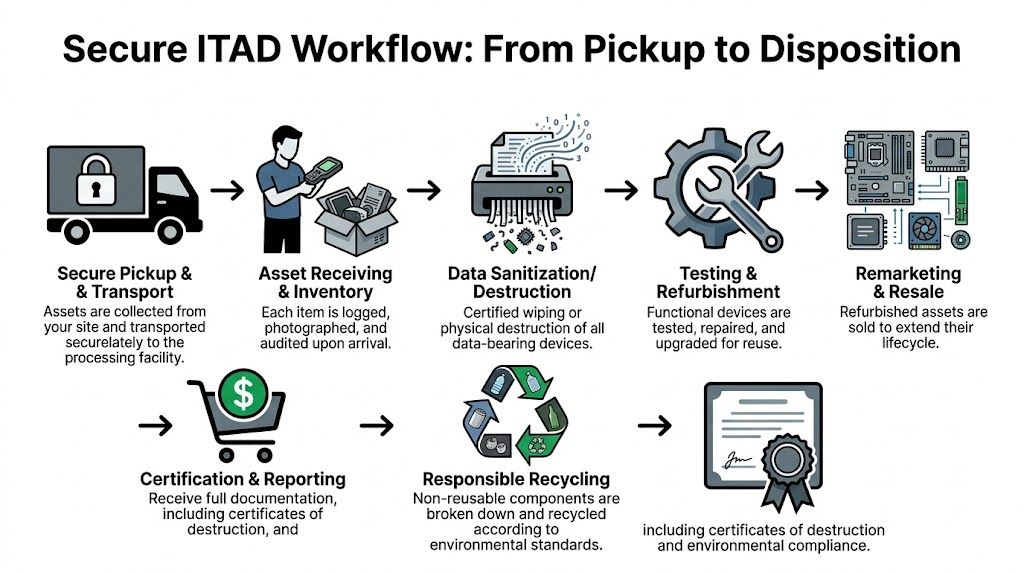
On pickup day, the asset shouldn’t disappear into a truck with no visibility. It should move into a documented chain of custody. Professional Houston providers commonly use scheduled secure pickups with serialized tracking, then process the assets under a workflow that includes certified data destruction aligned with NIST 800-88 and a path for either reuse or material recovery. One Houston market example describes a provider processing over 80 tons of e-waste from hundreds of businesses annually, with desktops and laptops making up nearly half the volume (Houston e-waste report 2026). Because that source is future-dated, treat it as a market projection rather than a current benchmark.
Pickup and receiving
At the first transfer point, every batch should tie back to your internal list. The vendor may use serialized manifests, barcode scans, or staged pallet records, but the principle is the same. You need a documented handoff from your custody to theirs.
When the equipment reaches the facility, receiving should be more than unloading. Good operators log, inspect, and reconcile incoming assets against what was expected. If there’s a variance, they should catch it early, not after final reporting.
Triage determines the path
Once assets are received, they typically split into two paths.
The first path is reuse. Functional devices that meet the partner’s standards may be tested, cleaned, and prepared for remarketing or approved reuse channels. The second path is recycling, where non-resalable or damaged equipment is dismantled and processed into recoverable commodities.
IT directors often miss an important point. The decision between reuse and destruction shouldn’t be improvised on the facility floor. It should be governed by your written instructions, your data policy, and the commercial agreement you approved.
Data destruction inside the workflow
Data destruction belongs in the middle of the process, not as an afterthought at the end. Once a drive-bearing asset has been triaged, the media should be sanitized or physically destroyed according to your approved method. The key aspect is that the action gets recorded in a way that can be tied back to the specific asset.
If you want a broader operational baseline for these handoffs and controls, this overview of what IT asset disposition means in practice is useful context.
Track the asset like evidence, not like surplus furniture.
Final disposition and reporting
For assets that can’t be reused, the final stage is responsible processing. In Houston, that can include in-house dismantling and separation of materials into recycling streams rather than simple collection and export. For the client, the practical output is the report: what was received, what was sanitized, what was destroyed, what was reused, and what was recycled.
When that workflow is tight, you get three things at once. Data security, environmental accountability, and a financial record you can explain.
Building an Audit-Proof Trail for Your Recycled Computers
The recycling event isn’t complete when the truck leaves or even when the drives are destroyed. It’s complete when your records can answer an auditor’s questions without guesswork.
That’s the gap many mid-market organizations discover too late. Public-facing recycling materials often highlight certifications, but they don’t always address the reporting detail required for SOC 2, ISO 27001, HIPAA, or internal audit reviews. One Houston-focused services analysis notes that standard recycling certificates often aren’t enough, because auditors may require device serial numbers and specific destruction timestamps tied to the audit period (computer recycling compliance gap for Houston organizations).

What auditors usually need
A generic “certificate received” line in a ticketing system won’t carry much weight if the audit gets detailed. You need documentation that proves the asset moved through a controlled process and reached a final, documented outcome.
At minimum, ask for:
- Serialized asset records: Each relevant device should be identified by serial number or equivalent unique identifier.
- Destruction method: The report should state whether media was wiped, degaussed, or shredded.
- Date and time detail: If your audit period is quarterly or annual, timestamps matter.
- Custody continuity: Pickup date, receiving date, processing date, and disposition date should align logically.
- Exception notes: Missing drives, damaged media, or unmatched serials should be called out, not buried.
How to make the documentation usable
A lot of teams collect reports and then fail to integrate them into their control environment. Don’t just save PDFs to a shared drive and hope someone can find them later. Tie the disposition records to the same systems you use for asset management, offboarding, and security evidence retention.
That usually means mapping each retired asset to:
- the internal asset tag,
- the employee or department previously assigned,
- the retirement approval ticket,
- the vendor’s serialized disposition report,
- and the certificate of destruction where applicable.
If your legal, compliance, or security team ever asks how to validate destroyed media, it helps to understand what a proper certificate of destruction for hard drives should contain.
Audit lens: A certificate is only useful if someone outside IT can read it and connect it to a specific control.
Documentation should match the risk
Not every retired keyboard needs the same record depth as a database server. Your documentation standard should reflect the asset type and the data sensitivity involved.
For example, a fleet laptop refresh may need serialized destruction or sanitization records plus a lot-level recycling summary for non-data peripherals. A healthcare imaging workstation or a finance server may require stricter retention of destruction evidence, approvals, and exception handling records. The key is consistency. Auditors notice when your control narrative says one thing and your actual files show another.
The standard to aim for
The best documentation does two jobs. It proves secure disposition happened, and it reduces the time your team spends answering follow-up questions later.
That’s why I recommend treating ITAD records as part of your compliance evidence library, not as shipping paperwork. When houston computer recycling is handled this way, the recycler becomes part of your audit chain. If they can’t support that role, they’re not the right partner for regulated equipment.
Managing Costs and Finding Value in Old Equipment
Most IT leaders ask the same two questions at the end of a refresh cycle. What will this cost, and can any of it offset the expense? Both are fair questions, and both get murky fast because the economics behind recycling and remarketing aren’t always transparent.
That opacity works against the buyer. If you don’t understand what drives cost, you can’t compare quotes properly. If you don’t understand what still has resale value, you may accept a flat disposal fee on equipment that could have reduced your net expense.
What usually drives the invoice
Pricing usually changes based on the effort and risk involved.
- Logistics: Pickup complexity, site access, packing conditions, and volume all affect labor and transport.
- Data destruction requirements: Physical shredding, onsite service, and higher-assurance handling tend to cost more than standard processing.
- Asset mix: Functional recent-model laptops behave differently from broken servers, CRT-era leftovers, or heavily damaged gear.
- Reporting depth: Detailed serialized reporting and exception handling can add administrative work.
Those cost drivers are legitimate. What buyers shouldn’t accept is a quote with no explanation of how resale value or material recovery affects the final number.
Value recovery is negotiable
Goodwill Houston’s public partnership content highlights a broader truth in this market: the economics of secondary market reuse and recovered materials affect what recycling costs, and organizations can ask for pricing tied to asset recovery rather than treating every load as pure waste (Goodwill Houston and CompuCycle partnership context).
That creates an advantage for informed buyers. If part of your batch includes usable business laptops, current desktops, quality monitors, or serviceable components, ask how the vendor handles resale proceeds. Ask whether value recovery offsets logistics or processing fees. Ask what happens when commodity values change.
Don’t ask only for a recycling quote. Ask for the vendor’s value recovery model.
Practical questions for your next quote review
Some questions improve pricing conversations immediately:
- Which items in this batch are likely candidates for remarketing?
- Do you offer a revenue-share, fee-offset, or blended pricing model?
- How do you handle accessories that improve resale readiness, such as power adapters and docks?
- Will physically damaged but part-harvestable systems affect the quote differently from complete non-working scrap?
- Can you separate destruction-only assets from reusable assets so we don’t pay premium handling across the whole lot?
Donation can fit the strategy
Not every organization wants to maximize resale return. Some prefer a mix of recovery and community benefit. Houston’s ecosystem includes partnerships where reusable electronics support job training, while non-resellable items go through certified local recycling channels. That can be a smart option when your organization values community impact but still needs secure processing and documented handling.
The key is not to confuse donation with informal disposal. Donation still requires data control, acceptance criteria, and reporting. If those pieces are missing, the feel-good outcome can create the same exposure as any other unmanaged exit path.
When you approach houston computer recycling with both compliance discipline and commercial awareness, the decision-making gets clearer. Some batches are pure risk reduction. Some hold recoverable value. Most are a mix. The organizations that manage this well don’t chase the lowest pickup fee. They build a repeatable process that protects data, satisfies audits, and captures value where it’s there.
If your team needs a nationwide ITAD partner that understands secure pickups, serialized chain of custody, certified data destruction, and audit-ready reporting, Dallas Fortworth Computer Recycling is built for that job. They support commercial and public-sector organizations that need practical, defensible technology retirement, from routine laptop refreshes to complex data center decommissions.