
Secure & Compliant Electronic Recycling Pickup
Your storage room probably looks familiar. Retired laptops are stacked on a shelf. Old switches sit in a corner waiting for “later.” A few decommissioned servers still have asset tags on them, and someone has been setting aside monitors because nobody is quite sure which vendor will take them.
That pile isn’t just clutter. It’s a mix of security exposure, compliance risk, and operational drag. Every device sitting untracked between last use and final disposition creates a gap. In regulated environments, that gap is exactly where audit questions start.
A good electronic recycling pickup closes that gap. A weak one just moves the risk off your floor and out of sight. If you manage IT for a healthcare group, a multi-site enterprise, a public agency, or a data center, the right question isn’t “Who can haul this away?” It’s “Who can prove what happened to every asset from pickup through final processing?”
From Storage Closet to Strategic Asset A New Look at E-Waste
Most IT teams don’t end up with e-waste because they’re careless. They end up with it because projects move faster than disposition workflows. A refresh finishes. A location closes. A lab upgrades equipment. The old assets get staged temporarily, then they linger because nobody wants to create a data security problem by moving too fast.
That hesitation is understandable. It’s also costly.
An unmanaged pile of electronics usually contains more than scrap. It may include drives that still hold user data, devices with missing ownership records, batteries needing special handling, and equipment that still has reuse value if it’s processed quickly. Once assets sit too long, labels fall off, inventories drift, and accountability gets weaker.

The bigger issue is scale. Global e-waste generation reached 62 million tonnes in 2022, up 82% since 2010, and is projected to reach 82 million tonnes by 2030 while formal recycling rates sit at 22.3% and are expected to decline, according to global e-waste statistics compiled from the Global E-waste Monitor. That tells you two things. The volume problem is accelerating, and informal or poorly controlled downstream handling is still common.
Why disposal is the wrong frame
If you treat electronic recycling pickup like junk removal, you’ll evaluate vendors on convenience first. That’s where organizations get burned. Convenience matters, but only after you’ve locked down chain of custody, accepted material scope, data destruction controls, and documentation.
A stronger approach is to treat disposition as part of your security and compliance program. The hardware leaving your building should be governed with the same discipline you’d apply to backup media, terminated-user access, or server decommissioning.
Here’s the practical shift:
- Track assets before movement: If an item isn’t on a manifest, it shouldn’t leave.
- Separate data-bearing from non-data-bearing devices: A keyboard isn’t a laptop. They don’t need the same controls.
- Require proof, not promises: “We recycle responsibly” isn’t useful in an audit.
- Think beyond removal: Pickup is only the first visible step in a longer documented chain.
Old equipment has two kinds of value. Residual market value and evidentiary value. Losing the second one usually costs more.
Organizations that handle this well also get sustainability credit the right way. They don’t just remove obsolete hardware. They create a defensible process that protects data, supports environmental goals, and gives procurement and compliance teams something they can verify. If you need a broader business case, this overview of the benefits of e-waste recycling is a useful reference point.
Preparing Your Assets for a Seamless Pickup
Preparation determines whether pickup day is controlled or chaotic. The recycler’s truck may be on-site for an hour, but your internal prep work decides whether that hour produces a clean chain of custody or a mess of handwritten corrections and missing serials.
In the US, 30 to 40 million PCs become obsolete annually, and fewer than 20% of end-of-life electronics are recycled, according to these U.S. e-waste recycling facts and figures. For business IT teams, that volume pressure shows up locally as backlogged closets, delayed projects, and rushed disposition events. Good preparation keeps your organization from becoming part of that pattern.
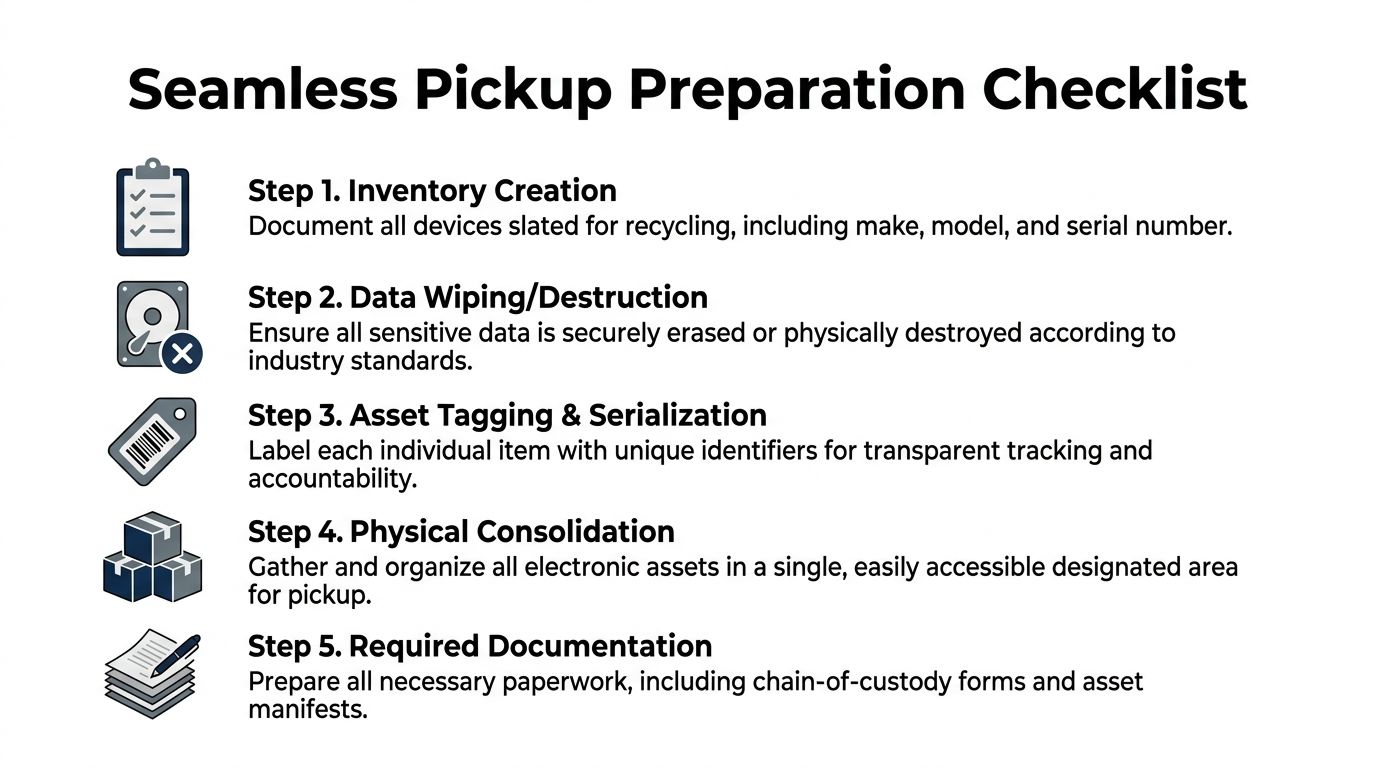
Start with the asset manifest
Your manifest is the backbone of the entire pickup. If it’s incomplete, every downstream report gets weaker.
At minimum, include:
- Asset identifier such as internal tag, serial number, or both.
- Device type such as laptop, server, firewall, monitor, UPS, copier, or lab instrument.
- Location so you know which office, floor, rack row, or department released it.
- Data-bearing status so the pickup team knows what requires secure handling.
- Disposition instruction such as reuse evaluation, data destruction, recycling, or return-to-lessor workflow.
If you can’t identify every serial number because equipment has already been stripped from racks or moved into bins, note that exception before pickup day. Don’t let the first discovery happen at the loading dock.
Separate by risk, not just by size
Many teams sort equipment by convenience. That’s better than nothing, but it’s not enough. Sort by control requirement first.
Use three working groups:
- Data-bearing assets: desktops, laptops, servers, storage arrays, mobile devices, copiers with hard drives, network appliances with onboard storage.
- Non-data peripherals: monitors, docks, keyboards, mice, standard cables, power supplies.
- Special handling items: medical devices, laboratory equipment, devices with embedded batteries, and anything with uncertain contamination or regulatory status.
This is also the point where your internal sanitization policy matters. Some organizations wipe devices before pickup. Others require the recycler to perform destruction or sanitization under documented controls. Either way, decide in advance. Don’t improvise with a box of mixed drives and a verbal instruction.
For teams handling laptops and desktops internally before release, this guide on how to erase a computer hard drive is useful as a baseline reference. Just make sure your internal method matches your policy and your audit requirements.
Build one staging area
Don’t make the pickup crew hunt through cubicles, closets, and conference rooms. Consolidate what you can into one controlled staging area. That area should be accessible enough for loading but restricted enough that devices can’t disappear between your final count and vehicle departure.
A good staging area has:
- Clear separation lines: pallets or zones for each asset category
- Visible labels: business unit, location, or project name
- Limited access: no casual traffic from employees or third-party movers
- Space for reconciliation: your team needs room to verify outgoing assets against the manifest
If you’re managing a multi-floor or multi-building pickup, create sub-manifests by location and reconcile each one independently. That keeps one bad count from contaminating the whole project.
Use practical packaging rules
You don’t need museum-grade packing for every retired device, but you do need enough physical control to prevent damage, dropped equipment, and confusion during loadout.
A few field-tested rules work well:
- Rack gear: remove loose rails, bag small parts, and stack in stable layers
- Laptops and desktops: palletize in cartons or gaylords if volume is high, but keep labels visible
- Monitors: stand and separate where possible to reduce breakage
- Loose hard drives and SSDs: place in tamper-controlled containers, never mixed into bulk peripheral boxes
- Cables and accessories: box separately so they don’t obscure serialized hardware
Practical rule: If a device needs individual proof of destruction, don’t bury it in mixed bulk.
Know what the recycler is likely to accept
Acceptance scope varies. Some providers are comfortable with enterprise IT assets but not medical imaging equipment. Others will take mixed office electronics but not anything with unusual handling requirements. Confirm scope before scheduling pickup.
Here’s a simple planning table you can use internally.
| Category | Examples | Key Considerations |
|---|---|---|
| Data-bearing IT assets | Laptops, desktops, servers, storage devices, network appliances | Require serialized tracking and documented data destruction path |
| Standard office electronics | Monitors, printers, docks, phones, cables, peripherals | Confirm whether low-value bulk items affect pickup terms |
| Specialized equipment | Medical devices, lab instruments, industrial electronics | Verify handling requirements, contamination status, and downstream capability |
Flag exceptions before the truck arrives
Problems that delay electronic recycling pickup usually aren’t technical. They’re procedural. Missing manifests, unclear ownership, and surprise items cause more friction than the physical move itself.
Watch for these issues early:
- Orphaned assets: devices with no owner, no department, or no usable tag
- Mixed legal status: leased equipment mixed with owned assets
- Incomplete drive removal: systems slated for retention of storage media
- Unapproved additions: departments adding equipment after the manifest is finalized
- Access failures: freight elevator restrictions, security desk confusion, loading dock timing conflicts
If pickup is part of a larger refresh or decommissioning project, appoint one internal decision-maker for exceptions. That person should be able to approve, reject, or hold questionable assets without slowing the entire loadout.
Preparation doesn’t need to be complicated. It needs to be controlled. When you inventory well, stage cleanly, and separate by risk, you make secure pickup possible. When you don’t, the recycler has to guess. Guesswork is the last thing you want attached to retired IT assets.
Executing a Compliant Pickup with Verifiable Security
Pickup day is where vendor claims meet observable process. This is the point where “secure and compliant” should become visible in actions, paperwork, and custody controls. If the recycler can’t demonstrate those controls on-site, you should assume the rest of the chain is just as loose.
A persistent gap in the market is straightforward. Regulated industries such as healthcare and government often need step-by-step chain-of-custody documentation, real-time tracking, and auditable reports, yet many recyclers claim compliance without providing that level of proof, as noted in this discussion of electronic recycling compliance gaps for pickup services.
That gap matters because compliance isn’t satisfied by a truck arriving on time. It’s satisfied when you can show who released each device, who received it, how it was tracked, when it was destroyed or processed, and what record ties the final outcome back to the original asset list.
What an unbroken chain of custody looks like
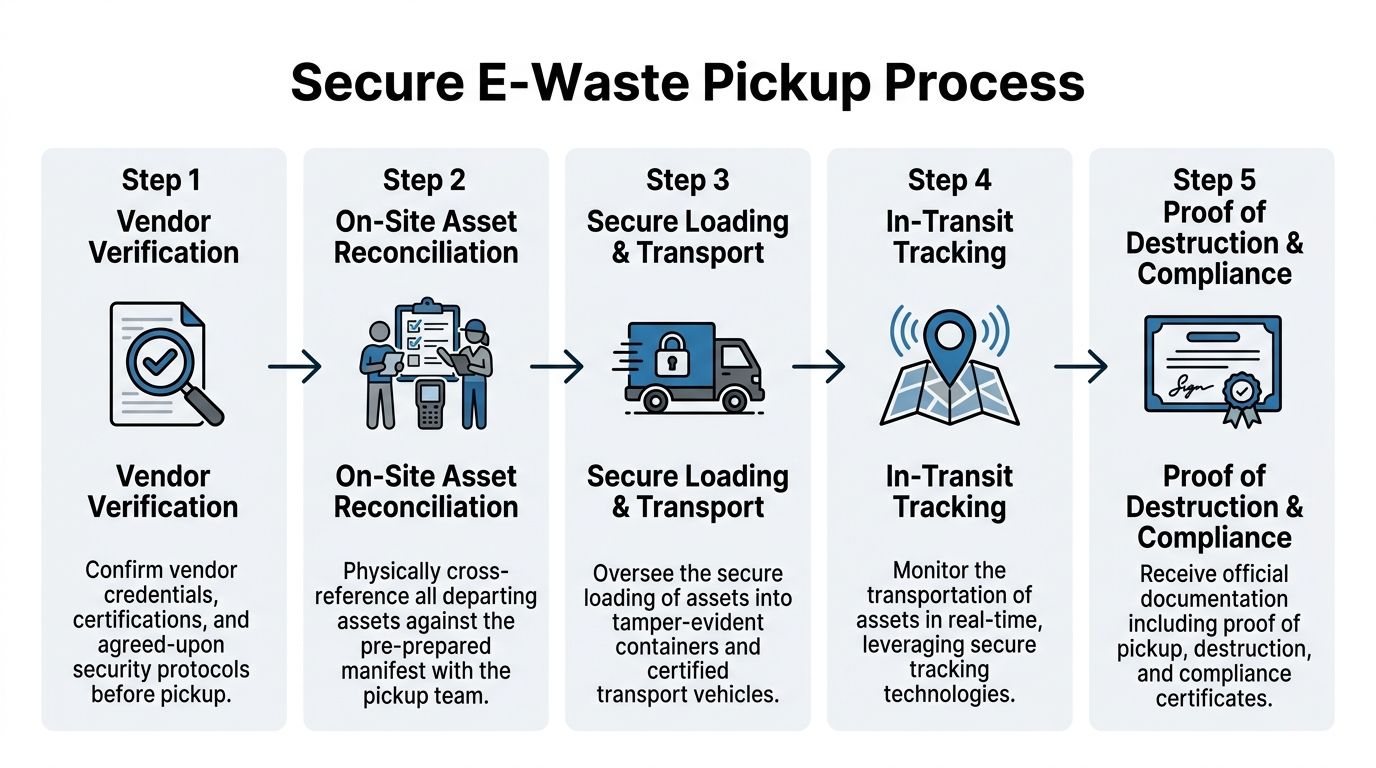
A real chain of custody starts before the first device leaves the room. It isn’t just a signature on a pickup receipt.
You want to see a sequence like this:
Vendor team arrives with work order alignment
The pickup crew should know the project scope, expected asset classes, handling requirements, and any special instructions for drives or regulated equipment.On-site reconciliation against your manifest
Your staff and the vendor should compare what’s staged against what’s documented. Exceptions should be logged, not waved through.Serialized or count-based transfer recording
Serialized assets should be individually captured. Bulk peripherals can sometimes be transferred by counted container or pallet, depending on your requirements.Secure loading under supervision
Devices should move directly from staging to secured transport, not sit unattended on an open dock.Transport and intake confirmation
The recycler should be able to confirm receipt at the processing facility and preserve the transfer record.
If a recycler says chain of custody starts at their facility, that means your highest-risk transfer point is undocumented.
Vet the people, not just the company
IT directors often focus on certifications first. That’s necessary, but not sufficient. The pickup crew handling your assets matters just as much as the framed certificate in the sales deck.
Ask operational questions:
- Who is allowed to access the pickup vehicle?
- How are drivers and loaders identified on arrival?
- What happens if the truck leaves partially loaded and returns later?
- How are sealed containers or serialized bins controlled?
- How are discrepancies reported back to you?
A good vendor can answer those questions clearly. A weak one responds with generalities.
Data destruction method has to match the asset and the risk
Different data-bearing devices require different end-of-life methods. The mistake we see most often is using one generic destruction expectation for everything.
On-site destruction
On-site destruction gives you immediate witnessability. That’s useful when internal policy, legal counsel, or regulator expectations require direct observation before assets leave your premises. Hard drive shredding is the most common example.
Benefits include direct control, immediate proof of handling, and reduced concern about transport of intact media. The trade-off is that on-site workflows can be less efficient for some projects, and not every asset can be processed the same way in the parking lot or loading area.
If your environment requires witnessed destruction before transport, review what on-site shredding services include and how proof is documented.
Off-site sanitization or destruction
Off-site processing can work well when the recycler has a tightly controlled intake, serialized tracking, facility security, and strong reporting discipline. This path is common for larger projects where wiping, degaussing, shredding, refurbishment evaluation, and parts harvesting occur in sequence.
The risk isn’t the off-site model itself. The risk is off-site processing without a documented custody trail.
Wiping, degaussing, and shredding
Each method serves a different purpose.
- Wiping is appropriate when you intend to preserve hardware for reuse and have a documented sanitization standard and verification workflow.
- Degaussing can be suitable for certain magnetic media but typically renders that media unusable.
- Physical shredding provides finality and is often preferred for failed drives, highly sensitive media, or assets that don’t need reuse preservation.
Your recycler should be able to tell you which method applies to which media type, and why.
Certifications matter when they show up in process
R2 and e-Stewards matter because they create external accountability around environmental and operational controls. But certification logos alone don’t protect you. The question is whether the pickup process you observe reflects disciplined control.
Look for signs of maturity:
- Documented intake protocol rather than ad hoc verbal instructions
- Asset-level reconciliation for sensitive equipment
- Secure vehicle loading practices with controlled containers where needed
- Post-pickup reporting commitments defined before the truck departs
- Clear exception handling when counts or serials don’t match
Security requirement: Never release data-bearing assets to a recycler that can’t explain how a missing serial number is investigated and documented.
What doesn’t work in the field
A lot of bad pickups follow the same pattern. The vendor says yes to everything, sends an underbriefed crew, and relies on your team to compensate. That’s how drives get mixed into monitor boxes and how certificates become too vague to support an audit.
Common failure points include:
- Manifest drift: assets leave that weren’t on the approved list
- Bulking sensitive devices: laptops, drives, and network gear get combined for convenience
- No site-level signoff: nobody from your side verifies the final outbound load
- Unclear custody handoff: the driver signs one document, but intake records don’t align later
- Generic destruction paperwork: the final certificate proves a batch was destroyed, but not your batch
A better pickup protocol for regulated organizations
For healthcare, finance, education, and public-sector environments, the strongest model is simple but disciplined.
Use this sequence:
- Pre-approve the scope: document the asset classes, service level, and data destruction requirement
- Assign one internal witness: not five stakeholders and not nobody
- Reconcile before movement: compare staged inventory to manifest before loading starts
- Control exceptions in writing: hold, add, or reject items with documented notation
- Require post-arrival confirmation: don’t wait weeks to find out what the facility says it received
This turns electronic recycling pickup into a controlled release process rather than a disposal event. That distinction matters. When legal, compliance, or executive leadership asks what happened to retired assets, a controlled release process gives you evidence. A disposal event gives you a story.
Decoding Quotes and Understanding the True Cost
“Free pickup” is one of the most misleading phrases in this market. Sometimes it’s legitimate. Often it means the vendor expects enough resale value, enough volume, or enough low-service complexity to make the economics work. The problem is that many providers don’t explain those conditions up front.
That lack of clarity is common. Many businesses run into opaque pricing because vendors advertise “free” pickup without clearly stating volume minimums or qualifying equipment, which creates budgeting friction for IT directors managing multi-site projects, as discussed in this overview of pricing transparency issues in B2B electronics recycling pickup.

Stop asking only for the pickup price
The wrong question is “How much is pickup?” The better question is “What is my total cost of disposition for this asset mix under my required controls?”
That changes the conversation.
A quote should tell you whether you’re paying for transportation only, transportation plus processing, data destruction, serialized reporting, packing labor, site support, or all of the above. If the quote doesn’t separate those elements, you can’t compare vendors intelligently.
Here’s what typically drives cost in practice:
- Asset mix: newer laptops and enterprise gear may have reuse value. Broken monitors and low-grade peripherals usually don’t.
- Volume concentration: one full truckload from one site is different from scattered pickups across multiple offices.
- Labor complexity: stair carries, after-hours pickup, rack removals, and deinstallation work change the economics.
- Security requirements: serialized drive tracking, witnessed destruction, and special documentation increase service intensity.
- Geography and timing: remote sites and narrow scheduling windows reduce routing efficiency.
What “free” often means operationally
A no-charge quote can still be acceptable. It just needs to be defined.
In practice, “free” may mean:
- the load contains enough recoverable equipment to offset handling costs
- only certain categories qualify
- a minimum volume applies
- data destruction is basic, but advanced documentation is extra
- the provider expects dock-ready staging and no deinstallation work
None of those conditions are unreasonable. The problem starts when they appear after procurement has already approved the vendor.
A quote that hides scope isn’t cheaper. It just defers the argument until the project is underway.
Compare value recovery against service depth
Some IT directors focus too heavily on rebate potential. Others ignore reuse value entirely. Both approaches miss the point.
The practical model is this: evaluate net outcome, not just gross charge or gross return. A vendor offering stronger reporting, better custody controls, and cleaner project management may deliver more organizational value than a slightly higher resale credit from a less disciplined operator.
When value recovery matters most
Value recovery becomes more relevant when assets are recent, functional, complete, and commercially desirable. Business-class laptops, late-model desktops, and certain network gear may support refurbishment or resale paths that offset part of the project cost. If that’s part of your expected outcome, ask how the vendor determines eligibility and how credits are documented.
For organizations retiring significant laptop fleets, this page on cash for laptops gives a practical view of why device condition and marketability affect returns.
When service quality should dominate
Service quality should outweigh residual value when you’re managing regulated devices, mixed estates with uncertain histories, or projects involving legal hold, location closures, or sensitive media. In those cases, the hidden cost of a weak vendor isn’t the invoice. It’s the remediation work after a reporting failure, chain-of-custody gap, or disputed asset count.
Ask for a quote in this format
If you want apples-to-apples comparison, request quotes in a structured way. Don’t ask vendors to “send pricing.” Tell them how to break it out.
Ask for these line items:
| Quote element | What you need to know | Why it matters |
|---|---|---|
| Pickup logistics | Whether transport, labor, and loading are included | Prevents surprise trip or handling charges |
| Data destruction scope | Which assets receive wiping, shredding, or other treatment | Aligns price with your policy requirements |
| Reporting deliverables | What post-pickup documentation is included | Distinguishes basic hauling from auditable service |
| Value recovery method | How resale or refurbishment credits are calculated | Lets you evaluate net disposition cost |
Red flags in pricing conversations
A few patterns usually signal trouble:
- One-line quotes: no scope breakdown, no service assumptions
- No mention of reporting: the vendor treats documentation as an afterthought
- Unlimited acceptance claims: they say they take everything but won’t define excluded items
- Vague “environmental fees”: charges appear without explanation of what triggered them
- Unclear downstream path: no answer on what gets reused, recycled, or destroyed
A solid quote reflects operational reality. It acknowledges that a secure electronic recycling pickup isn’t just transportation. It’s transportation plus custody, plus processing, plus proof. If you price only the truck, you’ll often underbuy the part that matters.
Closing the Loop with Auditable Reporting and Certification
The truck leaving your site is not the end of the process. It’s the midpoint. Risk remains open until you receive reporting that reconciles what left your control with what was processed, destroyed, or recycled.
Many otherwise competent projects often falter at this stage. Pickup happened. The vendor was responsive. The site was cleared. Then the documentation arrived late, lacked serial-level detail, or used generic language that wouldn’t satisfy an internal audit, customer questionnaire, or regulatory review.
Modern downstream processing can be advanced. UN reporting notes that automated sorting in modern facilities can achieve up to 95% accuracy in material separation, and certified B2B pickups can prevent up to 75% of e-waste from entering informal, hazardous channels, as described in this summary of electronic waste recycling and formal management outcomes. But that operational capability only helps your organization if the reporting ties the outcome back to your assets.
The documents that actually matter
You should expect more than a generic service receipt. For most business pickups, the minimum useful document set includes:
- Proof of pickup showing date, site, and transfer acknowledgment
- Serialized asset report for devices that require item-level accountability
- Certificate of destruction for media or assets designated for destruction
- Certificate of recycling or equivalent environmental disposition record where applicable
The exact package can vary by project, but the principle doesn’t. Every key document should support traceability.
What a defensible certificate includes
A certificate only helps if it identifies the scope clearly enough to stand on its own. If it merely states that “materials were destroyed in accordance with policy,” that may be too vague for a serious audit.
A stronger certificate should align to the manifest, the pickup date, and the service provided. If serialized media destruction was part of the job, the supporting report should let you map destroyed assets back to your internal records. This is especially important when legal, privacy, or contractual obligations require proof beyond a general batch statement.
For teams reviewing documentation standards, this resource on a certificate of destruction for hard drives is a helpful benchmark for what post-pickup proof should accomplish.
Your audit trail is only as strong as the weakest handoff document.
Reconcile before you archive
Don’t file the reports the moment they arrive. Reconcile them.
Check:
- Manifest alignment: do the reported assets match what you released?
- Exception handling: were held, added, or disputed items explained?
- Service alignment: were destruction, recycling, and reuse outcomes applied as instructed?
- Date consistency: do pickup, intake, and processing dates make sense together?
This review doesn’t need to be elaborate, but it does need ownership. Someone on your team should close the loop formally.
Turn one-off pickups into a repeatable control
The best organizations don’t treat electronic recycling pickup as a special event. They standardize it. They use the same manifest logic, custody rules, approval path, and documentation review process every time. That consistency reduces risk and makes procurement easier because vendors are responding to a defined control framework, not a different expectation on every project.
That’s the long-term value here. You’re not just clearing obsolete equipment. You’re building a repeatable disposition control that protects the organization after the hardware is gone.
If you need a partner for secure, documented pickups, Dallas Fortworth Computer Recycling provides nationwide IT asset disposition, certified data destruction, data center decommissioning support, and auditable reporting designed for organizations that can’t afford chain-of-custody gaps.