
ITAD Near Dallas Fort Worth International Airport: A Guide

If you're retiring racks, endpoints, lab systems, or branch office hardware anywhere around dallas fort worth international airport, you're not dealing with a normal pickup zone. You're working in a corridor where access windows tighten fast, building security is layered, and a missed handoff can create both compliance risk and operational drag.
Most enterprise teams I talk to are already balancing the same pressures. They need to clear space for a refresh, shut down a cage without disrupting production, document every serial number, and decide how data destruction will be handled before a single drive leaves the building. Near DFW, that planning has to be tighter than usual because logistics mistakes compound quickly once assets are staged and trucks are rolling.
Navigating ITAD in the DFW Airport Corridor
Dallas Fort Worth International Airport operates at a scale that changes how local IT asset disposition should be planned. In 2024, DFW handled 87,817,864 passengers and 743,203 aircraft operations, reinforcing its role as the world's 3rd busiest airport for passenger traffic according to Dallas Fort Worth International Airport data. That kind of volume creates a dense, high-security environment around the airport corridor.

A standard office cleanout approach doesn't hold up here. If your facility is near cargo routes, airport service roads, logistics parks, or a secured campus with strict dock procedures, your decommission plan needs to account for traffic timing, escort requirements, loading constraints, and documented custody from the first touch.
Why airport-adjacent decommissions get harder
The problem usually isn't the recycling decision. It's the coordination around it.
A typical enterprise decommission near DFW runs into a few pressure points:
- Access friction: Security desks, freight elevators, dock reservations, and badging rules can delay a pickup long before the truck is loaded.
- Mixed asset classes: Data-bearing devices, network gear, batteries, monitors, and specialty equipment often need different handling paths.
- Operational overlap: Teams are trying to retire hardware while keeping production systems, badge readers, Wi-Fi, and cameras online.
- Audit pressure: Legal, compliance, and procurement all want documentation, but they often want it in different formats and at different stages.
Practical rule: If your internal team can't answer who touched each asset, where it was staged, and when it left the building, the project isn't ready for pickup.
That matters even more in a market where transportation, trade, and critical business operations are tightly interconnected. Around DFW, the margin for sloppy handling is smaller because assets often move through busy commercial zones with little tolerance for delay.
What works in this corridor
The best projects are usually simple in design and strict in execution. Teams that do this well lock in the staging area early, separate destruction from remarketing candidates before pickup day, and build the chain of custody before they request transport.
For organizations that need a local service model built around those realities, this overview of DFW ITAD services reflects the kind of planning discipline that airport-corridor projects require.
What doesn't work is improvising on pickup day. Loose pallets, mixed bins, unlabeled drives, and last-minute scope changes are how routine retirements turn into investigations.
The Foundation for Secure Asset Disposition
The cleanest ITAD projects start with an audit that feels almost excessive. That's the right instinct.
DFW Airport's Terminal Renewal and Improvement Program upgraded IT systems across active terminals by starting with thorough pre-construction audits of existing systems, a methodology described by TLC Engineers in its DFW TRIP project overview.com/projects/dfw-terminal-renewal-and-improvement/). That same discipline is the best model for enterprise asset disposition. You map first, move second.
Start with a physical and logical audit
Before anything is unplugged, walk the site and document what exists. Don't rely on a CMDB alone. In decommission work, the rack never matches the spreadsheet perfectly.
Your audit should capture:
Asset identity
Record serial numbers, hostnames, asset tags, device type, and location. Include loose drives, spares, failed units, and gear sitting on shelves.Data-bearing status
Mark anything with storage. Servers, laptops, SAN gear, desktops, copiers, firewalls, and some lab or medical systems can all hold data.Disposition path
Decide whether each item is going to destruction, resale, redeployment, parts harvesting, or responsible recycling.Dependencies
Identify equipment that can't be pulled yet because it still supports badge systems, wireless, cameras, HVAC interfaces, or line-of-business apps.
Build a staging area that controls mistakes
A secure staging zone is where projects stay orderly or fall apart. It needs to be access-controlled, easy to supervise, and separated by asset path.
Use clearly marked sections such as:
- Data destruction queue: Drives and devices approved for shredding or purge workflows.
- Remarketing candidates: Hardware with reuse value that still requires testing and final disposition review.
- Hazardous or special handling items: Batteries, UPS units, damaged devices, and specialty electronics.
- Hold area: Assets under legal hold, internal review, or pending manager approval.
The fastest way to lose control of a decommission is to mix resale equipment and destruction equipment on the same pallet.
Create a pickup-ready packet
Before transport is scheduled, prepare the project packet your vendor and internal stakeholders will use. A solid project packet helps many teams save themselves from downstream disputes.
A solid packet usually includes:
- Site contact sheet: Who opens the dock, who signs chain-of-custody documents, who approves adds.
- Asset inventory export: The working list used for reconciliation.
- Handling notes: Elevator limits, pallet jack access, loading dock constraints, security instructions.
- Destruction instructions: Which items require on-site processing, witnessed handling, or segregation.
- Exception log: Missing assets, unreadable tags, damaged units, and unresolved ownership questions.
If you need a plain-language primer for internal stakeholders, this explanation of what IT asset disposition is can help align legal, procurement, and infrastructure teams before the project begins.
What works is over-documenting at the start. What fails is assuming the inventory can be cleaned up after the truck leaves.
On-Site vs Off-Site Data Destruction A Decision Framework
This decision shouldn't be made by habit. It should be made by risk profile.
DFW Airport facilitated $62.6 billion in international trade in 2024, according to the Texas Comptroller's DFW port analysis. In a region with that level of economic activity, a preventable data exposure can become more than an IT problem. It becomes a legal, contractual, and reputational event.
The real question to ask
Don't ask which method is better in the abstract. Ask which method best matches the data, the regulators involved, and your internal tolerance for transport risk.
On-site destruction is often the right call when your organization can't allow media to leave the premises intact. Off-site destruction is often the better operational choice when assets can move securely under documented custody to a controlled processing facility.
On-Site vs. Off-Site Data Destruction
| Factor | On-Site Destruction | Off-Site Destruction |
|---|---|---|
| Control | Strongest visual control because media is destroyed at your facility | Strong control if sealed transport, documented custody, and facility intake procedures are tight |
| Operational impact | Can interrupt dock flow, parking, and staff schedules on destruction day | Usually easier on internal teams once assets are released for transport |
| Best fit | Healthcare, government, legal hold environments, or highly sensitive datasets | Large refreshes, multi-site consolidations, and projects where efficiency matters |
| Witness requirements | Easier if compliance teams or auditors want to observe destruction | Better when observation isn't required and documentation is sufficient |
| Project speed | Useful for media-specific events, but can be slower for broad asset lots | Often better for mixed loads that need sorting, testing, and multiple disposition paths |
| Cost structure | Can be higher when specialized mobile services are required | Often more efficient when assets are processed in batches at a secure facility |
| Asset recovery | Limited if all media or devices are physically destroyed immediately | Better when data-bearing media is destroyed but reusable hardware can still be evaluated |
When on-site destruction is non-negotiable
Some environments shouldn't compromise on this.
Choose on-site destruction if:
- Your regulator or contract requires witnessed destruction
- Your security team prohibits intact media from leaving the building
- You manage patient, criminal justice, or highly restricted government data
- Your executive team needs direct confirmation before release
When off-site destruction makes more sense
Off-site workflows are often the better choice when the project includes a large volume of mixed equipment and the goal is to maintain both security and operational efficiency.
Off-site usually works well if:
- Your chain of custody is strong from pickup through intake
- You need downstream testing, sorting, and reuse evaluation
- Your dock area can't support mobile destruction operations cleanly
- Your legal and compliance teams accept certificates and serialized reporting as proof
If the debate inside your company is really about trust, don't solve it with opinions. Solve it with custody controls, documentation, and a destruction method that matches the risk.
If your team is evaluating mobile options specifically, this page on on-site shredding near DFW is a useful operational reference.
The mistake I see most often is teams choosing off-site destruction for convenience when their own policy language points to on-site. The second most common mistake is choosing on-site for everything, then destroying equipment that could have been securely processed with better value recovery.
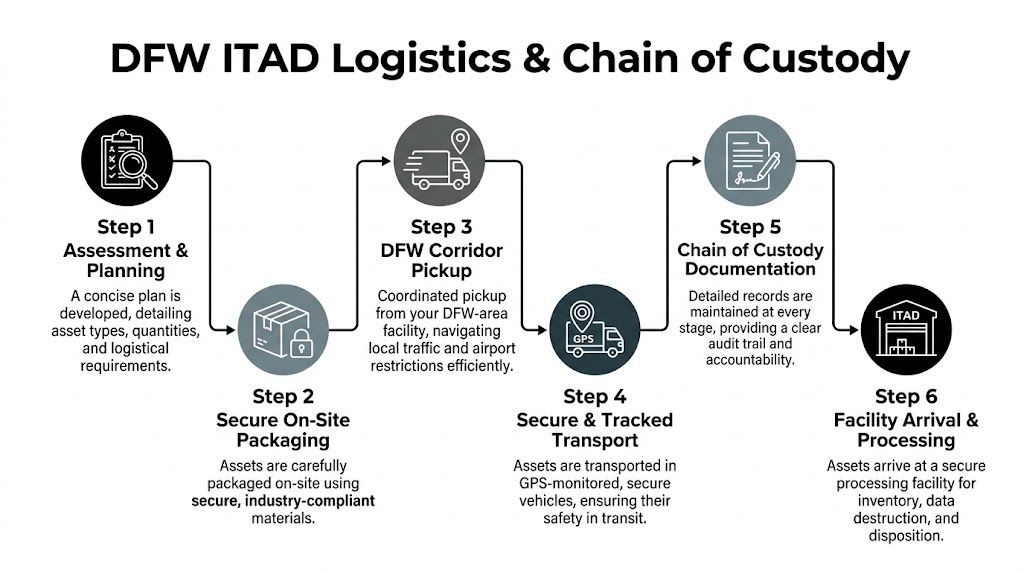
Mastering DFW Logistics Pickup and Chain of Custody
Transport is where good plans get tested. Around DFW, it's also where weak ones get exposed.
DFW's High C Gates reconstruction moved prefabricated modules over 1.5 miles using AI-paired cameras and real-time mapping, as outlined in HNTB's DFW Airport project summary. That same mindset applies to ITAD logistics near the airport. Movement has to be deliberate, tracked, and documented.
What a strong pickup plan includes
The best pickup plans answer operational questions before the truck is dispatched.
Focus on these details:
- Arrival window: Confirm when the site can load. A nominal pickup time means nothing if security won't release the dock.
- Vehicle fit: Verify truck size against dock height, turning radius, and campus traffic restrictions.
- Handling equipment: Decide in advance whether the crew needs bins, carts, pallet jacks, liftgate access, or anti-static packaging.
- Asset presentation: Stage by disposition path and label everything before the team arrives.
If your organization needs recurring collections or a broader retirement schedule, this guide to DFW e-waste pickup is a useful operational reference point.
Chain of custody that survives an audit
A real chain of custody isn't a single signature at the loading dock. It's a sequence.
Use this standard:
Tag assets at origin
Apply or verify serial-based identification before loading begins.Record condition and count
Note damaged units, missing drives, locked chassis, or unreadable labels.Seal by lot where appropriate
Use serialized seals or tamper-evident controls for containers or pallets carrying sensitive material.Document handoff
The releasing employee and pickup crew should sign the same transfer record.Track transit status
The receiving facility should confirm arrival against the shipping manifest, not against memory.Reconcile exceptions immediately
If counts don't match, stop and resolve the discrepancy before processing continues.
A custody document is only useful if it shows each handoff clearly enough that a third party can reconstruct the movement without calling your staff.
What doesn't work near DFW
Airport-adjacent projects punish vague instructions.
Avoid these common failures:
- Late scope adds at the dock: They break counts and confuse destruction instructions.
- Mixed gaylords or pallets: They create reconciliation problems at intake.
- Unclear release authority: Security staff, facilities teams, and IT often assume someone else approved the loadout.
- Pickup windows that ignore traffic reality: If you miss the practical loading window, the whole project slips.
One habit worth adopting is treating the loadout like a mini cutover. Assign a single release owner, a floor lead, and a documentation lead. That's enough structure to keep the project moving without turning pickup day into a committee meeting.
Beyond Destruction Compliance Reuse and Community Impact
The project isn't finished when the truck leaves. It's finished when your records, your compliance file, and your disposition outcome all line up.
DFW Airport gets public attention for visible sustainability work such as repurposing 32,000 pounds of used cooking oil monthly into sustainable aviation fuel, but there is still a gap in public guidance around electronics waste handling for large operations, as described in this Neste case story on DFW's waste-to-resource program. That gap is exactly why businesses need an ITAD process that goes beyond destruction alone.

The documents that matter after pickup
You should expect more than a generic receipt.
For most enterprise projects, the key outputs are:
- Certificate of Destruction: Confirms approved media or devices were destroyed under the agreed method.
- Serialized audit report: Ties destruction, testing, resale, or recycling outcomes back to specific assets.
- Recycling documentation: Shows which materials moved to downstream recycling channels.
- Exception reporting: Identifies unreadable, damaged, or nonconforming items that needed special handling.
Those records are what your privacy officer, auditor, or outside counsel will care about months later.
Why reuse deserves real attention
Not every retired asset belongs in a shred stream. If a device can be sanitized, tested, and reused under a compliant process, that route often serves both cost control and environmental goals better than immediate destruction of the whole unit.
That's especially true for laptops, desktops, networking gear, and parts with secondary market demand. Organizations that want to understand that value side more clearly can review practical options for where to sell computer parts.
The mature ITAD mindset is simple. Destroy the data, not the value, unless policy requires destruction of the entire device.
Community impact is part of the disposition strategy
Functional but outdated equipment can still do useful work. Refurbishment and donation programs can redirect technology to nonprofits, schools, and community groups that need reliable hardware but can't stretch budgets to new equipment.
That outcome only works if the front-end process is disciplined. Equipment has to be evaluated accurately, data handling has to be documented, and non-viable electronics still need responsible recycling. Otherwise "donation" turns into storage shuffling or deferred disposal.
The strongest programs don't separate compliance from sustainability. They treat them as the same job done correctly.
Your ITAD Partner in the DFW Ecosystem
A successful decommission near dallas fort worth international airport comes down to four disciplines. Audit the environment before anything moves. Choose a data destruction method that matches your actual risk. Control transportation with documented custody. Finish with reporting that stands up to audit and supports reuse or responsible recycling where appropriate.
Generic pickup vendors usually struggle in this corridor because they treat every site the same. Airport-adjacent projects aren't the same. They involve tighter scheduling, more security coordination, denser logistics conditions, and less room for undocumented exceptions.
The best partner for this kind of work understands how enterprise decommissions unfold on the ground. That means knowing how to stage a mixed-load pickup, how to separate destruction from value recovery without confusion, how to keep paperwork aligned with physical handling, and how to prevent the small errors that become large compliance problems later.
If you're planning a data center shutdown, a floor-by-floor office refresh, a lab equipment retirement, or a multi-site cleanout tied to the DFW corridor, don't start with truck scheduling. Start with the audit, the custody model, and the destruction decision. Once those are right, the rest of the project becomes manageable.
Dallas Fortworth Computer Recycling helps organizations across North Texas and nationwide retire technology with secure pickup, certified data destruction, compliant recycling, and practical support for complex decommissions near major logistics corridors. If you need a customized plan for a DFW-area office, data center, healthcare site, government facility, or multi-location refresh, contact Dallas Fortworth Computer Recycling to schedule a consultation.com) to schedule a consultation.