
Telecom Services in Houston: A Director’s Migration Guide
You’re probably in one of two situations right now. Either your current carrier setup has turned into a patchwork of aging circuits, overlapping contracts, and support tickets that never fully close. Or the business changed faster than the network did, and now hybrid users, cloud applications, voice traffic, and remote sites are all competing on infrastructure that was designed for a simpler environment.
That’s where most Houston telecom projects go sideways. Teams focus on speeds, rates, and contract terms, then treat everything else as cleanup. In practice, the risky part isn’t just choosing among telecom services in Houston. It’s making sure the choice fits the business, survives a migration, supports compliance, and doesn’t leave retired gear sitting in a closet with live data still on it.
Houston gives you options. It also gives you complexity. The market includes around 452 telecom companies and 124 verified B2B providers according to Houston telecom provider market data. That density offers good bargaining power, but it makes weak requirements and vague procurement habits expensive.
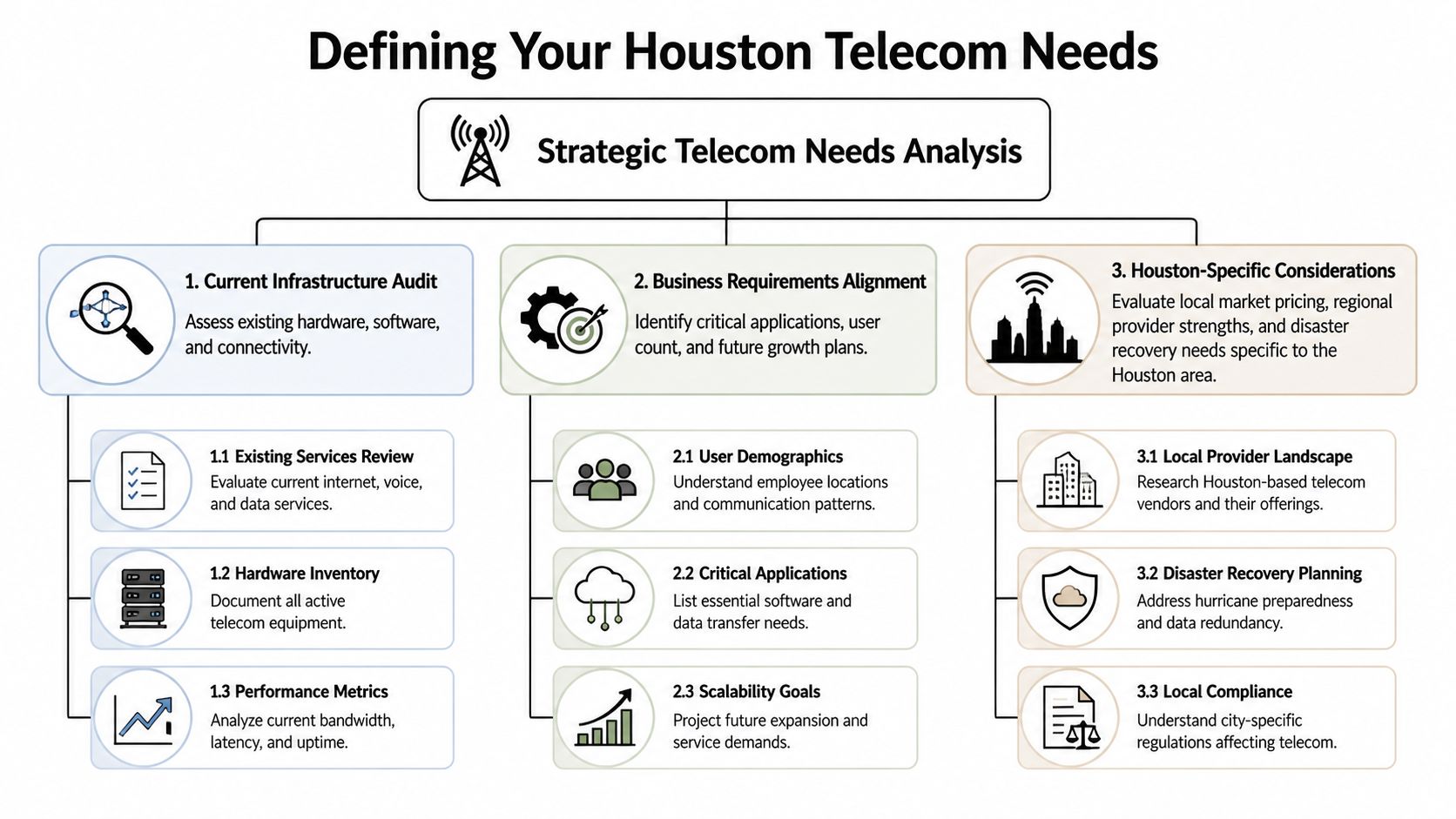
Defining Your Telecom Needs for the Houston Market
Most telecom mistakes happen before the first vendor call. If your team can’t describe what the network must do for the business, every provider proposal will look reasonable on paper and fail in a different way after deployment.
Houston businesses aren’t buying internet access alone anymore. In 2025, business requirements include high-speed fiber with SD-WAN, cloud-based VoIP, UCaaS platforms, internet failover, 24/7 local support, and a 100% uptime guarantee based on Houston enterprise telecom requirements. That changes how you gather requirements. You’re not shopping for a circuit. You’re defining an operating model.
Start with business dependency, not bandwidth
Ask each business function a direct question: what stops if telecom fails? Finance may say payment processing or ERP access. Operations may point to warehouse scanners, SIP trunks, or site-to-site application traffic. Leadership may care most about uptime during customer hours. Those answers matter more than a generic bandwidth target.
I usually separate requirements into four buckets:
- Connectivity requirements that cover primary internet, backup paths, branch connectivity, and cloud access.
- Communications requirements for hosted VoIP, call routing, contact center needs, and collaboration tools.
- Operational requirements such as local field support, monitoring, escalation handling, and after-hours response.
- Growth requirements tied to new offices, remote teams, acquisitions, or workload migration into cloud environments.
If you skip that segmentation, your RFP turns into a shopping list. That invites scope creep.
Audit what you already have
A proper audit is more than collecting invoices. Pull together your active circuits, contract dates, demarc locations, router and firewall handoffs, PRI or SIP dependencies, call flows, failover behavior, and every site that relies on a provider-managed device.
A short internal checklist helps:
- List every service by site. Include internet, voice, wireless backup, managed WAN, and any cloud telephony licenses tied to a carrier.
- Document failure impact. Identify which services are merely inconvenient to lose and which ones stop revenue, care delivery, or core operations.
- Map application dependency. Microsoft Teams, Zoom Phone, contact center platforms, ERP, file sync, and cloud desktops don’t fail in the same way.
- Review support history. Escalation delays, unresolved packet loss, poor dispatch coordination, and billing disputes tell you what contract language didn’t protect.
- Forecast realistic change. New locations, remote workers, and cloud migration should show up in the first requirements draft, not as change orders later.
Practical rule: If a requirement matters during an outage, put it in writing before procurement starts.
Build an RFP vendors can’t blur
Weak RFPs produce polished proposals and bad comparisons. Strong ones force precision. Require providers to respond to the same service definitions, same support expectations, same handoff model, and same cutover assumptions.
That’s where a practical reference point helps. If you’re comparing telecom service options near Houston businesses, keep your internal scoring tied to business risk, not marketing language.
Your final RFP should specify:
- Target architecture such as DIA, SD-WAN overlay, UCaaS, failover, and managed edge responsibilities
- Service boundaries so you know what the provider manages versus what your internal team owns
- Acceptance criteria including testing, porting validation, failback expectations, and escalation paths
- Retirement scope for replaced devices and old circuits so the project doesn’t end with unsecured leftovers
Evaluating Houston Telecom Vendors and Service Offerings
Houston is crowded enough that almost any requirement will attract multiple bids. That’s an advantage only if you compare providers on the issues that tend to break in production. Good procurement teams don’t ask who has the best brochure. They ask who can support the design when a cut fiber, routing issue, or voice porting error hits at the worst possible time.
The local market includes around 452 telecom companies, with 124 verified B2B providers, and that range spans large carriers, specialized fiber operators, and managed service firms according to Houston local telecom company options. Broad choice means you need a ranking method that punishes ambiguity.
What to score heavily
The first thing I look at is the SLA language. Not the headline promise. The exclusions. Many contracts advertise reliability, then narrow credits, carve out maintenance windows, or define outages so tightly that ordinary service degradation never triggers meaningful remedies.
The second issue is support geography. In Houston, local responsiveness matters. You want to know whether dispatch, field technicians, and account engineering are local or merely “regional.” That becomes critical when a circuit handoff is wrong, a building entry issue appears, or a post-cutover physical adjustment is needed.
Ask providers to explain exactly how they handle a degraded service state that doesn’t qualify as a full outage. That answer tells you more than the uptime headline.
Houston Telecom Vendor Comparison Checklist
| Criteria | Description | Weight (1-5) |
|---|---|---|
| SLA clarity | Review uptime terms, service credits, exclusions, and restoration language | 5 |
| Local support capability | Confirm Houston-area dispatch, engineering access, and escalation responsiveness | 5 |
| Redundancy design | Assess failover options, diverse paths, and backup connectivity models | 5 |
| Voice migration readiness | Evaluate number porting experience, call flow design, and hosted voice support | 4 |
| Managed service scope | Define who owns monitoring, edge devices, configuration changes, and incident coordination | 4 |
| Pricing transparency | Check install fees, cross-connects, burst terms, hardware charges, and renewal conditions | 5 |
| Contract flexibility | Review term length, expansion language, site adds, and exit constraints | 4 |
| Integration fit | Confirm alignment with cloud apps, remote users, and security controls | 4 |
| Reporting and visibility | Determine what performance and incident reporting the provider shares | 3 |
| Asset transition handling | Clarify who removes, returns, or leaves behind retired provider equipment | 3 |
What works and what doesn’t
What works is forcing every bidder into the same response template. Make them answer the same operational questions in the same order. Require them to show implementation ownership, not just account management structure.
What doesn’t work is comparing one provider’s managed SD-WAN proposal against another provider’s raw circuit quote and assuming the cheaper one is more efficient. It isn’t an apples-to-apples comparison. It’s a mismatch in service model.
A few practical trade-offs show up often:
- Large carrier strength often means wider footprint and stronger procurement familiarity. It can also mean slower exception handling.
- Regional specialist strength often means better design attention and local support. It can also mean narrower service breadth.
- Bundled voice and data can simplify escalation. It can also make future exits harder if the relationship deteriorates.
- Provider-managed edge gear can reduce internal workload. It can also slow change control if your team needs rapid policy changes.
Use demos and discovery calls to test whether the provider can discuss call flows, failover logic, handoff standards, and migration sequencing in plain language. If they can’t explain the environment clearly before the sale, they won’t simplify it after signature.
Navigating Compliance and Local Data Infrastructure
Compliance gets treated like paperwork when it should be treated like architecture. If your telecom environment carries regulated data, supports clinical operations, handles legal communications, or feeds audit systems, your provider choice affects far more than connectivity.
Houston has a genuine infrastructure advantage here. Its data center environment benefits from multiple Internet Exchange Points that allow direct interconnection and sub-millisecond latency, which supports real-time, redundant transmission of data destruction verification and audit trails according to Houston data center interconnection analysis. That matters because secure operations depend on how quickly and reliably records move between systems when evidence is needed.

Why local interconnection matters in audits
A lot of leaders hear “low latency” and think only about application speed. The bigger issue in regulated environments is integrity of process. If your telecom setup supports chain-of-custody records, security monitoring, destruction certificates, or system logs tied to a compliance event, you want those records transmitted reliably and without a fragile single path.
That’s one reason infrastructure teams working across Texas regulated technology environments should ask telecom vendors how they support redundant pathways, encryption in transit, and evidentiary records. The carrier doesn’t have to own every compliance control, but they do need to support the technical conditions that let your controls hold up under scrutiny.
Questions that separate mature providers from resellers
A capable provider should answer these without hand-waving:
- Where does traffic hand off, and how is redundancy built into the design?
- What documentation can they provide for outages, service events, and route-impacting incidents?
- How do they support encrypted traffic and preserve performance for critical systems?
- Can they coordinate with your security, legal, and audit teams during an incident review?
- What happens to logs, managed devices, and provider-owned equipment when service ends?
Compliance isn’t a side file maintained by legal. IT operations generate or break the evidence.
The competitive angle
Teams that build compliance into telecom selection usually move faster later. They don’t scramble for missing diagrams during an audit. They don’t discover after a migration that old voice appliances were never wiped. They don’t realize too late that provider documentation is too thin to support a review.
That’s why mature telecom services in Houston should be evaluated as part of the security posture, not outside it. The strongest providers can speak to network design, support practice, documentation quality, and termination procedures in the same conversation.
Planning a Seamless Migration and Cutover
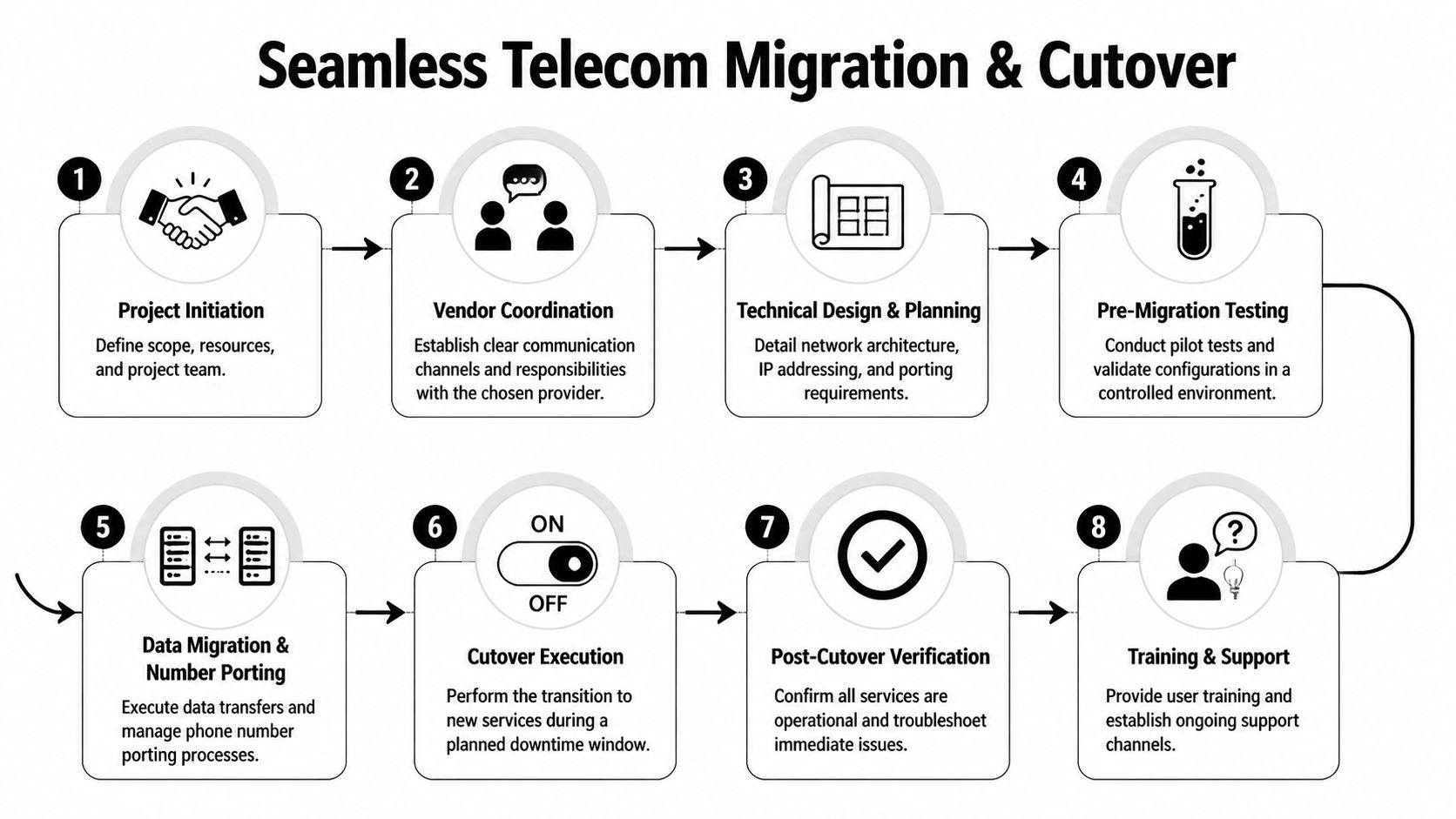
A telecom migration fails when the project team treats cutover as a calendar event instead of a controlled operational change. Most outages during migration aren’t caused by one dramatic error. They come from small misses that stack up. Wrong demarc assumptions. Incomplete number inventory. Old firewall objects left in place. End users not knowing what changed.
Treat the migration like a release with rollback, validation, and ownership at every layer.
Build the cutover around dependency order
Start with a dependency map, not a date. Which systems need to move first so others can be tested? Which locations can tolerate a pilot? Which voice queues can’t risk downtime during business hours? Which provider-managed devices must arrive, stage, and burn in before any live traffic moves?
A clean migration plan usually includes:
- Circuit and service inventory with billing IDs, install status, contract dates, and physical handoff details
- Technical design pack covering VLANs, routing, SIP or UCaaS settings, failover behavior, and remote site policy
- Stakeholder communication plan for leadership, help desk, site managers, and end users
- Test scripts for internet performance, application access, voice paths, contact center routing, and backup activation
- Rollback criteria that define exactly when the team reverts and who makes that call
Where migrations usually go wrong
Voice migrations get underestimated because teams assume number porting is an admin task. It isn’t. It’s an operational dependency with customer impact attached. Auto attendants, hunt groups, failover destinations, after-hours routing, fax holdouts, alarm lines, and contact center flows all need direct testing.
Data migrations fail for a different reason. Teams trust provider turn-up notices without validating the live path under normal load. That’s why I prefer pre-cutover pilot traffic, limited-user validation, and a formal issue list before the main event. If you need a practical checklist, data center migration planning guidance translates well to telecom cutovers because the risk patterns are similar.
Cut over only what you can verify. Verify only what you can roll back.
A workable sequence
Use a phased cutover approach whenever the business allows it.
- Pilot a low-risk site or service to expose provider process issues early.
- Stage all replacement hardware and confirm labeling against diagrams, not packing slips.
- Run pre-cutover validation on voice routes, cloud app performance, and failover behavior.
- Schedule the move around business impact, not provider convenience.
- Hold a live bridge during cutover with technical owners, provider engineers, and decision makers.
- Verify in layers. Start with circuit status, then routing, then apps, then voice and user workflows.
- Keep the old path available briefly when contract timing allows and rollback risk is high.
- Close only after post-cutover signoff from operations, not just infrastructure.
The best migration is boring. Users notice little, support stays calm, and the documentation is good enough that you can explain every step a month later.
Securely Retiring Your Old Telecom Infrastructure
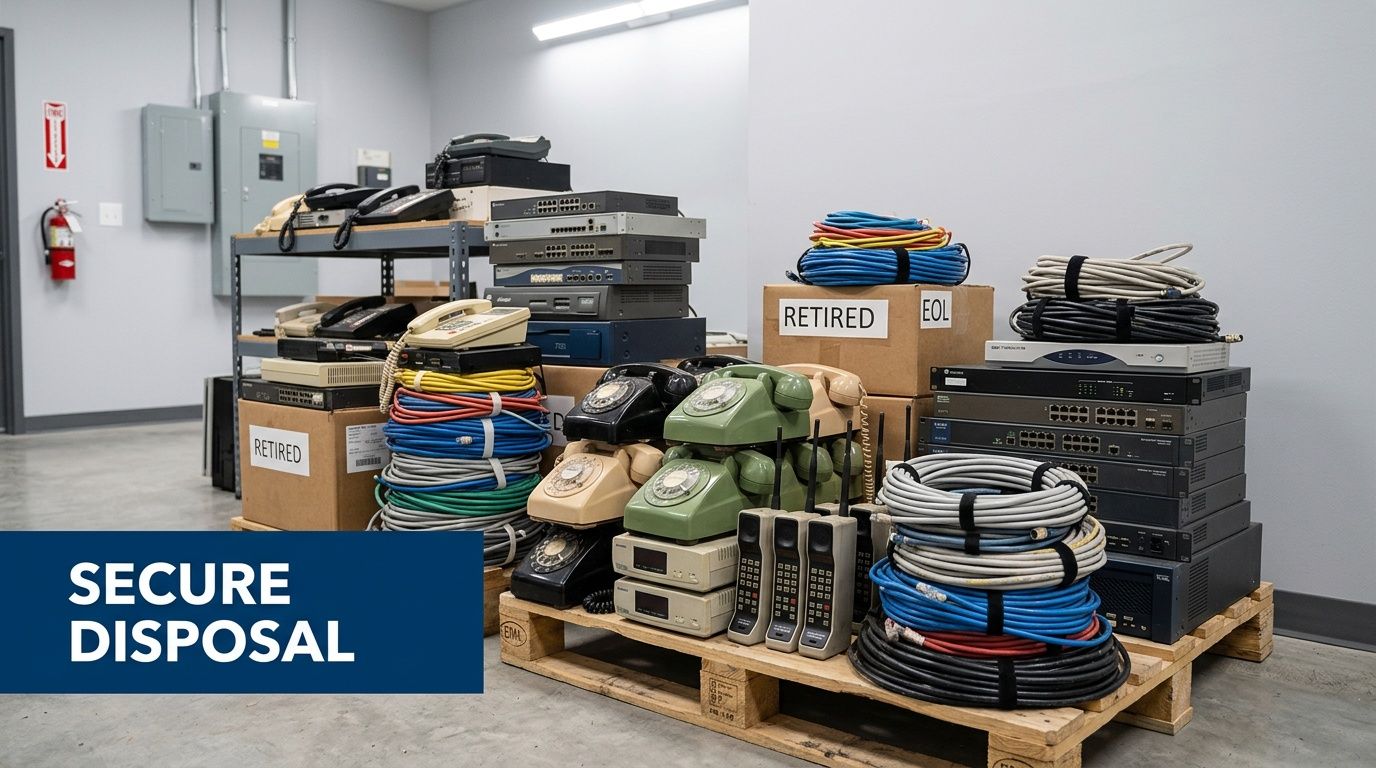
Organizations often declare victory once the new links are live and the phones work. That’s a mistake. Old firewalls, routers, access devices, SIP appliances, desk phones, modems, and provider handoff gear often leave the project in a messy state. Some are owned, some are leased, some still hold configs, and some are sitting in storage with credentials, call history, or network data intact.
Telecom projects subtly create future incidents.
Houston’s broader device ecosystem shows why this phase matters. The disposition of refurbished telecom equipment tied to digital inclusion efforts is largely undocumented, and with tens of thousands of hotspots and computers in circulation, end-of-life handling remains an unaddressed e-waste and data security challenge according to Houston digital inclusion device lifecycle reporting. If public and nonprofit device programs struggle to document retirement paths, private-sector telecom closets are often worse.
What gets missed after cutover
The usual blind spots aren’t dramatic. They’re ordinary.
- Provider-owned devices never get returned because nobody assigned exit responsibility.
- Owned equipment gets boxed up without documenting serials, configs, or storage media exposure.
- Remote site hardware stays in branch closets because no one funded pickup logistics.
- Old phones and edge devices get donated or discarded without verified data destruction.
- Circuit disconnects lag behind technical migration, so teams pay for dead service and keep unnecessary exposure alive.
Treat retirement like a controlled workstream
Retirement needs its own owner, inventory, and acceptance criteria. If a device touched your production environment, assume it contains something worth protecting until proven otherwise.
Use a structured closeout list:
| Retirement task | Why it matters |
|---|---|
| Confirm ownership status | Prevents accidental disposal of leased or provider-owned equipment |
| Capture asset inventory | Creates traceability for audit, finance, and chain of custody |
| Segregate by device type | Routers, phones, firewalls, and wireless gear don’t all retire the same way |
| Require certified data destruction | Reduces risk from residual configs, credentials, call data, and logs |
| Document final disposition | Supports audit readiness and environmental reporting |
What works in practice
What works is involving security, infrastructure, procurement, and facilities before the migration ends. Security defines handling requirements. Infrastructure validates what was removed. Procurement checks lease and return obligations. Facilities coordinates access and staging.
What doesn’t work is leaving retired hardware in “temporary” storage. Temporary storage turns into forgotten storage fast.
For organizations managing computer recycling and telecom hardware retirement in Houston, the standard should be documented chain of custody, certified data destruction, and a clear record of what was reused, recycled, returned, or destroyed. Anything less leaves too much ambiguity.
Old telecom gear isn’t dead hardware. It’s unresolved risk until you can prove otherwise.
The final discipline here is financial. If you don’t tie retirement to contract closure, asset write-off, and site turnover, the project stays open in all the ways that matter. You’re still paying, still exposed, or still carrying unknown equipment.
Frequently Asked Questions on Houston Telecom Projects
How do you avoid paying for two services during a transition
You usually can’t eliminate overlap entirely. You can control it. Align install milestones, testing windows, and disconnect notices early, then tie contract termination dates to verified production stability, not optimistic project schedules. Short overlap is cheaper than a rushed cutover that fails.
What should nonprofits and public agencies watch for with distributed devices
Device programs create lifecycle risk long after distribution. Houston’s digital divide persists because device access inequality remains a real issue, and the end of the Affordable Connectivity Program in 2024 exposed how hard compliant device retirement can be for vulnerable-population programs according to Houston broadband and device access reporting. If your organization manages hotspots, laptops, or telecom endpoints in the community, define return, wipe, replacement, and end-of-life handling before the next distribution round starts.
How do you handle a telecom overhaul in a 24/7 facility
Don’t treat it as a single cutover. Use parallel operation where possible, phase by service dependency, and put clinical, operational, or customer-facing functions on their own validation path. In continuous operations, rollback planning matters more than speed.
Should one vendor handle everything
Sometimes yes, often no. A single provider can simplify support and accountability. It can also create concentration risk. The right answer depends on your internal capacity, site spread, and tolerance for single-vendor dependency.
When is the project actually done
When new services are stable, old services are disconnected, retired equipment is accounted for, and you have the documentation to prove both.
If your team is replacing telecom infrastructure and needs a clean end to the project, Dallas Fortworth Computer Recycling helps organizations retire old equipment with secure, compliant IT asset disposition, certified data destruction, and documented chain-of-custody workflows. That’s especially useful when a Houston telecom migration leaves behind routers, phones, network appliances, and other hardware that can’t be treated as ordinary surplus.